Track and analyze AI spend with Unity Gateway
Analyze Unity Gateway spend by model, user, tag, and team with the usage dashboard, Genie, or SQL. Spend covers Databricks-hosted models and estimated spend for external models. To limit what users can spend, see Set budgets and spend limits for Unity Gateway.
For request-level analytics such as token counts and latency, see Track model usage.
要件
- お客様のアカウントでUnity Gatewayが有効になりました。
- Unity Gatewayがサポートされているリージョン内のDatabricksワークスペース。
- アカウントで有効化されている課金利用システムテーブル。「システムテーブルを有効にする」を参照してください。
- Access to the Unity Gateway system tables. See Grant access to system tables.
Usage and spend system tables
system.ai_gateway.usage records requests routed through Unity Gateway, with requester and service details, tokens, latency, and tags. Task-specific AI Function requests count toward Unity Gateway budgets but aren't recorded in this table. To view their billed usage, see View costs for AI Function workloads. See Usage table schema.
Spend is recorded in two more system tables:
system.billing.usage: Databricks-hosted model spend, in Databricks units (DBUs). See Billing usage fields.system.ai_gateway.external_model_spend: Estimated spend for external models, in USD. See External model spend table schema.
View spend in the usage dashboard
組み込みの Unity Gateway 使用状況ダッシュボードを使用すると、支出の傾向を特定し、モデルとユーザーを比較し、チームとプロジェクトに支出を割り当てることができます。これには、Databricksがホストするモデルの支出と、見積もりの外部モデルの支出が含まれます。
Unity Gateway > Govern > Usage Dashboard を開きます。
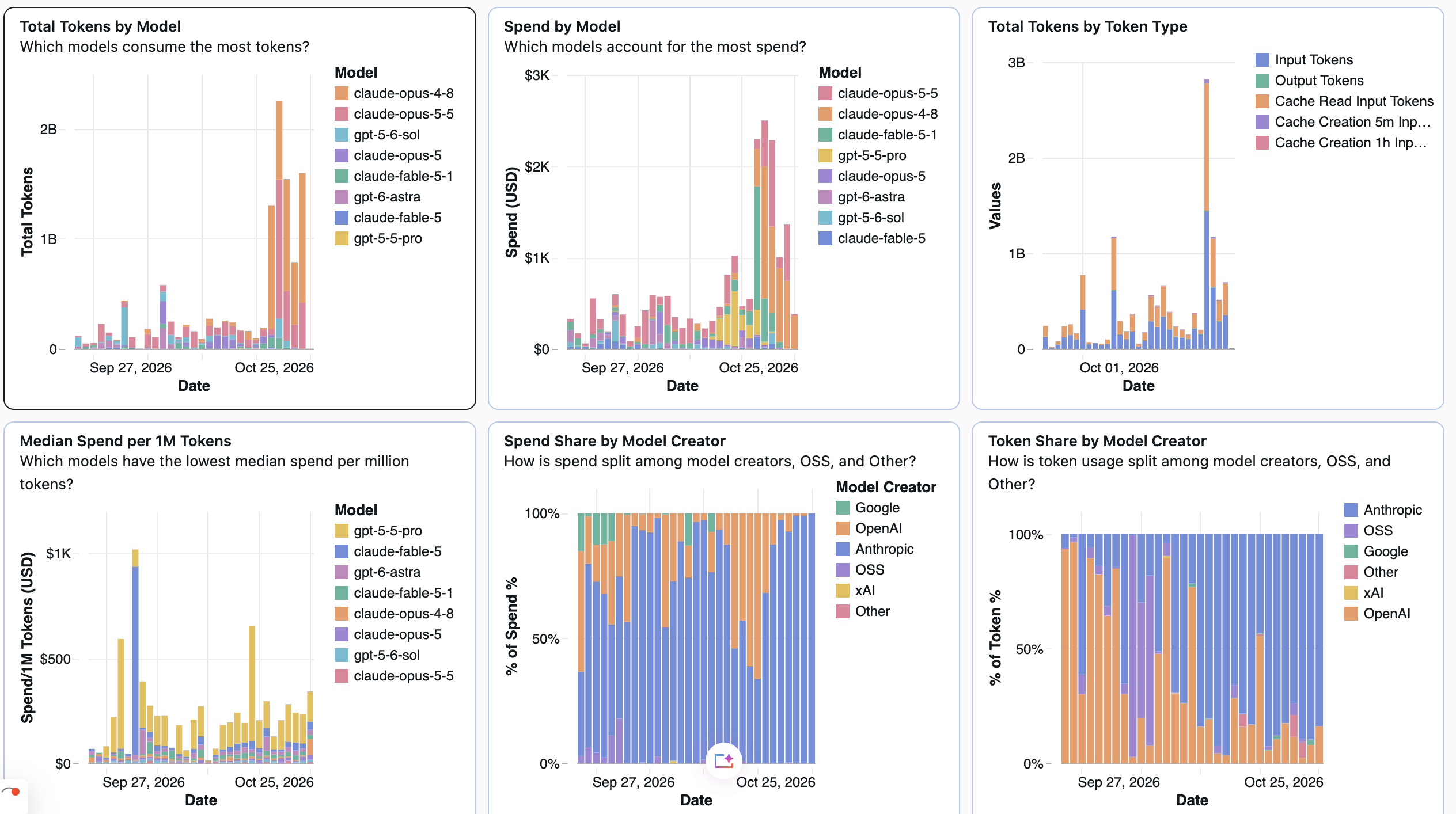
- 概要 :モデルとユーザーの支出を比較し、変更を追跡し、100万トークンまたはリクエストあたりの平均支出を評価します。
- Spend : Explore spend by model and user alongside token usage and caching. Use the User filter to focus the analysis. To rank spend by user, model, or tag, ask Genie.
- Service tags : Apply tags to services to attribute spend to teams or projects. Select a Service Tag Key and one or more Service Tag Value entries in the global filters to focus the analysis.
- Request tags : Send tags through request headers to attribute spend to individual workloads.
- コーディングエージェント セッション : コーディング エージェント tabで高額なセッションを調査し、トークン使用量、モデル、およびサブエージェント アクティビティとともに推定セッション支出を確認します。
使用状況ダッシュボードを設定および更新するには、組み込みの使用状況ダッシュボードを参照してください。
Attribute spend to teams and projects
Unity Gateway attributes spend to the requesting user automatically. To attribute spend to a team or project, tag your traffic:
- Service tags : Use when each team or project has its own model service. Every request routed through the service inherits the tag, so you set it one time.
- Request tags : Use when several teams or projects share a model service. The caller sets the tag on each request.
To add a service tag, open the model service in Unity Gateway. On the Overview tab, select Tags > Add tags , then enter a key and value, such as team and ml-platform. Service tags appear in endpoint_tags in system.ai_gateway.usage and in custom_tags in system.billing.usage.
To add a request tag, send the Databricks-Ai-Gateway-Request-Tags header with a JSON object of string keys and values:
Databricks-Ai-Gateway-Request-Tags: {"project": "chatbot", "team": "ml-platform"}
For SDK and REST API examples, see Request tagging.
For Databricks-hosted models, use service tags, because only service tags reach system.billing.usage. For external models, both service and request tags appear in system.ai_gateway.external_model_spend. Budgets match service tags only.
Ask questions about spend with Genie
To answer a question the dashboard doesn't show directly, ask Genie. Genie answers from the dashboard's data, so you don't need to name tables or write SQL.
- Unity Gateway > Govern > Usage Dashboard を開きます。
- Click Ask Genie .
- Ask your question in plain language. For example:
- Which users spent the most in the last 30 days?
- What did the
ml-platformteam spend last month? - Which models had the highest spend this week?
See Genie Agents with dashboards.
Query spend with SQL
Use SQL for repeatable reports and precise joins.
Create a combined spend view
The view combines Databricks-hosted model spend, recorded as DBUs in system.billing.usage and converted to list-price USD with system.billing.list_prices, with estimated external model spend, recorded in USD in system.ai_gateway.external_model_spend. Select from the view to cover all models. Create it in a schema you control:
CREATE OR REPLACE VIEW <catalog>.<schema>.ai_gateway_spend AS
WITH all_spend AS (
  SELECT
    'databricks_hosted' AS model_source,
    u.workspace_id AS workspace_id,
    u.usage_date AS usage_date,
    u.usage_metadata.ai_gateway.endpoint_name AS model_service_name,
    u.usage_metadata.ai_gateway.destination_model AS destination_model,
    u.identity_metadata.run_by AS requester,
    u.custom_tags AS service_tags,
    CAST(NULL AS MAP<STRING, STRING>) AS request_tags,
    u.usage_quantity AS dbus,
    u.usage_quantity * lp.pricing.effective_list.default AS usd
  FROM system.billing.usage u
  JOIN system.billing.list_prices lp
    ON  u.sku_name   = lp.sku_name
    AND u.cloud      = lp.cloud
    AND u.usage_unit = lp.usage_unit
    AND u.usage_end_time >= lp.price_start_time
    AND (lp.price_end_time IS NULL OR u.usage_end_time < lp.price_end_time)
  WHERE u.billing_origin_product = 'MODEL_SERVING'
    AND u.usage_metadata.ai_gateway.endpoint_name IS NOT NULL
    AND u.usage_unit = 'DBU'
    AND lp.currency_code = 'USD'
  UNION ALL
  SELECT
    'external' AS model_source,
    workspace_id,
    usage_date,
    usage_metadata.endpoint_name,
    usage_metadata.model,
    identity_metadata.run_by,
    custom_tags.endpoint_tags,
    custom_tags.request_tags,
    NULL,
    usage_quantity
  FROM system.ai_gateway.external_model_spend
)
SELECT * FROM all_spend;
In both branches, model_service_name is the Unity Catalog fully qualified name of the service that received the request: the model service for Databricks-hosted rows, and the model provider service that routed the request for external rows. workspace_id is the ID of the workspace associated with the usage in both sources. Requests and tokens for all models are in system.ai_gateway.usage, except task-specific AI Function requests, which aren't recorded there. To view their billed usage, see View costs for AI Function workloads. dbus is NULL for external rows and request_tags is NULL for hosted rows, because those sources don't record them.
Example queries
Each query selects from the view and covers the last 30 days.
Spend by model, with model_source separating Databricks-hosted and external models:
SELECT
  destination_model,
  model_source,
  SUM(usd) AS spend_usd
FROM <catalog>.<schema>.ai_gateway_spend
WHERE usage_date >= current_date() - INTERVAL 30 DAYS
GROUP BY destination_model, model_source
ORDER BY spend_usd DESC;
Spend by the user or Databricks service principal that issued the request:
SELECT
  requester,
  SUM(usd) AS spend_usd
FROM <catalog>.<schema>.ai_gateway_spend
WHERE requester IS NOT NULL
  AND usage_date >= current_date() - INTERVAL 30 DAYS
GROUP BY requester
ORDER BY spend_usd DESC;
Spend by the team service tag:
SELECT
  service_tags['team'] AS team,
  SUM(usd) AS spend_usd
FROM <catalog>.<schema>.ai_gateway_spend
WHERE service_tags['team'] IS NOT NULL
  AND usage_date >= current_date() - INTERVAL 30 DAYS
GROUP BY team
ORDER BY spend_usd DESC;
To group by request tag instead, replace service_tags with request_tags and add AND model_source = 'external', because request tags are recorded only for external model spend.
Build custom cost dashboards and reports
Unity Gateway spend data lives in Unity Catalog system tables, so you can report on it with the same Databricks tools you use for the rest of your data, without exporting it to a separate cost tool:
- Customize the usage dashboard : Add the charts and filters your teams need to the built-in dashboard. Save a copy first, because updating the dashboard to the latest template can overwrite your changes. See Built-in usage dashboard.
- Combine spend with your own data : Join the combined spend view to tables your organization maintains, such as an HR directory, to see spend by department, cost center, or manager.
- Control who sees what : Use Unity Catalog dynamic views and permissions so that each team or manager sees only their own spend.
- Deliver reports on a schedule : Subscribe people or channels to dashboard updates by email, Slack, or Microsoft Teams. See Manage scheduled dashboard updates and subscriptions.
Report spend by department or cost center
Unity Gateway attributes spend to users, models, and tags, but doesn't read your organization chart. To report by department, join the combined spend view to a user-to-department mapping your organization maintains, such as a Delta table synced from your HR system or identity provider. Replace <catalog>.<schema>.org_directory with your mapping table, which needs user_email and department columns.
SELECT
  COALESCE(o.department, 'Unmapped') AS department,
  SUM(s.usd) AS spend_usd
FROM <catalog>.<schema>.ai_gateway_spend s
LEFT JOIN <catalog>.<schema>.org_directory o
  ON s.requester = o.user_email
WHERE s.usage_date >= current_date() - INTERVAL 30 DAYS
GROUP BY COALESCE(o.department, 'Unmapped')
ORDER BY spend_usd DESC;
The LEFT JOIN keeps spend from users who are missing from the mapping table in the totals, under an Unmapped bucket, instead of dropping it from the report.
Build a team spend dashboard for managers
This isn't a built-in Unity Gateway feature. It uses Unity Catalog views and dashboards, plus a mapping table you maintain with user_email and manager_email columns.
- Create a view in a Unity Catalog schema that joins the combined spend view to your mapping table on the user email, and keeps only rows where the requester reports to the viewer. Use a dynamic view that filters on
o.manager_email = current_user(), and allows full access to a finance or admin group withis_account_group_member. - Grant managers
SELECTon the view. Managers don't need access to the system tables. - Build a dashboard on the view and share it with managers. To have each viewer's own identity applied, set the dashboard to use individual data permissions. See Dashboard data permissions.
Validate the view with a test manager account before you share the dashboard. Direct reports only appear if your mapping table contains them. For multi-level hierarchies, flatten the hierarchy in the mapping table.
To alert a manager when their team approaches a limit, send the team budget's threshold emails to the manager. See Configure alerts and usage blocking.
How spend is calculated
Unity Gateway records spend regardless of where the model runs.
- Databricks-hosted model spend is DBU usage in
system.billing.usage, converted to list-price USD withsystem.billing.list_prices. It reflects list prices, not negotiated discounts or your final invoice. Unity Gateway enrichesMODEL_SERVINGbilling records with service-specific metadata, so you can attribute cost to the associated services, target models, principals, and service tags. For the complete schema and field definitions, see the Billing usage system table reference. - External model spend is an estimate that Databricks computes for each request from its token usage and the external provider's published prices, aggregated hourly in
system.ai_gateway.external_model_spend. See Limitations.
外部モデルの使用料金は参考情報として提供されます。これらの見積もりは最終的なプロバイダーの請求額を反映していない場合があり、Databricksはサードパーティの請求の不一致について責任を負いません。
For negotiated external pricing, configure a price multiplier on the model provider service.
Reference
Billing usage fields
Unity Gateway populates the following fields in system.billing.usage for both real-time and batch inference requests routed through it:
フィールド | 説明 |
|---|---|
| リクエストを受信したUnity Gatewayモデルサービスの名前。これは、 |
| Unity Gateway モデルサービスの ID。 |
| リクエストを処理した宛先モデルです。たとえば |
| リクエストを処理したターゲットのID。 |
| リクエストを発行したユーザーまたはDatabricksサービスプリンシパル。 |
|
|
External model spend table schema
system.ai_gateway.external_model_spendテーブルのスキーマは次のとおりです。
列名 | Type | 説明 |
|---|---|---|
| STRING | 集計された支出記録の一意の識別子。 |
| STRING | アカウントID。 |
| STRING | モデルプロバイダーサービスが構成されているワークスペースのID。 |
| DATE | 使用状況レコードの日付 ( |
| TIMESTAMP | 時間単位の集計ウィンドウの開始時刻(UTC) |
| TIMESTAMP | 時間単位の集計ウィンドウの終了時刻 (UTC)。 |
| DATE | レコードがテーブルに取り込まれた日付。 |
| 構造体 | 外部モデルの使用状況に関するメタデータ。これには |
| 構造体 |
|
| STRING |
|
| DECIMALタイプ | 集計ウィンドウの推定コスト( |
| 構造体 | 適用される価格設定に関するメタデータ。 |
| 構造体 | リクエスタの識別情報( |
制限事項
- Databricksがホストするモデルの費用配分は、
system.billing.usageのMODEL_SERVINGレコードに適用されます。 - トラフィックスプリットやフォールバックなど、複数の宛先を持つモデルサービスの場合、
ai_gateway.destination_modelとai_gateway.destination_idは最終的にリクエストを処理した宛先を特定します。 - Unity Catalogのモデルプロバイダーサービスのみ、外部モデル利用料がサポートされます。
- External model spend tracking doesn't support the Custom provider. Databricks estimates spend from each provider's published prices, which are not available for custom endpoints.