AIエージェントを作成してモデルサービングにデプロイする
新しいユースケースの場合、 Databricks 、エージェント コード、サーバー構成、展開ワークフローを完全に制御するために、 Databricks Appsにエージェントを展開することをお勧めします。 「 AIエージェントを作成してDatabricks Appsにデプロイする」を参照してください。 既存のエージェントを移行するには、 「モデルサービングからDatabricks Appsへのエージェントの移行」を参照してください。
このページでは、Custom Agents と、LangGraph や OpenAI などの一般的なエージェントオーサリングライブラリを使用して、Python で AI エージェントを開発する方法を説明します。
要件
Databricks では、エージェントを開発するときに、最新バージョンの MLflow Python クライアントをインストールすることをお勧めします。
このページのアプローチを使用してエージェントを作成および展開するには、以下をインストールします。
databricks-agents1.2.0以上mlflow3.1.3またはそれ以上- Python 3.10 以降。
- この要件を満たすには、サーバレス コンピュートまたはDatabricks Runtime 13.3 LTS以降を使用してください。
%pip install -U -qqqq databricks-agents mlflow
Databricks では、エージェントの作成時に Databricks AI Bridge 統合パッケージをインストールすることもお勧めします。これらの統合パッケージは、エージェント作成フレームワークおよびSDK全体で、Genie SpacesやAI SearchなどのDatabricks AIの機能と連携するAPIの共有レイヤーを提供します。
- OpenAI
- LangChain/LangGraph
- DSPy
- Pure Python agents
%pip install -U -qqqq databricks-openai
%pip install -U -qqqq databricks-langchain
%pip install -U -qqqq databricks-dspy
%pip install -U -qqqq databricks-ai-bridge
オーサリングエージェントにはResponsesAgentを使用してください
Databricks 、本番運用グレードのエージェントを作成するには、 MLflowインターフェイスResponsesAgentを推奨します。 ResponsesAgent使用すると、任意のサードパーティ フレームワークを使用してエージェントを構築し、それをDatabricks AI機能と統合して、強力なログ記録、トレース、評価、展開、モニタリング機能を実現できます。
ResponsesAgentスキーマは OpenAI Responsesスキーマと互換性があります。OpenAI Responsesの詳細については、 「OpenAI: Responses vs. ChatCompletion」を参照してください。
古いChatAgentインターフェイスは Databricks で引き続きサポートされます。ただし、新しいエージェントの場合、Databricks では最新バージョンの MLflow とResponsesAgentインターフェイスを使用することをお勧めします。
「レガシー入出力エージェント スキーマ (モデルサービング)」を参照してください。
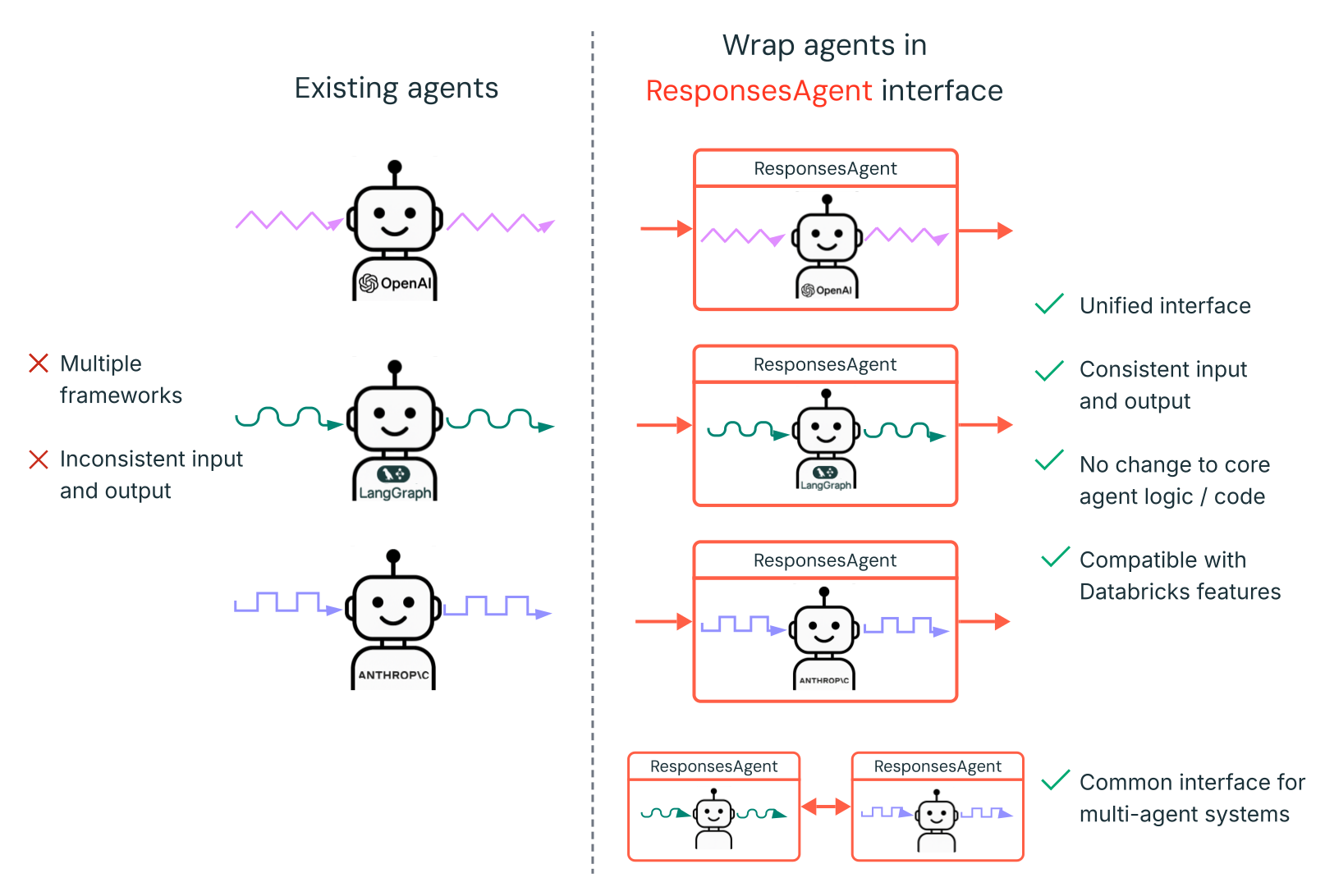
ResponsesAgent 次のような利点があります。
-
高度なエージェント機能
- マルチエージェントサポート
- ストリーミング出力 : 出力を小さなチャンクでストリーミングします。
- 包括的なツール呼び出しメッセージ履歴 : 中間ツール呼び出しメッセージを含む複数のメッセージを返し、品質と会話管理を向上させます。
- ツール呼び出し確認サポート
- 長期ツールサポート
-
開発、展開、モニタリングの合理化
- 任意のフレームワークを使用してエージェントを 作成する:
ResponsesAgentインターフェースを使用して既存のエージェントをラップし、 AI Playground 、エージェント評価、エージェント モニタリングとのすぐに使用できる互換性を実現します。 - 型付きオーサリング インターフェース : 型付き Python クラスを使用してエージェント コードを記述し、IDE とノートブックのオートコンプリートを活用します。
- 自動署名推論 : MLflow はエージェントをログに記録するときに
ResponsesAgent署名を自動的に推論し、登録と展開を簡素化します。ログ記録中にモデル署名を推測するを参照してください。 - 自動トレース : MLflow は
predict関数とpredict_stream関数を自動的にトレースし、ストリームされた応答を集約して、評価と表示を容易にします。 - AI ゲートウェイ拡張推論テーブル : AI ゲートウェイ推論テーブルは、デプロイされたエージェントに対して自動的に有効になり、詳細なリクエスト ログ メタデータにアクセスできるようになります。
- 任意のフレームワークを使用してエージェントを 作成する:
ResponsesAgent作成方法については、次のセクションの例とMLflowドキュメント (モデルサービング用の ResponsesAgent) を参照してください。
ResponsesAgentの例
次のノートブックは、一般的なライブラリを使用してストリーミングと非ストリーミングResponsesAgentを作成する方法を示しています。これらのエージェントの機能を拡張する方法については、 「AI エージェント ツール」を参照してください。
- OpenAI
- LangGraph
- DSPy
Databricks ホストモデルを使用した OpenAI のシンプルなチャットエージェント
OpenAI MCP ツール呼び出しエージェント
Databricks ホストモデルを使用した OpenAI ツール呼び出しエージェント
OpenAI ホストモデルを使用した OpenAI ツール呼び出しエージェント
LangGraph MCP ツール呼び出しエージェント
DSPy シングルターンツール呼び出しエージェント
マルチエージェントの例
マルチエージェント システムの作成方法については、 「マルチエージェント システムでGenie使用する (モデルサービング)」を参照してください。
ステートフルエージェントの例
Lakebase をメモリ ストアとして使用して、短期および長期メモリを持つステートフル エージェントを作成する方法については、 AIエージェント メモリ (モデルサービング)」を参照してください。
非会話型エージェントの例
複数ターンの対話を管理する会話エージェントとは異なり、非会話エージェントは明確に定義されたタスクを効率的に実行することに重点を置いています。この合理化されたアーキテクチャにより、独立したリクエストのスループットが向上します。
非会話型エージェントを作成する方法については、 「MLflow を使用した非会話型 AI エージェント」を参照してください。
すでにエージェントがいる場合はどうなりますか?
LangChain、LangGraph、または同様のフレームワークを使用して構築されたエージェントが既にある場合は、Databricks で使用するためにエージェントを書き換える必要はありません。代わりに、既存のエージェントを MLflow ResponsesAgentインターフェースでラップするだけです。
-
mlflow.pyfunc.ResponsesAgentから継承する Python ラッパー クラスを記述します。ラッパー クラス内で、既存のエージェントを属性
self.agent = your_existing_agentとして参照します。 -
ResponsesAgentクラスでは、非ストリーミング リクエストを処理するためにResponsesAgentResponseを返すpredictメソッドを実装する必要があります。以下はResponsesAgentResponsesスキーマの例です。Pythonimport uuid
# input as a dict
{"input": [{"role": "user", "content": "What did the data scientist say when their Spark job finally completed?"}]}
# output example
ResponsesAgentResponse(
output=[
{
"type": "message",
"id": str(uuid.uuid4()),
"content": [{"type": "output_text", "text": "Well, that really sparked joy!"}],
"role": "assistant",
},
]
) -
predict関数では、ResponsesAgentRequestからの受信メッセージをエージェントが期待する形式に変換します。エージェントが応答を生成したら、その出力をResponsesAgentResponseオブジェクトに変換します。
既存のエージェントをResponsesAgentに変換する方法については、次のコード例を参照してください。
- Basic conversion
- Streaming with code re-use
- Migrate from ChatCompletions
非ストリーミング エージェントの場合は、 predict関数で入力と出力を変換します。
from uuid import uuid4

from mlflow.pyfunc import ResponsesAgent
from mlflow.types.responses import (
    ResponsesAgentRequest,
    ResponsesAgentResponse,
)


class MyWrappedAgent(ResponsesAgent):
    def __init__(self, agent):
        # Reference your existing agent
        self.agent = agent

    def predict(self, request: ResponsesAgentRequest) -> ResponsesAgentResponse:
        # Convert incoming messages to your agent's format
        # prep_msgs_for_llm is a function you write to convert the incoming messages
        messages = self.prep_msgs_for_llm([i.model_dump() for i in request.input])

        # Call your existing agent (non-streaming)
        agent_response = self.agent.invoke(messages)

        # Convert your agent's output to ResponsesAgent format, assuming agent_response is a str
        output_item = (self.create_text_output_item(text=agent_response, id=str(uuid4())),)

        # Return the response
        return ResponsesAgentResponse(output=[output_item])
ストリーミング エージェントの場合、メッセージを変換するコードの重複を避けるために、ロジックを再利用することができます。
from typing import Generator
from uuid import uuid4

from mlflow.pyfunc import ResponsesAgent
from mlflow.types.responses import (
    ResponsesAgentRequest,
    ResponsesAgentResponse,
    ResponsesAgentStreamEvent,
)


class MyWrappedStreamingAgent(ResponsesAgent):
    def __init__(self, agent):
        # Reference your existing agent
        self.agent = agent

    def predict(self, request: ResponsesAgentRequest) -> ResponsesAgentResponse:
        """Non-streaming predict: collects all streaming chunks into a single response."""
        # Reuse the streaming logic and collect all output items
        output_items = []
        for stream_event in self.predict_stream(request):
            if stream_event.type == "response.output_item.done":
                output_items.append(stream_event.item)

        # Return all collected items as a single response
        return ResponsesAgentResponse(output=output_items)

    def predict_stream(
        self, request: ResponsesAgentRequest
    ) -> Generator[ResponsesAgentStreamEvent, None, None]:
        """Streaming predict: the core logic that both methods use."""
        # Convert incoming messages to your agent's format
        # prep_msgs_for_llm is a function you write to convert the incoming messages, included in full examples linked below
        messages = self.prep_msgs_for_llm([i.model_dump() for i in request.input])

        # Stream from your existing agent
        item_id = str(uuid4())
        aggregated_stream = ""
        for chunk in self.agent.stream(messages):
            # Convert each chunk to ResponsesAgent format
            yield self.create_text_delta(delta=chunk, item_id=item_id)
            aggregated_stream += chunk

        # Emit an aggregated output_item for all the text deltas with id=item_id
        yield ResponsesAgentStreamEvent(
            type="response.output_item.done",
            item=self.create_text_output_item(text=aggregated_stream, id=item_id),
        )
既存のエージェントが OpenAI ChatCompletions API を使用している場合は、コアロジックを書き換えずにResponsesAgentに移行できます。次のラッパーを追加します:
- 受信した
ResponsesAgentRequestメッセージをエージェントが期待するChatCompletions形式に変換します。 ChatCompletions出力をResponsesAgentResponseスキーマに変換します。- オプションで、
ChatCompletionsからの増分デルタをResponsesAgentStreamEventオブジェクトにマッピングすることにより、ストリーミングをサポートします。
from typing import Generator
from uuid import uuid4

from databricks.sdk import WorkspaceClient
from mlflow.pyfunc import ResponsesAgent
from mlflow.types.responses import (
    ResponsesAgentRequest,
    ResponsesAgentResponse,
    ResponsesAgentStreamEvent,
)


# Legacy agent that outputs ChatCompletions objects
class LegacyAgent:
    def __init__(self):
        self.w = WorkspaceClient()
        self.OpenAI = self.w.serving_endpoints.get_open_ai_client()

    def stream(self, messages):
        for chunk in self.OpenAI.chat.completions.create(
            model="databricks-claude-sonnet-4-5",
            messages=messages,
            stream=True,
        ):
            yield chunk.to_dict()


# Wrapper that converts the legacy agent to a ResponsesAgent
class MyWrappedStreamingAgent(ResponsesAgent):
    def __init__(self, agent):
        # `agent` is your existing ChatCompletions agent
        self.agent = agent

    def prep_msgs_for_llm(self, messages):
        # dummy example of prep_msgs_for_llm
        # real example of prep_msgs_for_llm included in full examples linked below
        return [{"role": "user", "content": "Hello, how are you?"}]

    def predict(self, request: ResponsesAgentRequest) -> ResponsesAgentResponse:
        """Non-streaming predict: collects all streaming chunks into a single response."""
        # Reuse the streaming logic and collect all output items
        output_items = []
        for stream_event in self.predict_stream(request):
            if stream_event.type == "response.output_item.done":
                output_items.append(stream_event.item)

        # Return all collected items as a single response
        return ResponsesAgentResponse(output=output_items)

    def predict_stream(
        self, request: ResponsesAgentRequest
    ) -> Generator[ResponsesAgentStreamEvent, None, None]:
        """Streaming predict: the core logic that both methods use."""
        # Convert incoming messages to your agent's format
        messages = self.prep_msgs_for_llm([i.model_dump() for i in request.input])

        # process the ChatCompletion output stream
        agent_content = ""
        tool_calls = []
        msg_id = None
        for chunk in self.agent.stream(messages):  # call the underlying agent's stream method
            delta = chunk["choices"][0]["delta"]
            msg_id = chunk.get("id", None)
            content = delta.get("content", None)
            if tc := delta.get("tool_calls"):
                if not tool_calls:  # only accommodate for single tool call right now
                    tool_calls = tc
                else:
                    tool_calls[0]["function"]["arguments"] += tc[0]["function"]["arguments"]
            elif content is not None:
                agent_content += content
                yield ResponsesAgentStreamEvent(**self.create_text_delta(content, item_id=msg_id))

        # aggregate the streamed text content
        yield ResponsesAgentStreamEvent(
            type="response.output_item.done",
            item=self.create_text_output_item(agent_content, msg_id),
        )

        for tool_call in tool_calls:
            yield ResponsesAgentStreamEvent(
                type="response.output_item.done",
                item=self.create_function_call_item(
                    str(uuid4()),
                    tool_call["id"],
                    tool_call["function"]["name"],
                    tool_call["function"]["arguments"],
                ),
            )


agent = MyWrappedStreamingAgent(LegacyAgent())

for chunk in agent.predict_stream(
    ResponsesAgentRequest(input=[{"role": "user", "content": "Hello, how are you?"}])
):
    print(chunk)
完全な例については、 ResponsesAgent例を参照してください。
ストリーミング応答
ストリーミングにより、エージェントは完全な応答を待つのではなく、応答をリアルタイムでまとめて送信できます。ResponsesAgentを使用してストリーミングを実装するには、一連のデルタ イベントを発行し、その後に最終的な完了イベントを発行します。
- デルタ イベントの送信 : 同じ
item_idを持つ複数のoutput_text.deltaイベントを、ラケット内のストリーム テキスト チャンクに送信します。 - 完了イベントで終了 : 完全な最終出力テキストを含むデルタ イベントと同じ
item_idを持つ最終response.output_item.doneイベントを送信します。
各デルタ イベントは、テキストのチャンクをクライアントにストリーミングします。 最後の done イベントには完全な応答テキストが含まれており、Databricks に次の操作を実行するように信号を送ります。
- MLflow トレースでエージェントの出力をトレースする
- AI Gateway 推論テーブルにストリーム応答を集約する
- AI Playground UIで完全な出力を表示する
ストリーミングエラーの伝播
Databricks は、 databricks_output.errorの下の最後のトークンを使用してストリーミング中に発生したエラーを伝播します。このエラーを適切に処理し、表示するのは、呼び出し元のクライアントの責任です。
{
  "delta": …,
  "databricks_output": {
    "trace": {...},
    "error": {
      "error_code": BAD_REQUEST,
      "message": "TimeoutException: Tool XYZ failed to execute."
    }
  }
}
高度な機能
カスタム入力と出力
シナリオによっては、 client_typeやsession_idなどの追加のエージェント入力や、将来のやり取りのためにチャット履歴に含めない取得ソースリンクなどの出力が必要になる場合があります。
これらのシナリオでは、MLflow ResponsesAgentはフィールドcustom_inputsとcustom_outputsをネイティブにサポートします。上記のResponsesAgent の例にリンクされているすべての例では、 request.custom_inputsを介してカスタム入力にアクセスできます。
エージェント評価レビュー アプリは、追加の入力フィールドを持つエージェントのトレースのレンダリングをサポートしていません。
カスタム入力と出力を設定する方法については、次のノートブックを参照してください。
AI Playgroundとレビューアプリでcustom_inputsを提供する
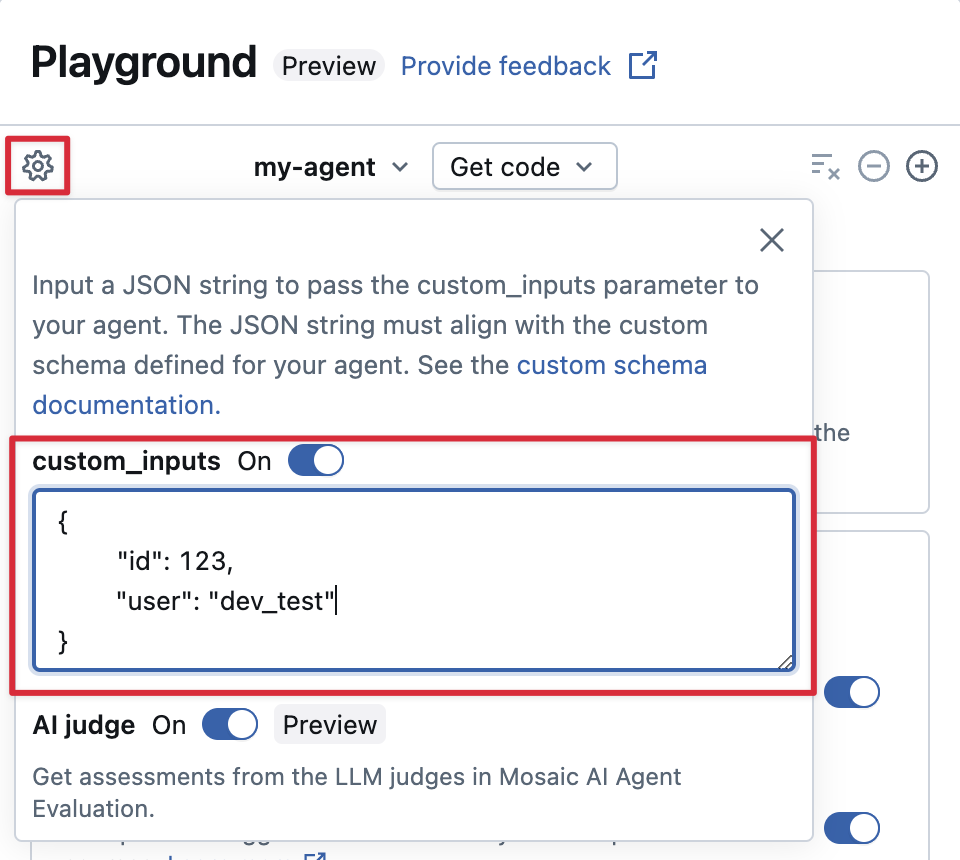
エージェントがcustom_inputsフィールドを使用して追加の入力を受け入れる場合、 AI Playgroundとレビュー アプリの両方でこれらの入力を手動で提供できます。
-
AI Playgroundまたはエージェントレビューアプリで、歯車アイコンを選択します。
 。
。 -
custom_inputs を有効にします。
-
エージェントの定義済み入力スキーマに一致する JSON オブジェクトを提供します。
カスタム リトリーバー スキーマを指定する
AIエージェントは一般的に、レトリーバーを使用して、AI Search インデックスから非構造化データを検索し、クエリを実行します。たとえば取得ツールについては、エージェントを非構造化データに接続するを参照してください。
MLflow RETRIEVER スパンのエージェント内でこれらのリトリーバーをトレースし、次のような Databricks 製品機能を有効にします。
- AI Playground UI で取得したソース ドキュメントへのリンクを自動的に表示する
- エージェント評価における検索根拠と関連性の判定の自動実行
Databricksは、 databricks_langchain.VectorSearchRetrieverToolやdatabricks_openai.VectorSearchRetrieverToolなどのDatabricks AI Bridgeパッケージが提供するリトリーバーツールを使用することを推奨しています。これらのツールは既にMLflowリトリーバースキーマに準拠しているためです。AI Bridge を使用してローカルでリトリーバーを開発する方法を参照してください。
エージェントにカスタム スキーマを持つリトリーバー スパンが含まれている場合は、コードでエージェントを定義するときにmlflow.models.set_retriever_schemaを呼び出します。これにより、リトリーバーの出力列が MLflow の予想されるフィールド ( primary_key 、 text_column 、 doc_uri ) にマッピングされます。
import mlflow
# Define the retriever's schema by providing your column names
# For example, the following call specifies the schema of a retriever that returns a list of objects like
# [
#     {
#         'document_id': '9a8292da3a9d4005a988bf0bfdd0024c',
#         'chunk_text': 'MLflow is the largest open source AI engineering platform for agents, LLMs, and ML models...',
#         'doc_uri': 'https://mlflow.org/docs/latest/index.html',
#         'title': 'MLflow: The Largest Open Source AI Engineering Platform'
#     },
#     {
#         'document_id': '7537fe93c97f4fdb9867412e9c1f9e5b',
#         'chunk_text': 'A great way to get started with MLflow is to use the autologging feature. Autologging automatically logs your model...',
#         'doc_uri': 'https://mlflow.org/docs/latest/getting-started/',
#         'title': 'Getting Started with MLflow'
#     },
# ...
# ]
mlflow.models.set_retriever_schema(
    # Specify the name of your retriever span
    name="mlflow_docs_vector_search",
    # Specify the output column name to treat as the primary key (ID) of each retrieved document
    primary_key="document_id",
    # Specify the output column name to treat as the text content (page content) of each retrieved document
    text_column="chunk_text",
    # Specify the output column name to treat as the document URI of each retrieved document
    doc_uri="doc_uri",
    # Specify any other columns returned by the retriever
    other_columns=["title"],
)
doc_uri列は、リトリーバーのパフォーマンスを評価するときに特に重要です。doc_uriは、リトリーバーによって返されるドキュメントの主な識別子であり、これをグラウンド トゥルース評価セットと比較することができます。評価セット (MLflow 2)を参照してください。
展開に関する考慮事項
Databricks モデルサービングの準備
Databricks 、 Databricksモデルサービング上の分散環境にResponsesAgentをデプロイします。 つまり、マルチターンの会話中に、同じサービスレプリカがすべてのリクエストを処理できない可能性があります。エージェントの状態を管理する場合は、次の点に注意してください。
-
ローカル キャッシュを避ける :
ResponsesAgentをデプロイする場合、同じレプリカがマルチターン会話内のすべてのリクエストを処理するとは想定しないでください。各ターンの辞書ResponsesAgentRequestスキーマを使用して内部状態を再構築します。 -
スレッドセーフな状態 : エージェントの状態をスレッドセーフに設計し、マルチスレッド環境での競合を防止します。
-
predict関数で状態を初期化します:predict初期化中ではなく、ResponsesAgent関数が呼び出されるたびに状態を初期化します。ResponsesAgentレベルで状態を保存すると、単一のResponsesAgentレプリカが複数の会話からの要求を処理できるため、会話間で情報が漏洩し、競合が発生する可能性があります。
環境間での展開のためにコードをパラメータ化する
エージェント コードをパラメーター化して、異なる環境で同じエージェント コードを再利用します。
パラメータは、Pythonディクショナリーまたは.yamlファイルで定義するキーと値のペアです。
コードを構成するには、Python 辞書または.yamlファイルを使用してModelConfigを作成します。ModelConfigは、柔軟な構成管理を可能にするキーと値のセットです。 たとえば、開発中に辞書を使用し、それを本番運用のデプロイメントとCI/CD用の.yamlファイルに変換できます。
例ModelConfigを以下に示します。
llm_parameters:
  max_tokens: 500
  temperature: 0.01
model_serving_endpoint: databricks-meta-llama-3-3-70b-instruct
vector_search_index: ml.docs.databricks_docs_index
prompt_template: 'You are a hello world bot. Respond with a reply to the user''s
  question that indicates your prompt template came from a YAML file. Your response
  must use the word "YAML" somewhere. User''s question: {question}'
prompt_template_input_vars:
  - question
エージェント コードでは、 .yamlファイルまたは辞書からデフォルト (開発) 構成を参照できます。
import mlflow
# Example for loading from a .yml file
config_file = "configs/hello_world_config.yml"
model_config = mlflow.models.ModelConfig(development_config=config_file)

# Example of using a dictionary
config_dict = {
    "prompt_template": "You are a hello world bot. Respond with a reply to the user's question that is fun and interesting to the user. User's question: {question}",
    "prompt_template_input_vars": ["question"],
    "model_serving_endpoint": "databricks-meta-llama-3-3-70b-instruct",
    "llm_parameters": {"temperature": 0.01, "max_tokens": 500},
}

model_config = mlflow.models.ModelConfig(development_config=config_dict)

# Use model_config.get() to retrieve a parameter value
# You can also use model_config.to_dict() to convert the loaded config object
# into a dictionary
value = model_config.get('sample_param')
次に、エージェントをログに記録するときに、 model_configをlog_modelに指定して、
ログに記録されたエージェントをロードするときに使用するカスタム セットを指定します。 見る
MLflow ドキュメント - ModelConfig 。
同期コードまたはコールバックパターンを使用する
安定性と互換性を確保するには、エージェントの実装で同期コードまたはコールバックベースのパターンを使用します。
Databricks は、エージェントを展開するときに、非同期通信を自動的に管理して、最適な同時実行性とパフォーマンスを提供します。カスタム イベント ループまたは非同期フレームワークを導入すると、 RuntimeError: This event loop is already running and caused unpredictable behaviorのようなエラーが発生する可能性があります。
Databricks では、エージェントを開発する際に、asyncio の使用やカスタム イベント ループの作成などの非同期プログラミングを避けることを推奨しています。