宛先テーブルに名前を付ける
適用対象 : SaaSコネクタデータベースコネクタクエリベースのコネクタ
当然、 LakeFlow Connect管理された取り込み中に作成された宛先テーブルには、対応するソース テーブルの名前が付けられます。 ただし、オプションで宛先テーブルに別の名前を指定することもできます。たとえば、同じスキーマ内の 2 つのテーブルにオブジェクトを取り込む場合は、それらのテーブルを区別するために、一方のテーブルに一意の名前を指定する必要があります。マネージド インジェスト コネクタでは、同じスキーマ内の重複する宛先テーブル名はサポートされません。
UIで宛先テーブルに名前を付ける
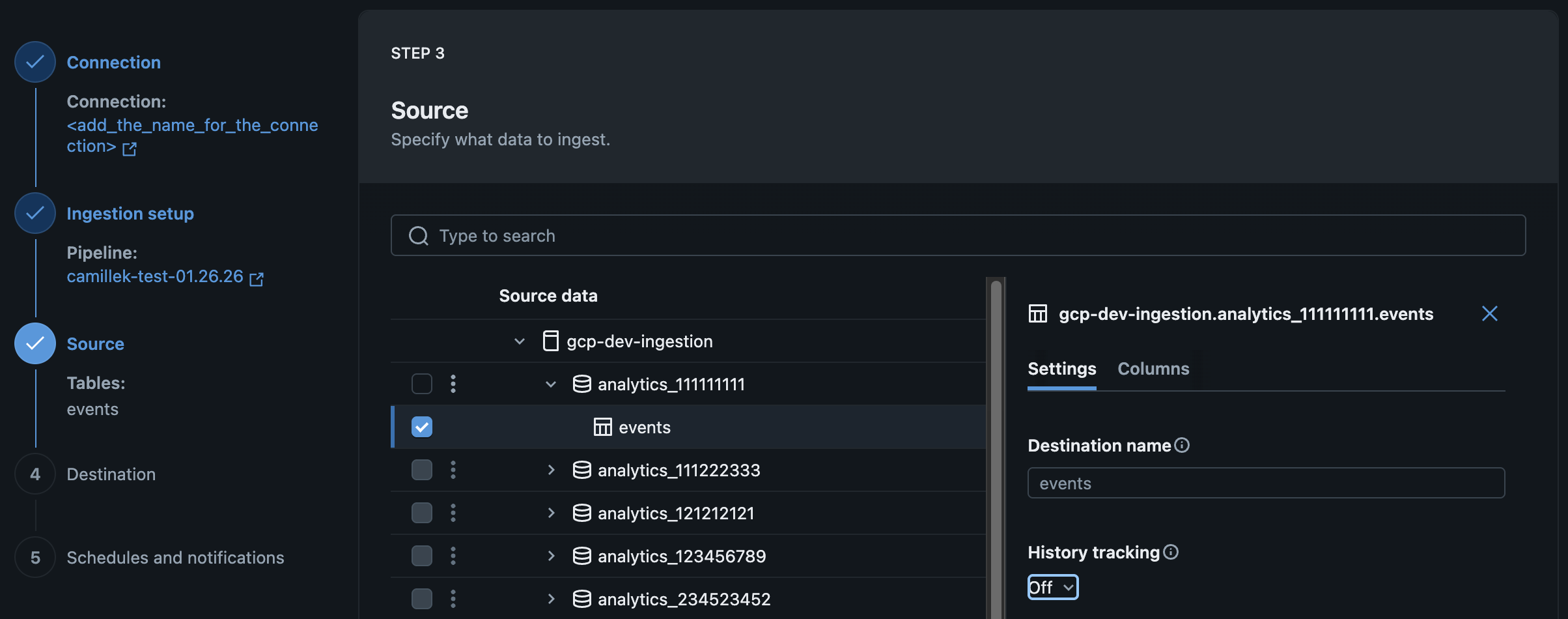
Databricks UI で管理されたインジェスト パイプラインを作成または編集するときに、宛先テーブルに名前を付けることができます。
データ取り込みウィザードの ソース ページで、 宛先テーブル の名前を入力します。
APIを使用して宛先テーブルに名前を付ける
宣言型自動化バンドル、ノートブック、または Databricks CLI を使用して管理対象のデータ取り込みパイプラインを作成または編集する際に、宛先テーブルに名前を付けることができます。これを行うには、 destination_table問題を設定します。 例えば:
例: Google アナリティクス
- Declarative Automation Bundles
- Databricks notebook
- Databricks CLI
YAML
resources:
  pipelines:
    pipeline_ga4:
      name: <pipeline-name>
      catalog: <target-catalog>	# Location of the pipeline event log
      schema: <target-schema> # Location of the pipeline event log
      ingestion_definition:
        connection_name: <connection-name>
        objects:
	        - table:
              source_url: <project-id>
              source_schema: <property-name>
              destination_catalog: <target-catalog>
              destination_schema: <target-schema>
              destination_table: <custom-target-table-name> # Specify destination table name
Python
pipeline_spec = """
{
  "name": "<pipeline-name>",
  "ingestion_definition": {
    "connection_name": "<connection-name>",
    "objects": [
      {
        "table": {
          "source_catalog": "<project-id>",
          "source_schema": "<property-name>",
          "source_table": "<source-table>",
          "destination_catalog": "<target-catalog>",
          "destination_schema": "<target-schema>",
          "destination_table": "<custom-target-table-name>",
        }
      }
    ]
  }
}
"""
JSON
{
  "resources": {
    "pipelines": {
      "pipeline_ga4": {
        "name": "<pipeline-name>",
        "catalog": "<target-catalog>",
        "schema": "<target-schema>",
        "ingestion_definition": {
          "connection_name": "<connection-name>",
          "objects": [
            {
              "table": {
                "source_url": "<project-id>",
                "source_schema": "<property-name>",
                "destination_catalog": "<destination-catalog>",
                "destination_schema": "<destination-schema>",
                "destination_table": "<custom-destination-table-name>"
              }
            }
          ]
        }
      }
    }
  }
}
例: Salesforce
- Declarative Automation Bundles
- Databricks notebook
- Databricks CLI
YAML
resources:
  pipelines:
    pipeline_sfdc:
      name: <pipeline-name>
      catalog: <target-catalog>	# Location of the pipeline event log
      schema: <target-schema> # Location of the pipeline event log
      ingestion_definition:
        connection_name: <connection-name>
        objects:
	        - table:
              source_schema: <source-schema>
              source_table: <source-table>
              destination_catalog: <target-catalog>
              destination_schema: <target-schema>
              destination_table: <custom-target-table-name> # Specify destination table name
Python
pipeline_spec = """
{
  "name": "<pipeline-name>",
  "ingestion_definition": {
    "connection_name": "<connection-name>",
    "objects": [
      {
        "table": {
          "source_catalog": "<source-catalog>",
          "source_schema": "<source-schema>",
          "source_table": "<source-table>",
          "destination_catalog": "<target-catalog>",
          "destination_schema": "<target-schema>",
          "destination_table": "<custom-target-table-name>",
        }
      }
    ]
  }
}
"""
JSON
{
  "resources": {
    "pipelines": {
      "pipeline_sfdc": {
        "name": "<pipeline-name>",
        "catalog": "<target-catalog>",
        "schema": "<target-schema>",
        "ingestion_definition": {
          "connection_name": "<connection-name>",
          "objects": [
            {
              "table": {
                "source_schema": "<source-schema>",
                "source_table": "<source-table>",
                "destination_catalog": "<destination-catalog>",
                "destination_schema": "<destination-schema>",
                "destination_table": "<custom-destination-table-name>"
              }
            }
          ]
        }
      }
    }
  }
}
例: 勤務日
- Declarative Automation Bundles
- Databricks notebook
- Databricks CLI
YAML
resources:
  pipelines:
    pipeline_workday:
      name: <pipeline-name>
      catalog: <target-catalog>	# Location of the pipeline event log
      schema: <target-schema> # Location of the pipeline event log
      ingestion_definition:
        connection_name: <connection-name>
        objects:
	        - report:
              source_url: <report-url>
              destination_catalog: <target-catalog>
              destination_schema: <target-schema>
              destination_table: <custom-target-table-name> # Specify destination table name
Python
pipeline_spec = """
{
  "name": "<pipeline-name>",
  "ingestion_definition": {
    "connection_name": "<connection-name>",
    "objects": [
      {
        "report": {
          "source_url": "<report-url>",
          "destination_catalog": "<target-catalog>",
          "destination_schema": "<target-schema>",
          "destination_table": "<custom-target-table-name>",
        }
      }
    ]
  }
}
"""
JSON
{
  "resources": {
    "pipelines": {
      "pipeline_workday": {
        "name": "<pipeline-name>",
        "catalog": "<target-catalog>",
        "schema": "<target-schema>",
        "ingestion_definition": {
          "connection_name": "<connection-name>",
          "objects": [
            {
              "report": {
                "source_url": "<report-url>",
                "destination_catalog": "<destination-catalog>",
                "destination_schema": "<destination-schema>",
                "destination_table": "<custom-destination-table-name>"
              }
            }
          ]
        }
      }
    }
  }
}