Serverlessジョブの環境変数を構成する
環境変数は、Serverless Lakeflow Jobsのタスク内のアプリケーションコードにデプロイメント固有の構成を提供します。ジョブに名前付き環境変数エントリを定義し、それを必要とする各タスクのエントリを選択します。
ベータ版
この機能はベータ版です。使用するには、ワークスペース管理者は、 プレビュー ページから Lakeflow Jobsの環境変数 を有効にする必要があります。Databricksのプレビューを管理するを参照してください。
これらの環境変数は、Serverlessジョブにのみ適用されます。Serverlessコンピュートではinitスクリプトはサポートされていません。ワークロードがクラシック・コンピュートで実行される場合は、initスクリプトによる環境変数の設定と使用を参照してください。
環境変数の仕組み
環境変数 entries are defined at the ジョブ level.Each entry has a unique key and contains inline variables, paths to .env files, or both.An entry works with all Serverless タスク types.An entry key can contain only letters, numbers, hyphens, and underscores.Each inline variable name must start with a letter or underscore and can contain only letters, numbers, and underscores.
各タスクは environment_variables_key を使用して環境変数のエントリを 1 つ選択し、そのエントリの変数のみを受け取ります。エントリが結合されることはなく、あるエントリが別のエントリから継承することもありません。environment_variables_key を省略したタスクには、環境変数は渡されません。
環境変数は、タスクプロセスで実行されるアプリケーションコードでのみ使用できます。これらはSparkの実行ロジックでは使用できません。
要件
- ワークスペース管理者が、 プレビュー ページから Lakeflow Jobsの環境変数 を有効にしました。Databricksのプレビューを管理するを参照してください。
- Serverless環境バージョン5以上で実行されるタスク。
.envファイルの場合、ジョブの 実行者 ID に各ファイルへの読み取りアクセス権が必要です。- シークレット参照の場合、ジョブの Run as IDには、参照される各Secret Scopeに対して少なくとも
READ権限が必要です。シークレット ACLを参照してください。
制限事項
ユーザー定義関数(UDF)は環境変数を読み取ることができません。なぜならUDFはタスクプロセスではなくSpark実行ロジック上で動作するためです。
ワークスペース レベルの Databricks シークレットのみがサポートされています。Unity Catalog シークレットのサポートは近日公開予定です。
以下の制限が適用されます。
構成 | 上限 |
|---|---|
ジョブごとの環境変数のエントリ | 10 |
エントリーキー | 1~100文字。一致する必要があります |
エントリごとのインライン変数 | 20 |
インライン変数名 | 1~256文字。一致する必要があります |
インライン変数の値 | 512 文字 |
| 5 |
ファイルパス | 1,024文字 |
ファイルサイズ | 32 KiB(32,768 バイト) |
ファイルの行サイズ | 1 KiB(1,024 バイト、UTF-8 バイトで測定) |
.envファイルを使用します
環境変数は、ワークスペース ファイル(/Workspace/...)または Unity Catalog ボリューム(/Volumes/...)内のファイルから読み込むことができます。UI のエントリの Files リスト、または Jobs API の spec.files 配列にファイルパスを追加します。ファイルは、ジョブを作成または更新するときではなく、タスクの開始時に読み込まれます。
Serverless ジョブの場合、Databricks は独自の .env ファイル形式を使用します。次のルールが適用されます。
- 先行する空白文字または
=の前のスペースなしで、各変数をKEY=VALUEとして 1 行に 1 つ定義します。 - 変数名は、ASCII 文字またはアンダースコアで始まる必要があります。残りの文字には、ASCII 文字、数字、またはアンダースコアを使用できます。
- 最初の
=以降のすべて(スペースや追加の=文字を含む)が値になります。空の値が許可されます。値にはUnicodeテキストを含めることができます。UTF-8エンコーディングを使用してファイルを保存します。 - 空行および空白のみの行は無視されます。コメントを追加するには、行の先頭文字として
#を入力します。
たとえば、execution.env ファイルには次の内容を含めることができます:
# Application configuration
APP_ENV=production
REGION=us-west-2
GREETING=こんにちは
OPTIONAL_VALUE=
この形式では、quotation marks、エスケープ シーケンス、インライン コメント、または ${OTHER_VARIABLE} などの変数参照は解釈されません。これらの文字は値の一部として残ります。たとえば、APP_ENV="production" の値には引用符が含まれます。export のプレフィックスが無効です。
シークレット参照は別の構文を使用し、ファイル変数とインライン変数が結合された後に解決されます。「シークレットの使用」を参照してください。
変数に複数の定義がある場合:
- ファイル内では、最後の定義が優先されます。
- ファイル全体を通して、後からリストされるファイルの値は、前にリストされたファイルの値よりも優先されます。
- インライン変数はファイルからの値をオーバーライドします。
たとえば、ファイルで LOG_LEVEL=DEBUG が定義されており、エントリでもインライン変数 LOG_LEVEL=INFO が定義されている場合、タスクは LOG_LEVEL=INFO を受け取ります。
ファイルに無効な行が含まれている場合、またはファイルや行のサイズ制限を超えている場合、タスクは失敗します。
シークレットを使用する
Serverlessジョブの環境変数は、ワークスペースレベルのDatabricksシークレットをサポートしており、これらはSecret Scopeに整理されています。シークレットリファレンスを使用して、シークレット値をジョブ構成や .env ファイルに保存せずに、認証情報やトークンをアプリケーションコードに渡します。Secret Scopeを作成してシークレットを追加するには、「シークレット管理」を参照してください。
環境変数の値を次の形式のシークレット参照に設定します:
{{secrets/<scope-name>/<secret-name>}}
<scope-name> をSecret Scope名に置き換え、<secret-name> をそのスコープ内のシークレットのキーに置き換えます。参照は値全体である必要があります。Bearer {{secrets/production/service-token}}のように、大きな文字列に埋め込まれた参照はリテラルテキストのままです。
UIで、 変数 の値として参照を入力します。Jobs API では、 spec.variablesの値として使用します。
{
  "SERVICE_TOKEN": "{{secrets/production/service-token}}"
}
.envファイルで同じシークレットを参照するには、参照の前後を引用符やスペースで囲まずに次の行を追加します。
SERVICE_TOKEN={{secrets/production/service-token}}
Databricks は、タスクの起動時に、ジョブの ラン者 IDを使用してシークレット参照を解決します。タスクは、プロセス環境で解決済みのシークレット値を受け取ります。アプリケーションコードは、Python の os.environ["SERVICE_TOKEN"] または Scala の sys.env("SERVICE_TOKEN") でそれを読み取ります。
Databricksはノートブックの出力でシークレット値を伏字処理しようとしますが、伏字処理はベストエフォートです。ノートブックの出力に [REDACTED] が表示されている場合でも、アプリケーションが印刷したりログに書き込んだりするシークレットがコンピュートログにプレーンテキストで表示される可能性があります。シークレット値を印刷したり、Logsに書き込んだりしないでください。シークレットの除外を参照してください。
同じ 優先順位ルール がシークレット参照に適用されます。結果の値のみが解決されます。ジョブ設定には、解決されたシークレット値ではなく、シークレット参照が保持されます。
参照されたシークレットが存在しないか、 [ラン] IDにそれを読み取る権限がない場合、アプリケーションコードが実行される前にタスクは失敗します。スコープ名、シークレットキー、およびSecret Scopeの権限を確認します。
UI で環境変数を構成する
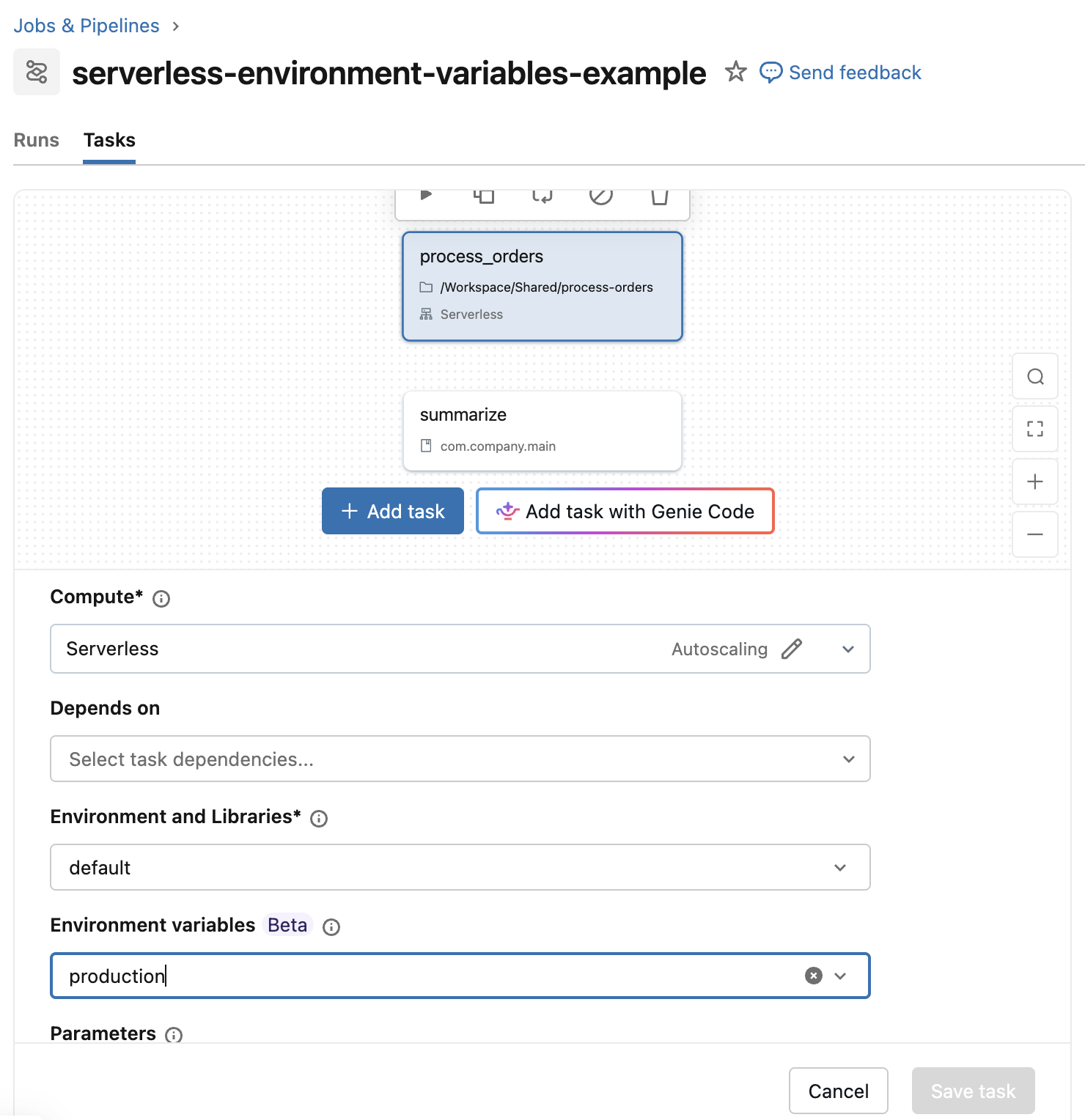
ジョブの Tasks tabで、タスクを選択します。[ 環境変数 ] を使用して、production などの環境変数エントリを選択または作成します。
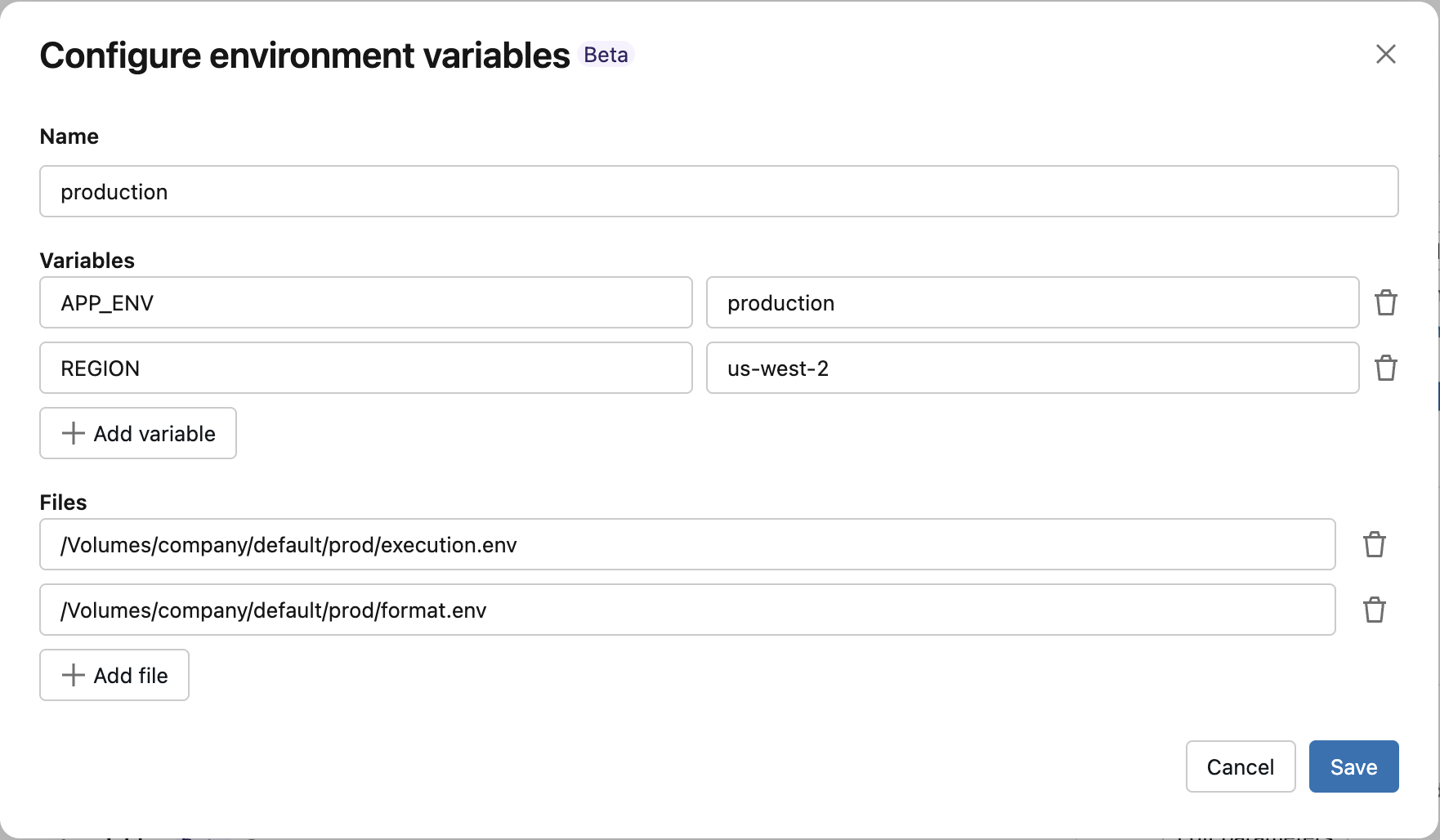
[環境変数の構成] に名前を入力します。必要に応じて、 [Variables] の下にキーと値のペアを追加し、 [Files] の下に.envファイルへのパスを追加するか、両方を追加します。両方のセクションを空のままにすることもできます。 [保存] をクリックします。
Jobs API を使用して環境変数を設定
POST /api/2.2/jobs/create リクエストの environment_variables フィールドを使用して、環境変数のエントリを定義します。エントリを使用する各タスクで environment_variables_key を設定します。
以下の例を実行する前に、productionスコープにservice-tokenシークレットを作成し、ジョブの 「ラン as」 にそのシークレットへのアクセス許可を付与してください。「シークレットの使用」を参照してください。この例では、ノートブックタスクとJARタスクに対して個別の環境変数エントリを定義しています。各エントリでは、インライン値にspec.variablesを、ファイルパスにspec.filesを使用します。各タスクはenvironment_variables_keyを使用してエントリを選択します。
{
  "name": "serverless-environment-variables-example",
  "tasks": [
    {
      "task_key": "process_orders",
      "notebook_task": {
        "notebook_path": "/Workspace/Shared/process-orders"
      },
      "environment_key": "default",
      "environment_variables_key": "production"
    },
    {
      "task_key": "summarize",
      "spark_jar_task": {
        "main_class_name": "com.company.main"
      },
      "environment_key": "summary_env",
      "environment_variables_key": "summary_vars"
    }
  ],
  "environments": [
    {
      "environment_key": "default",
      "spec": {
        "environment_version": "5",
        "dependencies": []
      }
    },
    {
      "environment_key": "summary_env",
      "spec": {
        "environment_version": "5",
        "java_dependencies": ["/Volumes/company/default/prod/summarize.jar"]
      }
    }
  ],
  "environment_variables": [
    {
      "environment_variables_key": "production",
      "spec": {
        "variables": {
          "APP_ENV": "production",
          "REGION": "us-west-2",
          "SERVICE_TOKEN": "{{secrets/production/service-token}}"
        },
        "files": ["/Volumes/company/default/prod/execution.env", "/Volumes/company/default/prod/format.env"]
      }
    },
    {
      "environment_variables_key": "summary_vars",
      "spec": {
        "variables": {
          "APP_ENV": "production",
          "LOG_LEVEL": "INFO",
          "LOG_FILE": "service.log"
        },
        "files": ["/Volumes/company/default/prod/format.env"]
      }
    }
  ]
}
ジョブの更新、ジョブの全設定の上書き、および1回限りのランの送信の各操作を使用して、環境変数のエントリを構成することもできます。
アプリケーションコードでの環境変数の読み取り
アプリケーションコードは、プロセス環境から構成された変数を読み取ります。
- Python
- Scala
import os

app_environment = os.environ["APP_ENV"]
region = os.environ["REGION"]
val appEnvironment = sys.env("APP_ENV")
val region = sys.env("REGION")