宣言型機能のAPIリファレンス
ベータ版
この機能はベータ版です。ワークスペース管理者は、 プレビュー ページからこの機能へのアクセスを制御できます。Databricksのプレビューを管理するを参照してください。
宣言型機能エンジニアリングAPI
Featureコンストラクタと register_feature()
推奨される方法は、 Featureオブジェクトをローカルで構築し、 register_featureを使用してそれをUnity Catalogに永続化することです。 この 2 ステップのワークフローでは、機能 ( create_training_setを含む) を登録する前に体験することができます。
Feature(
    source: DataSource,                                    # Required: DeltaTableSource or RequestSource
    function: Union[AggregationFunction, ColumnSelection], # Required: Aggregation or column selection
    entity: Optional[List[str]] = None,                    # Required for aggregation: entity columns
    timeseries_column: Optional[str] = None,               # Required for aggregation: timestamp column
    name: Optional[str] = None,                            # Optional: Feature name (auto-generated if omitted)
    description: Optional[str] = None,                     # Optional: Feature description
)
FeatureEngineeringClient.register_feature() ローカルに構築されたFeatureをUnity Catalogに登録します。
FeatureEngineeringClient.register_feature(
    feature: Feature,       # Required: A Feature instance (not already registered)
    catalog_name: str,      # Required: UC catalog name
    schema_name: str,       # Required: UC schema name
) -> Feature
from databricks.feature_engineering.entities import Feature, DeltaTableSource, AggregationFunction, Sum, RollingWindow
from datetime import timedelta

# Step 1: Construct the feature locally
feature = Feature(
    source=DeltaTableSource(catalog_name="main", schema_name="store", table_name="transactions"),
    entity=["user_id"],
    timeseries_column="transaction_time",
    function=AggregationFunction(Sum(input="amount"), RollingWindow(window_duration=timedelta(days=7))),
)

# Step 2: Register in Unity Catalog
fe = FeatureEngineeringClient()
registered_feature = fe.register_feature(
    feature=feature,
    catalog_name="main",
    schema_name="store",
)
create_feature()
FeatureEngineeringClient.create_feature() 単一のステップで機能を検証、構築し、すぐにUnity Catalogに登録します。 まずローカルでその機能を拡張する必要がない場合は、これを使用してください。
FeatureEngineeringClient.create_feature(
    source: DataSource,                                    # Required: DeltaTableSource or RequestSource
    function: Union[AggregationFunction, ColumnSelection], # Required: Aggregation or column selection
    catalog_name: str,                                     # Required: The catalog name for the feature
    schema_name: str,                                      # Required: The schema name for the feature
    entity: Optional[List[str]] = None,                    # Required for aggregation: entity columns
    timeseries_column: Optional[str] = None,               # Required for aggregation: timestamp column
    name: Optional[str] = None,                            # Optional: Feature name (auto-generated if omitted)
    description: Optional[str] = None,                     # Optional: Feature description
) -> Feature
パラメーター:
source: 特徴量計算に使用されるデータソース(DeltaTableSourceまたはRequestSource)。function演算子(例えば、Sum(input="amount"))、入力列、および時間ウィンドウをまとめて指定するAggregationFunction。または、パススルー機能の場合はColumnSelection("column_name")。catalog_name: この機能のUnity Catalog名。schema_name: 機能のUnity Catalogスキーマ名。entity集計レベルを定義する列名のリスト(主キー)。集計機能には必須です。例えば、["user_id"]ユーザーごとに集計します。timeseries_column時間ウィンドウ集計に使用されるタイムスタンプ列。集計機能には必須です。name: オプションの機能名。省略した場合、入力列、関数、ウィンドウから自動生成されます(例:amount_avg_rolling_7d)。description機能に関するオプションの説明。
戻り値: 検証済みのFeatureインスタンス
例外: 検証が失敗した場合、ValueError が発生します
delete_feature()
完全修飾名で指定された機能をUnity Catalogから削除します。
FeatureEngineeringClient.delete_feature(
    full_name: str,  # Required: '<catalog>.<schema>.<feature_name>'
) -> None
fe.delete_feature(full_name="main.store.amount_sum_rolling_7d")
機能を削除する前に、その機能を参照しているモデルや機能仕様をすべて削除または更新してください。機能が既に具体化されている場合は、まず具体化された機能を削除してください。マテリアライズドフィーチャーを削除する方法については、「マテリアライズドフィーチャーを削除する方法」を参照してください。
自動生成された名前
nameを省略した場合、名前は自動的に生成されます。生成される名前は、 {column}_{function}_{window}パターンに従います。例えば:
price_avg_rolling_1h(1時間あたりの平均価格)transaction_count_rolling_30d_1d(イベントのタイムスタンプから1日遅れで、30日間の取引件数をカウント)
サポートされている機能
集計関数
集計関数は、時間ウィンドウで説明されているように、時間ウィンドウとともにAggregationFunctionで囲まれます。各関数は、集計するソース列を指定するinput問題を受け取ります。
関数 | 説明 | 使用例 |
|---|---|---|
| 値の合計 | ユーザー1人あたりの1日のアプリ使用時間(分) |
| 平均値 | 平均取引金額 |
| レコード数 | ユーザーごとのログイン回数 |
| 最小値 | ウェアラブルデバイスで記録された最低心拍数 |
| 最大値 | セッションあたりの最高取引額 |
| 母集団標準偏差 | 顧客ごとの日々の取引金額の変動 |
| 標本標準偏差 | 広告キャンペーンのクリック率の変動性 |
| 母集団の分散 | 工場におけるIoTデバイスのセンサー読み取り値の分布 |
| 標本分散 | サンプルグループにおける映画評価の分布 |
| おおよそのユニークユーザー数 | 購入した商品の個数 |
| おおよそのパーセンタイル | p95応答潜伏期 |
| 最初の値 | 初回ログインのタイムスタンプ |
| 最終値 | 直近の購入金額 |
ColumnSelection (パススルー)
ColumnSelection 集計処理を適用せずに、ソースから単一の列を選択します。これは ( AggregationFunction内ではなく) function問題に直接ラップされています。 戻り値の型は、ソーススキーマから推論されます。
関数 | 説明 | 使用例 |
|---|---|---|
| 列の最新値(集計なし) | 最新のベンダーカテゴリ、リクエストフィールドのパススルー |
ColumnSelection あらゆるデータソースで使用可能です。
DeltaTableSource: ポイントインタイム結合(ルックバックウィンドウ集計なし)により、エンティティキーごとに最新の値を返します。RequestSource: 推論時に提供された値(またはラベル付きDataFrameから抽出された値)を渡します。
from databricks.feature_engineering.entities import (
    ColumnSelection, DeltaTableSource, Feature, FieldDefinition,
    RequestSource, ScalarDataType,
)

delta_source = DeltaTableSource(
    catalog_name="main", schema_name="feature_store", table_name="transactions",
)

request_source = RequestSource(
    schema=[
        FieldDefinition(name="session_duration", data_type=ScalarDataType.DOUBLE),
    ]
)

# ColumnSelection from a Delta table
latest_amount = Feature(
    source=delta_source,
    function=ColumnSelection("amount"),
    entity=["user_id"],
    timeseries_column="transaction_time",
    name="latest_transaction_amount",
)

# ColumnSelection from a RequestSource
session_feature = Feature(
    source=request_source,
    function=ColumnSelection("session_duration"),
    name="session_duration",
)
例:集計機能と列選択機能
以下の例は、同じデータソース上で定義された機能を示しています。
from databricks.feature_engineering.entities import (
    AggregationFunction, Feature, Sum, Avg, ApproxCountDistinct,
    ColumnSelection, RollingWindow,
)
from datetime import timedelta

window = RollingWindow(window_duration=timedelta(days=7))

sum_feature = Feature(
    source=source,
    entity=["user_id"],
    timeseries_column="event_time",
    function=AggregationFunction(Sum(input="amount"), window),
)

avg_feature = Feature(
    source=source,
    entity=["user_id"],
    timeseries_column="event_time",
    function=AggregationFunction(Avg(input="amount"), window),
)

distinct_count = Feature(
    source=source,
    entity=["user_id"],
    timeseries_column="event_time",
    function=AggregationFunction(ApproxCountDistinct(input="product_id", relativeSD=0.01), window),
)

# Column selection (no aggregation, no time window)
latest_amount = Feature(
    source=source,
    function=ColumnSelection("amount"),
    entity=["user_id"],
    timeseries_column="event_time",
    name="latest_amount",
)
フィルター条件付きの機能
filter_conditionを使用すると、集計を計算する 前に ソース テーブルの行をフィルタリングできます。 これは、データのグループ化と集計の前に適用されるSQLのWHERE句として機能します。
filter_condition 集計の前に行をフィルタリングします。これは、SQL WHERE句がGROUP BY前に適用されるのと同様です。これは粒度を変更するものではなく、粒度は常にフィーチャー定義のentityで定義されます。
フィルタは、特徴量計算に必要なデータのスーパーセットを含む大規模なソーステーブルを扱う場合に役立ち、これらのテーブルの上に個別のビューを作成する必要性を最小限に抑えます。
from databricks.feature_engineering.entities import AggregationFunction, Sum, Count, RollingWindow, DeltaTableSource
from datetime import timedelta

# Source with filter applied at the source level
high_value_transactions = DeltaTableSource(
    catalog_name="main",
    schema_name="ecommerce",
    table_name="transactions",
    filter_condition="amount > 100",  # Only transactions over $100
)

high_value_sales = Feature(
    source=high_value_transactions,
    entity=["user_id"],
    timeseries_column="transaction_time",
    function=AggregationFunction(Sum(input="amount"), RollingWindow(window_duration=timedelta(days=30))),
)

# Multiple conditions
completed_orders_source = DeltaTableSource(
    catalog_name="main",
    schema_name="ecommerce",
    table_name="orders",
    filter_condition="status = 'completed' AND payment_method = 'credit_card'",
)

completed_orders = Feature(
    source=completed_orders_source,
    entity=["user_id"],
    timeseries_column="order_time",
    function=AggregationFunction(Count(input="order_id"), RollingWindow(window_duration=timedelta(days=7))),
)
データソース
DeltaTableSource
DeltaTableSource ソーステーブルから特徴量をコンピュートする方法を定義するために使用される一時的なPythonオブジェクトです。新規テーブルは作成されません。データの読み取りと特徴量の集計のための構成を指定します。
DeltaTableSource(
    catalog_name: str,                              # Required: Catalog name
    schema_name: str,                               # Required: Schema name
    table_name: str,                                # Required: Table name
    filter_condition: Optional[str] = None,         # Optional: SQL WHERE clause to filter source data
    transformation_sql: Optional[str] = None,       # Optional: SQL SELECT expression for column transformations
    schema_json: Optional[str] = None,              # Required if transformation_sql is set: schema of the resulting DataFrame
)
パラメーター:
catalog_name、schema_name、table_name: Unity CatalogのDeltaテーブルを特定します。filter_condition: 集計の前に適用される SQLWHERE句。例:"status = 'completed'"。transformation_sqlソーステーブルに適用されたSQL式SELECT。これを使用して、集計前に列、キャスト型、またはコンピュート派生列の名前を変更します。 省略した場合、すべての列が選択されます (*)。例:"user_id, CAST(amount AS DOUBLE) AS amount, event_time"。schema_json: 変換後の結果の DataFrame のスキーマ (Spark StructType JSON 形式、df.schema.json()から)。transformation_sqlが指定されている場合は必須です。 これは、変換によって生成される列名と型をシステムに伝えるものです。
filter_conditionとtransformation_sql両方が設定されている場合、結果として得られるクエリはSELECT {transformation_sql} FROM {table} WHERE {filter_condition}です。
timeseries_column (機能定義で指定され、 DeltaTableSourceでは指定されない)は、タイプTimestampTypeまたはDateTypeでなければならない。整数型でも機能しますが、時間ウィンドウ集計の精度が低下します。
例:列変換にtransformation_sql使用する
source = DeltaTableSource(
    catalog_name="main",
    schema_name="analytics",
    table_name="raw_events",
    transformation_sql="user_id, CAST(price_cents AS DOUBLE) / 100 AS price, event_time",
    filter_condition="event_type = 'purchase'",
    schema_json=spark.sql(
        "SELECT user_id, CAST(price_cents AS DOUBLE) / 100 AS price, event_time FROM main.analytics.raw_events LIMIT 0"
    ).schema.json(),
)
例:PySpark DataFrameからtransformation_sqlとschema_jsonを導出する
変換処理をPySparkクエリとして記述し、結果として得られるDataFrameからスキーマを抽出することができます。
df = spark.sql(f"""
  SELECT user_id, CAST(amount AS DOUBLE) / 100 AS amount_dollars, event_time
  FROM main.analytics.events
  WHERE event_date >= date_sub(current_date(), 7)
  LIMIT 0
""")

# Use df.schema.json() as the schema_json
source = DeltaTableSource(
    catalog_name="main",
    schema_name="analytics",
    table_name="events",
    transformation_sql="user_id, CAST(amount AS DOUBLE) / 100 AS amount_dollars, event_time",
    filter_condition="event_date >= date_sub(current_date(), 7)",
    schema_json=df.schema.json(),
)
transformation_sql 行方向の式(列のリネーム、キャスト、算術演算)のみをサポートします。集計関数(COUNT(*) や SUM() など)はサポートされていません。特徴量定義では、代わりにAggregationFunctionを使用します。
DeltaTableSource.from_sql()
便宜上、SQLクエリからDeltaTableSourceを作成できます。このメソッドはクエリを解析して、テーブル名、 transformation_sql 、およびfilter_conditionを自動的に抽出します。
DeltaTableSource.from_sql(
    sql: str,                           # Required: SQL SELECT query
    spark_client,                       # Required: Spark client (for schema inference)
) -> DeltaTableSource
シンプルなSELECT ... FROM ... [WHERE ...]クエリのみがサポートされています。複雑なSQL(JOIN、サブクエリ、CTE、UNIONなど)は拒否されます。複雑なクエリの場合は、 DeltaTableSource transformation_sqlとfilter_conditionで直接構築します。
from databricks.feature_engineering.entities import (
    AggregationFunction,
    DeltaTableSource,
    Feature,
    Sum,
    TumblingWindow,
)
from databricks.ml_features._spark_client._spark_client import SparkClient

spark_client = SparkClient()
source = DeltaTableSource.from_sql(
    spark_client=spark_client,
    sql=f"SELECT customer_id, event_ts, amount * 2 AS doubled_amount, amount FROM {CATALOG}.{SCHEMA}.{TABLE}",
)

feature = Feature(
    source=source,
    function=AggregationFunction(Sum(input="doubled_amount"), time_window=TumblingWindow(window_duration=timedelta(days=7))),
    entity=["customer_id"], timeseries_column="event_ts",
)
反復する to_dataframe()
特徴量計算に使用されるデータをプレビューするには、 source.to_dataframe()を使用してください。これは、 filter_conditionとtransformation_sqlを繰り返して期待される結果が得られるまで行うのに役立ちます。
source = DeltaTableSource(
    catalog_name="main",
    schema_name="analytics",
    table_name="events",
    filter_condition="event_type = 'purchase'",
)

# Preview the filtered source data
source.to_dataframe().display()
エンティティの理解
エンティティ列は、フィーチャの集計レベルを定義します。それらはFeature定義で指定されており、 DeltaTableSourceでは指定されていません。各主体は以下を決定する:
- データのグループ化方法 :エンティティ値の固有の組み合わせごとにフィーチャが集約されます(SQLの
GROUP BYに相当)。 - 主キー構造 : それぞれの一意のエンティティの組み合わせにより、1 行のコンピュート機能が生成されます。
例:顧客レベルの機能
以下のコードは、顧客レベルで機能を集約します(顧客ごとに1行)。
from databricks.feature_engineering.entities import DeltaTableSource

source = DeltaTableSource(
    catalog_name="main",
    schema_name="analytics",
    table_name="user_events",
)

Feature(
    source=source,
    entity=["user_id"],                # Features aggregated per user
    timeseries_column="event_time",    # Timestamp for time windows
    function=AggregationFunction(Sum(input="amount"), RollingWindow(window_duration=timedelta(days=7))),
)
例:顧客店舗レベルの機能
より詳細なレベル(顧客と店舗の組み合わせごとに1行)で機能を集約するには、複数のエンティティ列を使用します。
source = DeltaTableSource(
    catalog_name="main",
    schema_name="retail",
    table_name="transactions",
)

Feature(
    source=source,
    entity=["user_id", "store_id"],  # Features aggregated per user-store pair
    timeseries_column="transaction_time",
    function=AggregationFunction(Sum(input="amount"), RollingWindow(window_duration=timedelta(days=7))),
)
異なる集計レベル(たとえば、顧客レベルと顧客店舗レベル)で機能が必要な場合は、機能定義で異なるentity値を使用してください。同じDeltaTableSource 、異なるエンティティ構成を持つ機能間で共有できます。
RequestSource
RequestSource 事前に作成されたテーブルから検索するのではなく、リクエストペイロード内で推論時に提供されるデータのスキーマを定義します。トレーニング中、これらの列はcreate_training_setに渡されるラベル付き DataFrame から抽出されます。モデルサービング中、呼び出し元はそれらを HTTP リクエスト ペイロードに含める必要があります。
RequestSource ColumnSelectionと一緒に使用して、値を直接渡します。集計関数や時間枠には対応していません。
スキーマの定義
スキーマをFieldDefinitionオブジェクトのリストとして定義します。各オブジェクトは列名とScalarDataTypeを指定します。
from databricks.feature_engineering.entities import (
    FieldDefinition, RequestSource, ScalarDataType,
)

request_source = RequestSource(
    schema=[
        FieldDefinition(name="transaction_amount", data_type=ScalarDataType.DOUBLE),
        FieldDefinition(name="vendor_id", data_type=ScalarDataType.STRING),
        FieldDefinition(name="transaction_id", data_type=ScalarDataType.STRING),
        FieldDefinition(name="transaction_time", data_type=ScalarDataType.DATE),
    ]
)
サポートされているデータ型
RequestSource ScalarDataTypeで定義されているスカラー型INTEGER 、 FLOAT 、 BOOLEAN 、 STRING 、 DOUBLE 、 LONG 、 TIMESTAMP 、 DATE 、 SHORTをサポートします。配列、マップ、構造体などの複雑な型はサポートされていません。
リクエストデータがどのようにハイドレートされるか
コンテキスト | 挙動 |
|---|---|
トレーニング ( | ラベル付けされたDataFrameから列が抽出されます。タイプは宣言されたスキーマに対して検証されます。不一致の場合、エラーを発生させます(暗黙的なキャストなし)。 |
サービス提供 (モデルエンドポイント) | 列はHTTPリクエスト内の |
モデル署名
RequestSource特徴を含むトレーニングセットを使用してlog_modelを使用してモデルをログに記録すると、 RequestSource列が必須入力として MLflow モデル署名に追加されます。これは、サービス提供エンドポイントのAPIスキーマが、呼び出し元が推論時に提供しなければならないフィールドを反映していることを意味します。
トレーニングおよび推論API
create_training_set()
特定の時点における正確な特徴量計算を含むトレーニングデータセットを作成します。詳細については、 「宣言型機能を使用してトレーニングするモデル」を参照してください。
FeatureEngineeringClient.create_training_set(
    df: DataFrame,                                # DataFrame with training data
    features: Optional[List[Feature]],            # List of Feature objects
    label: Union[str, List[str], None],           # Label column name(s)
    exclude_columns: Optional[List[str]] = None,  # Optional: columns to exclude
) -> TrainingSet
log_model()
推論中のリネージ追跡と自動特徴検索のために、特徴メタデータを含むモデルをログに記録します。 詳細については、 「宣言型機能を使用してトレーニングするモデル」を参照してください。
FeatureEngineeringClient.log_model(
    model,                                    # Trained model object
    artifact_path: str,                       # Path to store model artifact
    flavor: ModuleType,                       # MLflow flavor module (e.g., mlflow.sklearn)
    training_set: TrainingSet,                # TrainingSet used for training
    registered_model_name: Optional[str],     # Optional: register model in Unity Catalog
)
score_batch()
自動特徴量検索機能を備えたオフラインバッチ推論を実行します。モデルとともに保存された特徴メタデータを使用して、特定時点の正しい特徴をコンピュートし、トレーニングとの一貫性を確保します。
FeatureEngineeringClient.score_batch(
    model_uri: str,                           # URI of logged model (e.g., "models:/catalog.schema.model/1")
    df: DataFrame,                            # DataFrame with entity keys and timestamps
) -> DataFrame
入力DataFrameには、トレーニング中に使用されるエンティティ列と timeseries 列が含まれている必要があります。 特徴量はソースデータから自動コンピュートされます。
fe = FeatureEngineeringClient()

# Batch scoring with automatic feature lookup
predictions = fe.score_batch(
    model_uri="models:/main.ecommerce.fraud_model/1",
    df=inference_df,
)
predictions.display()
時間枠
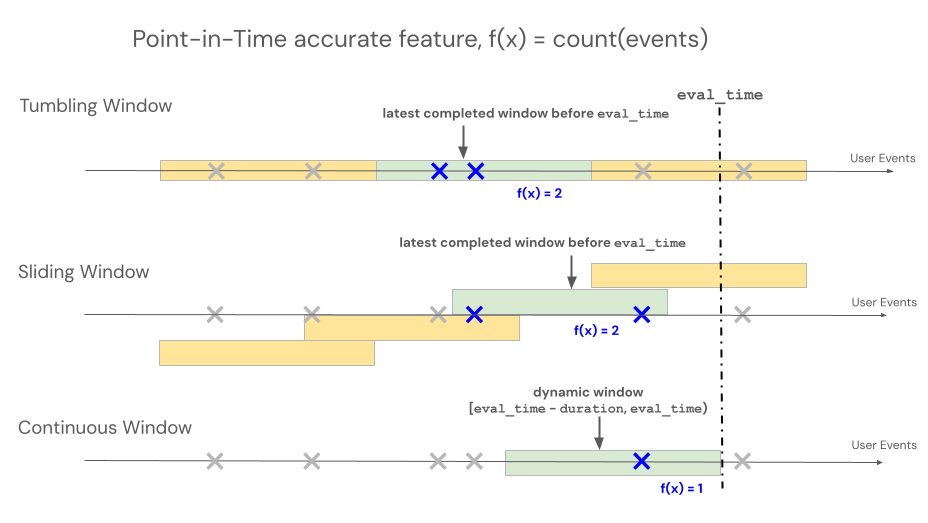
宣言型機能エンジニアリングAPIs 、タイム ウィンドウ ベースの集計のルックバック動作を制御するために、ローリング、タンブリング、スライディングという 3 つの異なるウィンドウ タイプをサポートします。
- 可動式の窓からは、イベント開催時の光景が垣間見える。期間と遅延時間は明示的に定義されています。
- タンブリングウィンドウとは、固定された、重複しない時間ウィンドウのことです。各データポイントは、正確に1つのウィンドウに属します。
- スライディングウィンドウとは、設定可能なスライド間隔を持つ、重なり合うローリングタイムウィンドウのことです。
以下の図は、それらの仕組みを示しています。
巻き上げ式窓
RollingWindow 以前はContinuousWindowという名前でした。以前のSDKバージョンから移行する場合は、インポートを適切に更新してください。
ローリングウィンドウは、最新のリアルタイム集計であり、通常はストリーミングデータに対して使用されます。ストリーミングパイプラインでは、ローリングウィンドウは、イベントがウィンドウに入ったり出たりするなど、固定長ウィンドウの内容が変更された場合にのみ、新しい行を出力します。トレーニングパイプラインでローリングウィンドウ機能を使用する場合、特定のイベントのタイムスタンプの直前の固定長のウィンドウ期間を使用して、ソースデータに対して正確な時点特徴量の計算が実行されます。これは、オンラインとオフラインの偏りやデータ漏洩を防ぐのに役立ちます。時刻Tの特徴は [ T − 期間、 T ) からイベントを集約します。
class RollingWindow(TimeWindow):
    window_duration: datetime.timedelta
    delay: Optional[datetime.timedelta] = None
次の表に、ローリング ウィンドウの懸念を示します。 ウィンドウの開始時間と終了時間は、次のようにこれらの懸念に基づいています。
- 開始時刻:
evaluation_time - window_duration - delay(含む) - 終了時刻:
evaluation_time - delay(排他的)
パラメーター | 制約 |
|---|---|
| 0以上でなければならない(評価タイムスタンプから時間的にウィンドウを過去にずらす)。今後のイベントがトレーニング データセットに漏洩するのを防ぐために、 |
| 0より大きい値でなければならない |
from databricks.feature_engineering.entities import RollingWindow
from datetime import timedelta

# Look back 7 days from evaluation time
window = RollingWindow(window_duration=timedelta(days=7))
以下のコードを使用して、遅延付きのローリングウィンドウを定義します。
# Look back 7 days, offset by 1 minute to account for data ingestion delay
window = RollingWindow(
    window_duration=timedelta(days=7),
    delay=timedelta(minutes=1)
)
巻き上げ窓の例
-
window_duration=timedelta(days=7)これにより、現在の評価時点を終了日とする7日間の遡及期間が作成されます。7日目の午後2時に開催されるイベントの場合、これには0日目の午後2時から7日目の午後2時まで(7日目の午後2時自体は含まない)のすべてのイベントが含まれます。 -
window_duration=timedelta(hours=1), delay=timedelta(minutes=30)これにより、評価時刻の30分前から始まる1時間の遡及期間が作成されます。午後3時のイベントの場合、これには午後1時30分から午後2時30分までのすべてのイベントが含まれます(午後2時30分は含まれません)。これは、データ取り込み遅延に対するアカウントに役立ちます。
転倒する窓
タンブリングウィンドウを使用して定義された特徴量の場合、集計は、スライド間隔で進む事前に決定された固定長のウィンドウに対して行われ、時間を完全に分割する重複しないウィンドウが生成されます。 その結果、ソース内の各イベントは、正確に1つのウィンドウに寄与する。時刻tにおける特徴量は、 t以前(またはそれ以前)に終了する期間のデータを集計します(排他的)。WindowsはUnixエポックから始まった。
class TumblingWindow(TimeWindow):
    window_duration: datetime.timedelta
次の表に、タンブリング ウィンドウの懸念を示します。
パラメーター | 制約 |
|---|---|
| 0より大きい値でなければならない |
from databricks.feature_engineering.entities import TumblingWindow
from datetime import timedelta

window = TumblingWindow(
    window_duration=timedelta(days=7)
)
タンブリングウィンドウの例
window_duration=timedelta(days=5)これにより、あらかじめ決められた5日間の固定長の期間が作成されます。例:ウィンドウ1は0日目から4日目まで、ウィンドウ2は5日目から9日目まで、ウィンドウ3は10日目から14日目まで、といった具合です。具体的には、ウィンドウ1には、0日目のタイムスタンプ00:00:00.00から始まり、5日目のタイムスタンプ00:00:00.00までのイベント(ただし、5日目のタイムスタンプのイベントは含まない)がすべて含まれます。各イベントは、必ず1つのウィンドウに属します。
引き違い窓
スライディングウィンドウを使用して定義された特徴量の場合、集計は、スライド間隔で進む事前に決定された固定長のウィンドウ上で行われ、重複するウィンドウが生成されます。 ソース内の各イベントは、複数のウィンドウにおける特徴量集約に貢献することができる。時刻tにおける特徴量は、 t以前(またはそれ以前)に終了する期間のデータを集計します(排他的)。WindowsはUnixエポックから始まった。
class SlidingWindow(TimeWindow):
    window_duration: datetime.timedelta
    slide_duration: datetime.timedelta
次の表に、スライディング ウィンドウの懸念を示します。
パラメーター | 制約 |
|---|---|
| 0より大きい値でなければならない |
| 0より大きく、かつ< |
from databricks.feature_engineering.entities import SlidingWindow
from datetime import timedelta

window = SlidingWindow(
    window_duration=timedelta(days=7),
    slide_duration=timedelta(days=1)
)
スライド式窓の例
window_duration=timedelta(days=5), slide_duration=timedelta(days=1)これにより、5日間の期間が重複して作成され、毎回1日ずつ進みます。例:ウィンドウ1は0日目から4日目まで、ウィンドウ2は1日目から5日目まで、ウィンドウ3は2日目から6日目まで、といった具合です。各期間には、開始日の00:00:00.00から終了日の00:00:00.00までのイベントが含まれます(終了日のは含みません)。ウィンドウは重なり合うため、1つのイベントが複数のウィンドウに属する可能性があります(この例では、各イベントは最大5つの異なるウィンドウに属します)。
具現化のトリガー
トリガーは、マテリアライゼーションパイプラインの実行タイミングを制御します。トリガーの種類は、機能の種類によって異なります。
CronSchedule
集計機能にはCronSchedule使用します ( AggregationFunction )。パイプラインは、Quartzのcron式で定義された固定スケジュールに従って実行されます。
from databricks.feature_engineering.entities import CronSchedule
from databricks.sdk.service.ml import MaterializedFeaturePipelineScheduleState

trigger = CronSchedule(
    quartz_cron_expression="0 0 * * * ?",  # Hourly
    timezone_id="UTC",
    pipeline_schedule_state=MaterializedFeaturePipelineScheduleState.ACTIVE,
)
TableTrigger
DeltaTableSourceに裏付けられたColumnSelection機能にはTableTrigger使用します。パイプラインは、上流のDeltaテーブルが新しいコミットを受け取るたびに実行されます。
from databricks.feature_engineering.entities import TableTrigger

trigger = TableTrigger()
トリガーの選択
機能タイプ | トリガー | 実行時 |
|---|---|---|
集約( |
| 固定のcronスケジュールで |
|
| 各ソーステーブルのコミット時に |
ColumnSelectionと集計機能は異なるトリガータイプを必要とするため、単一のmaterialize_features呼び出しで混在させることはできません。代わりに、個別に呼び出しを行ってください。