コードベースのスコアラーリファレンス
@scorer デコレータまたは Scorer クラスを使用して、MLflow でカスタム コードベース スコアラーを定義します。このリファレンスでは、それらの関数とクラスのシグネチャ、入力、出力、メトリクスの命名、エラー処理、およびシークレットへのアクセス方法について説明します。
@scorerデコレータ
ほとんどのコードベースのスコアラーは、 @scorerデコレータを使用して定義する必要があります。こうした得点者の署名は以下のとおりです。
from mlflow.genai.scorers import scorer
from typing import Optional, Any
from mlflow.entities import Feedback

@scorer
def my_custom_scorer(
    *,  # All arguments are keyword-only
    inputs: Optional[dict[str, Any]],       # App's raw input, a dictionary of input argument names and values
    outputs: Optional[Any],                 # App's raw output
    expectations: Optional[dict[str, Any]], # Ground truth, a dictionary of label names and values
    trace: Optional[mlflow.entities.Trace]  # Complete trace with all spans and metadata
) -> Union[int, float, bool, str, Feedback, List[Feedback]]:
    # Your evaluation logic here
@scorerデコレータよりも柔軟性を高めるには、 Scorerクラスを使用してスコアラーを定義します。
入力
スコアラーは、すべてのスパン、属性、および出力を含む完全なMLflowトレースを受け取ります。MLflowは、よく必要とされるデータを抽出し、名前付き引数として渡します。入力引数はすべてオプションなので、スコアラーに必要な引数のみを宣言してください。
inputsアプリに送信されるリクエスト(例:ユーザークエリ、コンテキスト)。outputsアプリからの応答(例えば、生成されたテキスト、ツール呼び出しなど)。expectations正解データまたはラベル(例:期待される応答、ガイドライン)。trace: すべてのスパンを含む完全なMLflowトレースにより、中間ステップ、レイテンシ、ツールの使用状況などを分析できます。トレースは、インスタンス化されたmlflow.entities.traceクラスとしてカスタムスコアラーに渡されます。
mlflow.genai.evaluate()を実行する際、 inputs 、 outputs 、 expectations項目はdata引数で指定するか、トレースから解析することができます。
本番運用モニタリングに登録されているスコアラーは、常にトレースからinputsとoutputsを解析します。 expectationsは利用できません。
出力
採点者は、評価のニーズに応じて、さまざまな種類の単純な値または詳細なフィードバックオブジェクトを返すことができます。
単純な値
単純な合格/不合格または数値の評価には、単純な値が使用されます。次の例は、応答として文字列を返すエージェントの単純なスコアラーを示しています。
@scorer
def response_length(outputs: str) -> int:
    # Return a numeric metric
    return len(outputs.split())

@scorer
def contains_citation(outputs: str) -> str:
    # Return pass/fail string
    return "yes" if "[source]" in outputs else "no"
豊富なフィードバック
スコア、根拠、メタデータを含む詳細な評価については、 Feedbackオブジェクト、またはFeedbackのオブジェクトのリストを返します。
from mlflow.entities import Feedback, AssessmentSource

@scorer
def content_quality(outputs):
    return Feedback(
        value=0.85,  # Can be numeric, boolean, string, or other types
        rationale="Clear and accurate, minor grammar issues",
        # Optional: source of the assessment. Several source types are supported,
        # such as "HUMAN", "CODE", "LLM_JUDGE".
        source=AssessmentSource(
            source_type="HUMAN",
            source_id="grammar_checker_v1"
        ),
        # Optional: additional metadata about the assessment.
        metadata={
            "annotator": "me@example.com",
        }
    )
複数のフィードバックオブジェクトをリストとして返すことができます。各フィードバックにはnameフィールドを指定する必要があり、それらの名前は評価結果に個別のメトリクスとして表示されます。
@scorer
def comprehensive_check(inputs, outputs):
    return [
        Feedback(name="relevance", value=True, rationale="Directly addresses query"),
        Feedback(name="tone", value="professional", rationale="Appropriate for audience"),
        Feedback(name="length", value=150, rationale="Word count within limits")
    ]
メトリクスの命名動作
スコアラーを定義する際は、スコアラーの目的が明確かつ一貫性のある名称を使用してください。これらの名前は、評価、モニタリングの結果、ダッシュボードにメトリクス名として表示されます。 MLflow の命名規則safety_checkやrelevance_monitorなど)に従ってください。
@scorer デコレータまたは Scorer クラスを使用してスコアラーを定義する場合、評価およびモニタリングによって作成されたトレース内のメトリクス名は次の規則に従います:
- スコアラーが1つ以上の
Feedbackオブジェクトを返す場合、指定されていればFeedback.nameフィールドが優先されます。 - プリミティブな戻り値または名前のない
Feedbackの場合、関数名 (@scorerデコレータの場合) またはScorer.nameフィールド (Scorerクラスの場合) が使用されます。
次の表は、メトリクスの命名動作をまとめたものです。
戻り値 |
|
|
|---|---|---|
プリミティブ値( | 関数名 |
|
名前のないフィードバック | 関数名 |
|
名前付きフィードバック |
|
|
|
|
|
評価とモニタリングを行うには、すべてのメトリクスに個別の名前を付ける必要があります。 スコアラーがList[Feedback]を返す場合、 List内の各Feedbackは一意の名前を持つ必要があります。
命名規則の例については、 「スコアラーの命名規則」を参照してください。
スコアラーのシークレットにアクセス
カスタムスコアラーは、Databricksのシークレットにアクセスして、APIキーと認証情報を安全に使用できます。これは、Azure OpenAI、AWS Bedrockなど、認証を必要とするカスタムLLMエンドポイントといった外部サービスを統合する場合に役立ちます。このアプローチは、開発評価と本番運用モニタリングの両方に機能します。
ちなみに、 dbutilsスコアラー ランタイム環境では使用できません。 スコアラー ランタイム環境のシークレットにアクセスするには、スコアラー関数内からfrom databricks.sdk.runtime import dbutilsを呼び出します。
以下の例は、カスタムスコアラーでシークレットにアクセスする方法を示しています。
import mlflow
from mlflow.genai.scorers import scorer, ScorerSamplingConfig
from mlflow.entities import Trace, Feedback

@scorer
def custom_llm_scorer(trace: Trace) -> Feedback:
    # Explicitly import dbutils to access secrets
    from databricks.sdk.runtime import dbutils

    # Retrieve your API key from Databricks secrets
    api_key = dbutils.secrets.get(scope='my-scope', key='api-key')

    # Use the API key to call your custom LLM endpoint
    # ... your custom evaluation logic here ...

    return Feedback(
        value="yes",
        rationale="Evaluation completed using custom endpoint"
    )

# Register and start the scorer
custom_llm_scorer.register()
custom_llm_scorer.start(sampling_config = ScorerSamplingConfig(sample_rate=1))
エラー処理
スコアラーがトレースでエラーに遭遇した場合、MLflowはそのトレースのエラーの詳細をキャプチャし、その後、正常に実行を続行できます。エラーの詳細を取得するために、MLflowは2つのアプローチを提供します。
- 例外を伝播させる(推奨)ことで、MLflowがエラーメッセージを自動的に取得できるようになります。
- 例外を明示的に処理する。
例外を伝播させる(推奨)
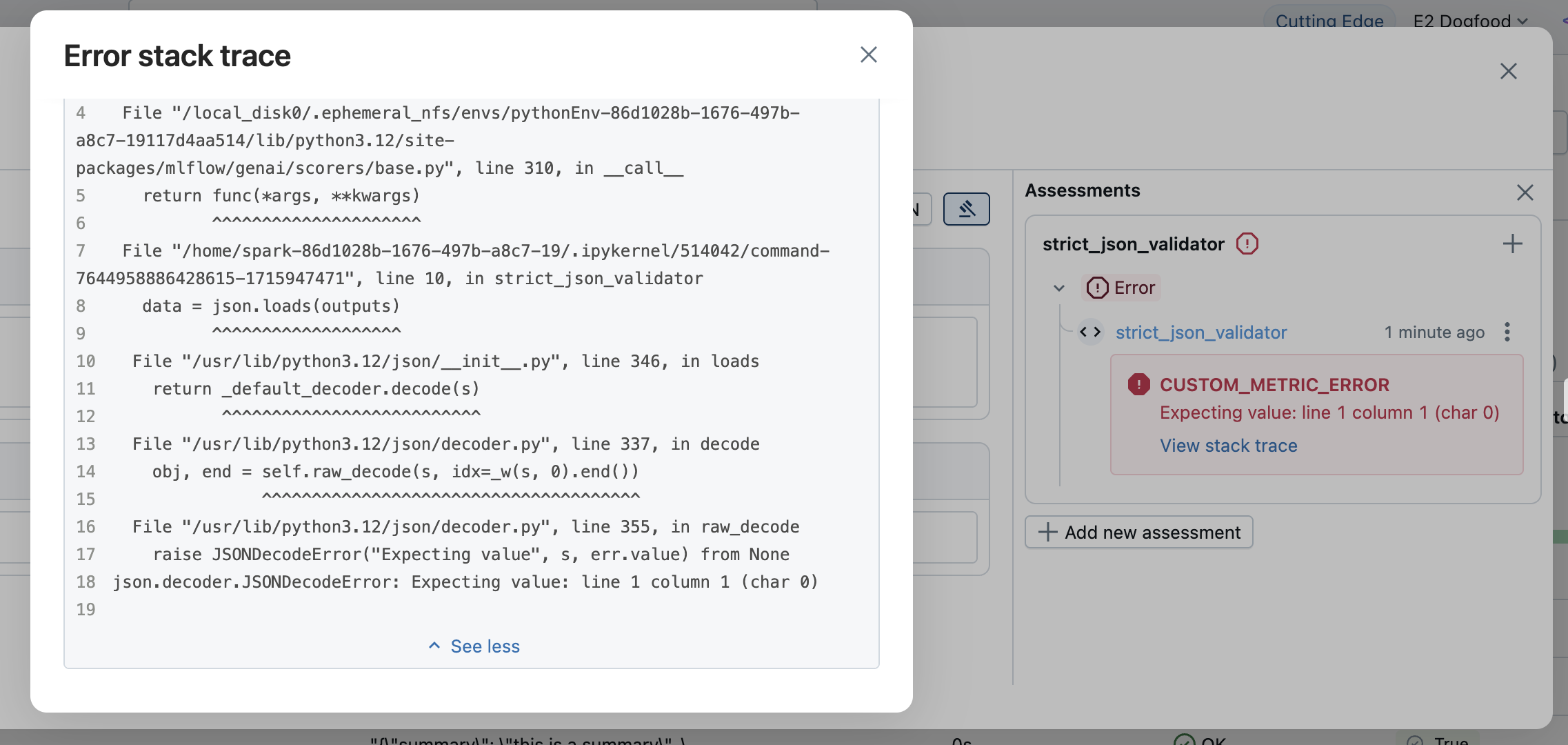
最もシンプルな方法は、例外を自然にスローさせることです。MLflowは例外を自動的に捕捉し、以下のエラー詳細を含むFeedbackオブジェクトを作成します。
value:Noneerror例外オブジェクト、エラーメッセージ、スタックトレースなどの例外の詳細
エラー情報は評価結果に表示されます。エラーの詳細を確認するには、該当する行を開いてください。
例外を明示的に処理する
カスタムエラー処理や特定のエラーメッセージを提供するには、例外をキャッチして、 Noneの値とエラーの詳細を含むFeedbackを返します。
from mlflow.entities import AssessmentError, Feedback

@scorer
def is_valid_response(outputs):
    import json

    try:
        data = json.loads(outputs)
        required_fields = ["summary", "confidence", "sources"]
        missing = [f for f in required_fields if f not in data]

        if missing:
            return Feedback(
                error=AssessmentError(
                    error_code="MISSING_REQUIRED_FIELDS",
                    error_message=f"Missing required fields: {missing}",
                ),
            )

        return Feedback(
            value=True,
            rationale="Valid JSON with all required fields"
        )

    except json.JSONDecodeError as e:
        return Feedback(error=e)  # Can pass exception object directly to the error parameter
error問題は次のタイプのエラーを受け入れます。
- Pythonの例外処理 :例外オブジェクトを直接渡します。
AssessmentError: エラーコードを使用した構造化されたエラー報告用。
Scorerクラス
ほとんどの場合、 @scorerデコレータの使用をお勧めします。ロジックに内部状態や追加のカスタマイズが必要な場合は、代わりにScorer基底クラスを使用してください。ScorerクラスはPydantic オブジェクトなので、追加のフィールドを定義して__call__メソッドで使用できます。
Scorerクラスを使用して定義されたスコアラーは、本番運用モニタリングでは サポートされていません 。 詳細については、 「コードベースのスコアラー」を参照してください。
メトリクス名を設定するには、 nameフィールドを定義する必要があります。 Feedbackオブジェクトのリストを返す場合は、名前の競合を避けるために、各Feedbackのnameフィールドを設定する必要があります。
from mlflow.genai.scorers import Scorer
from mlflow.entities import Feedback
from typing import Optional

# Scorer class is a Pydantic object
class CustomScorer(Scorer):
    # The `name` field is mandatory
    name: str = "response_quality"
    # Define additional fields
    my_custom_field_1: int = 50
    my_custom_field_2: Optional[list[str]] = None

    # Override the __call__ method to implement the scorer logic
    def __call__(self, outputs: str) -> Feedback:
        # Your logic here
        return Feedback(
            value=True,
            rationale="Response meets all quality criteria"
        )
状態管理
Scorerクラスを使用してスコアラーを作成する際は、Python クラスで状態を管理するためのルールに注意してください。特に、可変クラス属性ではなく、インスタンス属性を使用するようにしてください。以下の例は、スコアラーインスタンス間で状態を誤って共有している例を示しています。
from mlflow.genai.scorers import Scorer
from mlflow.entities import Feedback

# WRONG: Don't use mutable class attributes
class BadScorer(Scorer):
    results = []  # Shared across all instances!

    name: str = "bad_scorer"

    def __call__(self, outputs, **kwargs):
        self.results.append(outputs)  # Causes issues
        return Feedback(value=True)

# CORRECT: Use instance attributes
class GoodScorer(Scorer):
    results: list[str] = None

    name: str = "good_scorer"

    def __init__(self):
        self.results = []  # Per-instance state

    def __call__(self, outputs, **kwargs):
        self.results.append(outputs)  # Safe
        return Feedback(value=True)