高可用性を管理する
このガイドでは、Lakebase エンドポイントの高可用性の有効化と管理について説明します。高可用性の仕組みと、セカンダリ コンピュート インスタンスがスタンドアロンの読み取りレプリカとどのように異なるかについての背景については、 「高可用性」を参照してください。
高可用性を実現する
高可用性を有効にするには、UIでコンピュートタイプとHA構成を設定するか、 API経由でエンドポイントのEndpointGroupSpecを構成します。
前提条件
- ゼロへのスケールは無効にする必要があります。UI上で、編集コンピュートドロワーの 「スケールをゼロにする」を「 オフ」 に設定します。API を介して、エンドポイント仕様で
no_suspension: trueを設定します (更新マスクとしてspec.suspensionを使用します)。
- UI
- Python SDK
- CLI
- curl
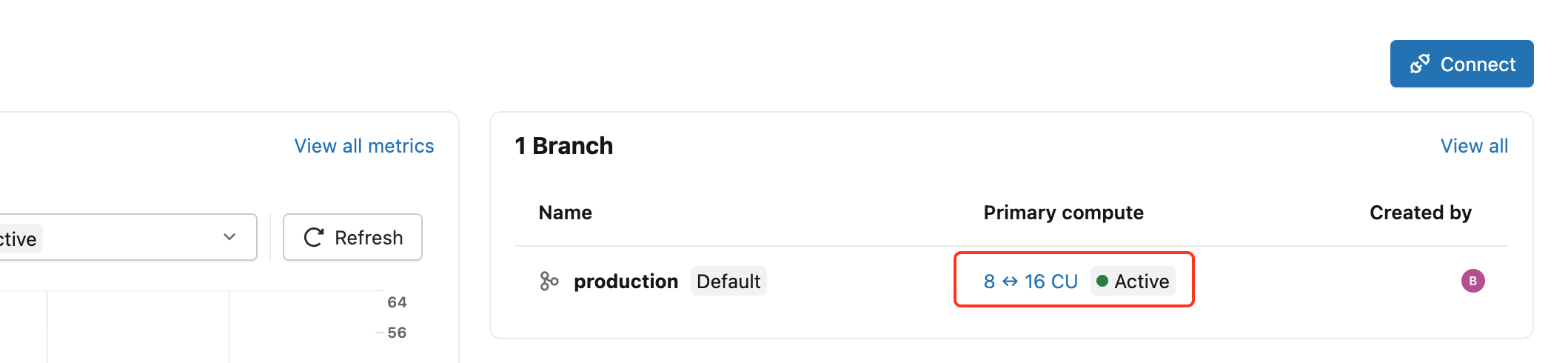
プロジェクトを作成した後、プロジェクト ダッシュボードからプライマリ コンピュート リンクをクリックして、編集コンピュート ドロワーを開きます。
コンピュート タイプを [高可用性] に設定し、 [高可用性] で [構成] を選択します。
- 2 (プライマリ1、セカンダリ1)、
- 3 (プライマリ1、セカンダリ2)、
- または合計 4 (プライマリ 1 つ、セカンダリ 3 つ) のコンピュート インスタンス。
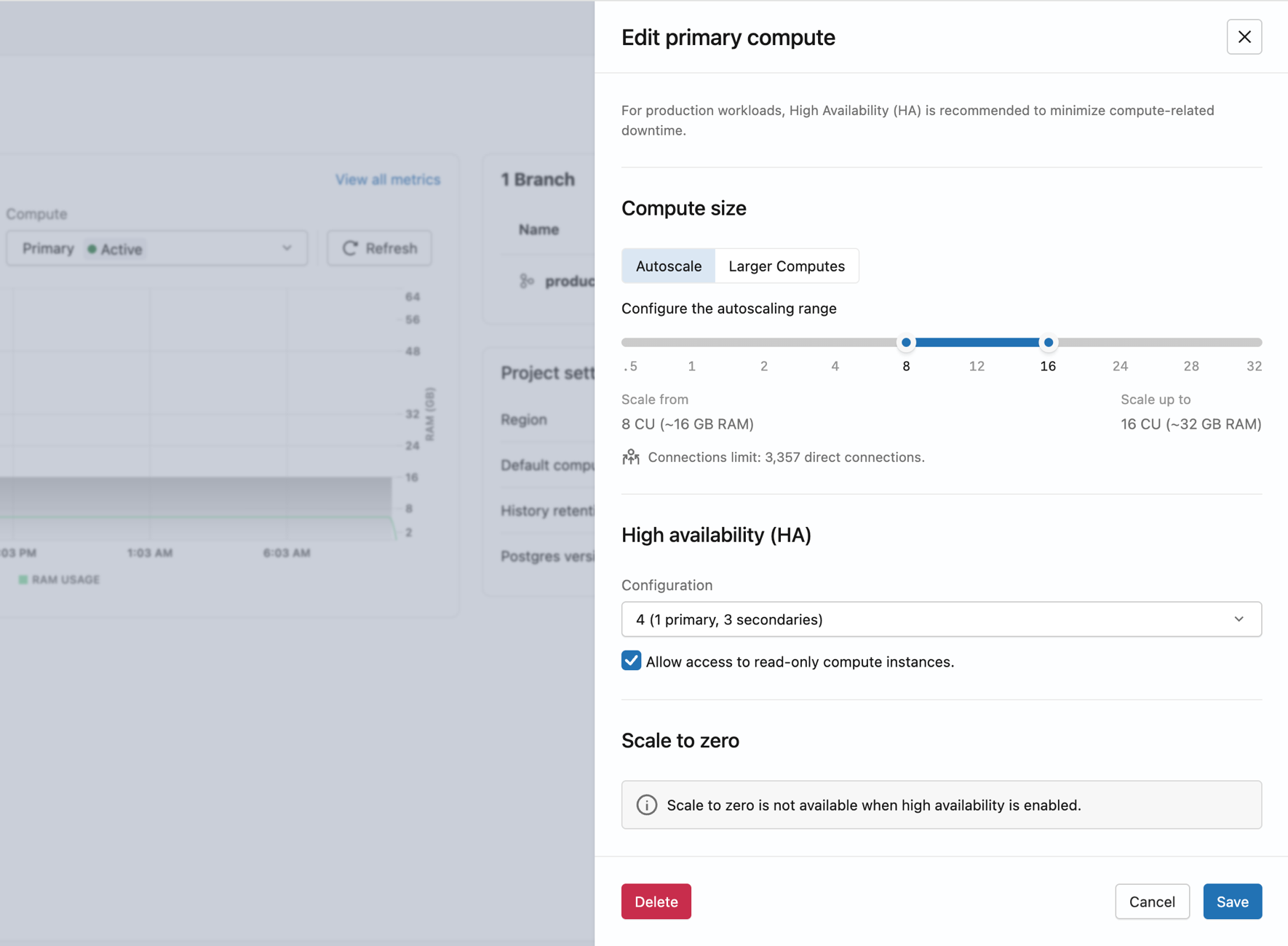
Lakebase は、さまざまなアベイラビリティ ゾーンでセカンダリ コンピュート インスタンスをプロビジョニングします。 すべてのコンピュート インスタンスがアクティブになると、エンドポイントは自動フェイルオーバーを実行します。
from databricks.sdk import WorkspaceClient
from databricks.sdk.service.postgres import (
    Endpoint, EndpointSpec, EndpointType, EndpointGroupSpec, FieldMask
)

w = WorkspaceClient()

endpoint_name = "projects/my-project/branches/production/endpoints/my-endpoint"

result = w.postgres.update_endpoint(
    name=endpoint_name,
    endpoint=Endpoint(
        name=endpoint_name,
        spec=EndpointSpec(
            endpoint_type=EndpointType.ENDPOINT_TYPE_READ_WRITE,
            no_suspension=True,
            group=EndpointGroupSpec(
                min=2,
                max=2,
                enable_readable_secondaries=True
            )
        )
    ),
    update_mask=FieldMask(field_mask=["spec.group", "spec.suspension"])
).wait()

print(f"Group size: {result.status.group.max}")
print(f"Host: {result.status.hosts.host}")
print(f"Read-only host: {result.status.hosts.read_only_host}")
databricks postgres update-endpoint \
  projects/my-project/branches/production/endpoints/my-endpoint \
  "spec.group,spec.suspension" \
  --json '{
    "spec": {
      "no_suspension": true,
      "group": {
        "min": 2,
        "max": 2,
        "enable_readable_secondaries": true
      }
    }
  }'
curl -X PATCH "$DATABRICKS_HOST/api/2.0/postgres/projects/my-project/branches/production/endpoints/my-endpoint?update_mask=spec.group,spec.suspension" \
  -H "Authorization: Bearer $DATABRICKS_TOKEN" \
  -H "Content-Type: application/json" \
  -d '{
    "name": "projects/my-project/branches/production/endpoints/my-endpoint",
    "spec": {
      "no_suspension": true,
      "group": {
        "min": 2,
        "max": 2,
        "enable_readable_secondaries": true
      }
    }
  }' | jq
セカンダリ コンピュート インスタンスへの読み取り専用アクセスを構成する
読み取り専用コンピュート インスタンスへのアクセスを許可することで、 セカンダリ コンピュート インスタンスが-ro接続文字列を介して読み取りトラフィックを処理するかどうかを制御します。
- UI
- Python SDK
- CLI
- curl
- [コンピュート] タブで、プライマリ コンピュートの [編集] をクリックします。
- [高可用性] で、 [読み取り専用コンピュート インスタンスへのアクセスを許可する] を オンまたはオフにします。
- 保存 をクリックします。
from databricks.sdk import WorkspaceClient
from databricks.sdk.service.postgres import (
    Endpoint, EndpointSpec, EndpointType, EndpointGroupSpec, FieldMask
)

w = WorkspaceClient()

endpoint_name = "projects/my-project/branches/production/endpoints/my-endpoint"

# Get current group size first
current = w.postgres.get_endpoint(name=endpoint_name)
current_size = current.status.group.max

w.postgres.update_endpoint(
    name=endpoint_name,
    endpoint=Endpoint(
        name=endpoint_name,
        spec=EndpointSpec(
            endpoint_type=EndpointType.ENDPOINT_TYPE_READ_WRITE,
            group=EndpointGroupSpec(
                min=current_size,
                max=current_size,
                enable_readable_secondaries=True  # set False to disable
            )
        )
    ),
    update_mask=FieldMask(field_mask=["spec.group.enable_readable_secondaries"])
).wait()
# Replace 2 with your current group size
databricks postgres update-endpoint \
  projects/my-project/branches/production/endpoints/my-endpoint \
  "spec.group.enable_readable_secondaries" \
  --json '{
    "spec": {
      "group": {
        "min": 2,
        "max": 2,
        "enable_readable_secondaries": true
      }
    }
  }'
# Replace 2 with your current group size
curl -X PATCH "$DATABRICKS_HOST/api/2.0/postgres/projects/my-project/branches/production/endpoints/my-endpoint?update_mask=spec.group.enable_readable_secondaries" \
  -H "Authorization: Bearer $DATABRICKS_TOKEN" \
  -H "Content-Type: application/json" \
  -d '{
    "name": "projects/my-project/branches/production/endpoints/my-endpoint",
    "spec": {
      "group": {
        "min": 2,
        "max": 2,
        "enable_readable_secondaries": true
      }
    }
  }' | jq
セカンダリ コンピュート インスタンスが 1 つ だけあり、読み取りアクセスが有効になっている場合、置き換えが追加されるまで、フェイルオーバー中に-ro接続文字列上のすべての読み取りトラフィックが中断されます。 回復力のある読み取りアクセスを実現するには、読み取りアクセスを有効にして 2 つ以上の セカンダリ コンピュート インスタンスを構成します。
セカンダリ コンピュート インスタンスの数を変更する
- UI
- Python SDK
- CLI
- curl
- [コンピュート] タブで、プライマリ コンピュートの [編集] をクリックします。
- [高可用性] で、ドロップダウンから新しい コンピュート構成を 選択します ( 合計 2 、 3 、または 4 コンピュート インスタンス)。
- 保存 をクリックします。
高可用性を無効にするには、 コンピュート タイプを シングル コンピュート に戻します。 これにより、すべてのセカンダリ コンピュート インスタンスが削除され、エンドポイントは単一コンピュート構成に戻ります。
from databricks.sdk import WorkspaceClient
from databricks.sdk.service.postgres import (
    Endpoint, EndpointSpec, EndpointType, EndpointGroupSpec, FieldMask
)

w = WorkspaceClient()

endpoint_name = "projects/my-project/branches/production/endpoints/my-endpoint"

# Scale to 3 compute instances (1 primary + 2 secondaries)
w.postgres.update_endpoint(
    name=endpoint_name,
    endpoint=Endpoint(
        name=endpoint_name,
        spec=EndpointSpec(
            endpoint_type=EndpointType.ENDPOINT_TYPE_READ_WRITE,
            group=EndpointGroupSpec(min=3, max=3)
        )
    ),
    update_mask=FieldMask(field_mask=["spec.group.min", "spec.group.max"])
).wait()
# Scale to 3 compute instances (1 primary + 2 secondaries)
databricks postgres update-endpoint \
  projects/my-project/branches/production/endpoints/my-endpoint \
  "spec.group.min,spec.group.max" \
  --json '{
    "spec": {
      "group": { "min": 3, "max": 3 }
    }
  }'
curl -X PATCH "$DATABRICKS_HOST/api/2.0/postgres/projects/my-project/branches/production/endpoints/my-endpoint?update_mask=spec.group.min,spec.group.max" \
  -H "Authorization: Bearer $DATABRICKS_TOKEN" \
  -H "Content-Type: application/json" \
  -d '{
    "name": "projects/my-project/branches/production/endpoints/my-endpoint",
    "spec": {
      "group": { "min": 3, "max": 3 }
    }
  }' | jq
高可用性のステータスとロールを表示する
[コンピュート] タブには、高可用性構成内のすべてのコンピュート インスタンスが、現在の役割、ステータス、アクセス レベルとともに表示されます。
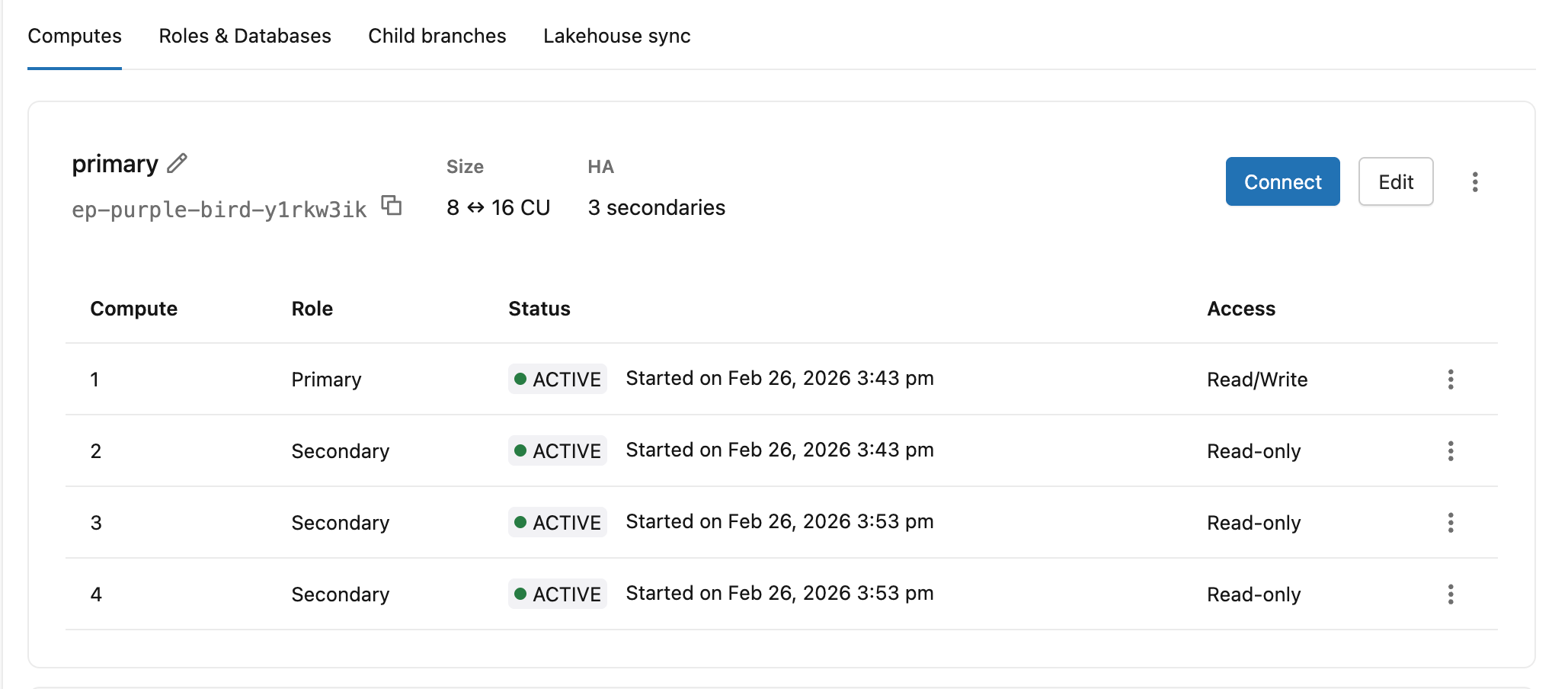
列 | 値 |
|---|---|
ロール | プライマリ、セカンダリ |
ステータス | 開始、アクティブ |
アクセス | 読み取り/書き込み (プライマリ)、読み取り専用 (アクセスが有効なセカンダリ コンピュート インスタンス)、無効 (読み取りアクセスのないセカンダリ コンピュート インスタンス) |
プライマリ コンピュート ヘッダーには、エンドポイント ID、オートスケール範囲、セカンダリ カウント (例: 8 ↔ 16 CU · 3 secondaries )。
接続文字列を取得する
- UI
- Python SDK
- CLI
- curl
プライマリ コンピュートの [接続] をクリックして、接続の詳細ダイアログを開きます。 コンピュート ドロップダウンには、高可用性エンドポイントの両方の接続オプションがリストされます。
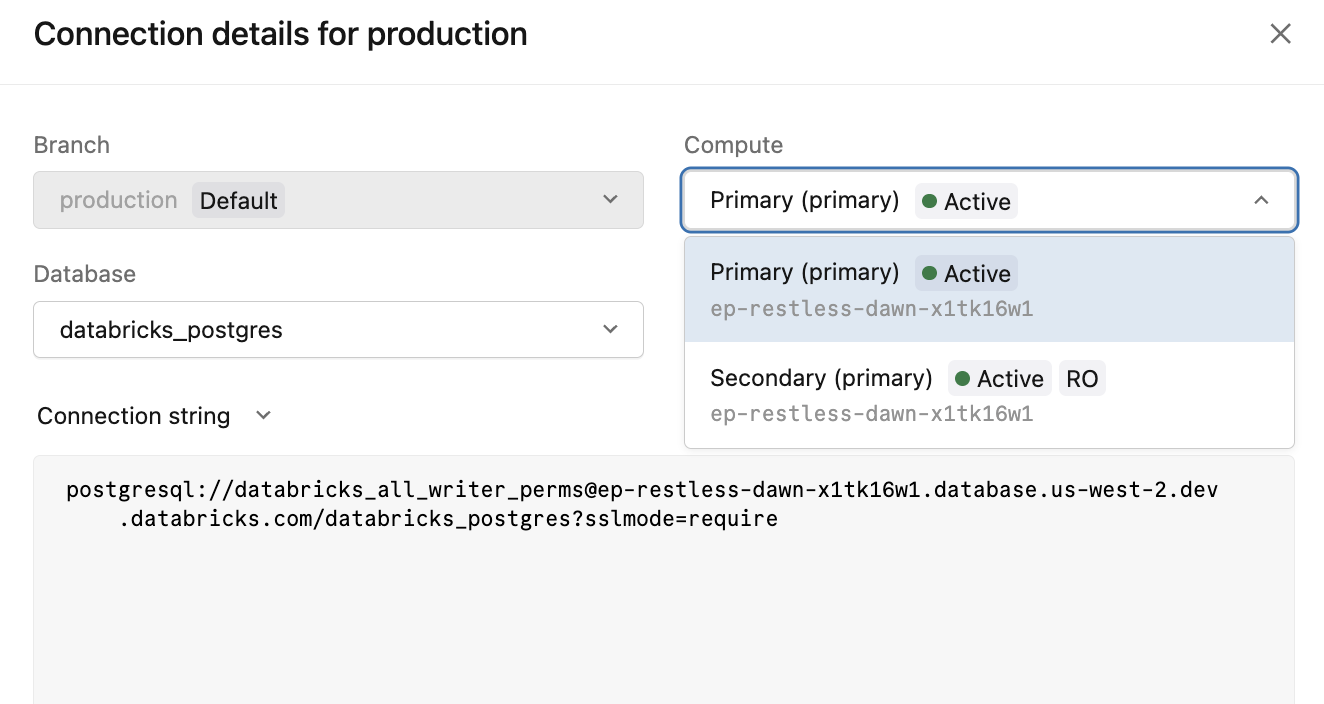
コンピュートオプション | 接続文字列 | 用途 |
|---|---|---|
|
| すべての書き込みおよび読み取り/書き込み接続 |
|
| セカンダリ コンピュート インスタンスへの読み取りオフロード |
-ro接続文字列は、 [読み取り専用コンピュート インスタンスへのアクセスを許可する] が有効になっている場合にのみ使用できます。
from databricks.sdk import WorkspaceClient

w = WorkspaceClient()

endpoint = w.postgres.get_endpoint(
    name="projects/my-project/branches/production/endpoints/my-endpoint"
)

print(f"Read/write host: {endpoint.status.hosts.host}")
print(f"Read-only host:  {endpoint.status.hosts.read_only_host}")
databricks postgres get-endpoint \
  projects/my-project/branches/production/endpoints/my-endpoint \
  -o json | jq '{rw_host: .status.hosts.host, ro_host: .status.hosts.read_only_host}'
curl -X GET "$DATABRICKS_HOST/api/2.0/postgres/projects/my-project/branches/production/endpoints/my-endpoint" \
  -H "Authorization: Bearer $DATABRICKS_TOKEN" \
  | jq '{rw_host: .status.hosts.host, ro_host: .status.hosts.read_only_host}'
接続文字列の完全なリファレンスについては、 「接続文字列」を参照してください。
その他のリソース
- 高可用性- 概念、フェイルオーバーの動作、ベストプラクティス
- 月間稼働率コミットメントに関するサービスレベルアグリーメント(SLA)
- リードレプリカ- 高可用性なしで追加の読み取り容量を実現するスタンドアロンのリードレプリカ
- 接続文字列