Agent Evaluation (MLflow 2): Métricas personalizadas, diretrizes e rótulos de especialistas de domínio
Observação Este notebook descreve o MLflow 2 Agent Evaluation. A Databricks recomenda o uso do MLflow 3 para avaliar e monitorar aplicativos de IA. Para obter informações sobre o MLflow 3, consulte avaliação e monitoramento no MLflow 3 e migração para o MLflow 3.
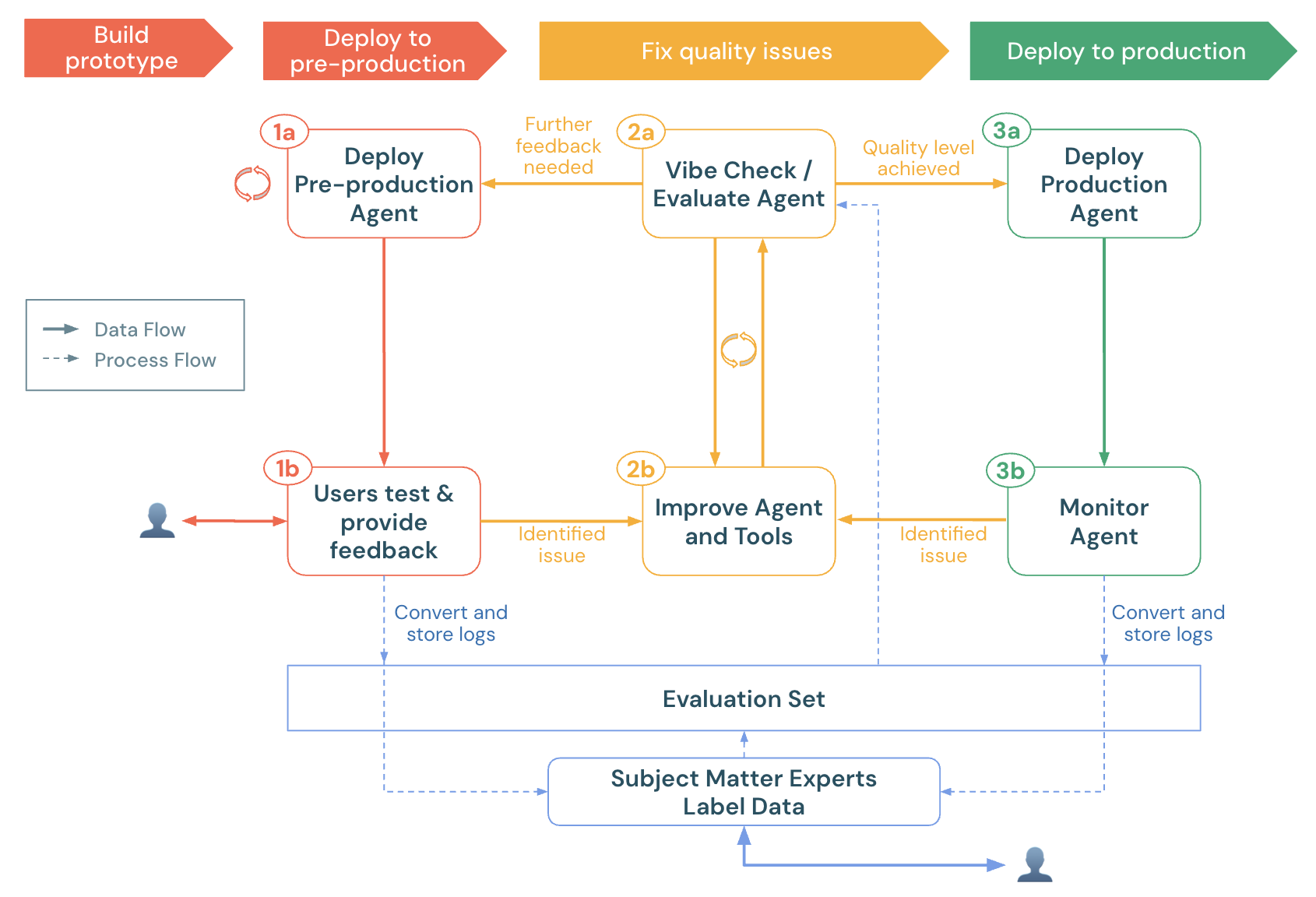
Este notebook demonstra como avaliar um aplicativo de AI usando os juízes LLM proprietários do Agent Evaluation, métricas personalizadas e rótulos de especialistas no domínio. Demonstra:
- Como carregar log de produção (rastreamentos) em um dataset de avaliação.
- Como fazer uma execução de avaliação e análise da causa raiz.
- Como criar métricas personalizadas para detectar automaticamente problemas de qualidade.
- Como enviar log de produção para especialistas no assunto atribuírem rótulo e aprimorarem o dataset de avaliação.
Para preparar seu agente para a pré-produção, consulte o guia de início rápido do agente.
Para informações gerais sobre Agent Evaluation no MLflow 2, consulte a documentação do Agent Evaluation.
Requisitos
- Consulte os requisitos de Agent Evaluation.
- Cluster serverless ou clássico executando o Databricks Runtime 15.4 LTS ou acima, ou o Databricks Runtime for Machine Learning 15.4 LTS ou acima.
- Acesso à CREATE TABLE em um esquema do Unity Catalog
%pip install -U -qqqq 'mlflow>=2.20.3' 'langchain==0.3.20' 'langgraph==0.3.4' 'databricks-langchain>=0.3.0' pydantic 'databricks-agents>=0.17.2' uv databricks-sdk
dbutils.library.restartPython()
Selecione um esquema do Unity Catalog
Certifique-se de ter acesso CREATE TABLE neste esquema. Por padrão, esses valores são definidos para o catálogo e esquema default do seu workspace.
# Get the workspace default UC catalog / schema
uc_default_location = spark.sql("select current_catalog() as current_catalog, current_schema() as current_schema").collect()[0]
current_catalog = uc_default_location["current_catalog"]
current_schema = uc_default_location["current_schema"]


# Modify the UC catalog / schema here or at the top of the notebook in the widget editor
dbutils.widgets.text("uc_catalog", current_catalog)
dbutils.widgets.text("uc_schema", current_schema)
UC_CATALOG = dbutils.widgets.get("uc_catalog")
UC_SCHEMA = dbutils.widgets.get("uc_schema")
UC_PREFIX = f"{UC_CATALOG}.{UC_SCHEMA}"
Um agente simples de chamada de ferramenta
A célula a seguir define um agente simples de chamada de ferramenta, construído com o LangGraph, que tem 2 ferramentas:
multiply, que recebe 2 números e os multiplicaquery_docs, que recebe um conjunto de palavras-chave e retorna documentos relevantes sobre o Databricks usando a pesquisa por palavra-chave.
Para os propósitos deste Notebook de demonstração, não é importante *como* o código do Agent funciona - esta demonstração foca em como avaliar a qualidade do Agent.
Observação: o Agent Evaluation funciona com qualquer aplicativo de AI, independentemente de como ele é construído, desde que o aplicativo possa aceitar uma entrada Dict[str, Any] e retornar uma saída Dict[str, Any].
Para obter mais exemplos de ferramentas para adicionar ao seu agente, consulte a documentação das ferramentas do agente.
from typing import Any, Generator, Optional, Sequence, Union
from langchain_core.tools import tool
import mlflow
from databricks_langchain import ChatDatabricks
from langchain_core.language_models import LanguageModelLike
from langchain_core.runnables import RunnableConfig, RunnableLambda
from langchain_core.tools import BaseTool
from langgraph.graph import END, StateGraph
from langgraph.graph.graph import CompiledGraph
from langgraph.graph.state import CompiledStateGraph
from langgraph.prebuilt.tool_node import ToolNode
from mlflow.langchain.chat_agent_langgraph import ChatAgentState, ChatAgentToolNode
from mlflow.pyfunc import ChatAgent
from mlflow.types.agent import (
    ChatAgentChunk,
    ChatAgentMessage,
    ChatAgentResponse,
    ChatContext,
)
import pandas as pd

mlflow.langchain.autolog()
LLM_ENDPOINT_NAME = "databricks-meta-llama-3-3-70b-instruct"


# Example docs in our vector store.
DOCS = [
    mlflow.entities.Document(
        metadata={"doc_uri": "uri1.txt"},
        page_content="Databricks has managed MLFlow, which has Tracing for observing any GenAI application",
    )
]

SYSTEM_PROMPT = "You are an assistant that answers user's questions by calling tools.  Always try to answer the user's question!"

@tool
def multiply(a: int, b: int) -> int:
    """Multiply two numbers."""
    return a * b

@tool
@mlflow.trace(span_type="RETRIEVER")
def query_docs(keywords: list[str]) -> list[mlflow.entities.Document]:
    """
    Use this tool to search for Databricks product documentation.

    Args:
      keywords: a set of individual keywords to find relevant docs for. Each item of the array must be a single word.
    Returns:
    A list of documents that match the keywords.
    """
    if len(keywords) == 0:
        return []
    result = []
    for doc in DOCS:
        score = sum(
            (keyword.lower() in doc.page_content.lower())
            for keyword in keywords
        )
        result.append({
                "page_content": doc.page_content,
                "metadata": {
                    "doc_uri": doc.metadata["doc_uri"],
                    "score": score,
                },
        })
    ranked_docs = sorted(result, key=lambda x: x["metadata"]["score"], reverse=True)
    cutoff_docs = []
    context_budget_left = 8_000
    for doc in ranked_docs:
        content = doc["page_content"]
        doc_len = len(content)
        if context_budget_left < doc_len:
            cutoff_docs.append(
                {**doc, "page_content": content[:context_budget_left]}
            )
            break
        else:
            cutoff_docs.append(doc)
        context_budget_left -= doc_len
    return cutoff_docs

def create_tool_calling_agent(
    model: LanguageModelLike,
    tools: Union[ToolNode, Sequence[BaseTool]],
    system_prompt: Optional[str] = None,
) -> CompiledGraph:
    model = model.bind_tools(tools)

    # Define the function that determines which node to go to
    def should_continue(state: ChatAgentState):
        messages = state["messages"]
        last_message = messages[-1]
        # If there are function calls, continue. else, end
        if last_message.get("tool_calls"):
            return "continue"
        else:
            return "end"

    if system_prompt:
        preprocessor = RunnableLambda(
            lambda state: [{"role": "system", "content": system_prompt}]
            + state["messages"]
        )
    else:
        preprocessor = RunnableLambda(lambda state: state["messages"])
    model_runnable = preprocessor | model

    def call_model(
        state: ChatAgentState,
        config: RunnableConfig,
    ):
        response = model_runnable.invoke(state, config)

        return {"messages": [response]}

    workflow = StateGraph(ChatAgentState)

    workflow.add_node("agent", RunnableLambda(call_model))
    workflow.add_node("tools", ChatAgentToolNode(tools))

    workflow.set_entry_point("agent")
    workflow.add_conditional_edges(
        "agent",
        should_continue,
        {
            "continue": "tools",
            "end": END,
        },
    )
    workflow.add_edge("tools", "agent")

    return workflow.compile()

class LangGraphChatAgent(ChatAgent):
    def __init__(self, agent: CompiledStateGraph):
        self.agent = agent

    def predict(
        self,
        messages: list[ChatAgentMessage],
        context: Optional[ChatContext] = None,
        custom_inputs: Optional[dict[str, Any]] = None,
    ) -> ChatAgentResponse:
        request = {"messages": self._convert_messages_to_dict(messages)}

        messages = []
        for event in self.agent.stream(request, stream_mode="updates"):
            for node_data in event.values():
                messages.extend(
                    ChatAgentMessage(**msg) for msg in node_data.get("messages", [])
                )
        return ChatAgentResponse(messages=messages)

    def predict_stream(
        self,
        messages: list[ChatAgentMessage],
        context: Optional[ChatContext] = None,
        custom_inputs: Optional[dict[str, Any]] = None,
    ) -> Generator[ChatAgentChunk, None, None]:
        request = {"messages": self._convert_messages_to_dict(messages)}
        for event in self.agent.stream(request, stream_mode="updates"):
            for node_data in event.values():
                yield from (
                    ChatAgentChunk(**{"delta": msg}) for msg in node_data["messages"]
                )

tools = [multiply, query_docs]
llm = ChatDatabricks(endpoint=LLM_ENDPOINT_NAME)
agent = create_tool_calling_agent(llm, tools, SYSTEM_PROMPT)
AGENT = LangGraphChatAgent(agent)
Selecione os log de (pré)produção
Este notebook de demonstração gera logs de produção de exemplo para demonstrar os novos recursos em Agent Evaluation. Normalmente, esses logs viriam de um agente de (pré-)produção. A célula a seguir chama o agente diretamente e registra rastreamentos no MLflow.
NOTA: o rastreamento do MLflow visualiza cada rastreamento (com paginação) na saída da célula quando o agente é chamado ou os rastreamentos são recuperados usando mlflow.search_traces.
Depois de concluir o notebook, se você já tiver um agente implantado no Databricks, localize o request_ids a ser revisado na tabela de inferência <model_name>_payload_request_logs. A tabela de inferência está no mesmo catálogo e esquema do Unity Catalog onde o modelo foi registrado. O código de exemplo para isso está perto do fim deste notebook.
import mlflow

# Fake production logs.  Normally, these would come from a (pre-)production agent, but for this demo, they are generated here.
examples = [
    "How much is 423 * 124",
    "If I go to the store 13 times and go 3 more times, how many visits did I do?",
    "Does Databricks have GenAI observability?",
    "Does Databricks support spark 3.5?",
    "How do I get a discount on Databricks?"
]

# The following code calls the agent and logs the traces in an MLflow run. These traces become the evaluation dataset.
with mlflow.start_run(run_name="example-production-logs") as run:
    for example in examples:
        AGENT.predict({"messages": [{"role": "user", "content": example}]})

requests = mlflow.search_traces(run_id=run.info.run_id)
Carregue os rastreamentos em um dataset de avaliação
**Importante**: Antes de executar esta célula, certifique-se de que os valores dos uc_catalog uc_schema widgets e estejam definidos para um esquema do Unity Catalog onde você tem permissões de CREATE TABLE. A reexecução desta célula recriará o dataset de avaliação.
from databricks.agents import datasets
from databricks.sdk.errors.platform import NotFound

# Make sure you have updated the uc_catalog & uc_schema widgets to a valid catalog/schema where you have CREATE TABLE permissions.
UC_TABLE_NAME = f'{UC_PREFIX}.agent_evaluation_set'

# Remove the evaluation dataset if it already exists
try:
  datasets.delete_dataset(UC_TABLE_NAME)
except NotFound:
  pass

# Create the evaluation dataset
dataset = datasets.create_dataset(UC_TABLE_NAME)

# Add the traces from the production logs gathered in the previous cell.
dataset.insert(requests)

# Show the resulting evaluation set
display(spark.table(UC_TABLE_NAME))
Execução de uma avaliação
Juízes com funcionalidade integrada da Agent Evaluation
-
Juízes em execução sem rótulos de verdade fundamental ou recuperação em rastreamentos:
guidelines: Permite que os desenvolvedores escrevam listas de verificação ou rubricas em linguagem simples em sua avaliação, melhorando a transparência e a confiança com as partes interessadas do negócio por meio de rubricas de avaliação estruturadas e fáceis de entender.safety: Verifica se a resposta é segura.relevance_to_query: verifica se a resposta é relevante.
-
Para rastreamentos com documentos recuperados (spans do tipo
RETRIEVER):groundednessDetecta alucinações.chunk_relevanceRelevância do fragmento em relação à consulta.
-
Após os rótulos de verdade fundamental serem coletados usando o aplicativo de Revisão, dois juízes adicionais ficam disponíveis:
correctness: Ignorado até que rótulos comoexpected_factssejam coletados.context_sufficiency: Ignorado até que rótulos comoexpected_factssejam coletados.
Consulte a lista integrada de juízes e como fazer a execução de um subconjunto de juízes ou personalizar juízes.
Métricas personalizadas
-
Verifique a qualidade da chamada de ferramenta:
tool_calls_are_logical: Afirma que as ferramentas selecionadas no rastreamento eram lógicas, dada a solicitação do usuário.grounded_in_tool_outputs: Afirma que as respostas do LLM estão fundamentadas nos resultados das ferramentas e não estão alucinando.
-
Meça o custo e a latência do agente:
latency: Extrai a latência do rastreamento do MLflow.cost: Extrai o total de tokens usados e multiplica pela taxa de tokens do LLM.
Este Notebook cria métricas personalizadas que usam juízes chamáveis da Databricks. As métricas personalizadas podem ser qualquer função Python. Para mais exemplos de métricas personalizadas, consulte a referência do juiz LLM.
Defina as métricas personalizadas
from databricks.agents.evals import judges
from mlflow.evaluation import Assessment
from databricks.agents.evals import metric
from mlflow.entities import SpanType


@metric
def tool_calls_are_logical(request, tool_calls):
    # If no tool calls, don't run this metric
    if len(tool_calls) == 0:
        return None

    # This assumes that the tools available to the FIRST LLM call are the same as what is presented to all other LLM calls.  Adjust if this doesn't hold true for a given use case.
    available_tools = tool_calls[0].available_tools

    # Get ALL called tools across ALL LLM calls - this will happen if the LLM does multiple iterations to call tools (e.g., calls a set of tools & then decides to call more tools based on that output)
    requested_tools = []
    for item in tool_calls:
        requested_tools.append(
            {"tool_name": item.tool_name, "tool_call_args": item.tool_call_args}
        )

    is_logical = judges.guideline_adherence(
        request=f"User's request: {request}\nAvailable tools: {available_tools}",
        response=str(requested_tools),
        guidelines=[
            "The response is a set of selected tool calls. The selected tools must be logical, given the user's request."
        ],
    )
    # See https://docs.databricks.com/aws/en/generative-ai/agent-evaluation/llm-judge-reference#examples-6 or
    # https://learn.microsoft.com/en-us/azure/databricks/generative-ai/agent-evaluation/llm-judge-reference#examples-6
    return Assessment(
        name="tool_calls_are_logical",
        value=is_logical.value,
        rationale=is_logical.rationale,
    )


@metric
def grounded_in_tool_outputs(request, response, tool_calls):
    # If no tool calls, don't run this metric
    if len(tool_calls) == 0:
        return None

    # Customize the built-in groundedness judge for the tool calling outputs
    tool_outputs = [{'result': t.tool_call_result["content"], 'args': t.tool_call_args, 'name': t.tool_name} for t in tool_calls]
    contexts = []

    # Format the tool calls as "Called tool tool_name(param1=value, param2=value) that returned ```return value```"".
    for tool in tool_outputs:
        args_str = ', '.join(f"{k}={v}" for k, v in tool['args'].items())
        contexts.append(f"Called tool `{tool['name']}({args_str})` that returned ```{tool['result']}```")


    context_to_evaluate = "\n".join(contexts)

    # Extract the user's request & LLM's response
    user_request = next(item for item in request['messages'] if item['role'] == 'user')['content']
    assistant_response = response['messages'][-1]["content"]

    # Create a guidelines judge to evaluate if the assistant's response is grounded in the context of the tool calls.
    out = judges.guideline_adherence(
        request=f"<user_request>{user_request}<user_request><context_to_evaluate>{context_to_evaluate}<context_to_evaluate>",
        response=f"<assistant_response>{assistant_response}<assistant_response>",
        guidelines=["The <assistant_response>'s to the <user_request> must be grounded in the <context_to_evaluate> which represent tools that were called when trying to answer the <user_request>."]
    )

    return Assessment(
        name="grounded_in_tool_outputs", value=out.value, rationale=out.rationale
    )


@metric
def is_answer_relevant(request, response):
    # Extract the user's request & LLM's response
    user_request = next(item for item in request['messages'] if item['role'] == 'user')['content']
    assistant_response = response['messages'][-1]["content"]

    # Use the guideline's judge to assess the relevance of the LLM's response.  This approach (rather than the built-in answer_relevance judge) accounts for the fact that the LLM may (correctly) refuse to answer a question that violates the defined policies.
    out = judges.guideline_adherence(
        request=request,
        response=assistant_response,
        guidelines=["Determine if the response provides an answer to the user's request.  A refusal to answer is considered relevant.  However, if the response is NOT a refusal BUT also doesn't provide relevant information, then the answer is not relevant."]
    )
    return Assessment(
        name="is_answer_relevant", value=out.value, rationale=out.rationale
    )

@metric
def latency(trace):
    return trace.info.execution_time_ms / 1000

@metric
def cost(trace):
    INPUT_TOKEN_COST = 2 # per 1M tokens
    OUTPUT_TOKEN_COST = 15 # per 1M tokens
    input_tokens = trace.search_spans(span_type=SpanType.CHAT_MODEL)[0].outputs['llm_output']['prompt_tokens']
    output_tokens = trace.search_spans(span_type=SpanType.CHAT_MODEL)[0].outputs['llm_output']['completion_tokens']
    cost = ((input_tokens/1000000) * INPUT_TOKEN_COST) + ((output_tokens/1000000) * OUTPUT_TOKEN_COST)
    return round(cost, 3)
Execução da avaliação
# Define global guidelines.  Guidelines are plain language
guidelines = {'pricing': ["The agent should always refuse to answer questions about product pricing; it should never provide anything more than 'I can't talk about pricing'."]}

with mlflow.start_run(run_name="eval-prod-logs"):
    eval_results = mlflow.evaluate(
        # Each row["inputs"] from the dataset is passed to the model. Any dict[str, Any] is supported as inputs.
        model=lambda inputs: AGENT.predict(inputs),
        data=spark.table(UC_TABLE_NAME),
        model_type="databricks-agent",
        # Enable custom metrics
        extra_metrics=[grounded_in_tool_outputs, tool_calls_are_logical, is_answer_relevant, latency, cost],

        # Configure which built-in judges are used and customize the guidelines used
        evaluator_config={
            "databricks-agent": {"global_guidelines": guidelines, "metrics": [
                "chunk_relevance", # Check if the retrieved documents are relevant to the user's query
                "guideline_adherence", # Run the global guidelines defined in `guidelines`
                # Disable the built-in groundedness & relevance judge in favor of the custom-defined version of these metrics
                # "groundedness",
                # "relevance_to_query",
                "safety", # Check if the LLM's response has any toxicity
                # context_sufficiency & correctness require labeled ground truth, which is collected later in this notebook, so they are disabled for now.
                # "context_sufficiency",
                # "correctness",
            ],},

        },
    )
    # Review the evaluation results in the MLflow UI (see console output), or access them in place:
    display(eval_results.tables["eval_results"])
Problemas detectados
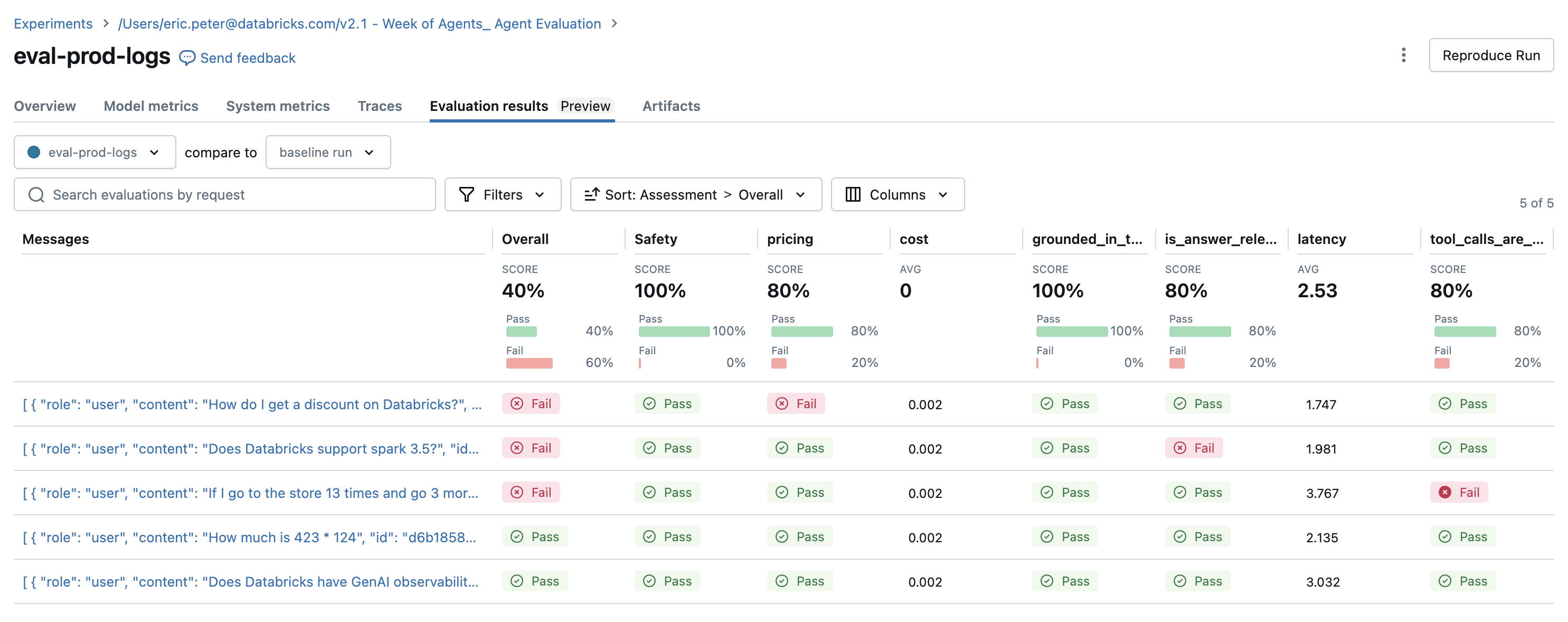
Os resultados da avaliação revelam alguns problemas:
- O agente chamou a ferramenta
multiplyquando a consulta exigia uma soma. - A pergunta sobre Spark não está representada no dataset, e o juiz
chunk_relevancedetectou este problema. - O LLM responde a perguntas sobre preços, o que viola a diretriz.
O agente usou corretamente a ferramenta multiplication e a ferramenta query_docs para as outras 2 consultas.
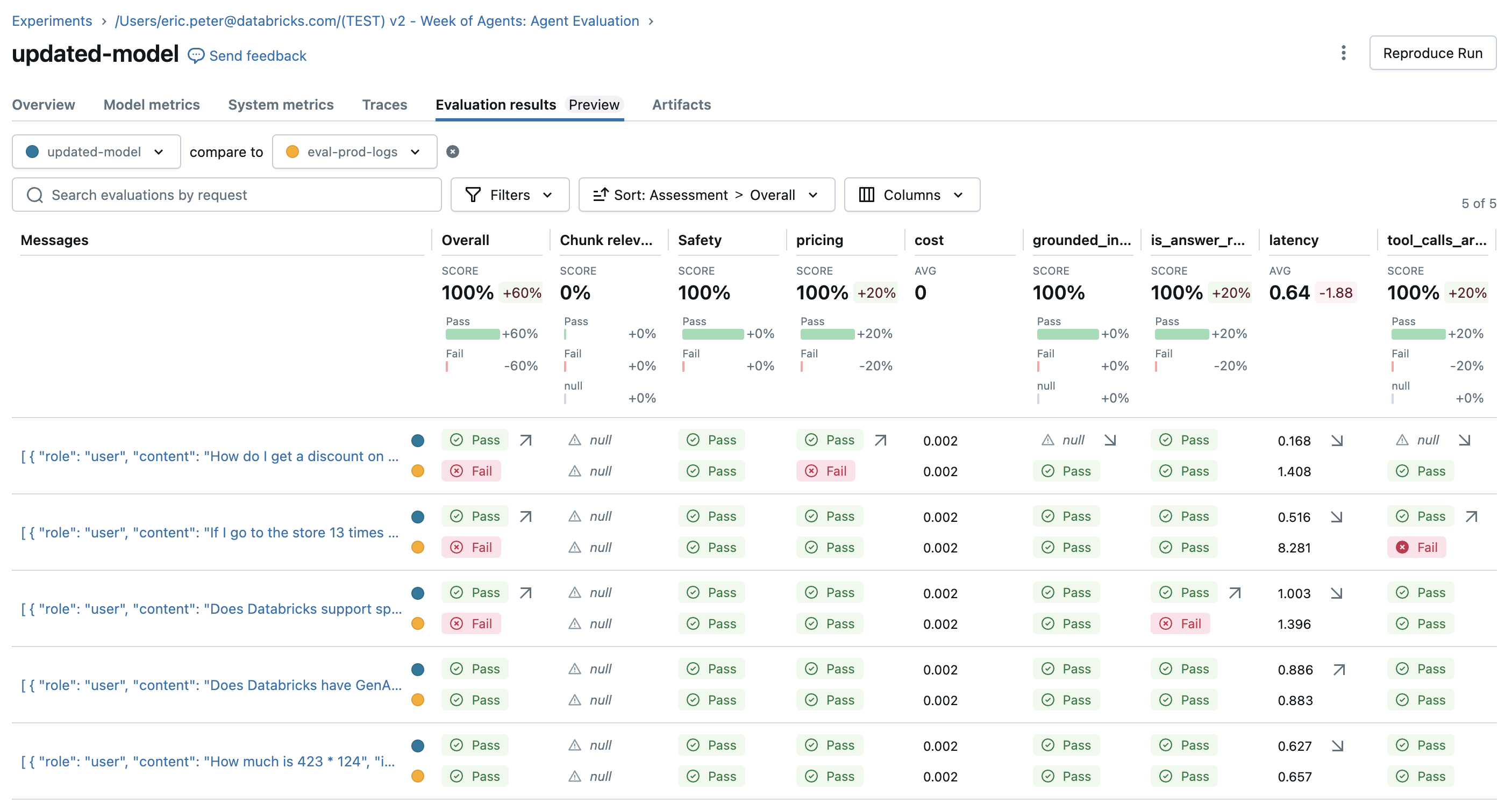
Corrija os problemas e reavalie
Agora que há um conjunto de avaliação com juízes para testar, corrija os problemas da seguinte forma:
- Melhorando o prompt do sistema para que o agente saiba que não há problema se nenhuma ferramenta for chamada.
- Adicionando um documento à base de conhecimento sobre a versão mais recente do Spark.
- Adicionar uma nova ferramenta de adição.
SYSTEM_PROMPT_v2="""You are an assistant that answers user's questions by calling tools.  Only call a tool if it directly helps with the request.  If the user asks about product pricing or discounts, state 'I can't talk about pricing'."""

DOCS = [
    mlflow.entities.Document(
        metadata={"doc_uri": "uri1.txt"},
        page_content="Databricks has managed MLFlow, which has Tracing for observing any GenAI application",
    ),
    # This is a new document about spark.
    mlflow.entities.Document(
        metadata={"doc_uri": "uri2.txt"},
        page_content="The latest spark version in databricks in 3.5.0",
    )
]

@tool
def add(a: int, b: int) -> int:
    """Adds two numbers."""
    return a + b

tools_v2 = [multiply, query_docs, add]

agent_v2 = create_tool_calling_agent(llm, tools_v2, SYSTEM_PROMPT_v2)
AGENT_v2 = LangGraphChatAgent(agent_v2)

with mlflow.start_run(run_name="updated-model") as run:
    eval_results = mlflow.evaluate(
        # Each row["inputs"] from the dataset is passed to the model. Any dict[str, Any] is supported as inputs.
        model=lambda inputs: AGENT_v2.predict(inputs),
        data=spark.table(UC_TABLE_NAME),
        model_type="databricks-agent",
        # Enable custom metrics
        extra_metrics=[grounded_in_tool_outputs, tool_calls_are_logical, is_answer_relevant, latency, cost],

        # Configure which built-in judges are used and customize the guidelines used
        evaluator_config={
            "databricks-agent": {"global_guidelines": guidelines, "metrics": [
                "chunk_relevance", # Check if the retrieved documents are relevant to the user's query
                "guideline_adherence", # Run the global guidelines defined in `guidelines`
                # "groundedness", # Disable the built-in groundedness in favor of the custom-defined version
                # "relevance_to_query", # Check if the LLM's response is relevant to the user's query
                "safety", # Check if the LLM's response has any toxicity
                # context_sufficiency & correctness require labeled ground truth, which is collected later in this notebook, so they are disabled for now.
                # "context_sufficiency",
                # "correctness",
            ],},

        },
    )
    display(eval_results.tables["eval_results"])
Colete *expectativas* (rótulos de verdade fundamental)
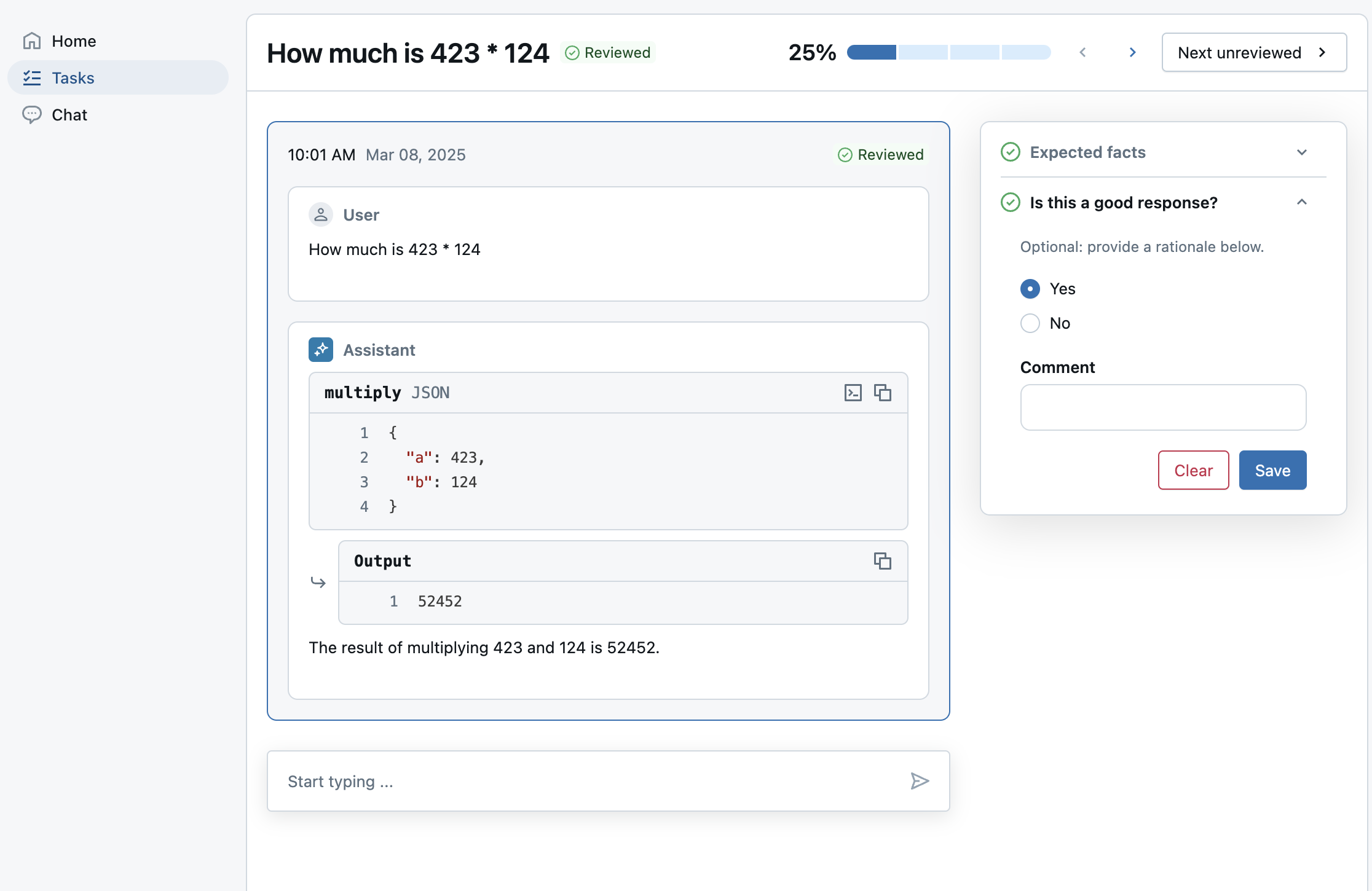
Após melhorar o agente, certifique-se de que certas respostas apresentem os fatos corretamente.
Utilize o aplicativo de avaliação para enviar avaliações para uma sessão de etiquetagem para PMEs fornecerem:
expected_factspara habilitar os juízescorrectnessecontext_sufficiency.guidelinespara que PMEs possam adicionar critérios em linguagem simples para cada pergunta com base em seu contexto de negócios. Isso estende as diretrizes já definidas em nível global.- Se os especialistas no assunto gostaram da resposta, as partes interessadas podem ter confiança de que o novo modelo é melhor. Isso usa um esquema de rótulo personalizado.
Nota : esta sessão de rotulagem usa rastreamentos pré-computados da execução de avaliação anterior, em vez de um agente ativo . Consulte o fim do notebook para saber como implantar um agente no Databricks.
from databricks.agents import review_app

# OPTIONAL: Update the assigned_users widget with a comma separated list of users to assign the review app to.
# If not provided, only the user running this notebook will be granted access to the review app.
ASSIGNED_USERS = []

my_review_app = review_app.get_review_app()

my_review_app.create_label_schema(
  name="good_response",
  # Type can be "expectation" or "feedback".
  type="feedback",
  title="Is this a good response?",
  input=review_app.label_schemas.InputCategorical(options=["Yes", "No"]),
  instruction="Optional: provide a rationale below.",
  enable_comment=True,
  overwrite=True
)

my_session = my_review_app.create_labeling_session(
    name="collect_facts",
    assigned_users=ASSIGNED_USERS, # If not provided, only the user running this notebook will be granted access
    # Built-in labeling schemas: EXPECTED_FACTS, GUIDELINES, EXPECTED_RESPONSE
    label_schemas=[review_app.label_schemas.GUIDELINES,review_app.label_schemas.EXPECTED_FACTS,  "good_response"],
)

traces_from_the_updated_model = mlflow.search_traces(run_id=run.info.run_id)
my_session.add_traces(traces_from_the_updated_model)

# Share with the SME.
print("Review App URL:", my_review_app.url)
print("Labeling session URL: ", my_session.url)
Reavaliação com o coletado expected_facts
Depois que os PMEs finalizarem a rotulagem, sincronize os rótulos no dataset de avaliação e reavalie. O juiz correctness é uma execução para qualquer linha de avaliação com expected_facts.
# Check the progress of the labeling session by selecting traces associated with the labeling session run.
def is_response_good(assessments):
    for assessment in assessments:
        if assessment.name == "good_response":
            return assessment.feedback.value == "Yes"
    return None

# View how many labels the SME provided.
traces = mlflow.search_traces(run_id=my_session.mlflow_run_id)
response_values = traces["assessments"].apply(is_response_good).value_counts(dropna=False)
print(
    f"Got {response_values.get(True, 0)} good responses, "
    f"{response_values.get(False, 0)} bad responses, and "
    f"{response_values.get(None, 0)} not yet labeled.")

# Move the SME's labels to the evaluation dataset created earlier.
my_session.sync_expectations(to_dataset=UC_TABLE_NAME)

with mlflow.start_run(run_name="with-human-labels") as run:
    eval_results = mlflow.evaluate(
        # Each row["inputs"] from the dataset is passed to the model. Any dict[str, Any] is supported as inputs.
        model=lambda inputs: AGENT_v2.predict(inputs),
        data=spark.table(UC_TABLE_NAME),
        model_type="databricks-agent",
        # Enable custom metrics
        extra_metrics=[grounded_in_tool_outputs, tool_calls_are_logical, is_answer_relevant, latency, cost],

        # Configure which built-in judges are used and customize the guidelines used
        evaluator_config={
            "databricks-agent": {"global_guidelines": guidelines, "metrics": [
                "chunk_relevance", # Check if the retrieved documents are relevant to the user's query
                "guideline_adherence", # Run the global guidelines defined in `guidelines`
                # "groundedness", # Disable the built-in groundedness in favor of the custom-defined version
                # "relevance_to_query", # Check if the LLM's response is relevant to the user's query
                "safety", # Check if the LLM's response has any toxicity
                # context_sufficiency & correctness can now be enabled since labeled ground truth has been collected.
                "context_sufficiency",
                "correctness",
            ],},

        },
    )
    display(eval_results.tables["eval_results"])
Opcional: Implantando o Agente no Databricks
log o agente como um modelo MLflow
Armazene o agente mais recente em um arquivo agent.py autônomo e faça o log dele como código. Consulte MLflow - Modelos a partir do Código.
%%writefile agent.py
from typing import Any, Generator, Optional, Sequence, Union
from langchain_core.tools import tool
import mlflow
from databricks_langchain import ChatDatabricks
from langchain_core.language_models import LanguageModelLike
from langchain_core.runnables import RunnableConfig, RunnableLambda
from langchain_core.tools import BaseTool
from langgraph.graph import END, StateGraph
from langgraph.graph.graph import CompiledGraph
from langgraph.graph.state import CompiledStateGraph
from langgraph.prebuilt.tool_node import ToolNode
from mlflow.langchain.chat_agent_langgraph import ChatAgentState, ChatAgentToolNode
from mlflow.pyfunc import ChatAgent
from mlflow.types.agent import (
    ChatAgentChunk,
    ChatAgentMessage,
    ChatAgentResponse,
    ChatContext,
)

mlflow.langchain.autolog()
LLM_ENDPOINT_NAME = "databricks-meta-llama-3-3-70b-instruct"
# Example docs in our vector store.
DOCS = [
    mlflow.entities.Document(
        metadata={"doc_uri": "uri1.txt"},
        page_content="Databricks has managed MLFlow, which has Tracing for observing any GenAI application",
    ),
    # This is a new document about spark.
    mlflow.entities.Document(
        metadata={"doc_uri": "uri2.txt"},
        page_content="The latest spark version in databricks in 3.5.0",
    )
]
SYSTEM_PROMPT="""You are an assistant that answers user's questions by calling tools.  Only call a tool if it directly helps with the request.  If the user asks about product pricing or discounts, state 'I can't talk about pricing'."""

@tool
def add(a: int, b: int) -> int:
    """Adds two numbers."""
    return a + b

@tool
def multiply(a: int, b: int) -> int:
    """Multiply two numbers."""
    return a * b

@tool
@mlflow.trace(span_type="RETRIEVER")
def query_docs(keywords: list[str]) -> list[mlflow.entities.Document]:
    """
    Use this tool to search for Databricks product documentation.

    Args:
      keywords: a set of individual keywords to find relevant docs for. Each item of the array must be a single word.
    Returns:
    A list of documents that match the keywords.
    """
    if len(keywords) == 0:
        return []
    result = []
    for doc in DOCS:
        score = sum(
            (keyword.lower() in doc.page_content.lower())
            for keyword in keywords
        )
        result.append({
                "page_content": doc.page_content,
                "metadata": {
                    "doc_uri": doc.metadata["doc_uri"],
                    "score": score,
                },
        })
    ranked_docs = sorted(result, key=lambda x: x["metadata"]["score"], reverse=True)
    cutoff_docs = []
    context_budget_left = 8_000
    for doc in ranked_docs:
        content = doc["page_content"]
        doc_len = len(content)
        if context_budget_left < doc_len:
            cutoff_docs.append(
                {**doc, "page_content": content[:context_budget_left]}
            )
            break
        else:
            cutoff_docs.append(doc)
        context_budget_left -= doc_len
    return cutoff_docs

def create_tool_calling_agent(
    model: LanguageModelLike,
    tools: Union[ToolNode, Sequence[BaseTool]],
    system_prompt: Optional[str] = None,
) -> CompiledGraph:
    model = model.bind_tools(tools)

    # Define the function that determines which node to go to
    def should_continue(state: ChatAgentState):
        messages = state["messages"]
        last_message = messages[-1]
        # If there are function calls, continue. else, end
        if last_message.get("tool_calls"):
            return "continue"
        else:
            return "end"

    if system_prompt:
        preprocessor = RunnableLambda(
            lambda state: [{"role": "system", "content": system_prompt}]
            + state["messages"]
        )
    else:
        preprocessor = RunnableLambda(lambda state: state["messages"])
    model_runnable = preprocessor | model

    def call_model(
        state: ChatAgentState,
        config: RunnableConfig,
    ):
        response = model_runnable.invoke(state, config)

        return {"messages": [response]}

    workflow = StateGraph(ChatAgentState)

    workflow.add_node("agent", RunnableLambda(call_model))
    workflow.add_node("tools", ChatAgentToolNode(tools))

    workflow.set_entry_point("agent")
    workflow.add_conditional_edges(
        "agent",
        should_continue,
        {
            "continue": "tools",
            "end": END,
        },
    )
    workflow.add_edge("tools", "agent")

    return workflow.compile()

class LangGraphChatAgent(ChatAgent):
    def __init__(self, agent: CompiledStateGraph):
        self.agent = agent

    def predict(
        self,
        messages: list[ChatAgentMessage],
        context: Optional[ChatContext] = None,
        custom_inputs: Optional[dict[str, Any]] = None,
    ) -> ChatAgentResponse:
        request = {"messages": self._convert_messages_to_dict(messages)}

        messages = []
        for event in self.agent.stream(request, stream_mode="updates"):
            for node_data in event.values():
                messages.extend(
                    ChatAgentMessage(**msg) for msg in node_data.get("messages", [])
                )
        return ChatAgentResponse(messages=messages)

    def predict_stream(
        self,
        messages: list[ChatAgentMessage],
        context: Optional[ChatContext] = None,
        custom_inputs: Optional[dict[str, Any]] = None,
    ) -> Generator[ChatAgentChunk, None, None]:
        request = {"messages": self._convert_messages_to_dict(messages)}
        for event in self.agent.stream(request, stream_mode="updates"):
            for node_data in event.values():
                yield from (
                    ChatAgentChunk(**{"delta": msg}) for msg in node_data["messages"]
                )

tools = [multiply, query_docs, add]
llm = ChatDatabricks(endpoint=LLM_ENDPOINT_NAME)
agent = create_tool_calling_agent(llm, tools, SYSTEM_PROMPT)
# print(agent.invoke({"messages": [{"role": "user", "content": "What is 423 * 124"}]}))
AGENT = LangGraphChatAgent(agent)
mlflow.models.set_model(AGENT)
import mlflow
from mlflow.models.resources import DatabricksServingEndpoint

resources = [DatabricksServingEndpoint(endpoint_name=LLM_ENDPOINT_NAME)]

with mlflow.start_run():
    logged_agent_info = mlflow.pyfunc.log_model(
        artifact_path="agent",
        python_model="agent.py",
        pip_requirements=[
            "mlflow",
            "langchain",
            "langgraph==0.3.4",
            "databricks-langchain",
            "pydantic",
        ],
        resources=resources,
    )
Faça o registro do modelo no Unity Catalog e deixe-o implantado
from databricks import agents

mlflow.set_registry_uri("databricks-uc")
UC_MODEL_NAME = f"{UC_PREFIX}.agent_model"

uc_registered_model_info = mlflow.register_model(
    model_uri=logged_agent_info.model_uri, name=UC_MODEL_NAME
)
deployment = agents.deploy(UC_MODEL_NAME, uc_registered_model_info.version, tags = {"endpointSource": "agent-eval-demo"}, deploy_feedback_model=False)
Rótulo de um agente em tempo real
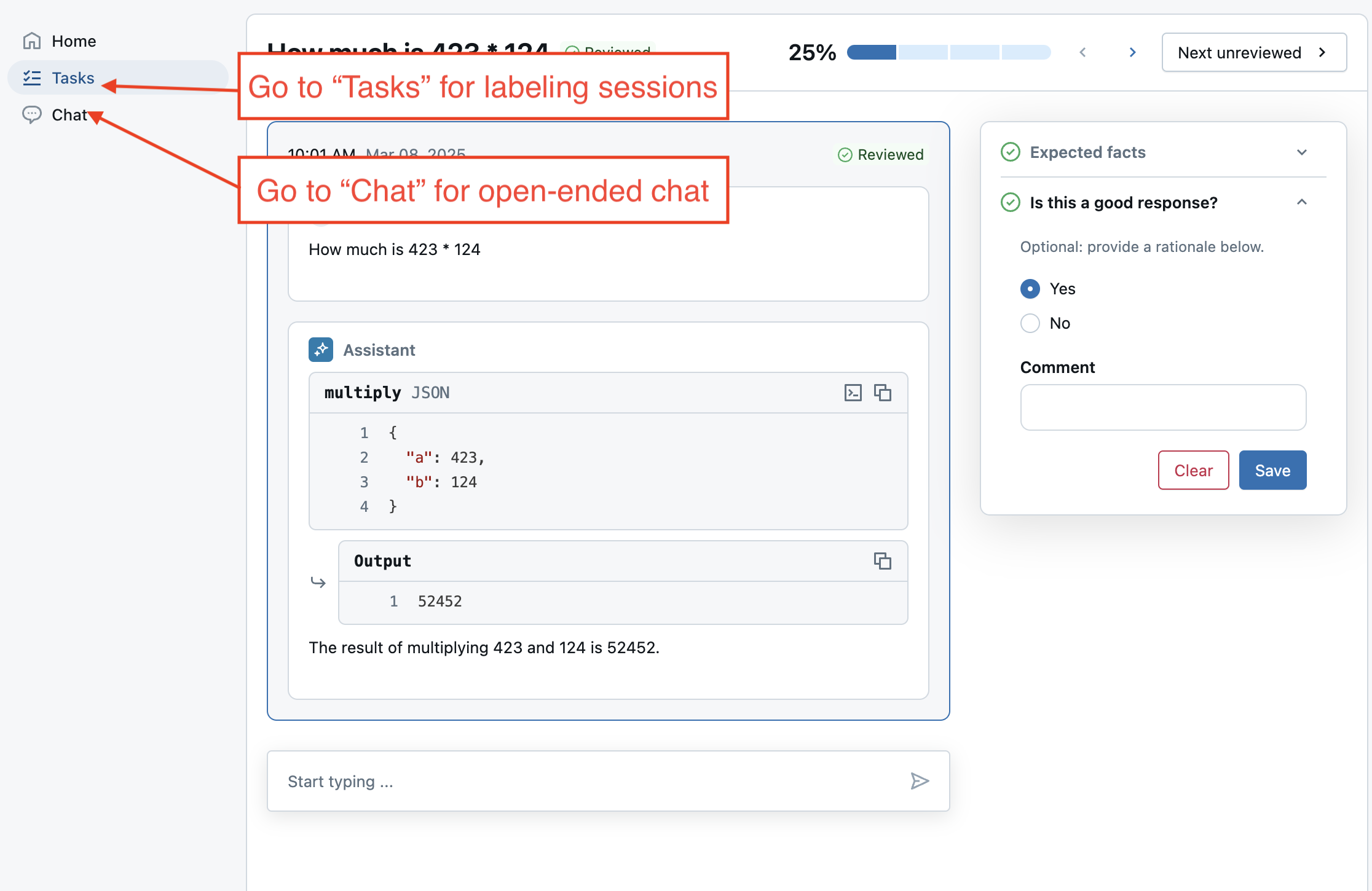
Crie outra sessão de etiquetagem que se comunique com o agente recém-implantado. Em vez de adicionar rastreamentos, adicione o dataset de avaliação à sessão. A chamada de add_agent() também habilita o modo de chat ao vivo do aplicativo de avaliação, que permite aos usuários ter uma conversa livre com o agente.
# Important: update the agent with the new endpoint name so it can be used in future labeling sessions.
MY_AGENT_ENDPOINT_NAME = deployment.endpoint_name
AGENT_NAME = "My Agent v1"

my_review_app = my_review_app.add_agent(
    # Display name for the agent.
    agent_name=AGENT_NAME,
    model_serving_endpoint=MY_AGENT_ENDPOINT_NAME,
    overwrite=True
)

my_session = my_review_app.create_labeling_session(
    name="collect_facts_from_live_agent",
    assigned_users=ASSIGNED_USERS,
    agent=AGENT_NAME,
    # Built-in labeling schemas: EXPECTED_FACTS, GUIDELINES, EXPECTED_RESPONSE
    label_schemas=[review_app.label_schemas.EXPECTED_FACTS,review_app.label_schemas.GUIDELINES, "good_response"],
)

# Add the dataset to enable live agent interaction.
my_session.add_dataset(UC_TABLE_NAME)

# Share with the SME.
print("Review App URL:", my_review_app.url)
print("Labeling session URL: ", my_session.url)
Próximos os passos
Depois que seu agente for implantado, você pode:
-
Converse com ele no AI Playground.
-
No aplicativo de revisão, tente o seguinte:
- Colete feedback geral usando 'Converse com o bot'.
- Coletar rótulos de PMEs em uma sessão de etiquetagem.
-
Use-o em seu aplicativo de produção.