Memória do agente de AI (Model Serving)
Visualização
Este recurso está em Pré-lançamento público.
Para novos casos de uso, a Databricks recomenda implantar agentes no Databricks Apps para controle total sobre o código do agente, a configuração do servidor e o fluxo de trabalho de implantação. Consulte Crie um agente de AI e o tenha implantado no Databricks Apps. Para migrar um agente existente, consulte Migre um agente do Model Serving para o Databricks Apps.
A memória permite que agentes de AI se lembrem de informações de etapas anteriores da conversa ou de conversas anteriores. Isso permite que os agentes forneçam respostas sensíveis ao contexto e construam experiências personalizadas ao longo do tempo. Use Databricks Lakebase, um banco de dados OLTP Postgres totalmente gerenciado, para gerenciar o estado e a história da conversa.
Requisitos
- Uma instância do Lakebase, consulte Criar e gerenciar uma instância de banco de dados.
Memória de curto prazo vs. memória de longo prazo
A memória de curto prazo captura o contexto em uma única sessão de conversação, enquanto a memória de longo prazo extrai e armazena informações key em várias conversas. Você pode construir seu agente com um ou ambos os tipos de memória.
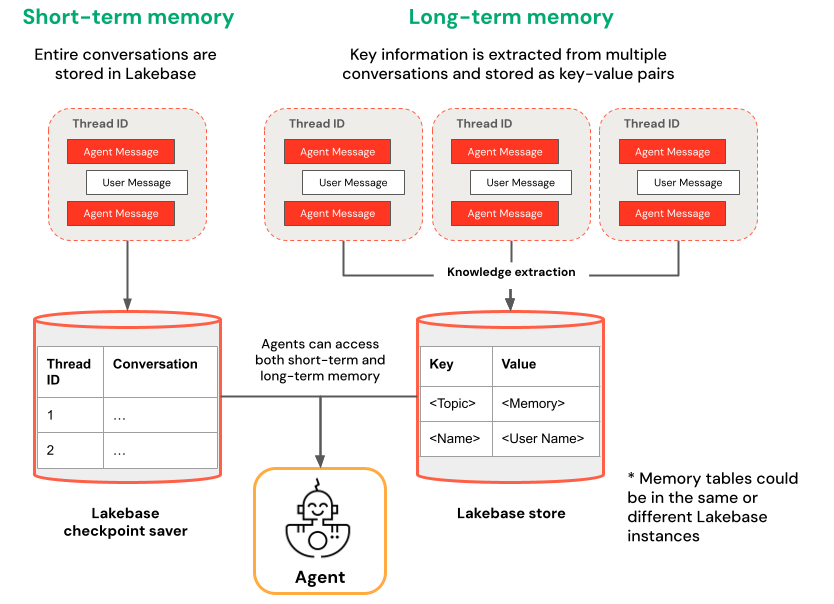
Memória de curto prazo | Memória de longo prazo |
|---|---|
Capture o contexto em uma única sessão de conversa usando IDs de thread e sistema de checkpoints Mantenha o contexto para perguntas de acompanhamento dentro de uma sessão Depure e teste fluxos de conversa usando viagem do tempo | Extraia e armazene automaticamente key percepções em várias sessões Personalize as interações com base em preferências passadas Crie uma base de conhecimento sobre usuários que melhora as respostas ao longo do tempo |
Exemplos de Notebook
Agente com memória de curto prazo
Agente com memória de longo prazo
Consulte seu agente implantado
Depois de implantar seu agente em um endpoint de Model Serving, consulte Consultar um agente implantado no Databricks para obter instruções de consulta.
Para passar um ID de thread, use o parâmetro extra_body. O exemplo a seguir mostra como passar um ID de thread para um endpoint ResponsesAgent:
   response1 = client.responses.create(
    model=endpoint,
    input=[{"role": "user", "content": "What are stateful agents?"}],
    extra_body={
        "custom_inputs": {"thread_id": thread_id}
    }
)
Se você estiver usando um cliente que passa automaticamente ChatContext como o Playground ou o aplicativo Review, o ID da conversa e o ID do usuário serão passados automaticamente para casos de uso de memória de curto/longo prazo.
Viagem do tempo de memória de curto prazo
Para agentes com memória de curto prazo, use a viagem do tempo do LangGraph para retomar a execução de checkpoints. Você pode reproduzir a conversa ou modificá-la para explorar caminhos alternativos. Cada vez que você retoma de um checkpoint, o LangGraph cria uma nova bifurcação na história da conversa, preservando o original enquanto permite a experimentação.
-
No código do agente, crie funções que recuperam a história do ponto de verificação e atualizam o estado do ponto de verificação na classe
LangGraphResponsesAgent:Pythonfrom typing import List, Dict
def get_checkpoint_history(self, thread_id: str, limit: int = 10) -> List[Dict[str, Any]]:
"""Retrieve checkpoint history for a thread.
Args:
thread_id: The thread identifier
limit: Maximum number of checkpoints to return
Returns:
List of checkpoint information including checkpoint_id, timestamp, and next nodes
"""
config = {"configurable": {"thread_id": thread_id}}
with CheckpointSaver(instance_name=LAKEBASE_INSTANCE_NAME) as checkpointer:
graph = self._create_graph(checkpointer)
history = []
for state in graph.get_state_history(config):
if len(history) >= limit:
break
history.append({
"checkpoint_id": state.config["configurable"]["checkpoint_id"],
"thread_id": thread_id,
"timestamp": state.created_at,
"next_nodes": state.next,
"message_count": len(state.values.get("messages", [])),
# Include last message summary for context
"last_message": self._get_last_message_summary(state.values.get("messages", []))
})
return history
def _get_last_message_summary(self, messages: List[Any]) -> Optional[str]:
"""Get a snippet of the last message for checkpoint identification"""
return getattr(messages[-1], "content", "")[:100] if messages else None
def update_checkpoint_state(self, thread_id: str, checkpoint_id: str,
new_messages: Optional[List[Dict]] = None) -> Dict[str, Any]:
"""Update state at a specific checkpoint (used for modifying conversation history).
Args:
thread_id: The thread identifier
checkpoint_id: The checkpoint to update
new_messages: Optional new messages to set at this checkpoint
Returns:
New checkpoint configuration including the new checkpoint_id
"""
config = {
"configurable": {
"thread_id": thread_id,
"checkpoint_id": checkpoint_id
}
}
with CheckpointSaver(instance_name=LAKEBASE_INSTANCE_NAME) as checkpointer:
graph = self._create_graph(checkpointer)
# Prepare the values to update
values = {}
if new_messages:
cc_msgs = self.prep_msgs_for_cc_llm(new_messages)
values["messages"] = cc_msgs
# Update the state (creates a new checkpoint)
new_config = graph.update_state(config, values=values)
return {
"thread_id": thread_id,
"checkpoint_id": new_config["configurable"]["checkpoint_id"],
"parent_checkpoint_id": checkpoint_id
} -
Atualize as funções
predictepredict_streampara dar suporte à passagem de pontos de verificação:
- Predict
- Predict_stream
def predict(self, request: ResponsesAgentRequest) -> ResponsesAgentResponse:
    """Non-streaming prediction"""
    # The same thread_id is used by BOTH predict() and predict_stream()
    ci = dict(request.custom_inputs or {})
    if "thread_id" not in ci:
        ci["thread_id"] = str(uuid.uuid4())
    request.custom_inputs = ci

    outputs = [
        event.item
        for event in self.predict_stream(request)
        if event.type == "response.output_item.done"
    ]

    # Include thread_id and checkpoint_id in custom outputs
    custom_outputs = {
        "thread_id": ci["thread_id"]
    }
    if "checkpoint_id" in ci:
        custom_outputs["parent_checkpoint_id"] = ci["checkpoint_id"]

    try:
        history = self.get_checkpoint_history(ci["thread_id"], limit=1)
        if history:
            custom_outputs["checkpoint_id"] = history[0]["checkpoint_id"]
    except Exception as e:
        logger.warning(f"Could not retrieve new checkpoint_id: {e}")

    return ResponsesAgentResponse(output=outputs, custom_outputs=custom_outputs)
def predict_stream(
    self,
    request: ResponsesAgentRequest,
) -> Generator[ResponsesAgentStreamEvent, None, None]:
    """Streaming prediction with PostgreSQL checkpoint branching support.

    Accepts in custom_inputs:
    - thread_id: Conversation thread identifier for session
    - checkpoint_id (optional): Checkpoint to resume from (for branching)
    """
    # Get thread ID and checkpoint ID from custom inputs
    custom_inputs = request.custom_inputs or {}
    thread_id = custom_inputs.get("thread_id", str(uuid.uuid4()))  # generate new thread ID if one is not passed in
    checkpoint_id = custom_inputs.get("checkpoint_id")  # Optional for branching

    # Convert incoming Responses messages to LangChain format
    langchain_msgs = self.prep_msgs_for_cc_llm([i.model_dump() for i in request.input])

    # Build checkpoint configuration
    checkpoint_config = {"configurable": {"thread_id": thread_id}}
    # If checkpoint_id is provided, we're branching from that checkpoint
    if checkpoint_id:
        checkpoint_config["configurable"]["checkpoint_id"] = checkpoint_id
        logger.info(f"Branching from checkpoint: {checkpoint_id} in thread: {thread_id}")

    # DATABASE CONNECTION POOLING LOGIC FOLLOWS
    # Use connection from pool
Em seguida, teste seu branching de checkpoint:
-
Comece um tópico de conversa e adicione algumas mensagens:
Pythonfrom agent import AGENT
# Initial conversation - starts a new thread
response1 = AGENT.predict({
"input": [{"role": "user", "content": "I'm planning for an upcoming trip!"}],
})
print(response1.model_dump(exclude_none=True))
thread_id = response1.custom_outputs["thread_id"]
# Within the same thread, ask a follow-up question - short-term memory will remember previous messages in the same thread/conversation session
response2 = AGENT.predict({
"input": [{"role": "user", "content": "I'm headed to SF!"}],
"custom_inputs": {"thread_id": thread_id}
})
print(response2.model_dump(exclude_none=True))
# Within the same thread, ask a follow-up question - short-term memory will remember previous messages in the same thread/conversation session
response3 = AGENT.predict({
"input": [{"role": "user", "content": "Where did I say I'm going?"}],
"custom_inputs": {"thread_id": thread_id}
})
print(response3.model_dump(exclude_none=True)) -
Recuperar história do ponto de verificação e bifurcar a conversação com uma mensagem diferente:
Python# Get checkpoint history to find branching point
history = AGENT.get_checkpoint_history(thread_id, 20)
# Retrieve checkpoint at index - indices count backward from most recent checkpoint
index = max(1, len(history) - 4)
branch_checkpoint = history[index]["checkpoint_id"]
# Branch from node with next_node = `('__start__',)` to re-input message to agent at certain part of conversation
# I want to update the information of which city I am going to
# Within the same thread, branch from a checkpoint and override it with different context to continue the conversation in a new fork
response4 = AGENT.predict({
"input": [{"role": "user", "content": "I'm headed to New York!"}],
"custom_inputs": {
"thread_id": thread_id,
"checkpoint_id": branch_checkpoint # Branch from this checkpoint!
}
})
print(response4.model_dump(exclude_none=True))
# Thread ID stays the same even though it branched from a checkpoint:
branched_thread_id = response4.custom_outputs["thread_id"]
print(f"original thread id was {thread_id}")
print(f"new thread id after branching is the same as original: {branched_thread_id}")
# Continue the conversation in the same thread and it will pick up from the information you tell it in your branch
response5 = AGENT.predict({
"input": [{"role": "user", "content": "Where am I going?"}],
"custom_inputs": {
"thread_id": thread_id,
}
})
print(response5.model_dump(exclude_none=True))