Change data capture and snapshots
Data engineers often need to replicate data from sources upstream of Databricks, such as relational databases (Oracle, Postgres, SQL Server), into Databricks for analytics, reporting, and machine learning. As operational systems change, analytical tables must stay synchronized with those changes.
Some teams need to reflect the current state of their operational databases for reporting and analytics. Others need to preserve a full history of changes for auditability, regulatory requirements, or customer analytics.
Change data capture (CDC) treats a database as a set of changes, rather than as a complete static database. The following diagram shows that when a row in a source table that contains employee data is updated, it generates a new set of rows in a CDC feed that contains only the changes. Each row of the CDC feed typically contains additional metadata, including the operation such as UPDATE and a column that can be used to deterministically order each row in the CDC feed so that you can handle out-of-order updates. For example, the sequenceNum column in the following diagram determines the row order in the CDC feed:
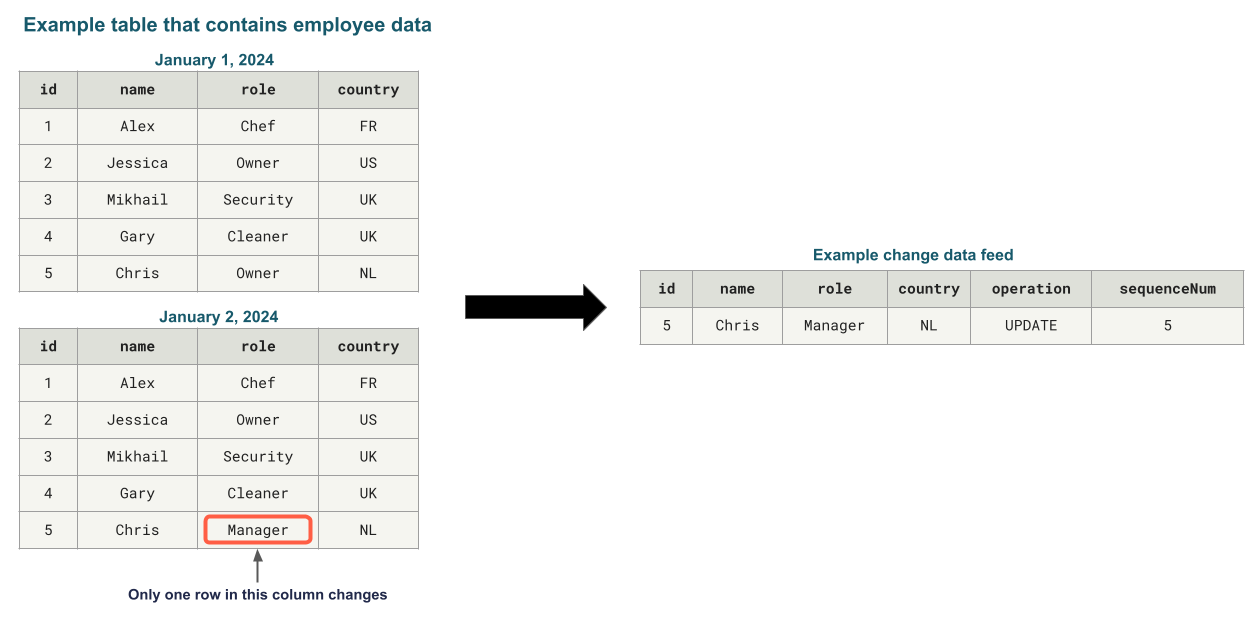
CDC allows you to just view the changes to the data for simpler transactions when updating the database in a downstream system. It can also allow you to see the history of the database, if that is a requirement.
The challenge is that source systems provide data in different formats. Some emit change feeds that capture individual changes (inserts, updates, deletes). Others only provide periodic snapshots of the entire table. Each format requires different processing approaches to keep downstream tables accurate and up to date.
Historically, teams have relied on custom MERGE INTO logic to apply these changes, whether from change feeds or by comparing snapshots. This approach is complex and error-prone, requiring staging tables, window functions, and sequencing assumptions that are difficult to reason about and maintain as pipelines evolve.
Benefits of CDC
Change data capture provides several benefits in your workloads.
- Change data is typically smaller than the full dataset, and changes can be processed by downstream queries as incremental updates to the data.
- Change data can be stored in a way that allows you to reconstruct records as they were at a specific time, giving you a full history for auditing, point-in-time reporting, or trend analysis.
- Change data allows for stable surrogate keys over time.
How changes are applied: Current state or full history of changes
Slowly Changing Dimensions (SCD) define how upstream changes are applied and modeled after they land in analytical tables. Organizations might use different approaches based on their data needs. SCD Type 1 allows you to save only the current state of the dataset. SCD Type 2 saves the complete history of changes to the dataset. This section describes these in more detail.
SCD Type 1: Current state only
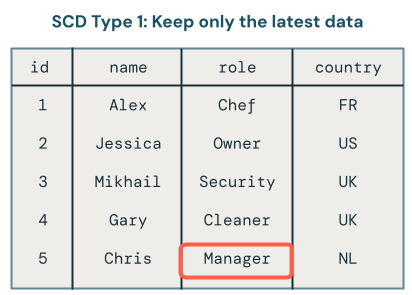
SCD Type 1 overwrites old data with new data whenever changes occur, keeping only the latest version of each record. History is not retained.
Use SCD Type 1 when:
- You only need the current state of the data.
- You want downstream materialized views to incrementally refresh rather than fully recompute.
- You need stable surrogate keys for joins.
Only the latest version of the data is available in SCD1. It's a straightforward approach that you can think of as storing only the final table. If a record changes from Owner to Manager, only Manager remains in the table:
SCD Type 2: Historical tracking
SCD Type 2 maintains a complete historical record by creating multiple versions of data over time, each timestamped with metadata. The __START_AT and __END_AT columns define the validity period for each version of a record. Active records have __END_AT = NULL. You can view the state of the dataset as it was at any point in time.
Use SCD Type 2 when:
- Auditability or regulatory requirements demand historical tracking.
- Customer analytics requires understanding how entities evolved over time.
- Business logic requires point-in-time reporting.
- You need to analyze trends or compare historical states.
SCD Type 2 processing maintains a historical record of data changes. For example, if a record currently has the role field set to Manager, you can also see that the role was previously set to Owner. In the following image, that is exactly what happened to the record for Chris. You can tell the current record because it has a null value for the end_at field:

What is a CDC feed?
Change Data Capture (CDC) is a data integration pattern that captures changes made to data in a source system: inserts, updates, and deletes. Rather than processing entire datasets, CDC generates feeds containing only the modified records.
For example, if you have an employee table in Oracle with 50 rows, and one employee's job title changes, the CDC feed contains a single UPDATE record for that employee. This allows Databricks to process only the changed records rather than reading the entire source table on every run.
Each CDC record from the source database includes:
- The operation type (
INSERT,UPDATE,DELETE) - The data values for the record
- A sequence number or timestamp for deterministic ordering
The sequence number ensures that late or out-of-order arrivals are applied correctly. Transactional databases such as SQL Server, MySQL, and Oracle generate CDC feeds natively. Delta tables also generate their own CDC feed, known as a Change Data Feed (CDF), making it straightforward to process changes from Delta sources as well.
What is a snapshot?
A snapshot represents the complete state of a table at a specific point in time. Unlike CDC feeds that capture only changes, snapshots contain every row in the source table.
Teams do not always enable CDC feeds on operational databases for various reasons:
- Cost (CDC can increase load on production databases)
- Performance concerns on the source database
- Legacy systems that don't support CDC
- Organizational constraints (the teams managing ingestion don't own the upstream databases)
When a change feed is unavailable, snapshot-based ingestion is the only option. Snapshots can come from:
- Periodic exports from relational databases (Oracle, Postgres, SQL Server)
- Cloud storage file dumps from upstream systems
- Delta tables (each table version is effectively a snapshot)
- OpenSharing from upstream tenants
Because snapshots don't capture record-level changes, identifying what changed requires comparing records across snapshots to infer inserts, updates, and deletes.
Automatically process CDC feeds
Databricks simplifies CDC processing through the AUTO CDC API within Lakeflow pipelines. This API is designed to process changes from CDC feeds on source databases or Delta tables with Change Data Feed enabled.
For SQL and Python code examples, see AUTO CDC examples.
Use AUTO CDC when any of these is true:
- Your source system generates a Change Data Feed (CDF)
- You're reading from a Delta table with Change Data Feed enabled
- You have a CDC feed from a relational database (via tools such as Debezium or Oracle GoldenGate)
AUTO CDC automatically handles out-of-sequence records by processing events in the order defined by the sequencing column. The sequencing column must be a monotonically increasing representation of the correct event order, with one distinct update per key at each sequencing value. NULL sequencing values are not supported. For SCD Type 2, the pipeline propagates sequencing values to the __START_AT and __END_AT columns of the target table.
Initial hydration: When replicating an existing operational database table into Databricks, you first need to load all historical data before processing ongoing changes. AUTO CDC supports this through once flows, a mode that processes all available data one time and then stops. After the initial load completes, use a triggered or continuous mode flow for ongoing CDC processing. This ensures consistent logic for both bulk and incremental loads.
Automatically process snapshots
When CDC feeds aren't available, Databricks provides the AUTO CDC FROM SNAPSHOT API. This API is designed for snapshot-based ingestion; it compares consecutive snapshots, generates a synthetic change feed, and applies SCD Type 1 or Type 2 logic into the target table. The target table can provide a CDC feed (called a change data feed (CDF) in Delta tables) of either SCD Type 1 or Type 2 for downstream queries.
For code examples, see AUTO CDC FROM SNAPSHOT examples.
AUTO CDC FROM SNAPSHOT is supported in the Python and SQL pipeline interfaces. Snapshots must be processed in ascending order by version. In both interfaces, each snapshot version after a successful commit must be greater than the previously committed version. A non-increasing version fails the update. Downstream processing, such as a materialized view that queries the output of an AUTO CDC FROM SNAPSHOT dataset, gets the benefits of CDC, including incremental processing and stable surrogate keys.
AUTO CDC FROM SNAPSHOT is not just for initial loads. It is designed for ongoing processing when snapshots are your only available format. Each time a new snapshot arrives, the API compares it to the previous snapshot to derive changes and a change data feed.
For SCD Type 1 targets, you can combine AUTO CDC FROM SNAPSHOT with AUTO CDC when a source provides both periodic authoritative snapshots and a lower-latency CDC feed. See Add a backfill to an AUTO CDC SCD Type 1 table.
Use AUTO CDC FROM SNAPSHOT when:
- CDC is not enabled on the source database
- You only have access to periodic snapshots (full table dumps)
- You want the benefits of CDC for incremental processing, or to have a full history of changes.
AUTO CDC FROM SNAPSHOT handles the following automatically:
- Compares consecutive snapshots to identify inserted, updated, and deleted records.
- Generates a synthetic change feed based on the differences between snapshots.
- Applies the same SCD logic as
AUTO CDCto compute SCD Type 1 or Type 2.
AUTO CDC FROM SNAPSHOT only knows about changes from one snapshot to the next, and does not get interim changes. For example, if you get daily snapshots, and a user changes their address twice in one day (from A to B, then from B to C), your change feed might go directly from A to C, because you only received snapshots for those times.
Snapshot processing patterns
In Python, AUTO CDC FROM SNAPSHOT supports two patterns for determining snapshot versions.
Snapshot processing using pipeline ingestion time
The snapshot is read at the time of the pipeline run, and the ingestion time is used as the snapshot version. A new snapshot is ingested with each pipeline update. When a pipeline runs in continuous mode, multiple snapshots are ingested based on the trigger interval setting for the flow.
Use this pattern when snapshots arrive regularly and in order and you can rely on the pipeline run timestamp for versioning.
Snapshot processing using version functions
You provide a Python function that specifies which snapshot version to process at the time of the pipeline run. The function returns a tuple: (DataFrame, version_number). The API processes snapshots in the order defined by version numbers. If the function returns a version that is not greater than the last successfully committed version, the update fails.
Use this pattern when:
- Multiple snapshots can arrive at the same time and need sequential processing.
- Snapshots can arrive out of order.
- You need explicit control over snapshot ordering.
Snapshot processing in SQL
In SQL, use the required FROM SNAPSHOT query to read snapshot data. To process ordered snapshots across pipeline updates, add a WITH VERSION query that selects the next version. A single update processes available versions until the version query returns no rows. Each version returned after a successful commit must be greater than the previously committed version.
A SQL snapshot flow without WITH VERSION supports only an initial load while the target is empty. For syntax and examples, see CREATE FLOW (pipelines).
Additional CDC capabilities
Change operations on AUTO CDC targets
Unlike standard streaming tables, Unity Catalog tables that are AUTO CDC targets support INSERT, UPDATE, DELETE, and MERGE statements even while the pipeline is running. For details and limitations, see Add, change, or delete data in a target streaming table.
Reading change data feeds from AUTO CDC targets
AUTO CDC target streaming tables can emit their own Change Data Feed (CDF), allowing downstream pipelines to consume changes from the AUTO CDC output. For details, see Read a change data feed from an AUTO CDC target table.
Reading change data feeds from materialized views
Materialized views can emit their own Change Data Feed (CDF), so downstream consumers can process materialized view changes, including replicating them outside Databricks. This feature is in Beta. For details, see Read a change data feed from a materialized view.
Metrics and monitoring
AUTO CDC automatically captures num_upserted_rows and num_deleted_rows metrics on each pipeline run. For details, see Advanced AUTO CDC topics.
Tracking column subsets for SCD Type 2
By default, SCD Type 2 creates a new version whenever any column value changes. AUTO CDC allows you to specify which columns to track for history, so that changes to untracked columns update the current version in place rather than creating a new historical record. This reduces storage costs and query complexity while preserving history for critical attributes. For an example, see Track a column subset with SCD Type 2.
Recommendations
Use change data capture (CDC) when you want to only work with the changes to your data, for example, to allow downstream materialized views to be incrementally updated. Also use CDC when you want to maintain a history of the changes to your data, for example, to know who had what role at a specific point in time.
Use the AUTO CDC APIs when you need to replicate upstream data into Databricks and keep it in sync with source changes. The right API depends on how your source system exposes changes:
- Use
AUTO CDCwhen your source emits a change feed, for example, a relational database with CDC enabled (via tools such as Debezium or Oracle GoldenGate), a Delta table with Change Data Feed enabled, or any source that produces a stream of inserts, updates, and deletes with a sequencing column. - Use
AUTO CDC FROM SNAPSHOTwhen your source does not support CDC and only provides periodic full table dumps. This API infers changes by comparing consecutive snapshots and generates a synthetic change feed, so you get the same SCD processing benefits even without a native CDC feed. - Combine
AUTO CDC FROM SNAPSHOTandAUTO CDCfor an SCD Type 1 target when periodic snapshots provide the authoritative state and a CDC feed provides lower-latency changes between snapshots.
In both cases, choose SCD Type 1 if you only need the current state of each record, or SCD Type 2 if you need to preserve a full history of changes for auditing, point-in-time reporting, or trend analysis.
Additional resources
- The AUTO CDC APIs: Simplify change data capture with pipelines: Learn how to implement CDC with the
AUTO CDCandAUTO CDC FROM SNAPSHOTAPIs. - Advanced AUTO CDC topics: Learn about advanced CDC topics, such as using DML operations, reading change data feeds, and monitoring metrics.