Authentication for agents
Agents often need to authenticate to other resources to complete tasks. For example, a deployed agent might need to access an AI Search index to query unstructured data, a serving endpoint to call a foundation model, or Unity Catalog functions to execute custom logic.
This page covers authentication methods for agents deployed on Databricks Apps. For agents deployed on Model Serving endpoints, see Authentication for agents (Model Serving).
Databricks Apps provides two authentication methods for agents. Each method serves different use cases:
Method | Description | When to use |
|---|---|---|
Agent authenticates using an automatically created service principal with consistent permissions. Previously called Service Principal authentication. | Most common use case. Use when all users should have the same access to resources. | |
Agent authenticates using the identity of the user making the request. Previously called On-Behalf-Of (OBO) authentication. | Use when you need user-specific permissions, audit trails, or fine-grained access control with Unity Catalog. |
You can combine both methods in a single agent. For example, use app authorization to access a shared AI Search index while using user authorization to query user-specific tables.
Configure authentication with the workspace UI or Declarative Automation Bundles
You can configure all authentication settings in two ways:
- Workspace UI: Edit the app and manage resources and scopes from the Configure step. Recommended when you're iterating on a single app in the workspace.
- Declarative Automation Bundles: Declare resources, scopes, and environment variables in a
databricks.ymlfile and deploy withdatabricks bundle deploy. Recommended when you want Git-based versioning, CI/CD, or to ship the same agent across workspaces. All agent templates ship with adatabricks.yml.
Both paths produce the same runtime configuration. The rest of this page shows each instruction in both forms so you can select one and stay consistent within your project.
To add a resource to the app through either path, you must have Can Manage permission on both the resource and the app.
For the full bundle reference, see app resource and app.resources. For an end-to-end bundle walkthrough, see Manage Databricks apps using Declarative Automation Bundles.
App authorization
By default, Databricks Apps authenticate using app authorization. Databricks automatically creates a service principal when you create the app, and it acts as the app's identity.
All users who interact with the app share the same permissions defined for the service principal. This model works well when you want all users to see the same data or when the app performs shared operations not tied to user-specific access controls.
For detailed information about app authorization, see App authorization.
Grant permissions to the MLflow experiment
Your agent needs access to an MLflow experiment to log traces and evaluation results. Grant the service principal Can Edit permission on the experiment.
- Workspace UI
- Declarative Automation Bundles
- Click Edit on your app home page.
- Go to the Configure step.
- In the App resources section, add the MLflow experiment resource with
Can Editpermission.
-
Declare the experiment under your app's
resourceslist indatabricks.yml. Thenameyou assign to the resource is referenced later when you wire up environment variables.YAMLresources:
apps:
my_agent:
name: 'my-agent'
source_code_path: ./
resources:
- name: 'experiment'
experiment:
experiment_id: '<experiment-id>'
permission: 'CAN_EDIT' -
Redeploy the bundle:
Bashdatabricks bundle deploy
databricks bundle run my_agent
See app.resources.experiment for all fields.
Grant permissions to other Databricks resources
If your agent uses other Databricks resources, such as Genie Agents, AI Search indexes, or SQL warehouses, grant the service principal permissions on each one.
To access the prompt registry, grant CREATE FUNCTION, EXECUTE, and MANAGE permissions on the Unity Catalog schema for storing prompts.
When granting access to Unity Catalog resources, you must also grant permissions to all downstream dependent resources. For example, if you grant access to a Genie Agent, you must also grant access to its underlying tables, SQL warehouses, and Unity Catalog functions.
- Workspace UI
- Declarative Automation Bundles
Add resources to the app through the App resources section when you create or edit the app in the Databricks workspace.
- Click Edit on your app home page.
- Go to the Configure step.
- In App resources, click + Add resource for each resource the agent uses and set the permission.
See Add resources to a Databricks app for the complete list of supported resources and screenshots.
-
Declare every resource the agent uses in the
resourceslist under your app indatabricks.yml. The example below shows an agent that uses an MLflow experiment, a serving endpoint, a Genie Agent, a SQL warehouse, an AI Search index, a Unity Catalog function, and a Lakebase instance. Each resourcenameis referenced fromconfig.envthroughvalue_fromso the agent receives the resolved identifier at runtime.YAMLbundle:
name: my_agent
resources:
apps:
my_agent:
name: 'my-agent'
description: 'Custom agent deployed on Databricks Apps'
source_code_path: ./
config:
command: ['uv', 'run', 'start-app']
env:
- name: MLFLOW_EXPERIMENT_ID
value_from: 'experiment'
- name: LAKEBASE_INSTANCE_NAME
value_from: 'database'
resources:
- name: 'experiment'
experiment:
experiment_id: '<experiment-id>'
permission: 'CAN_EDIT'
- name: 'llm'
serving_endpoint:
name: 'databricks-claude-sonnet-4-5'
permission: 'CAN_QUERY'
- name: 'sales-genie'
genie_space:
space_id: '<genie-space-id>'
permission: 'CAN_RUN'
- name: 'warehouse'
sql_warehouse:
id: '<warehouse-id>'
permission: 'CAN_USE'
- name: 'docs-index'
uc_securable:
securable_full_name: 'main.docs.chunks_index'
securable_type: 'TABLE'
permission: 'SELECT'
- name: 'lookup-function'
uc_securable:
securable_full_name: 'main.tools.order_lookup'
securable_type: 'FUNCTION'
permission: 'EXECUTE'
- name: 'database'
database:
instance_name: '<lakebase-instance-name>'
database_name: 'databricks_postgres'
permission: 'CAN_CONNECT_AND_CREATE'
targets:
dev:
mode: development
default: trueimportantEvery
value_fromvalue inconfig.envmust match anamefield in theresourceslist. Mismatches cause the environment variable to resolve toNonein the deployed app. -
Deploy and start the bundle:
Bashdatabricks bundle validate
databricks bundle deploy
databricks bundle run my_agentbundle deployuploads the source and configures resources.bundle runstarts or restarts the app with the latest source. The argument tobundle runis the YAML key underresources.apps(heremy_agent), not the deployed app'snamefield.
For the full schema of every resource subtype, see app.resources.
The following table lists the minimum permissions used in the examples above and the equivalent Declarative Automation Bundles value for each resource type:
Resource type | Workspace UI permission | Declarative Automation Bundles resource and permission |
|---|---|---|
SQL Warehouse |
|
|
Model Serving endpoint |
|
|
Unity Catalog Function |
|
|
Genie Agent |
|
|
AI Search index |
|
|
Unity Catalog Table |
|
|
Unity Catalog Connection |
|
|
Unity Catalog Volume |
|
|
Lakebase (provisioned) |
|
|
Lakebase (autoscaling) |
|
|
Follow the principle of least privilege. Grant the service principal only the permissions the agent needs, and use a dedicated service principal per app. For the full list, see Security best practices.
User authorization
User authorization is in Public Preview. Your workspace admin must enable it before you can use user authorization.
User authorization allows an agent to act with the identity of the user making the request. This provides:
- Per-user access to sensitive data
- Fine-grained data controls enforced by Unity Catalog
- User-specific audit trails
- Automatic enforcement of row-level filters and column masks
Use user authorization when your agent needs to access resources using the requesting user's identity instead of the app's service principal.
How user authorization works
When you configure user authorization for your agent:
- Add API scopes to your app: Define which Databricks APIs the app can access on behalf of users. See Add scopes to an app.
- User credentials are downscoped: Databricks takes the user's credentials and restricts them to only the API scopes you defined.
- Token forwarding: The downscoped token is made available to your app through the
x-forwarded-access-tokenHTTP header. - MLflow AgentServer stores the token: The Agent Server automatically stores this token per request for convenient access in agent code.
Configure user authorization by adding scopes in the Databricks Apps UI when creating or editing your app, or programmatically using the API. See Add scopes to an app for detailed instructions.
Agents with user authorization can access the following Databricks resources:
- SQL Warehouse
- Genie Agent
- Files and directories
- Model Serving Endpoint
- AI Search Index
- Unity Catalog Connections
- Unity Catalog Tables
Implement user authorization
To implement user authorization, you must add authorization scopes to your app. Scopes restrict what the app can do on the user's behalf. For the list of available scopes and scope semantics, see Scope-based security and privilege escalation.
- Workspace UI
- Declarative Automation Bundles
- In the Databricks UI, go to your app's Authorization settings.
- Under User authorization, click + Add scope and select the scopes that the app needs to access resources on behalf of the user.
- Save the changes and restart the app.
-
Declare scopes under
user_api_scopeson the app resource indatabricks.yml:YAMLresources:
apps:
my_agent:
name: 'my-agent'
source_code_path: ./
user_api_scopes:
- sql
- genie
- model-serving
resources:
- name: 'experiment'
experiment:
experiment_id: '<experiment-id>'
permission: 'CAN_EDIT' -
Redeploy the bundle and restart the app:
Bashdatabricks bundle deploy
databricks bundle run my_agentnoteAfter enabling user authorization on a workspace for the first time, you must restart existing apps before they can use scopes. See Add scopes to an app.
To configure user authorization in your agent code, retrieve the header for this request from the AgentServer and construct a workspace client with those credentials.
-
In your agent code, import the authentication utility:
If using one of the provided templates from databricks/app-templates, import the provided utility:
Pythonfrom databricks_app.utils import get_user_workspace_clientOtherwise, import from the Agent Server utilities:
Pythonfrom agent_server.utils import get_user_workspace_clientThe
get_user_workspace_client()function uses the Agent Server to capture thex-forwarded-access-tokenheader and constructs a workspace client with those user credentials, handling authentication between the user, app, and agent server. -
Initialize the workspace client at query time, not during app startup:
importantCall
get_user_workspace_client()inside theinvokeandstreamhandlers, not in__init__or at app startup. User credentials are only available at query time when a user makes a request. Initializing during app startup will fail because no user context exists yet.Python# In your agent code (inside invoke or stream handler)
user_client = get_user_workspace_client()
# Use user_client to access Databricks resources with user permissions
response = user_client.serving_endpoints.query(name="my-endpoint", inputs=inputs)
For a complete guide on adding scopes and understanding scope-based security, see Scope-based security and privilege escalation. Request only the minimum scopes your agent needs and log every action performed on behalf of a user; see Best practices for user authorization.
Verify user authorization
After you add scopes and call get_user_workspace_client(), confirm the agent runs as the caller and not the app's Databricks service principal. If the forwarded token is missing, get_user_workspace_client() falls back to the Databricks service principal without raising, so the agent can return a normal-looking response while still acting as the app. To check, add a whoami tool and invoke it as yourself. If it returns your username, user authorization is working.
current_user.me() is covered by the default iam.current-user:read scope, so you don't need to add any scopes for this test.
from agents import Agent, function_tool
from agent_server.utils import get_user_workspace_client

@function_tool
def whoami() -> str:
    """Returns the identity of the current user."""
    user_wc = get_user_workspace_client()
    return user_wc.current_user.me().user_name

agent = Agent(
    name="my-agent",
    instructions=(
        "When the user asks who they are, call the whoami tool "
        "and return the raw result."
    ),
    model="databricks-claude-sonnet-4-6",
    tools=[whoami],
)
Redeploy the agent. See Author an agent and deploy it on Databricks Apps.
- Workspace UI
- Python
The Workspace UI test is the quickest sanity check and doesn't require OAuth tokens.
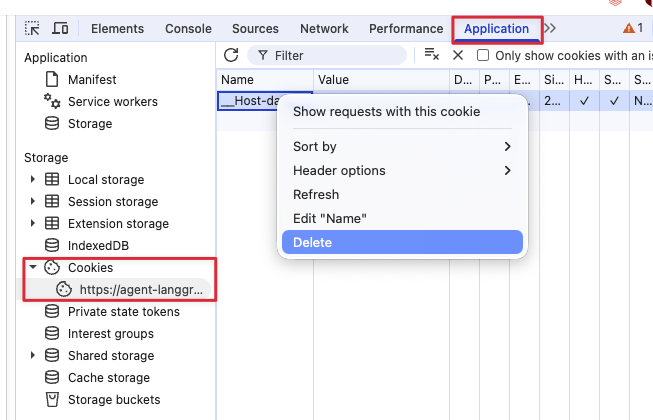
- Scope changes take effect immediately, but internal caches can take up to 5 minutes to refresh — wait that long before testing (no app restart required). Always clear your browser cookies for the app URL (see the dropdown below for steps), otherwise the session reuses tokens issued before the scope change.
- Confirm you have
CAN USEpermission on the app. See Configure permissions for a Databricks app. - Open the app URL in a browser. On first visit, accept the consent prompt for the requested scopes.
- In the chat, ask
Who am I?and confirm the agent returns your username (for example,you@your-company.com).
Clear cookies in Chrome
- Open DevTools: press F12, or Cmd+Option+I on macOS, or Ctrl+Shift+I on Windows or Linux.
- Open the Application tab.
- Under Storage > Cookies, select your app's URL.
- Right-click each cookie and choose Delete.
Use a CLI profile or Databricks service principal credentials to invoke the agent. See Query an agent deployed on Databricks for query options and Connect to an API Databricks app using token authentication for how to generate OAuth tokens.
-
Scope changes take effect immediately, but internal caches can take up to 5 minutes to refresh, so wait before testing (no app restart required).
-
Invoke the agent as yourself:
Pythonfrom databricks.sdk import WorkspaceClient
from databricks_openai import DatabricksOpenAI
app_name = "<your-app-name>"
prompt = [{"role": "user", "content": "Call the whoami tool and return only the raw result."}]
w = WorkspaceClient(profile="<your-profile>")
client = DatabricksOpenAI(workspace_client=w)
response = client.responses.create(model=f"apps/{app_name}", input=prompt)
print(response.output_text)The output should be your username — for example,
you@your-company.com.
If the tool returns a UUID instead of a username, the x-forwarded-access-token header isn't reaching the tool and the agent fell back to the app's Databricks service principal (the UUID is the app's service principal client ID). To diagnose, confirm each of the following:
- User authorization is enabled on the workspace.
- The app has scopes configured.
get_user_workspace_client()is called inside the@invokeor@streamhandler, not at app startup.- The code uses
get_user_workspace_client()and notWorkspaceClient().
A few things to watch for:
- Remove the
whoamitool before production. It's diagnostic only and exposes user identity to anyone who can invoke the agent. - Test with a second user. A single-user check confirms the token is forwarded; a second caller confirms each request gets its own identity instead of a shared fallback.
- Never log the forwarded token. See Best practices for user authorization.
- To verify a specific scope, replace
current_user.me()with a call that requires that scope. For example, aSELECT current_user()statement against a warehouse exercises thesqlscope end to end.
Authenticate to Databricks MCP servers
Databricks managed MCP servers expose AI Search indexes and Unity Catalog functions as tools through URLs of the form https://<workspace>/api/2.0/mcp/ai-search/<catalog>/<schema> and https://<workspace>/api/2.0/mcp/functions/<catalog>/<schema>. The legacy /api/2.0/mcp/vector-search/ URL prefix continues to work for backwards compatibility. For the list of available servers and their URL patterns, see Databricks managed MCP servers.
To authenticate, grant the agent's service principal (or the user, if using user authorization) access to every downstream resource in those schemas.
For example, if your agent uses the following MCP server URLs:
https://<your-workspace>/api/2.0/mcp/ai-search/prod/customer_supporthttps://<your-workspace>/api/2.0/mcp/ai-search/prod/billinghttps://<your-workspace>/api/2.0/mcp/functions/prod/billing
You must grant access to every AI Search index in prod.customer_support and prod.billing, and every Unity Catalog function in prod.billing.
- Workspace UI
- Declarative Automation Bundles
Add each index and function as a resource under App resources. Follow the same steps as Grant permissions to other Databricks resources.
-
Add one
uc_securableentry per index and per function under your app'sresourceslist:YAMLresources:
apps:
my_agent:
resources:
- name: 'support-index'
uc_securable:
securable_full_name: 'prod.customer_support.tickets_index'
securable_type: 'TABLE'
permission: 'SELECT'
- name: 'billing-index'
uc_securable:
securable_full_name: 'prod.billing.invoices_index'
securable_type: 'TABLE'
permission: 'SELECT'
- name: 'refund-function'
uc_securable:
securable_full_name: 'prod.billing.process_refund'
securable_type: 'FUNCTION'
permission: 'EXECUTE' -
Redeploy the bundle:
Bashdatabricks bundle deploy
databricks bundle run my_agent
Authenticate to MCP Services
The previous section covers managed MCP servers, which expose your own Unity Catalog data and functions. MCP Services are different: they cover external MCP servers you register and the built-in system.ai.* services (such as system.ai.google_calendar) that Databricks provides for third-party SaaS tools. Both kinds are invoked through Unity Gateway at https://<workspace>/ai-gateway/mcp-services/<catalog>.<schema>.<mcp-service>, and both authenticate the same way.
Each MCP Service is its own Unity Catalog securable, so you grant access one service at a time.
Grant the caller access to the service
To invoke a service, the caller needs EXECUTE on that service, plus USE CATALOG and USE SCHEMA on its parent catalog and schema. EXECUTE alone is not enough, because Unity Catalog also checks the parent chain (see Grant access to teammates).
For built-in system.ai.* services, account users already hold these privileges by default, so you usually don't need to grant anything.
For a service in your own catalog and schema, grant the caller yourself: the app's Databricks service principal for app-identity access, or the calling user or group for on-behalf-of access. Use the Permissions tab in Catalog Explorer, or the REST API (substitute your own <catalog>.<schema>.<service>):
databricks api patch "/api/2.1/unity-catalog/permissions/mcp_service/<catalog>.<schema>.<service>" \
  --json '{ "changes": [ { "principal": "data-team", "add": ["EXECUTE"] } ] }'
databricks api patch "/api/2.1/unity-catalog/permissions/catalog/<catalog>" \
  --json '{ "changes": [ { "principal": "data-team", "add": ["USE_CATALOG"] } ] }'
databricks api patch "/api/2.1/unity-catalog/permissions/schema/<catalog>.<schema>" \
  --json '{ "changes": [ { "principal": "data-team", "add": ["USE_SCHEMA"] } ] }'
Forward the user's token for on-behalf-of access
On-behalf-of access runs each call as the calling user, so the app must be allowed to forward that user's token to Unity Gateway. Enable this by adding the ai-gateway user API scope: declare user_api_scopes: [ai-gateway] on the app resource (see Add scopes to an app), then call the service with the per-user client (get_user_workspace_client()) from Author an agent and deploy it on Databricks Apps.
The first time each user calls the service, they must authorize it. Until they do, the call returns JSON-RPC error -32042 with a login url in error.data.elicitations[]. Surface that link so the user can authorize in-app, or have them open the service in Catalog Explorer and click Login.
You can't grant this EXECUTE access through a bundle. A Declarative Automation Bundles uc_securable resource supports only VOLUME, TABLE, FUNCTION, and CONNECTION securables, not MCP Services, so you must grant EXECUTE separately, with the UI or the REST API above. Watch out: databricks bundle validate doesn't flag the missing grant, so the agent can deploy cleanly and then fail only when it first calls the service.
Custom MCP servers hosted as their own Databricks apps (app names prefixed with mcp-) are not yet supported as bundle resources. Grant the agent's service principal Can Use on the MCP server app manually with databricks apps update-permissions. See the custom-mcp-server skill in the agent templates repository.