Lakeflow Connect connector concepts
Lakeflow Connect connectors are in various release states.
Lakeflow Connect organizes connectors by source type, including database, SaaS, file, and streaming connectors, along with community and custom connectors for sources without a built-in option. This page describes the concepts shared by Lakeflow Connect's managed connectors: the connector types available, how a connector is structured, how it runs, and how it ingests data incrementally. Managed connectors produce ingestion pipelines that are governed by Unity Catalog and powered by serverless compute and Lakeflow pipelines, using efficient incremental reads and writes to keep your data fresh for downstream consumption.
If you need more control over your pipelines, you can also use standard connectors, which trade some automation for broader source support and customization. See Choose a standard connector.
Connector types
-
- Community connectors
- Ingest data using open-source, community-built connectors.
-
- Database connectors (CDC)
- Ingest data from relational databases including MySQL, PostgreSQL, and SQL Server using change data capture.
-
- File source connectors
- Ingest unstructured and structured files from enterprise file storage services including Google Drive and SharePoint.
-
- Query-based connectors
- Ingest data from databases by querying the source directly, without requiring change data capture (CDC) configuration.
-
- SaaS connectors
- Ingest data from enterprise SaaS applications including Salesforce, HubSpot, Jira, Workday, and more.
-
- Streaming connectors
- Continuously ingest data from message buses and event streaming sources including RabbitMQ.
Architecture
Each connector type has a distinct set of components. SaaS and file connectors use a connection, an ingestion pipeline, and destination tables. Database connectors also include an ingestion gateway and staging storage to support continuous change capture. Query-based and streaming connectors use the components described in the following sections. For details on SaaS and database connectors, see Managed SaaS connectors and Managed database connectors.
Query-based connector components
A query-based connector queries the source database directly on a schedule, without a gateway or staging storage. For an overview of how query-based connectors work, see Query-based connectors.
Component | Description |
|---|---|
Connection | A Unity Catalog securable object that stores authentication details for the source database. Either a direct Unity Catalog connection (for foreign connection ingestion) or a Unity Catalog foreign catalog (for foreign catalog ingestion using Lakehouse Federation). |
Ingestion pipeline | A pipeline that queries the source database directly and writes the results to streaming tables. The pipeline runs on serverless compute by default. |
Destination tables | The streaming tables where the ingestion pipeline writes the data. |
Streaming connector components
A streaming connector continuously reads messages from a message bus or event streaming source and writes them to streaming tables. For an overview of how streaming connectors work, see Streaming connectors.
Component | Description |
|---|---|
Connection | A Unity Catalog securable object that stores the source endpoint and authentication credentials for your streaming source. The managed connector uses this connection to authenticate without requiring credentials in your pipeline configuration. |
Ingestion pipeline | A pipeline that continuously reads messages from the streaming source and writes the results to streaming tables. The pipeline runs on serverless compute. |
Destination tables | The streaming tables where the ingestion pipeline writes the data. |
Orchestration
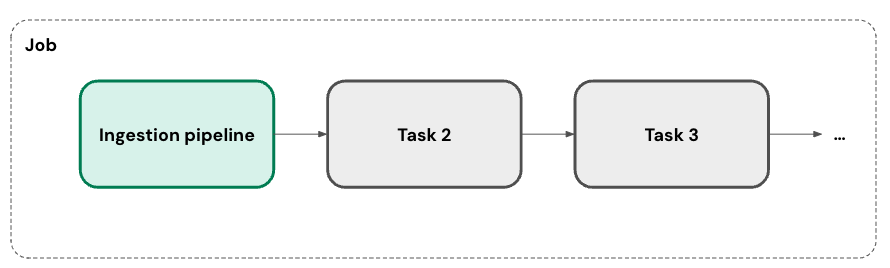
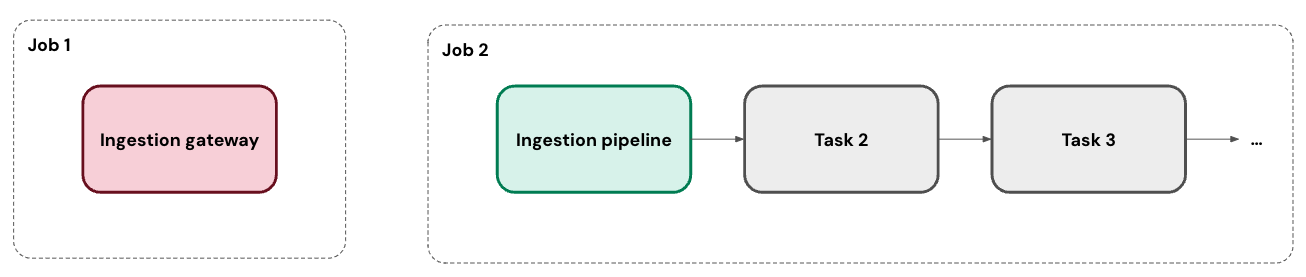
You can run your ingestion pipeline on one or more custom schedules. For each schedule that you add to a pipeline, Lakeflow Connect automatically creates a job for it. The ingestion pipeline is a task within the job. You can optionally add more tasks to the job.
For database connectors, the ingestion gateway runs in its own job as a continuous task.
Incremental ingestion
Lakeflow Connect uses incremental ingestion to improve pipeline efficiency. On the first run of your pipeline, it ingests all of the selected data from the source. In parallel, it tracks changes to the source data. On each subsequent run of the pipeline, it uses that change tracking to ingest only the data that's changed from the prior run, when possible.
The exact approach depends on what's available in your data source. For example, you can use both change tracking and change data capture (CDC) with SQL Server. In contrast, the Salesforce connector selects a cursor column from a set list of options.
Some sources or specific tables don't support incremental ingestion at this time. Databricks plans to expand coverage for incremental support.
Networking
There are several options for connecting to a SaaS application or database.
- Connectors for SaaS applications reach out to the source's APIs. They're also automatically compatible with serverless egress controls.
- Connectors for cloud databases can connect to the source using Private Link. Alternatively, if your workspace has a Virtual Network (VNet) or Virtual Private Cloud (VPC) that's peered with the VNet or VPC hosting your database, then you can deploy the gateway inside of it.
- Connectors for on-premises databases can connect using services like AWS Direct Connect and Azure ExpressRoute.
Deployment
You can deploy ingestion pipelines using Declarative Automation Bundles, which enable best practices like source control, code review, testing, and continuous integration and delivery (CI/CD). Bundles are managed using the Databricks CLI and can be run in different target workspaces, such as development, staging, and production.
Create connections programmatically
For connectors that use API-only authentication (all database connectors and most SaaS connectors), you can create connections programmatically using notebooks, the Databricks CLI, or Declarative Automation Bundles instead of the Catalog Explorer UI.
- Notebooks: Use the Connections API from a notebook to create a connection and pass it to your pipeline.
- Databricks CLI: Run
databricks connections createwith--jsonto pass connection type and credentials. The JSON body follows the same schema as the Connections REST API. - Declarative Automation Bundles: Use a pre-deploy script or job task to call
databricks connections createas part of your bundle workflow before deploying the pipeline.
Connectors that use browser-based OAuth (OAuth U2M) as their only authentication option cannot be created programmatically. These connectors require interactive sign-in to obtain the initial OAuth token. This includes: Confluence, Google Ads, HubSpot, Jira, Meta Ads, Slack, Slack Audit Logs, TikTok Ads, and Zendesk Support.
Failure recovery
As a fully-managed service, Lakeflow Connect aims to automatically recover from issues when possible. For example, when a connector fails, it automatically retries with exponential backoff.
However, it's possible that an error requires your intervention (for example, when credentials expire). In these cases, the connector tries to avoid missing data by storing the last position of the cursor. It can then pick back up from that position on the next run of the pipeline when possible.
Monitoring
Lakeflow Connect provides robust alerting and monitoring to help you maintain your pipelines. This includes event logs, cluster logs, pipeline health metrics, and data quality metrics. You can also use the system.billing.usage table to track costs and monitor pipeline usage. See Monitor managed ingestion pipeline cost.
For database connectors, you can monitor gateway progress in real time using event logs. See Monitor ingestion gateway progress with event logs.
Community connectors
Community connectors extend Lakeflow Connect to sources without managed connector support. They're built and maintained by the community. See Community connectors in Lakeflow Connect.
Custom connectors
If no managed or community connector supports your source, you can build your own custom connector and run it in your workspace. See Build a custom connector for Lakeflow Connect.
Dependence on external services
Databricks SaaS, database, and other fully-managed connectors depend on the accessibility, compatibility, and stability of the application, database, or external service they connect to. Databricks does not control these external services and, therefore, has limited (if any) influence over their changes, updates, and maintenance.
If changes, disruptions, or circumstances related to an external service impede or render impractical the operation of a connector, Databricks may discontinue or cease maintaining that connector. Databricks will make reasonable efforts to notify customers of discontinuation or cessation of maintenance, including updates to the applicable documentation.