Pipeline concepts
Lakeflow pipelines provide a declarative framework for building batch and streaming data pipelines in SQL and Python. Their core concepts are pipelines, flows, streaming tables, materialized views, and sinks, which work together to process data with automatic orchestration and incremental updates.
Lakeflow pipelines extend Apache Spark™ Declarative Pipelines (SDP). To learn more about SDP and how it compares with Lakeflow pipelines, see Apache Spark Declarative Pipelines.
New to pipelines? Start with How to use Spark Declarative Pipelines on Lakeflow to understand how you use pipelines across their lifecycle, and why, with links to the tasks at each stage.
What are the benefits of pipelines?
In contrast to developing data engineering processes with the Apache Spark and Spark Structured Streaming APIs on the Databricks Runtime using manual orchestration via Lakeflow Jobs, the declarative nature of pipelines provides the following benefits:
- Automatic orchestration: Pipelines run processing steps (called "flows") in the correct order with maximum parallelism, and retry transient failures progressively: from the Spark task, to the flow, to the entire pipeline.
- Declarative processing: Declarative functions reduce hundreds of lines of manual Spark and Structured Streaming code to a few. The AUTO CDC API handles change data capture (CDC) events, including SCD Type 1 and Type 2, without manual code for out-of-order events or streaming concepts like watermarks.
- Incremental processing: An incremental processing engine keeps materialized views current: you write transformation logic with batch semantics, and the engine reprocesses only new or changed source data when possible.
Key concepts
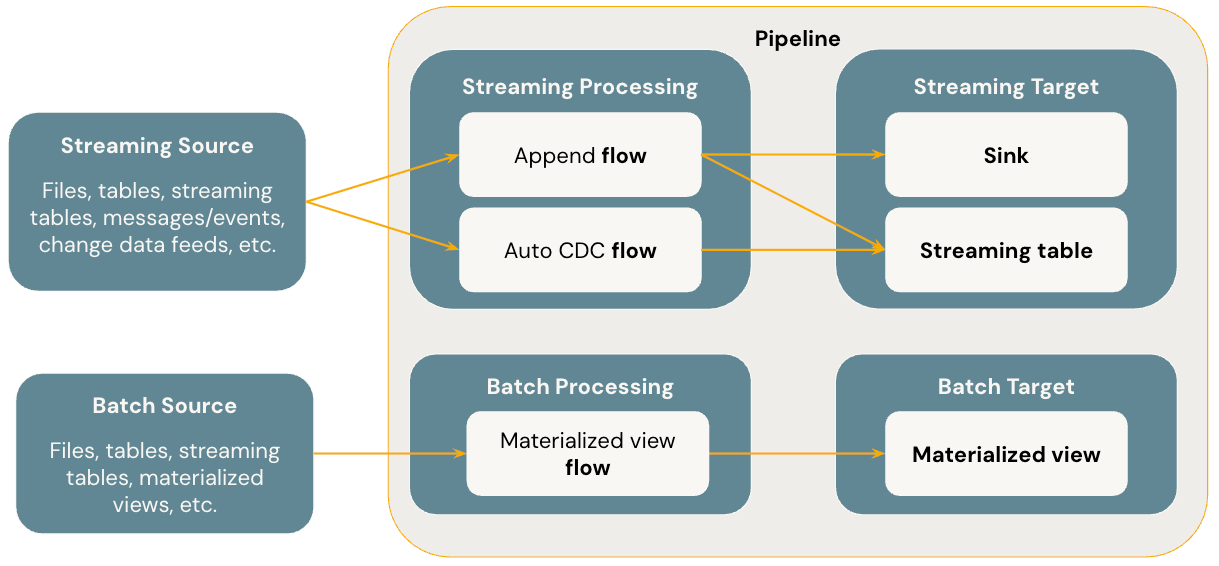
The diagram below illustrates the most important concepts of pipelines.
Datasets
A pipeline produces three types of datasets, each with different processing semantics:
Dataset type | How records are processed |
|---|---|
Streaming table | Each record is processed exactly one time, assuming an append-only source. Streaming tables are suited for ingestion and incremental processing of continuously growing data. |
Materialized view | Results are recomputed as needed to reflect the current state of the data. Materialized views are suited for transformations, aggregations, or pre-computing results consumed by multiple downstream datasets. |
View | Evaluated on demand, not persisted. Use views for intermediate transformations and checks that do not need to be published to a catalog. |
A streaming table is a form of Unity Catalog managed table that is also a streaming target. A streaming table can have one or more streaming flows (Append, AUTO CDC) written into it. You can define streaming flows explicitly and separately from their target streaming table, or implicitly as part of a streaming table definition.
A materialized view is also a form of Unity Catalog managed table and is a batch target. A materialized view can have one or more materialized view flows written into it. Materialized views differ from streaming tables in that you always define the flows implicitly as part of the materialized view definition.
For details, see Streaming tables and Materialized views.
When to use views, materialized views, and streaming tables
When implementing pipeline queries, choose the dataset type that best fits your use case.
Consider using a view to:
- Break a large or complex query into easier-to-manage queries.
- Validate intermediate results using expectations.
- Reduce storage and compute costs for results you don't need to persist. Because tables are materialized, they require additional computation and storage resources.
Consider using a materialized view when:
- Multiple downstream queries consume the table. Because a materialized view caches its results, downstream queries read the precomputed results instead of re-computing the query on each access.
- Other pipelines, jobs, or queries consume the table. Because a materialized view is materialized to a Unity Catalog table, consumers outside the pipeline that defines it can query it. Views are not materialized, so you can only use them within the same pipeline.
- You want to inspect the results of a query during development. Because a materialized view is materialized and can be queried outside of the pipeline, you can validate the correctness of computations during development. After validating, convert queries that do not require materialization into views.
- Your query performs aggregations or joins, or the source data can change due to updates and deletes rather than only growing. A materialized view keeps its results consistent with the current state of the source data, whereas a streaming table is designed for append-only sources and processes each record a single time.
Consider using a streaming table when:
- A query is defined against a data source that is continuously or incrementally growing.
- Query results should be computed incrementally.
- The pipeline needs high throughput and low latency.
Streaming tables are always defined against streaming sources. You can also use streaming sources with AUTO CDC ... INTO to apply updates from CDC feeds. See The AUTO CDC APIs: Simplify change data capture with pipelines.
Flows
A flow is the foundational data processing concept in pipelines, and supports both streaming and batch semantics. A flow reads data from a source, applies user-defined processing logic, and writes the result into a target. Pipelines share the same streaming flow type (Append, Update, Complete) as Spark Structured Streaming. (Currently, only the Append and Update flows are exposed.) For more details, see output modes in Structured Streaming.
Pipelines also provide additional flow types:
- AUTO CDC is a unique streaming flow in Lakeflow pipelines that handles out of order CDC events and supports both SCD Type 1 and SCD Type 2. Auto CDC is not available in SDP.
- Materialized view is a batch flow in pipelines that only processes new data and changes in the source tables whenever possible.
For details, see Load and process data incrementally with Lakeflow pipeline flows.
Sinks
A sink is a streaming target for a pipeline and supports Delta tables, Apache Kafka topics, Azure EventHubs topics, and custom Python data sources. A sink can have one or more streaming flows (Append, Update) written into it.
For details, see Sinks in Lakeflow pipelines.
Pipelines
A pipeline is the unit of development and execution, and is the container for the flows, streaming tables, materialized views, and sinks that you define. You build a pipeline by defining these objects in your pipeline source code and then running the pipeline. While your pipeline runs, it analyzes the dependencies of your defined objects and orchestrates their order of execution and parallelization automatically.
For details, see What are pipelines?.
You can also define standalone materialized views and streaming tables outside a Lakeflow pipeline, where Databricks manages the pipeline for you. To compare the two approaches, see Standalone pipelines vs. Lakeflow pipelines.
A pipeline runs in either triggered or continuous mode, which controls whether it refreshes available data and stops or keeps tables fresh as new data arrives. To compare the two modes, see Triggered vs. continuous pipeline mode.
Data ingestion
Pipelines support all data sources available in Databricks. Databricks recommends using streaming tables for most ingestion use cases. For files in cloud object storage, Auto Loader provides incremental, idempotent loading. For streaming data, pipelines can ingest directly from message buses such as Apache Kafka, Azure Event Hubs, Amazon Kinesis, and Google Pub/Sub. See Load data in pipelines.
Data quality
Expectations are optional clauses on datasets that validate data as it flows through the pipeline. You define an expectation as a SQL boolean constraint and specify what happens when a record fails: warn, drop the record, or fail the update. See Manage data quality with pipeline expectations.
Delta integration
All tables created and managed by pipelines are Delta tables. They have the same guarantees as Delta Lake, including ACID transactions, time travel, and schema enforcement. Pipelines add additional table properties and perform automatic maintenance using predictive optimization, including OPTIMIZE and VACUUM operations. See What is Delta Lake in Databricks?.