Governance Hub
This feature is in Beta. An account admin enables it from the account console Previews page. See Manage Databricks previews.
Governance Hub is a centralized, account-level UI for monitoring governance across your Databricks account. It provides a unified view of data health and coverage, AI usage and spend, and cost drivers, with prioritized insights and recommendations. All views respect existing permissions.
Governance Hub is in the account console. After enabling Governance Hub, administrators can open the account console by clicking Select workspace at the top of the workspace UI and selecting Manage account, or by going directly to the account console URL for their cloud:
https://accounts.gcp.databricks.com
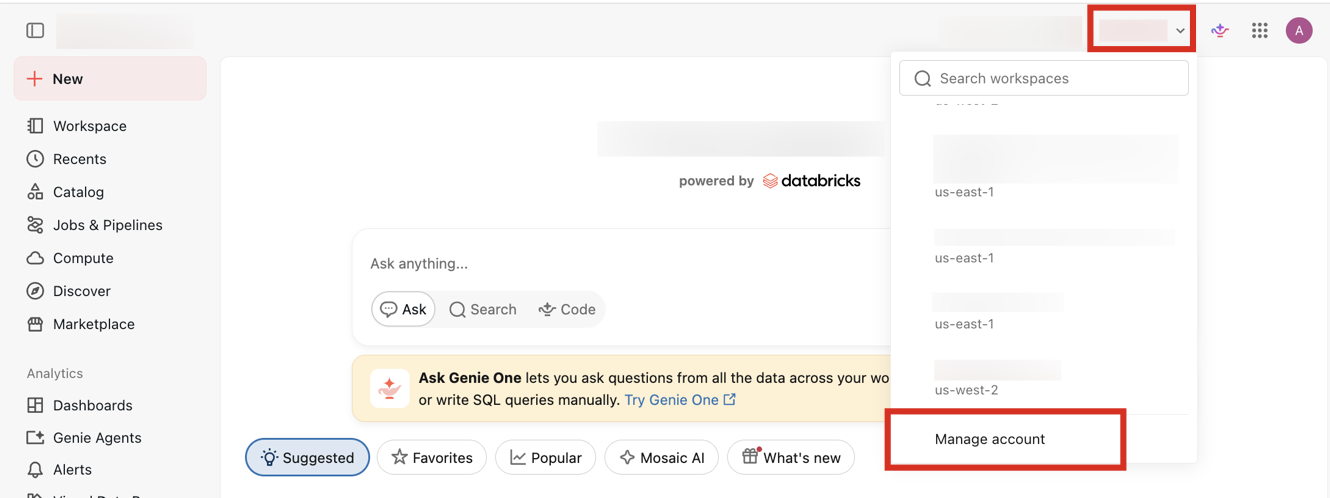
In the account console, the Data, AI, and Cost pages that comprise Governance Hub appear under Governance in the left sidebar.
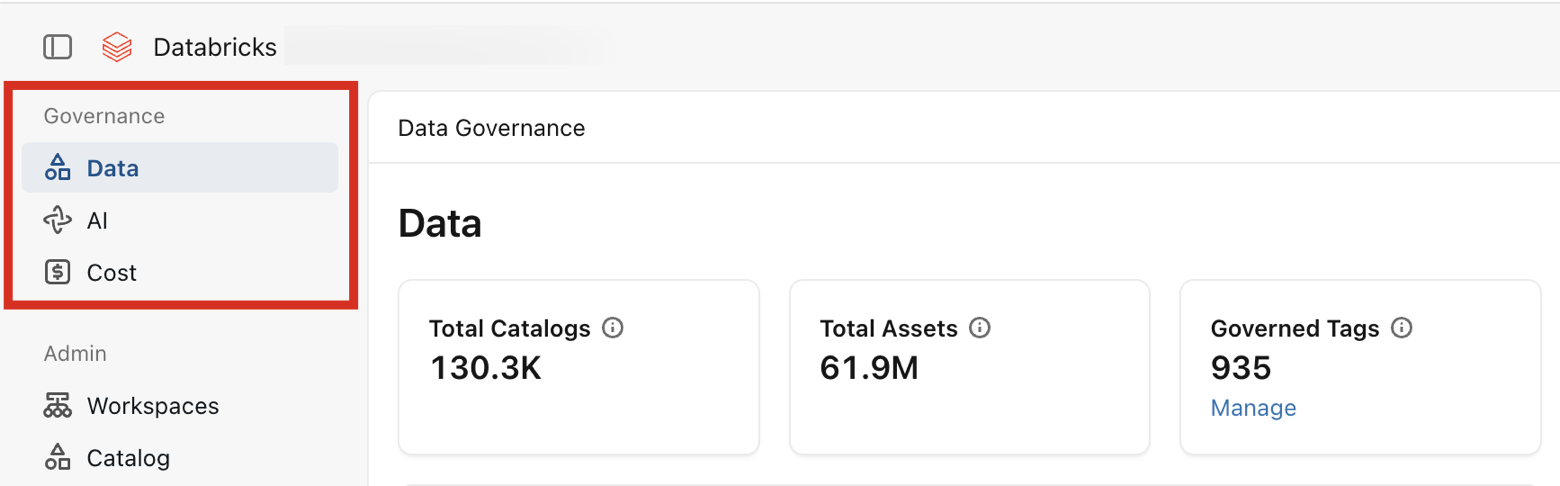
Governance Hub pages
Governance Hub includes the following pages:
-
- Data
- An overview of your data estate, including object access, asset usage, governed tags, data classification, and data quality monitoring.
-
- AI
- An overview of your AI usage and spend, including token usage, budgets, and model and user activity.
-
- Cost
- An overview of your entire Databricks spend, including cost drivers, budgets, tagging coverage, and cost recommendations.
-
- Tags
- An overview of how tags are applied across your account, including recent tag assignments, governed tag usage, and recommendations to fix gaps.
Access and permissions
Governance Hub does not introduce new permissions, nor does it manage access to data or resources. Users see Governance Hub pages based on the access they already have, which is reflected by their role:
Role | Access |
|---|---|
Full access to the Data, AI, and Cost pages, including account-wide metrics, all workspace-level drill-downs for cost and AI, and all metastore-level drill-downs for data. | |
The Cost page for their assigned workspaces, including the ability to create and manage budgets scoped to those workspaces. | |
The Data page for their assigned metastores. |
Data page dashboards and visualizations respect each user's underlying Unity Catalog permissions. Users see only visualizations that they are already allowed to access.
To manage access to data, grant privileges with Unity Catalog. See Manage privileges in Unity Catalog.
Enable Governance Hub
An account admin enables the preview from the account console Previews page. See Manage Databricks previews. Data might take up to a day to load after you enable the preview.
Data processing
When your organization participates in Governance Hub, Databricks may process certain metadata about your Databricks estate in a US region to power the account-level governance experience. This metadata describes your resources rather than the data inside them. It includes resource names and identifiers, owners, usernames, tags, and comments, along with operational signals such as usage, access grants, and query performance. This metadata lets account admins discover, understand, and govern data across all of your workspaces from one place.
Governance Hub does not centralize the row-level data inside your tables, dashboards, or other assets. Only the metadata needed to provide the governance experience is processed, and it is used solely for that purpose.
We handle this metadata consistent with your agreement with Databricks and applicable data protection laws, including the General Data Protection Regulation (GDPR). If your organization stops participating in Governance Hub, the associated metadata is deleted within 30 days.
Opting out
If your data residency or compliance policies do not permit metadata to be centralized in a United States region, you can opt out from the account preview page. The ability to opt out from Governance Hub is permanent. Opting out stops Governance Hub from centralizing any metadata used to support the Governance Hub experience and deletes all centralized metadata within 30 days.