AI governance guide
AI governance keeps the AI your organization uses safe, compliant, and cost-controlled. On Databricks, Unity Gateway is the control plane for AI. It routes every model and MCP request, enforces rate limits and cost controls, applies service policies to implement guardrails, and records usage across any model provider and any coding agent. Unity Catalog governs the assets behind it, such as models, MCP servers, and functions, with the same privileges and policies you use for data. As a result, you don't maintain a separate access model for AI.
This governance applies to external AI, not just Databricks-hosted resources. You govern the following in the same way:
- External coding agents, such as Claude Code, Codex, Cursor, and Gemini CLI, by routing them through a Databricks model service.
- External MCP servers, registered as Unity Catalog MCP Services.
- External models from any provider, such as OpenAI, Anthropic, and Google, accessed through Unity Gateway.
This guide is for workspace and account administrators setting up AI governance for the first time. After you complete it, your teams can use AI productively while Databricks enforces your rules automatically.
For a hands-on start, go to the tutorial: govern a coding agent's GitHub access or moderate a model service's content.
How AI governance works on Databricks
Unity Catalog is the foundation for AI governance on Databricks. It governs your AI assets as securables, the same way it governs your data. Unity Gateway is the control plane for the traffic to those assets, and service policies govern the content of each request and response. AI governance spans three dimensions:
- Asset governance: Unity Catalog manages every model, MCP server, function, and connection as a securable object, governed with the same privileges and ABAC GRANT policies you use for tables and volumes.
- Traffic governance: Unity Gateway routes every model service and MCP service request from a central control plane, and enforces rate limits, budgets, and usage tracking.
- Behavior governance: Service policies allow or deny individual requests and responses. On MCP Services, they can also require approval for input calls, based on who is calling and what the request contains.
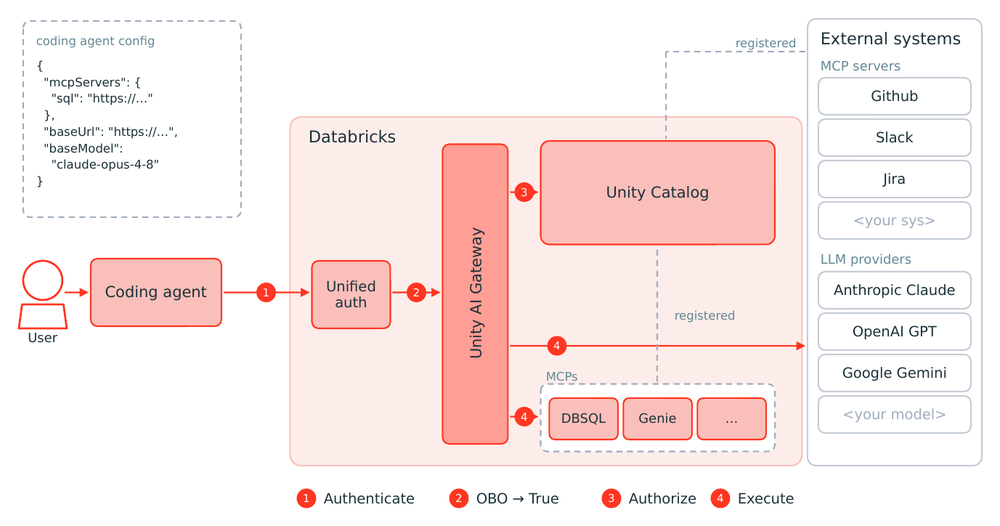
When an agent calls a tool or model, Databricks authenticates the request, authorizes it against Unity Catalog, and routes it through Unity Gateway before it reaches any external system:
Prerequisites
- A workspace that is enabled for Unity Catalog. See Get started with Unity Catalog.
- To use service policies (in Beta), account administrator access to turn on the Unity Gateway beta features from the account console Previews page, or an account administrator who can turn it on for you.
Set up AI governance
Set up governance across your AI assets, traffic, and service behavior, and then confirm that it works. Unity Gateway and Unity Catalog asset governance are generally available. Service policies are in Beta and require enabling the Unity Gateway preview, described in the service policies step below.
Step 1: Govern access to your AI assets in Unity Catalog
Unity Catalog manages AI assets as securable objects, so you grant and revoke access to them with the same privileges and ABAC GRANT policies you use for tables and volumes. Focus on the two primary AI assets:
- MCP Services: Govern access to MCP servers registered as Unity Catalog securables, with tool filtering and service policies. See MCP Services in Unity Catalog.
- Models: Govern access to registered ML models, including Databricks-hosted foundation models. See Manage model lifecycle.
Unity Catalog also governs the functions that agents use as tools, with the same privileges. For tool use in agents, MCP Services provide the richest governance, including tool filtering and service policies.
Grant only the privileges each principal needs. Access to an AI asset determines what an agent acting on a user's behalf can reach.
Step 2: Route and control AI traffic with Unity Gateway
Unity Gateway is the agent control plane. It routes traffic to the model and MCP services your organization uses, enforces cost controls, and records usage from one place, through the same Unity Catalog governance layer:
- Review how Unity Gateway works and how to get started. See AI governance with Unity Gateway.
- Create model services for your LLMs, including Databricks-hosted and external-provider models. See Create a custom model service .
- Point your coding agent at a Databricks model service, so its traffic is governed and costed through Unity Gateway. See Get started with coding agents.
- Set rate limits and spend caps to protect capacity and control cost. See Apply rate limits to model and MCP services.
- Govern access to MCP servers registered as Unity Catalog MCP Services, with grants, tool selection, and service policies. See Govern an MCP.
Step 3: Apply service policies to requests and responses
Service policies are in Beta. Unity Gateway is generally available, but its beta capabilities are enabled separately. An account admin must turn on the Unity Gateway beta features from the account console Previews page. See Manage Databricks previews.
After you govern your assets and traffic, add controls on the content of individual requests and responses. Service policies implement guardrails for AI services. A service policy is a type of attribute-based access control (ABAC) policy scoped to AI services. Attach a service policy to a Model Service, Model Provider Service, or MCP Service to allow or deny an interaction based on its content. On an MCP Service, an input policy can also require human approval. For example, block a request that contains PII or deny an out-of-policy tool call.
Databricks has built-in service policies (guardrails) for common risks such as PII, prompt injection, and unsafe content. You can also author a custom one, or enforce a third-party guardrail vendor's decisions with an external service policy. See Service policies for AI securables and Create and attach a service policy.
Step 4: Monitor usage and cost
Confirm that your governance is working and track activity over time:
- Track model and MCP usage, including who called what and when, in governed usage tables.
- Analyze cost across models, principals, and tags.
- Inspect full request and response payloads in inference tables.
Tutorials
Put these capabilities into practice with a tutorial:
- Tutorial: Control a coding agent's GitHub MCP access
- Tutorial: Add service policy guardrails to a model service
Next steps
- Learn how service policies control the content of requests and responses.
- Explore Unity Gateway for full model service and MCP service governance.