Select models or use Smart Routing
Unity Gateway lets you use different models in your coding agent. Choose a model when you start, switch while you work, or let Smart Routing select one for your task.
Choose a model
ug discovers the models available through your workspace. What you can choose depends on the agent's model support, your organization's configuration, and the access granted to you.
Choose a model at launch
Add --model to your agent's launch command, using the full name of a model available to you:
ug claude --model system.ai.claude-sonnet-4-6
ug codex --model system.ai.gpt-5-5
The agent opens with that model, ready for your usual workflow. Without --model, it starts with its configured default.
To cut per-token cost for routine work, launch on an open source model, such as system.ai.glm-5-2:
ug codex --model system.ai.glm-5-2
With OpenCode, run ug opencode and select an open source model such as system.ai.glm-5-2. To see which agents support open models, see Supported coding and work agents. For the cost rationale, see Control spending.
To route through your organization's registered provider account instead, pass its Unity Catalog name to --provider. See Bring your own model providers.
Switch models during a session
In most coding agents, enter:
/model
Select a model from the picker and continue working. You can use a faster model for routine edits and switch to a more capable model for a complex task.
The command varies by agent. If /model isn't available, check your agent's help menu for its model picker.
Use Smart Routing
Smart Routing is in Beta. An account admin must enable the Enhanced Unity Gateway preview from the account console Previews page. See Manage Databricks previews.
Smart Routing selects the lowest-cost model capable of handling your task, so you don't choose a model for every request. It works with Claude Code and Codex.
Requirements
- The Enhanced Unity Gateway preview enabled for your account. An account admin enables it from the account console Previews page. See Manage Databricks previews. Allow 1–2 minutes after enablement for it to propagate to your workspace.
EXECUTEaccess to every candidate model Smart Routing can select. Smart Routing chooses only amongsystem.ai-prefixed model services. If access is missing, routing fails with an error that identifies the required models.
- A Databricks workspace in an Unity Gateway supported region.
Use Smart Routing with the Unity Gateway CLI
If your admin enables Smart Routing in your agent's workspace configuration, ug applies it automatically. Launch your agent as usual:
ug claude
ug codex
To turn on Smart Routing yourself for a launch, add --enable-smart-routing:
ug claude --enable-smart-routing
ug codex --enable-smart-routing
To turn it off for a launch, including when your admin enables it, launch with --disable-smart-routing.
To turn Smart Routing off or back on during a session, enter:
- Claude Code:
/smart-router offor/smart-router on - Codex:
$smart-router offor$smart-router on
With Smart Routing on, your agent hands off tasks to subagents. Each subagent's task is routed independently and can use a different model. The agent shows each subagent's selected model and, when available, the reason for the choice. The main session stays on its default model: your admin's default or smart default if one is set, otherwise the agent's configured default. To keep a task in the main session, ask the agent not to use subagents.
For automatic tool-call safety checks with Claude Code subagents using non-Anthropic foundation models hosted by Databricks, see Auto mode.
To choose the model yourself, launch with --model. Smart Routing is off for that launch, including for subagents.
Use Smart Routing in Omnigent
Omnigent can select both the coding harness and the model for a task, including work delegated to subagents. Use version v0.8.0 or later.
Configure Claude Code and Codex for your Databricks workspace:
omni setup
Connect your computer to the Omnigent server:
omni host --server <workspace-url>
Replace <workspace-url> with your Databricks workspace URL.
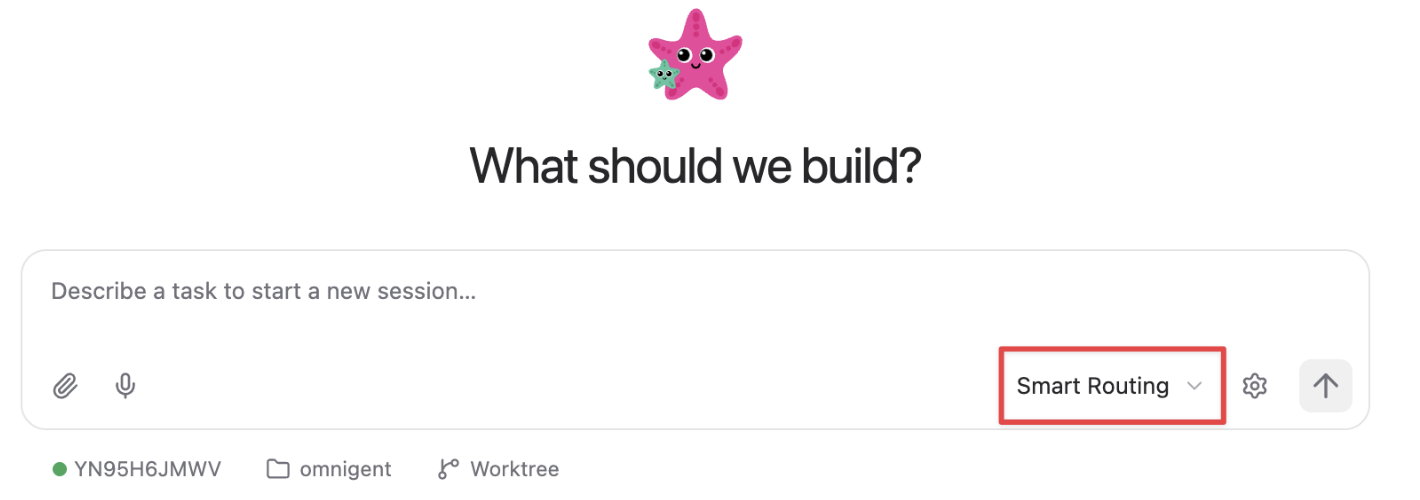
In the Omnigent UI, select Smart Routing as the harness to let it choose both the harness and model:
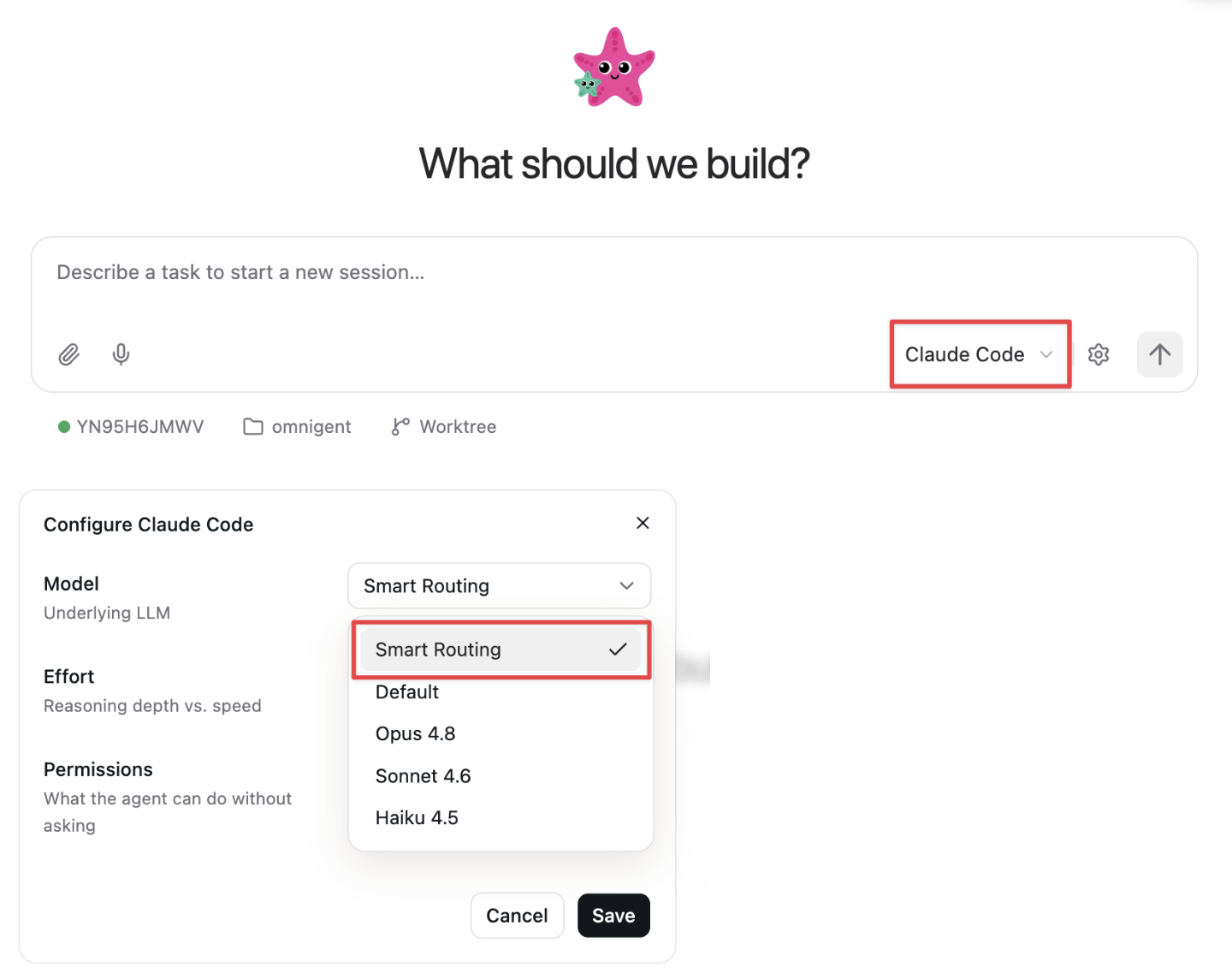
To keep Claude Code or Codex, select that harness, open its gear menu, and choose Smart Routing for the model:
You can also enable model routing from the CLI for a chosen harness:
omni claude --smart-routing --server <workspace-url>
omni codex --smart-routing --server <workspace-url>
The Unity Gateway CLI routes among models within the selected supported harness. Omnigent also selects across harnesses; the omni claude and omni codex examples explicitly choose a harness.