Configure Unity AI Gateway endpoints
This feature is in Beta. Account admins can control access to this feature from the account console Previews page. See Manage Databricks previews.
This page describes how to configure Unity AI Gateway endpoints.
Requirements
- Unity AI Gateway preview enabled for your account. See Manage Databricks previews.
- A Databricks workspace in a Unity AI Gateway supported region.
- Unity Catalog enabled for your workspace. See Enable a workspace for Unity Catalog.
- Endpoint admin operations require
CAN MANAGEon that endpoint. See Access control lists. - On creation, the creator is granted
CAN MANAGEon the new endpoint. - To prevent bypassing guardrails or throughput limits, restrict endpoint creation and
CAN MANAGEto admins, and grant other users only query permissions on approved endpoints.
Create a Unity AI Gateway endpoint
To create a Unity AI Gateway endpoint:
- In the sidebar, click AI Gateway.
- Click Create Unity AI Gateway Endpoint.
- Configure your endpoint name and primary model.
- Click Create.
Configure features on an endpoint
You can update Unity AI Gateway endpoints to enable and disable features. Updates to Unity AI Gateway configurations take up to 1 minute to take effect.
To update Unity AI Gateway features on an existing endpoint:
- Click on your endpoint from the AI Gateway page.
- In the Gateway Endpoint Details sidebar, click the edit icon next to the feature you want to update.
- Make your changes and click Save.
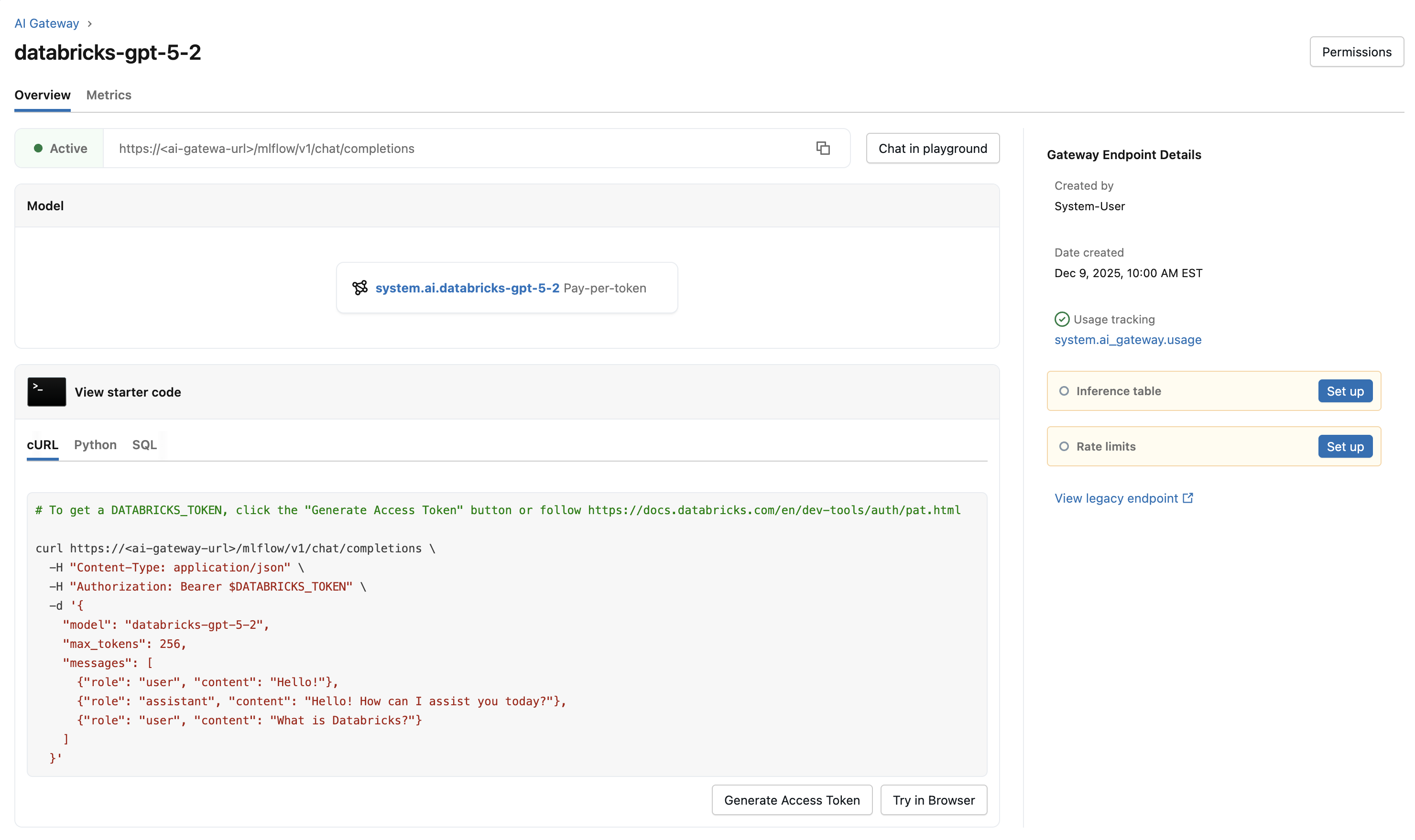
The following table summarizes the available Unity AI Gateway features and how to configure them:
Feature | How to configure | Details |
|---|---|---|
Enabled by default. |
| |
Select Enable inference tables to log requests and responses. |
| |
Select Rate limits to configure queries per minute (QPM) or tokens per minute (TPM). |
| |
Select Guardrails to configure content policies. |
| |
Fallbacks | Select Add fallback model to configure fallback models. |
|
Traffic splitting | Select Add traffic split to distribute requests across multiple model backends. |
|
Custom APIs | Select Custom API when creating an endpoint to connect to an external API. |
|
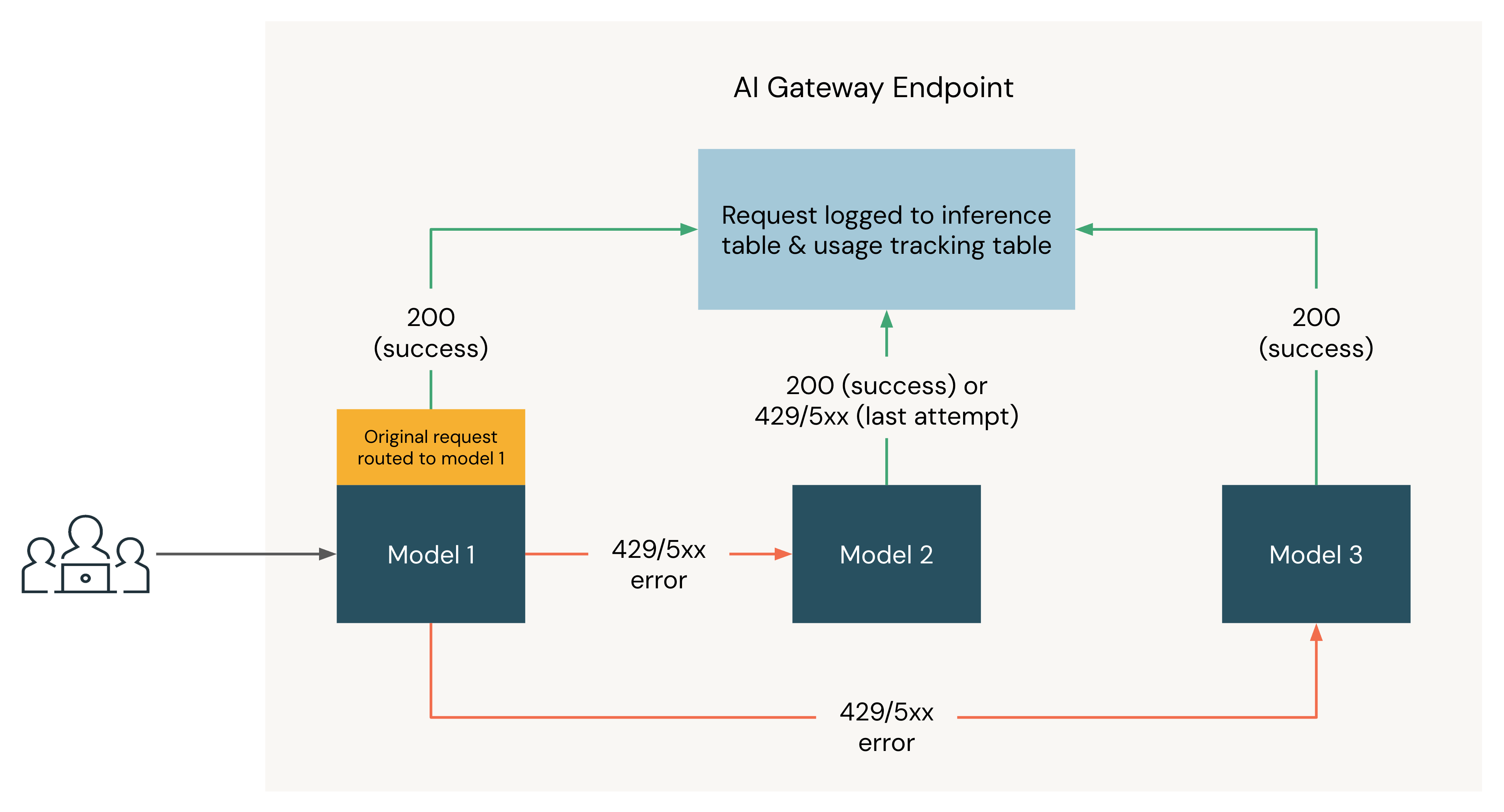
The following diagram shows a fallbacks example where three models are registered as destinations of a Unity AI Gateway endpoint:
- The request is originally routed to Model 1.
- If the request returns a 200 response, the request was successful on Model 1 and the request and its response are logged to the usage tracking and inference tables.
- If the request returns a
429or5XXerror on Model 1, the request falls back to the next model on the endpoint, Model 2. - If the request returns a
429or5XXerror on Model 2, the request falls back to the next model on the endpoint, Model 3. - If the request returns a
429or5XXerror on Model 3, the request fails since all fallback models have been tried. The failed request and the response error are logged to the usage tracking and inference tables.