Migrate from classic compute to serverless compute
Migrate your workloads from classic compute to serverless compute. Serverless compute handles provisioning, scaling, runtime upgrades, and optimization automatically.
Most classic workloads can migrate with minimal or no code changes. This page focuses on those workloads. Some features, such as df.cache, are not yet supported on serverless, but will not require code changes once available. Certain workloads that depend on R or Scala notebooks require classic compute and will not be able to migrate to serverless. For a full list of current limitations, see Serverless compute limitations.
Migrate with the migration agent
This feature is in Beta. Workspace administrators can enable it from the Previews page by opting into the Compute Agent preview. See Manage Databricks previews.
You can use a migration agent to migrate a single notebook or job to serverless compute. The agent reviews the workload's environment, libraries, Spark configurations, tags, and code, then proposes each change as an individual suggestion for you to accept or reject. Accepted changes are applied in place and can be rolled back.
What the agent reviews and changes
Area | What the agent does |
|---|---|
Environment and libraries | Translates library installs into a serverless environment specification, including |
Environment variables | Translates cluster environment variables to their serverless equivalents, preserving workspace secret references and omitting platform-managed values. |
Data and storage access | Rewrites serverless-incompatible paths, such as local disk, |
Spark configurations | Classifies each Spark configuration, comments out configurations that are safe to drop, and flags and removes configurations that serverless does not support. Covers both cluster-attached and in-notebook configurations. |
Workload code | Rewrites code that serverless does not support into compatible equivalents, such as RDD operations rewritten to DataFrame operations, and adjusts code for ANSI-mode SQL behavior on serverless. |
Tags | Translates custom cluster tags, such as a cost-center tag, to their serverless equivalents. |
Performance mode | Suggests a performance mode based on the cluster's configuration. See Choose a performance mode. |
Requirements
-
Workspace admin access is recommended to ensure a complete migration. This is because the agent also inspects workspace-level global init scripts beyond the target workload. You might be able to migrate if you have
CAN MANAGEpermission on the workload, but without admin permissions, it can result in missing libraries, environment settings, or tags. -
Confirm you have access to the agent. Type
/computein Genie Code./computeshould appear in the autocomplete menu. If it doesn't appear, a workspace admin must enable the preview in your workspace.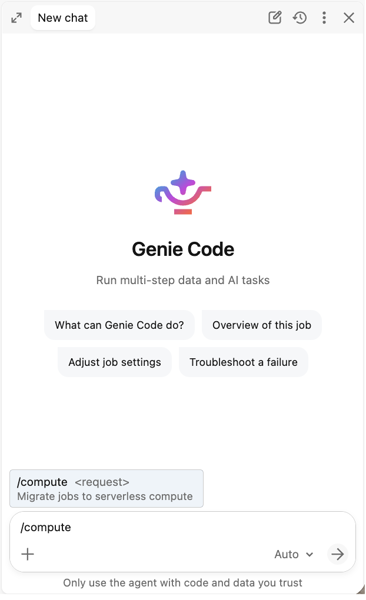
Migrate a notebook
- Open the notebook you want to migrate.
- Open Genie Code and run
/compute migrate to serverlessfrom the/command palette. - Review the agent's findings. The agent scans the notebook's environment, libraries, and code, and proposes a change for each item that needs one, such as moving a library install into an environment specification or rewriting a code cell to run on serverless.
- Accept or reject each proposed change.
- Apply the changes you accepted. They are written to the notebook in place.
- Attach the notebook to serverless and run it to confirm it behaves as you expect. See Verifying a migrated workload.
Migrate a job
- Open the job you want to migrate.
- Open Genie Code and run
/compute migrate to serverlessfrom the/command palette. - The agent clones your job and attempts to migrate the cloned job to serverless.
- Review the agent's findings. For a multi-task job, the agent enumerates every task and its per-task cluster configuration, and proposes changes for each while preserving the job's schedule.
- Accept or reject each proposed change across the migration surface: environment and libraries, Spark configurations, and any workload code that must change.
- Apply the changes you accepted. The job's compute is switched to serverless.
- Run the job on serverless and confirm the results. See Verifying a migrated workload.
- Optionally, as a final step, the agent promotes the migrated clone. It copies the clone's configuration and notebooks back onto your original job in place (keeping the same job ID, schedule, and permissions), then deletes the clone. If you skip promotion and keep both jobs, pause the schedule on whichever job you are not running, or the same trigger fires both and can duplicate writes or other side effects.
Verify a migrated workload
The agent proposes and applies changes, but does not run your workload or verify its output. Always run a migrated workload on serverless and confirm the results before you rely on it, especially for workloads that write to production tables. If the agent proposes a change that looks wrong, reject it and send us feedback so we can improve the agent. See Submit product feedback.
While you validate a migrated workload, run it in performance-optimized mode. It starts faster than standard mode, so you get quicker feedback as you confirm the results. Switch to the mode that best fits the workload before you run it in production. See Choose a performance mode.
When the agent finds something it cannot safely migrate, it reports a blocker and stops by default. You can explicitly instruct it to proceed past some compatibility or dependency blockers, but doing so accepts the risk that those dependencies, cost attribution, or runtime behavior will not carry over, and the workload may fail on serverless.
Roll back migration changes
The changes the agent applies are reversible.
For a notebook, open it and restore the revision from just before the migration. See Version history in Databricks notebooks.
For a job, if you did not promote the migrated clone, your original job was never changed: run it as before and delete the clone. If you promoted the clone, restore from the backup the agent wrote before it made any change:
- Open the backup folder in your workspace home:
/Workspace/Users/<your-username>/serverless-migration/backups/job-<job-id>/<timestamp>/. The agent showed this path during the migration. If there are several timestamps, pick the one from just before the migration. - Open
job.yaml, which holds your pre-migration job settings, and apply those settings back to the same job with aPOST /api/2.2/jobs/resetrequest, which overwrites the job's settings with the ones you supply. You can also paste them into the job's JSON definition in the UI. This returns the job to classic compute. - Open
mapping.yaml, which lists each backed-up file and the original path it came from. Copy each backup file back over its original path to undo the code rewrites. - Run the job to confirm it behaves as it did before the migration.
The migration never deletes this backup. Tasks the agent did not modify, such as git-sourced, SQL, or dbt tasks, are recorded in job.yaml but their files are not copied into the backup, so restore those from your source of truth if needed.
Known limitations
- The following are reported as blockers: custom images, ML Runtime variants, Databricks Runtime versions earlier than 13, Spark configurations that can't be safely ignored on serverless, and dependencies such as eggs, JARs, and Maven libraries. A blocker means the agent stops instead of migrating that item. You can either resolve it yourself and run the migration again, or tell the agent to migrate anyway, which leaves that item unresolved and may cause the workload to fail on serverless.
- The agent reads init scripts stored in workspace files or Unity Catalog volumes. Init scripts stored in GCS or DBFS cannot be read and are reported as blockers.
- The agent does not inspect every classic compute attribute. Cluster log delivery and SSH keys are not modeled, and while it detects many DBFS mount dependencies from workload code, it does not enumerate or resolve every mount.
- Cache and checkpoint APIs, global temporary views, DBFS mount-management calls, and Scala or R code are hard blockers by default. You can instruct the agent to proceed, but the unresolved functionality is left unchanged and may fail on serverless.
- Jobs with more than 10 migratable tasks cannot currently be migrated.
- The agent migrates one workload at a time. There is no fleet-wide discovery, bulk migration, or admin approval workflow.
- The agent proposes changes and applies the ones you accept, but it does not execute your workload or verify output correctness. Verify a migrated workload before relying on it for production data.
- If your workload's source of truth is a Databricks Asset Bundle or a Git folder, the agent applies changes to the workspace object in place. Reconcile those changes with your bundle or repository so that a later deploy does not overwrite the migration.
Migrate to serverless manually
To migrate your workloads from classic compute to serverless compute, follow these steps:
- Check prerequisites: Verify that your workspace, networking, and cloud storage access meet the requirements. See Prerequisites.
- Update code: Make any necessary code and configuration changes. See Update your code.
- Test your workloads: Validate compatibility and correctness before cutting over. See Test your workloads.
- Choose a performance mode: Select the performance mode that best matches your workload requirements. See Choose a performance mode.
- Migrate in phases: Roll out serverless incrementally, starting with new and low-risk workloads. See Migrate in phases.
- Monitor costs: Track serverless DBU consumption and set up alerts. See Monitor costs.
Prerequisites
Before you begin migrating, you might need to update some legacy configurations in your workspace.
Prerequisite | Action | Details |
|---|---|---|
Workspace is enabled for Unity Catalog | Migrate from Hive Metastore if needed | |
Networking configured | Replace VPC peering with NCCs, Private Link, or firewall rules | |
Cloud storage access | Replace legacy data access patterns with Unity Catalog external locations |
Update your code
The following sections list the code and configuration changes required to make your workloads compatible with serverless.
Data access
Legacy data access patterns are not supported on serverless. Update your code to use Unity Catalog instead.
Classic pattern | Serverless replacement | Details |
|---|---|---|
DBFS paths ( | Unity Catalog volumes | |
Hive Metastore tables | Unity Catalog tables (or HMS Federation) | |
Storage account credentials | Unity Catalog external locations | |
Custom JDBC JARs | Lakehouse Federation |
DBFS access is limited on serverless. Update all dbfs:/ paths to Unity Catalog volumes before migrating. For more information, see Migrate files stored in DBFS.
Example: Replace DBFS paths and Hive Metastore references
# Classic
df = spark.read.csv("dbfs:/mnt/datalake/data.csv", header=True)
df.write.parquet("dbfs:/mnt/output/results")
df = spark.table("my_database.my_table")

# Serverless
df = spark.read.csv("/Volumes/main/sales/raw_data/data.csv", header=True)
df.write.parquet("/Volumes/main/analytics/output/results")
df = spark.table("main.my_database.my_table")  # three-level namespace
APIs and code
Certain APIs and code patterns are not supported on serverless. Reference this table to see if your code needs to be updated.
Classic pattern | Serverless replacement | Details |
|---|---|---|
RDD APIs ( | DataFrame APIs | |
| Remove caching calls | |
| Use | |
Hive variables ( | SQL | |
Unsupported Spark configs | Remove unsupported configs. Serverless auto-tunes most settings. | Configure Spark properties for serverless notebooks and jobs |
Example: Replace RDD operations with DataFrames
from pyspark.sql import functions as F

# sc.parallelize + rdd.map
# Classic:  rdd = sc.parallelize([1, 2, 3]); rdd.map(lambda x: x * 2).collect()
df = spark.createDataFrame([(1,), (2,), (3,)], ["value"])
result = df.select((F.col("value") * 2).alias("value")).collect()

# rdd.flatMap
# Classic:  sc.parallelize(["hello world"]).flatMap(lambda l: l.split(" ")).collect()
df = spark.createDataFrame([("hello world",)], ["line"])
words = df.select(F.explode(F.split("line", " ")).alias("word")).collect()

# rdd.groupByKey
# Classic:  rdd.groupByKey().mapValues(list).collect()
df = spark.createDataFrame([("a", 1), ("b", 2), ("a", 3)], ["key", "value"])
grouped = df.groupBy("key").agg(F.collect_list("value").alias("values")).collect()

# rdd.mapPartitions → applyInPandas
import pandas as pd
def process_group(pdf: pd.DataFrame) -> pd.DataFrame:
    return pd.DataFrame({"total": [pdf["id"].sum()]})
result = (spark.range(100).repartition(4)
    .groupBy(F.spark_partition_id())
    .applyInPandas(process_group, schema="total long").collect())

# sc.textFile → spark.read.text
df = spark.read.text("/Volumes/catalog/schema/volume/file.txt")
Example: Replace SparkContext and caching
from pyspark.sql.functions import broadcast

# sc.broadcast → broadcast join
result = main_df.join(broadcast(lookup_df), "key")

# sc.accumulator → DataFrame aggregation
total = df.agg(F.sum("amount")).collect()[0][0]

# sqlContext.sql → spark.sql
result = spark.sql("SELECT * FROM main.db.table")

# df.cache() → remove caching calls
# Materialize expensive intermediate results to Delta as a workaround:
df = spark.read.parquet(path)
result = df.filter("status = 'active'")
expensive_df.write.format("delta").mode("overwrite").saveAsTable("main.scratch.temp")
result = spark.table("main.scratch.temp")
SQL behavior differences
Serverless compute enables ANSI mode by default. Databricks Runtime enables ANSI mode by default in version 17.0 and above. If your classic compute runs an earlier version, some queries that succeed there raise runtime errors on serverless.
The migration agent adjusts code for ANSI-mode behavior automatically. If you migrate manually, review the following operations, which most often change behavior:
Operation | Classic compute with ANSI mode disabled | Serverless compute |
|---|---|---|
Invalid cast, such as | Returns | Raises CAST_INVALID_INPUT |
Integer arithmetic overflow | Wraps around. For example, | Raises ARITHMETIC_OVERFLOW |
Decimal arithmetic overflow | Returns | Raises NUMERIC_VALUE_OUT_OF_RANGE |
Division by zero | Returns | Raises DIVIDE_BY_ZERO |
Malformed URL in parse_url | Returns | Raises |
To return NULL instead of raising an error, replace the operation with its try_* equivalent, such as try_cast, try_add, try_divide, or try_parse_url. Databricks recommends this approach instead of disabling ANSI mode, because ANSI mode surfaces data quality issues that a silent NULL hides.
To opt out of ANSI mode for casts, arithmetic, and parsing, set spark.sql.ansi.enabled to false. Serverless compute applies ANSI rules to implicit casts on table inserts regardless of this setting, because spark.sql.storeAssignmentPolicy cannot be changed on serverless compute. For a full description of ANSI behavior, see ANSI compliance in Databricks Runtime.
Libraries and environments
You can manage libraries and environments at the workspace level using base environments and at the notebook level using the notebook's serverless environment.
Classic pattern | Serverless replacement | Details |
|---|---|---|
Init scripts | Serverless environments | |
Cluster-scoped libraries | Notebook-scoped or environment libraries | |
Maven/JAR libraries | JAR task support for jobs; PyPI for notebooks | |
Docker containers | Serverless environments for library needs |
Pin Python packages in requirements.txt for reproducible environments. See Specify Python package versions.
Streaming
Streaming workloads are supported on serverless, but certain triggers are not supported. Update your code to use the supported triggers.
Spark trigger | Supported | Notes |
|---|---|---|
| Yes | Recommended |
| Yes | This is deprecated. Use |
| No | Returns |
| No | Use Lakeflow pipelines continuous mode instead |
Default (not setting | No | Omitting |
For continuous streaming, migrate to Spark Declarative Pipelines in continuous mode or use continuous-schedule jobs with AvailableNow. For large sources, set maxFilesPerTrigger or maxBytesPerTrigger to prevent out-of-memory errors.
Example: Fix streaming triggers
# Classic (not supported on serverless — default trigger is ProcessingTime)
query = df.writeStream.format("delta").outputMode("append").start()

# Serverless (explicit AvailableNow trigger)
query = (df.writeStream.format("delta").outputMode("append")
    .trigger(availableNow=True)
    .option("checkpointLocation", checkpoint_path)
    .start(output_path))
query.awaitTermination()

# With OOM prevention for large sources
query = (spark.readStream.format("delta")
    .option("maxFilesPerTrigger", 100)
    .option("maxBytesPerTrigger", "10g")
    .load(input_path)
    .writeStream.format("delta")
    .trigger(availableNow=True)
    .option("checkpointLocation", checkpoint_path)
    .start(output_path))
Test your workloads
- Quick compatibility test: Run the workload on classic compute with Standard access mode and Databricks Runtime 14.3 or above. If the run succeeds, the workload can migrate to serverless without any code changes.
- A/B comparison (recommended for production): Run the same workload on classic (control) and serverless (experiment). Diff output tables and verify correctness. Iterate until outputs match.
- Temporary configs: You can temporarily set supported Spark configs during testing. Remove them once stable.
Choose a performance mode
Serverless jobs and pipelines support two performance modes: standard and performance-optimized. The performance mode you choose depends on your workload requirements.
Mode | Availability | Startup | Best for |
|---|---|---|---|
Standard | Jobs, Lakeflow pipelines | 4-6 minutes | Cost-sensitive batch |
Performance-optimized | Notebooks, Jobs, Lakeflow pipelines | Seconds | Interactive, latency-sensitive |
Migrate in phases
- New workloads: Start all new notebooks and jobs on serverless.
- Low-risk workloads: Migrate PySpark/SQL workloads already on standard access mode and Databricks Runtime 14.3 or above.
- Complex workloads: Migrate workloads needing code changes (RDD rewrites, DBFS updates, trigger fixes).
- Remaining workloads: Review periodically as capabilities expand.
Monitor costs
Serverless billing is based on DBU consumption, not cluster uptime. Validate cost expectations with representative workloads before migrating at scale. For tools and strategies to monitor serverless costs, see Monitor the cost of serverless compute.
Additional resources
- Best practices for serverless compute: Optimization tips for serverless workloads
- Serverless compute limitations: Full list of current limitations and unsupported features
- Configure the serverless environment: Manage libraries and dependencies
- Supported Spark configurations: Spark configs available on serverless
- Spark Connect vs. classic Spark: Behavioral differences in serverless architecture
- Serverless network security: NCCs, Private Link, and firewall configuration
- Serverless compute release notes: Track new capabilities as they ship
- Unity Catalog upgrade guide: Migrate from Hive Metastore to Unity Catalog
You can also refer to the following blog posts for more information:
- What is serverless computing?: Overview of serverless capabilities and customer results
- Evolution of data engineering: How serverless compute is transforming notebooks and Lakeflow jobs: How serverless powers Lakeflow Jobs and Pipelines