Dataset materialization in AI/BI dashboards
This feature is in Beta. To use it, a workspace admin must turn on AI/BI Dashboard Materialization from the Previews page. See Manage Databricks previews.
AI/BI dashboards are built on dashboard-scoped datasets. By default, every dataset is evaluated live, so each time a dashboard loads or a viewer interacts with it, the underlying queries, joins, and source scans run again on your SQL warehouse. For dashboards built on expensive source queries or many joins, rerunning those queries on every interaction is slow and costly.
Dataset materialization pre-computes and stores the results behind a dataset, so the heavy work happens one time on a schedule instead of on every dashboard load or interaction. Interactions then render from the stored results, which makes published dashboards faster.
Materialization uses Unity Catalog metric view materialization technology. See Materialization for metric views.
What gets materialized
Materialization pre-computes and stores dataset data. What gets stored differs between the two dataset types:
- For SQL datasets, the full query result is pre-computed and stored.
- For local metric views, the row-level data model (source data, joins, and filter fields) is stored, while measures are still computed at query time against the pre-computed base.
Benefits
Dataset materialization provides the following benefits:
- Faster dashboards without re-modeling. Expensive joins and source scans run one time on a schedule rather than on every load, which removes the wait viewers experience when a dashboard re-queries large tables.
- Lower warehouse cost on read. Pre-computing the base data model avoids repeating the same heavy query for every viewer and every page load, which reduces redundant warehouse usage.
- No operational overhead. Databricks creates, stores, and refreshes the materialized data for you. There is no pipeline, schema, or storage to manage.
Costs
Dataset materialization incurs storage and compute costs:
- Storage. You pay for storing the materialized data. Charges depend on the underlying storage used. For an overview of storage in Unity Catalog, see Connect to cloud object storage using Unity Catalog.
- Compute. Initial creation and refreshes run on serverless Lakeflow pipelines and incur compute charges. See Lakeflow pipelines pricing.
Weigh these costs against the savings from avoiding repeated source scans and joins. Choose a refresh schedule that balances data freshness with compute costs.
When to use materialization
Materialization is not always the right lever for performance. The benefit comes from replacing repeated, full recomputation of a dataset (scanning and joining) with reads against a pre-computed table. Materialize a dataset when one or more of the following apply:
- Heavily interactive dashboards. The dashboard has many filters, cross-filtering, or drill-downs. Without materialization, every interaction reruns the dataset query, so pre-computing those datasets pays off repeatedly in a session.
- Expensive datasets. The dataset is built on multi-table joins, heavy views or common table expressions (CTEs), window functions, or unions across many tables.
- Selective filters on large tables. The dataset selects a small subset, such as one region or the last 7 days out of billions of rows. Materialization stores only the small subset.
- Tolerance for scheduled freshness. The data only needs to be as fresh as the dashboard's refresh schedule, such as hourly or daily, rather than real time.
For small datasets or dashboards that are rarely loaded, the live query is often fast enough, and materialization might not be worth the cost. Because materialization is opt-in per publish and per dataset, you can apply it only where it pays off.
Requirements
- Access to an AI/BI dashboard.
- The dashboard is published with the Share data permissions option. Materialization is not supported for dashboards published with individual data permissions. See What are shared data permissions?.
- Serverless compute enabled in the workspace. Initial creation and refreshes run on serverless Lakeflow pipelines. See Set up serverless SQL warehouses.
- CAN USE permission on a SQL warehouse running Databricks Runtime 17.3 and above.
Enable dataset materialization
Datasets are selected for materialization by default, but materialization is off for the dashboard until you turn on the Materialize datasets option when publishing.
Choose which datasets to materialize
On the Data tab, click the materialization icon next to a dataset to include or exclude it.

When you exclude a dataset from materialization, queries against that dataset return live results, while queries against materialized datasets reflect the latest materialization run. When all datasets use the same materialization schedule, widgets have consistent data freshness.
Publish with materialization
- Click Publish in the draft dashboard.
- Select Share data permissions in the publishing dialog.
- Turn on the Materialize datasets option to materialize the datasets selected on the Data tab.
- Click Publish.
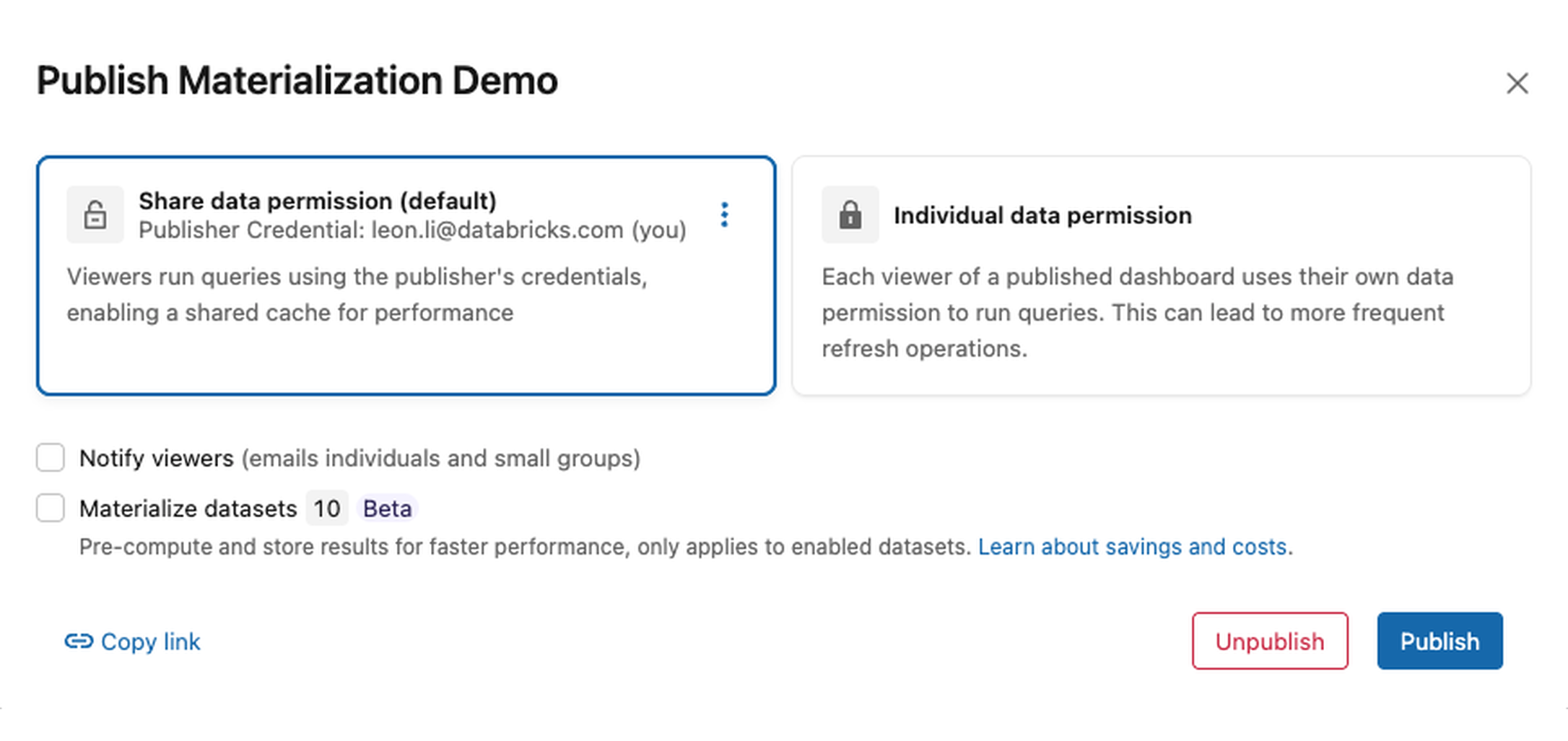
Turn on the Materialize datasets option on each publish.
Set a refresh schedule
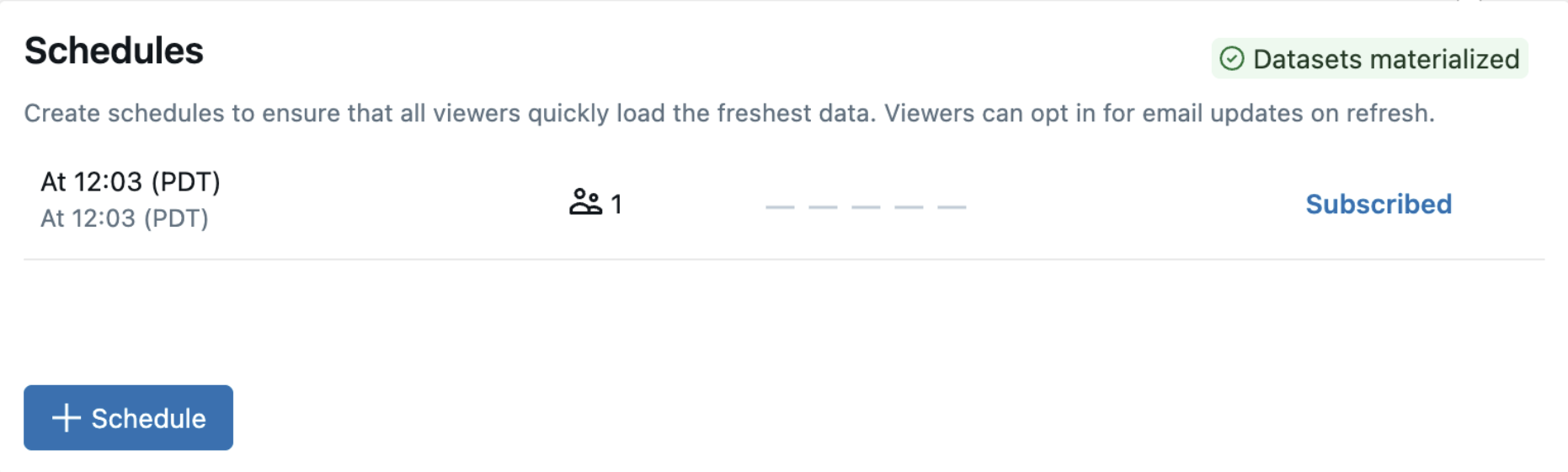
Materialized data refreshes on the dashboard's refresh schedule. Use the dashboard schedule to adjust the refresh frequency.
If the dashboard has no schedule, publishing with materialization enabled adds a daily refresh schedule. Existing schedules are preserved. Without an active schedule, materialized data does not refresh automatically after creation.
View materialization status
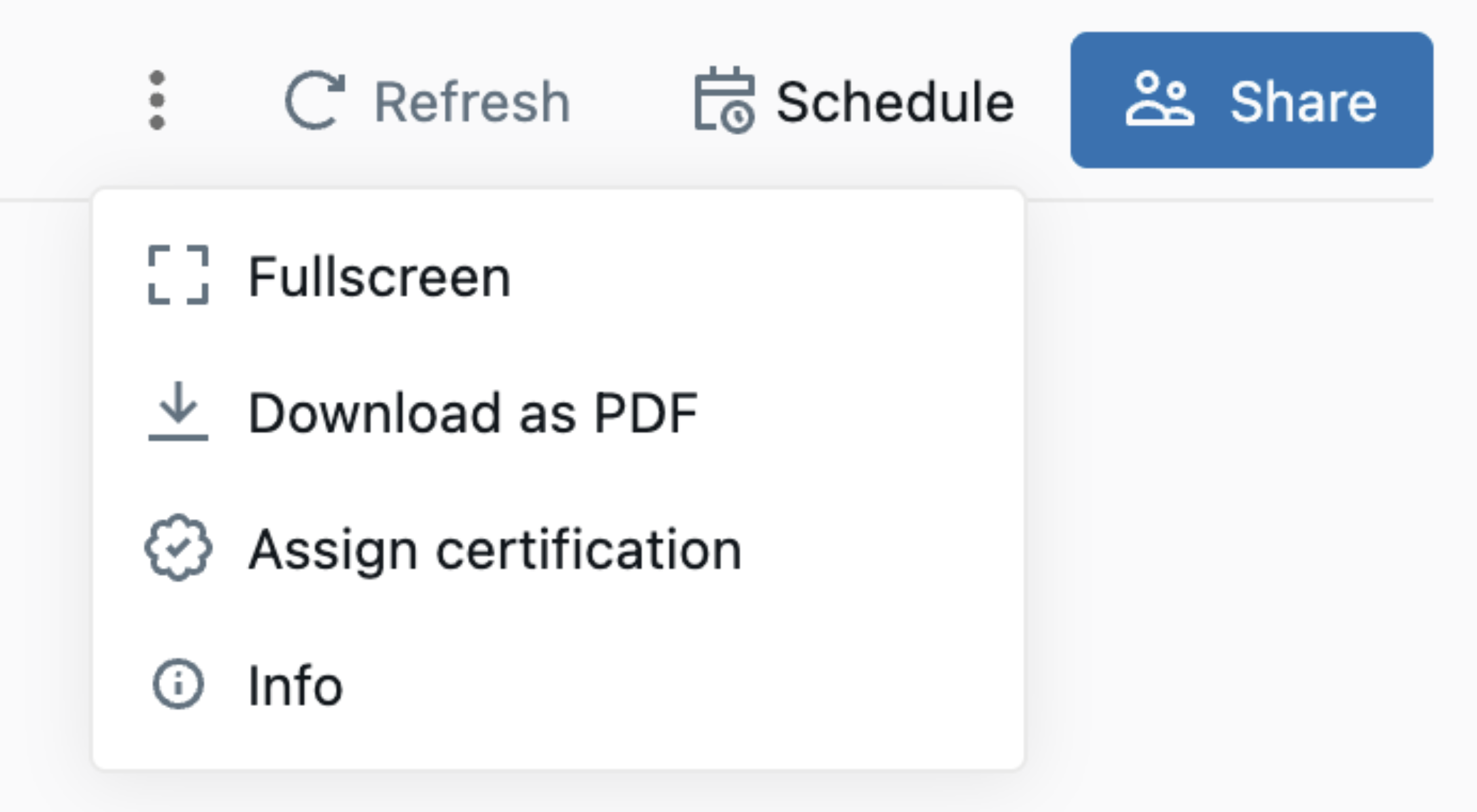
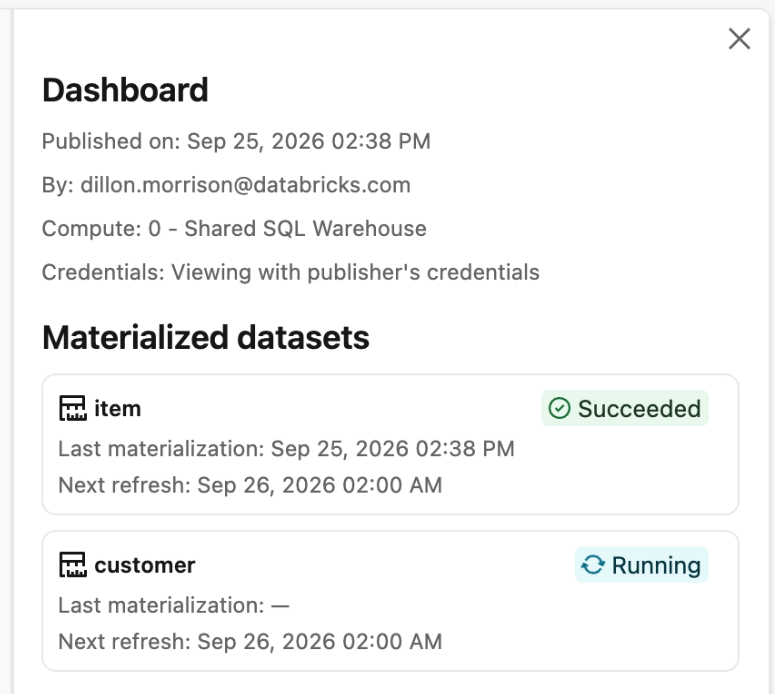
In the published dashboard, open the  menu and select Info. The sidebar shows each materialized dataset's status and refresh information.
Reuse and cleanup
Databricks manages the lifecycle of your materialized data:
- Reuse across revisions. If a dashboard is republished by the same user and a dataset is unchanged, the existing materialization will be reused, avoiding wasted compute.
- Automatic cleanup. Databricks drops materializations that a published dashboard no longer references, such as after a definition change or an unpublish.
Republishing does not necessarily refresh materialized data.
Limitations
Dataset materialization has the following limitations:
- Published dashboards only. Materialization applies to published dashboards. Drafts continue to query live data.
- No parameterized datasets. Datasets that define parameters cannot be materialized. If you opt a parameterized dataset into materialization, Databricks reports it as failed rather than materializing it.
- Refresh follows the dashboard schedule only. There is no separate per-dataset refresh schedule. Materialization refreshes on your dashboard's scheduled-refresh cadence.
- Serverless required. Initial creation and refreshes run on serverless Lakeflow pipelines, so the workspace must have serverless compute enabled.
- Protected data is not served from materializations. Materialization cannot be created for source data protected by row-level security, column masks, or attribute-based access control (ABAC) policies. If row-level security is added to a source table after materialization is created, subsequent queries against the metric view bypass the materialization and run against the source data.
- Share data permissions required. You can enable materialization only when you publish with shared data permissions. You cannot enable it when you publish with individual data permissions.
Frequently asked questions
The following questions cover dataset materialization behavior, refreshes, and permissions.
Does materialization change my metrics or results?
Materialization preserves the dataset's query logic, but its data reflects the latest successful refresh. For local metric views, measures are computed at query time against the materialized data. See What gets materialized.
What happens if a materialization is not ready or not available?
If a materialization is not ready or not available at query time, the query returns an error instead of querying live data. Wait for the materialization to finish, then rerun the query.
Where is the materialized data stored?
Databricks stores the materialized data in managed, internal storage scoped to your published dashboard. There is nothing for you to publish to Unity Catalog, and no schema or storage to manage. Access continues to follow your dashboard and underlying data permissions.
How often does the materialized data refresh?
Materialized data refreshes on the dashboard's refresh schedule. See Set a refresh schedule.
What compute does materialization use?
Initial creation and refreshes both run on serverless Lakeflow pipelines managed by Databricks. This is why serverless compute must be enabled in the workspace.
Does materialization affect permissions?
No. Materialization does not grant additional access to data. Access still follows the dashboard's sharing configuration and the permissions used to publish it.
What happens when I republish?
Existing materializations can be reused when the same user republishes an unchanged dataset. See Reuse and cleanup. Turn on the Materialize datasets option on each publish.