Delta Sharing and ABAC
You can share tables and views protected by ABAC policies through Delta Sharing if the share owner is exempted from the policies on the provider side. This page covers how to share tables with row filters and column masks and how to handle views when you need to enforce policies on the recipient side.
Prerequisites
- Databricks Runtime 16.4 or above, or serverless compute.
- Account admin or workspace admin permissions (to create governed tags).
MANAGEpermission on the target catalog or schema.EXECUTEon the UDFs.- Delta Sharing configured between the provider and recipient. See What is Delta Sharing?.
Sharing tables protected by ABAC policies
Share owners can share tables secured by ABAC policies through Delta Sharing if they meet both of these conditions:
- They have the required Delta Sharing permissions.
- They are exempt from the ABAC policies (listed in the
EXCEPTclause).
The following example shows a provider-side policy where the share owner is exempted:
-- Provider: row filter policy with the share owner exempted
CREATE POLICY hide_eu_customers
ON CATALOG provider_catalog
ROW FILTER hide_eu
TO `account users`
EXCEPT 'share_owner_group'
FOR TABLES
MATCH COLUMNS has_tag('geo_region') AS region
USING COLUMNS (region);

-- Add the table to the share
CREATE SHARE employees_share;
ALTER SHARE employees_share ADD TABLE provider_catalog.hr.employees;
GRANT SELECT ON SHARE employees_share TO RECIPIENT `recipient_org`;
The provider's ABAC policy doesn't govern the recipient's access. Because the share owner is exempt from the provider-side policy, the recipient sees unfiltered or unmasked data by default. Recipients can apply their own ABAC policies to shared tables to enforce access control on their side.
- For share providers, see Add tables and schemas secured by ABAC policies to a share.
- For share recipients, see Read ABAC-secured data and apply ABAC policies.
Sharing views protected by ABAC policies
Share owners can also share views that reference ABAC-protected base tables. As with sharing tables directly, the share owner must be exempt from ABAC policies on the underlying tables.
-- Provider: row filter policy with the share owner exempted
CREATE POLICY hide_eu_customers
ON CATALOG provider_catalog
ROW FILTER hide_eu
TO `account users`
EXCEPT 'share_owner_group'
FOR TABLES
MATCH COLUMNS has_tag('geo_region') AS region
USING COLUMNS (region);

-- Add the view to the share
ALTER SHARE employees_share ADD VIEW provider_catalog.hr.employees_view AS hr.employees_view;
GRANT SELECT ON SHARE employees_share TO RECIPIENT `recipient_org`;
If you were sharing views before April 23, 2026, you might need to update your ABAC policies. Before this date, the view owner needed to be exempt from policies on the underlying tables. Starting April 23, 2026, the share owner must be exempt instead. If Databricks has contacted you as a potentially impacted customer, you have until July 22, 2026 to update your EXCEPT clauses.
Recipient-local views over shared tables
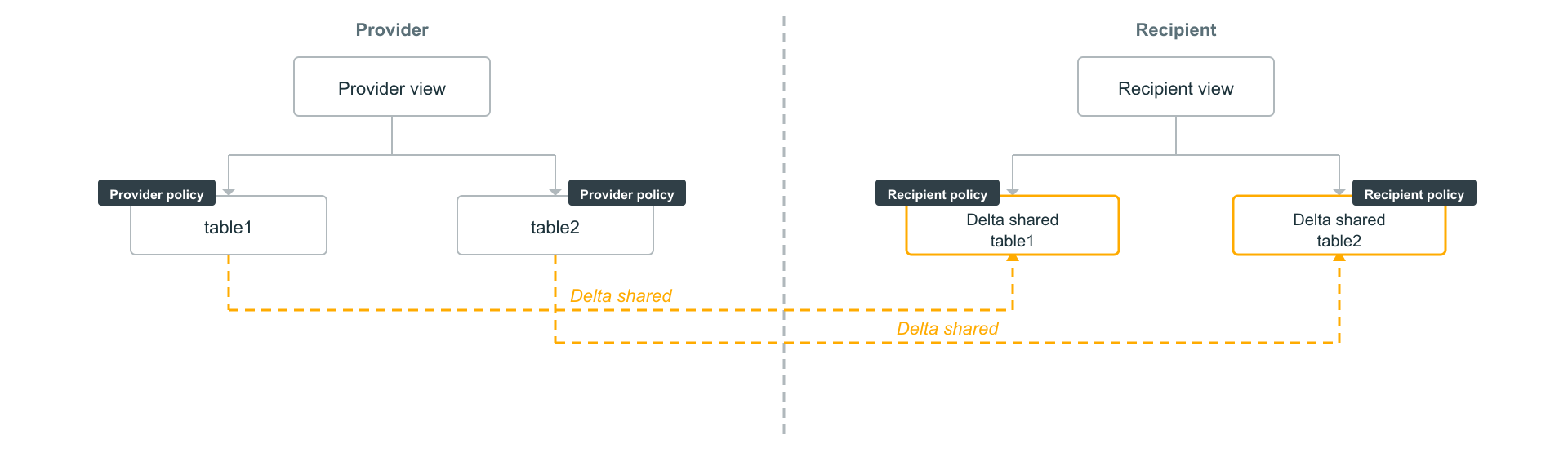
Because ABAC policies can only be set on tables, not views, if you need recipient-side users to consume data through views and sensitive data must be protected, share the base tables and set ABAC policies on them. The recipient creates views locally over the shared tables, and the policies on the base tables are respected when data is accessed through those views. You don't need to share provider-side views in this case.
This approach works as follows:
- Share only the base tables, not the views. On the recipient side, the shared tables appear in a read-only delta share schema.
- Apply ABAC policies to the source tables on the provider side and to the shared tables on the recipient side. The provider's policy controls access on the provider side. The recipient creates a policy to control access for users on the recipient side.
- Create views at the recipient on top of the shared base tables in a separate schema. Because Delta Sharing schemas are read-only, recipient-local views must be created in a different schema. If you set ABAC policies on the Delta Sharing tables, these policies are respected when users access the data through the recipient-local views.
-- Recipient: apply an ABAC policy to the shared table
CREATE POLICY hide_eu_customers
ON CATALOG recipient_catalog
ROW FILTER hide_eu
TO `account users`
EXCEPT 'recipient_admins'
FOR TABLES
MATCH COLUMNS has_tag('geo_region') AS region
USING COLUMNS (region);

-- Create a view in a separate schema (delta share schema is read-only)
CREATE VIEW recipient_catalog.analytics.employees_view AS
  SELECT * FROM recipient_catalog.delta_share_schema.employees;