Unity Catalog securable objects reference
This page describes all securable objects in Unity Catalog. A securable object is an object defined in Unity Catalog on which privileges can be granted to a principal (user, service principal, or group).
The Unity Catalog object hierarchy
Securable objects in Unity Catalog are hierarchical. This hierarchical structure provides the foundation for access control in Unity Catalog.
The metastore is the top-level securable object. Within this metastore, your data assets live in a three-level namespace that defines its catalog, schema, and type of asset, such as table (catalog.schema.table). The following diagram highlights these securable objects.
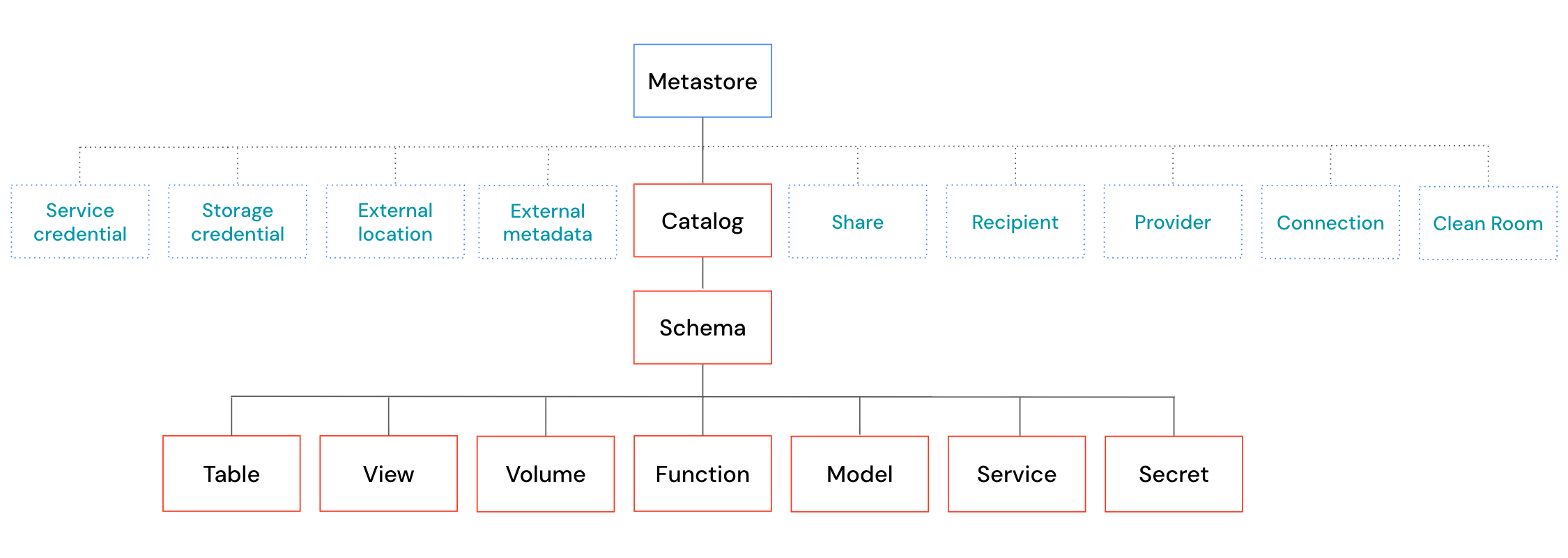
The preceding diagram shows the following:
- Catalogs are the top-level layer for your data assets. Catalogs exist directly under the metastore. They are used to organize your data and AI assets, typically by organizational units or software development lifecycle scopes.
- Schemas exist within catalogs. They organize data and AI assets into categories that are more granular than catalogs. A schema may represent a single use case, project, or team sandbox.
- Tables are collections of structured data organized by rows and columns.
- Views are saved queries against other tables or views.
- Volumes represent collections of unstructured data in cloud object storage.
- Functions are units of reusable logic that return a scalar value or set of rows.
- Models are versioned or unversioned AI models registered in Unity Catalog.
- Services are governed, invocable AI assets, such as model services and MCP services.
- Secrets store sensitive values, such as credentials and tokens, that you can govern in Unity Catalog and reference without exposing the value.
- Schemas exist within catalogs. They organize data and AI assets into categories that are more granular than catalogs. A schema may represent a single use case, project, or team sandbox.
There are also many other securable objects in Unity Catalog. All of these objects exist directly under the metastore. The following diagram highlights these securable objects.
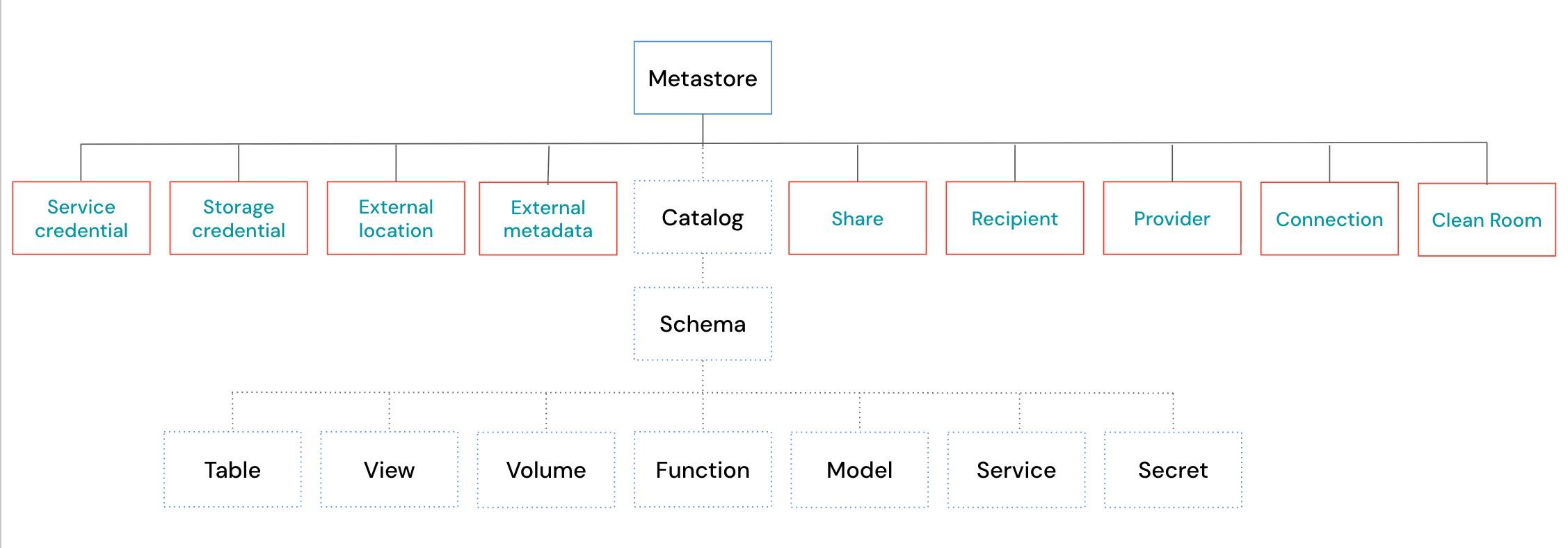
These securable objects can be broadly categorized into two groups. The first group includes objects that manage access to cloud storage and other external data sources and services:
- Storage credentials are objects that represent the authentication information required to access a specific path in cloud storage.
- External locations are objects that represent a specific path in cloud storage. It also includes a reference to the storage credential required to access that path.
- An external metadata object is used to define custom data lineage relationships for systems that operate outside of Unity Catalog.
- Service credentials are objects that represent the authentication information required to access external cloud services.
- Connections are objects that represent a connection to an external database system.
The second group includes objects that manage access to data and AI asset sharing across metastore or organizational boundaries:
- Shares are objects that represent a logical grouping of data assets that you intend to share with external recipients.
- Providers are objects that represent an external organization or group of users that has shared data with your organization.
- Recipients are objects that represent an external organization or group of users that a provider shares data with.
- Clean rooms are objects that represent a secure environment for collaborating with other organizations without exposing underlying data.
The following sections describe each securable object in greater detail.
Metastore
The metastore is the top-level securable object in Unity Catalog. A metastore contains all securable objects registered in Unity Catalog in a single cloud region. These objects include not only the catalogs that organize your data, but also objects that control how data is accessed and shared, such as service credentials, storage credentials, external locations, connections, shares, recipients, providers, and clean rooms.
The following table summarizes important details about the metastore:
Detail | Description |
|---|---|
Scope | A metastore is scoped to a single cloud region. Your organization requires one metastore per region in which it operates. A single metastore can be attached to multiple workspaces in the same region. Permission grants in a metastore apply to all workspaces attached to that metastore. In other words, a privilege granted in one workspace is effective in all other workspaces sharing that metastore. |
Metastore privileges | Privileges on the metastore allow operations at the metastore level. For example, Importantly, privileges granted at the metastore level do not inherit to child objects in the hierarchy. Metastore-level grants are scoped to metastore-level operations only. This differs from the privilege inheritance behavior for catalog and schema grants, where inherited privileges automatically apply to all current and future child objects. See Privilege inheritance. |
Metastore admins | The metastore admin is an optional role in Databricks. It is assigned by account admins. Certain capabilities are available only to metastore admins, including deleting the metastore, managing workspace assignments, and taking ownership of any object in the metastore, which gives indirect access to all data in the metastore. These capabilities cannot be granted through standard privilege grants. See Metastore admins. When a workspace is enabled for Unity Catalog automatically, workspace admins receive a default set of metastore-level privileges, including |
Catalog
Within a metastore, a catalog is the first and highest-level layer for your data assets. Catalogs are container objects. A catalog contains schemas, which in turn contain tables, views, volumes, and functions.
We frequently refer to the "three-level namespace" (catalog.schema.table) for data in Unity Catalog. Here, the catalog is the first layer of the three-level namespace.
The following table summarizes important details about catalogs:
Detail | Description |
|---|---|
Inheritance | Privileges granted on a catalog automatically apply to all current and future schemas, tables, views, volumes, and functions within it. For example, granting Due to inheritance, catalog-level privileges are broad. Be careful when granting them to users. |
Usage privilege ( | The |
The | Granting the Databricks recommends granting |
Workspace binding | By default, a catalog is accessible from all workspaces attached to the same metastore. You can restrict this by binding the catalog to specific workspaces, optionally as read-only. Workspace binding supersedes individual privilege grants. Even a user with an explicit |
For more information about catalogs, see What are catalogs in Databricks?.
Schema
Within a catalog, a schema (also called a database) is the second layer of the object hierarchy for your data assets. Schemas are container objects. A schema contains tables, views, volumes, and functions.
We frequently refer to the three-level namespace (that is, catalog.schema.table) for data in Unity Catalog. Here, the schema is the second layer of the three-level namespace.
The following table summarizes important details about schemas:
Detail | Description |
|---|---|
Inheritance | Privileges granted on a schema automatically apply to all current and future tables, views, volumes, and functions within it. For example, granting Due to inheritance, schema-level privileges can be broad. Review what objects are contained in the schema before granting privileges to users. |
Usage privilege ( | The |
For more information about schemas, see Schemas.
Table
Within a schema, a table is the primary securable object for structured data in Unity Catalog. Following are the types of tables in Databricks:
- Managed tables are tables where the storage location path is determined by Unity Catalog. Importantly, the data itself still lives in your cloud account. Databricks recommends using managed tables to take advantage of the latest table features. See Unity Catalog managed tables for Delta Lake and Apache Iceberg.
- External tables are tables where you specify the storage location path. Unity Catalog continues to manage the table's metadata, but doesn't manage the data's lifecycle, optimization, storage location, or layout. See Work with external tables.
- Foreign tables are tables from a foreign catalog that are registered in Unity Catalog. See Work with foreign tables.
The following table summarizes important details about tables:
Detail | Description |
|---|---|
Usage privileges | To access a table, a user must have |
Inheritance | Table privileges can be inherited from the parent schema or catalog. For example, granting |
Read and write access | Use |
For more information about tables, see Databricks tables.
View
Within a schema, a view is a read-only object defined by a stored SQL query over one or more tables or other views. Views recompute results on every query.
The following table summarizes important details about views:
Detail | Description |
|---|---|
Usage privileges | To access a view, a user must have The user doesn't need privileges on the underlying tables that the view queries. The view owner's privileges are used to resolve the underlying tables at query time. For table owners, this makes views useful for restricting access to specific rows or columns without exposing the underlying tables directly. |
Inheritance |
|
For more information about views, see What is a view?.
Materialized view
A materialized view is a view that pre-computes and stores its query results. Results reflect the state of data at the time the materialized view was last refreshed.
The permissions model for materialized views is the same as that of standard views. In addition to SELECT and MANAGE, materialized views support the REFRESH privilege, which allows a user to trigger a refresh of the materialized view's results. Users with only SELECT and the appropriate usage privileges can query the stored results but cannot trigger a refresh.
For more information about materialized views, see Materialized views.
Metric view
A metric view is a read-only object that defines a set of reusable metric definitions based on one or more tables, views, or SQL queries. Users query a metric view as they would a standard view.
The permissions model for materialized views is the same as that of standard views. Users need SELECT and the appropriate usage privileges to query the metric view. The metric view owner's privileges are used to resolve the underlying data sources at query time.
For more information about metric views, see Unity Catalog metric views.
Volume
Within a schema, a volume is a securable object for unstructured data in cloud storage. Volumes can be managed (storage location determined by Unity Catalog) or external (you specify the storage path). Unlike tables and views, volumes do not support SQL query operations — they provide file-level read and write access to data in cloud storage. Following are the types of volumes in Databricks:
- Managed volumes are volumes where the storage location path is determined by Unity Catalog. Importantly, the data itself still lives in your cloud account. Databricks recommends using managed volumes to have Unity Catalog automatically govern all data access.
- External volumes are volumes where you specify the storage location path. You can use external volumes if you require external system access outside of Databricks, but be wary that external systems can bypass Unity Catalog governance.
The following table summarizes important details about volumes:
Detail | Description |
|---|---|
Usage privileges | To access files in a volume, a user must have |
Read and write access | Use |
Inheritance |
|
For more information about volumes, see What are Unity Catalog volumes?.
Function
Within a schema, a function is a securable object in Unity Catalog that represents reusable, executable logic. Functions include user-defined functions (UDFs), stored procedures, and registered models (MLflow models registered in Unity Catalog).
- User-defined functions (UDFs) are custom functions written in SQL or Python that can be called in SQL queries and notebooks. See What are user-defined functions (UDFs)?.
- Stored procedures are user-defined routines that execute a sequence of SQL statements and may include side effects such as inserting or updating data.
- Registered models are MLflow machine learning models registered in Unity Catalog. In Unity Catalog, registered models are implemented as a type of function. See Manage model lifecycle in Unity Catalog.
The following table summarizes important details about functions:
Detail | Description |
|---|---|
Usage privileges | To execute a function or load a registered model, a user must have |
The | Granting |
Inheritance |
|
Model
A model is a versioned or unversioned AI model stored in Unity Catalog. A model is a container that can hold multiple versions. If you use MLflow to train the model, the artifacts and metadata for each training run are stored as model versions within it.
The permissions model for registered models is the same as that of functions. The following additional privileges apply specifically to models:
-
APPLY TAG: Allows adding and editing tags on a model and its versions. The user must also haveUSE CATALOGon the parent catalog andUSE SCHEMAon the parent schema. -
CREATE MODEL VERSION: Allows a user to register new versions of a model without granting the ability to execute, modify, or add tags to the model. The user must also haveUSE CATALOGon the parent catalog andUSE SCHEMAon the parent schema.
Creating a model requires the CREATE MODEL privilege on the parent schema or catalog. Granting CREATE MODEL on a catalog allows creating models in any schema in that catalog.
For more information about models, see Manage model lifecycle in Unity Catalog.
Service
Within a schema, a service is a securable object that represents a governed, invocable AI asset. Services let you manage access to AI traffic with the same privileges you use for data. Unity Catalog supports the following service types, currently in Beta:
- Model services expose LLM endpoints that you can invoke and share across workspaces. See Custom model services.
- Model provider services store connection details and encrypted credentials for external model providers, so teams can query external models without accessing those credentials. See Model providers external to Databricks.
- MCP services register MCP servers so you can govern which tools agents use. See MCPs.
- Agent services register agents so you can govern who can invoke them. See Register agents (agent services).
The following table summarizes important details about services:
Detail | Description |
|---|---|
Usage privileges | To invoke a service, a user must have |
The | Creating a service requires the |
The | Granting |
For more information about governing AI services, see AI governance in Unity Catalog.
Secret
Within a schema, a secret is a securable object that stores a sensitive value, such as a credential or an API token. Secrets let you govern access to sensitive values in Unity Catalog and reference them in code or from other Unity Catalog objects without exposing the value. Secrets are part of the three-level namespace (catalog.schema.secret).
The following table summarizes important details about secrets:
Detail | Description |
|---|---|
Usage privileges | To use a secret, a user must have |
Secret privileges |
|
Inheritance | Secret privileges granted at the catalog or schema level apply to all current and future secrets in that catalog or schema. See Privilege inheritance. |
For more information about secrets in Unity Catalog, see Secrets in Unity Catalog.
Feature
The Feature securable object is in Public Preview.
Within a schema, a feature is a securable object in Unity Catalog that represents the stored definition of a machine learning feature: its source data, its computation logic, and the time windows used to compute it. As the governed source of truth for a feature, a single definition can be reused across training, materialization, and serving, with Unity Catalog tracking lineage to its source data and the models that use it.
Defining a feature is a metadata-only operation: no feature data is computed until the feature is materialized.
For more information about features, see Feature Views.
The following table summarizes important details about features:
Detail | Description |
|---|---|
Usage privileges | To read a feature, a user must have |
Create access | To create a feature in a schema, a user must have the |
Read access |
|
Inheritance |
|
Storage credential
Within a metastore, a storage credential is a securable object that stores the authentication information required to access a specific path in cloud storage. The stored authentication method depends on the cloud provider: an IAM role on AWS, a service principal on Azure, or a service account on GCP.
Storage credentials are most commonly used as a building block for external locations, which pair a storage credential with a specific cloud storage path. A storage credential can also be used directly to create external tables.
To create a storage credential, a user needs the CREATE STORAGE CREDENTIAL privilege on the Unity Catalog metastore.
For more information about storage credentials, see Overview of storage credentials.
External location
Within a metastore, an external location is a securable object that pairs a storage credential with a cloud storage path. It governs access to a specific path in cloud storage.
To create an external location, a user needs the CREATE EXTERNAL LOCATION privilege on the Unity Catalog metastore.
After creating an external location, users need the READ FILES privilege to read files directly from the storage path, and the WRITE FILES privilege to write files. However, Databricks recommends managing cloud storage access through volumes and the READ VOLUME and WRITE VOLUME privileges rather than granting READ FILES and WRITE FILES directly on external locations.
For more information about external locations, see Overview of external locations.
External metadata
Within a metastore, an external metadata object is a securable object used to define custom data lineage relationships for systems that operate outside of Unity Catalog's native lineage tracking.
To create an external metadata object, a user needs the CREATE EXTERNAL METADATA privilege on the Unity Catalog metastore. To add or modify lineage relationships on the object, the user needs MODIFY on the external metadata object, plus the appropriate privileges on any Unity Catalog objects referenced in the relationship.
For more information about external metadata, see Lineage in Unity Catalog.
Service credential
Within a metastore, a service credential is a securable object that stores authentication information for accessing external cloud services. This is unlike storage credentials, which govern access to cloud storage.
To create a service credential, a user needs the CREATE SERVICE CREDENTIAL privilege on the Unity Catalog metastore.
The ACCESS privilege allows a user to use the service credential to access an external service. CREATE CONNECTION on a service credential (combined with CREATE CONNECTION on the metastore) allows a user to create a connection to an external database using that credential.
For more information about service credentials, see Create service credentials.
Connection
Within a metastore, a connection is a securable object that stores the endpoint and credentials needed to access an external system. Connections support the following scenarios:
To create a connection, a user needs the CREATE CONNECTION privilege on the Unity Catalog metastore. If the connection uses a service credential, the user also needs CREATE CONNECTION on that service credential.
The USE CONNECTION privilege allows a user to list and view connection details and use the connection for its supported scenario.
For more information, see Unity Catalog connections.
Share
Within a metastore, a share is a securable object in OpenSharing that represents a logical grouping of data assets (tables, views, and volumes). A provider can then make the share available to external recipients.
The SELECT privilege on a share is granted to a recipient (not to individual users) to allow that recipient to read the assets in the share. To create a share, a user needs the CREATE SHARE privilege on the Unity Catalog metastore.
For more information about shares, see Create shares for OpenSharing.
Provider
Within a metastore, a provider is a securable object in OpenSharing that represents an external organization that has shared data with your organization. Provider objects are created in the recipient's Unity Catalog metastore. The USE PROVIDER privilege allows a user to view all providers and their shares, and, combined with CREATE CATALOG, to mount a shared catalog without requiring the metastore admin role.
To create a provider, a user needs the CREATE PROVIDER privilege on the Unity Catalog metastore.
For more information about providers, see What is OpenSharing?.
Recipient
Within a metastore, a recipient is a securable object in OpenSharing that represents an external organization or group of users that a provider shares data with. Recipient objects are created in the provider's Unity Catalog metastore. No privileges can be granted on a recipient object itself. Access to shared data is controlled by granting SELECT on a share to the recipient.
To create a recipient, a user needs the CREATE RECIPIENT privilege on the Unity Catalog metastore.
For more information about recipients, see Create data recipients for OpenSharing (Databricks-to-Databricks sharing).
Clean room
Within a metastore, a clean room is a securable object that provides a secure environment for collaborating with other organizations on shared data without either party exposing their underlying data to the other.
To create a clean room, a user needs the CREATE CLEAN ROOM privilege on the Unity Catalog metastore.
The EXECUTE CLEAN ROOM TASK privilege allows a user to run notebooks inside the clean room and view clean room details. The MODIFY CLEAN ROOM privilege allows a user to update the clean room, including adding or removing data assets, notebooks, and comments.
For more information about clean rooms, see What is Databricks Clean Rooms?.