Developer best practices on Databricks
This page provides best practices for your data engineering and development lifecycle including version control, environment management, developer tooling, and managed deployments.
Source control
Version control all files
Declarative automation is built on the idea that if something isn't in version control, it doesn't exist. Hence, Databricks recommends that you version control almost every file, including:
- All notebooks and source files (
.py,.sql) - Bundle configuration files (
databricks.ymland environment-specific YAML overrides)
However, do not commit:
- Build artifacts, such as
.jaror.whlfiles. Instead, upload compiled binaries to Unity Catalog volumes during CI. See upload JAR. - Tokens or credentials. Use workspace-level secret management backed by a cloud secret manager (such as AWS Secrets Manager or Azure Key Vault) and sync values into Databricks secret scopes. See Secret management.
- Local data examples and files with PII. Use
.gitignoreto exclude them.
Single repository
Databricks recommends that you use a single repository for all of your code (source code and configuration files), as it makes collaboration, and code and best practices sharing for both humans and AI easier. If you have multiple bundles for separate deployment lifecycles, keep them in a single repository.
The one exception to the single repository recommendation is in regulated industries where multiple repositories are necessary for confidentiality purposes.
Trunk-based branching strategy
To minimize merge conflicts and ensure the main branch is always in a deployable state, use a trunk-based branching strategy.
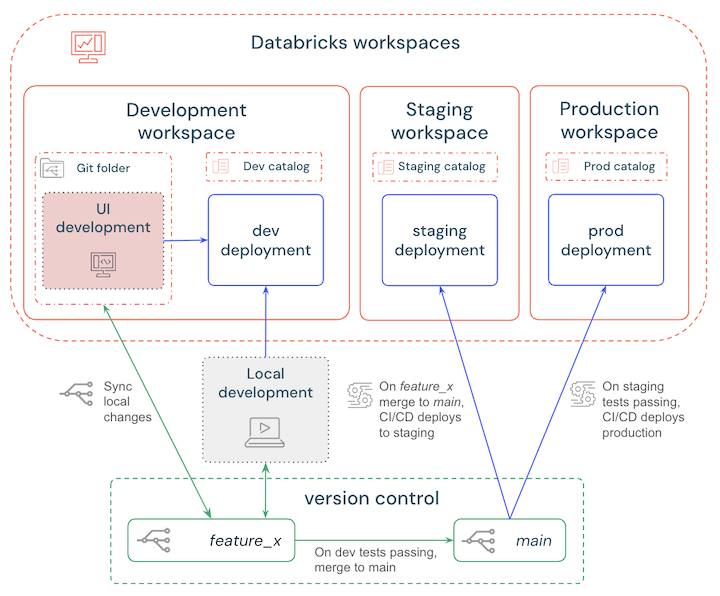
A simple workflow would be:
- Develop locally or in the workspace and deploy to a Databricks development workspace to test changes.
- Create a short-lived feature branch to version control updates and regularly sync your local or workspace changes.
- When testing is finished, merge the feature branch into the main branch.
- CI/CD automatically deploys the main branch to a staging workspace and automated tests are triggered.
- When the staging tests and checks pass, CI/CD deploys the main branch to a production workspace.
These steps are outlined in the following diagram:
Workspace configuration
Isolate workspace environments
Isolate workspace environments to minimize the impact of a failed deployment. For example:
- Small teams (up to 5 data engineers): Start with two workspaces (development and production) in a single cloud account.
- Growing teams (5+ data engineers): Move to three workspaces (development, staging, and production). Staging should be functionally representative of production — same bundle configuration, schema, and critical integrations — even if it is scaled down.
- Regulated industries (banking, healthcare, defense): Physically isolate workspaces and cloud accounts to prevent data leakage. Managing isolation through IAM and Unity Catalog boundaries within a single account is possible but provides a less robust security posture.
For production workspaces, use serverless compute with network policies where possible. Otherwise, configure cloud accounts to use private subnets or VNets with tightly controlled egress and network security controls.
For more information, see Context-based network policies.
Isolate data storage
- Use a single Unity Catalog metastore and create separate catalogs for dev, staging (if applicable), and production, mirroring your workspace layout.
- Use personal schemas for individual developers for development and staging (non-production) catalogs.
- Bind the production catalog in
ISOLATEDmode to the production workspace only. Setting a catalog's isolation mode toISOLATEDensures that production data is unreachable from development or staging environments, even if an identity is misconfigured. - Reserve separate metastores, accounts, or regions only for organizations with regulatory, data-sovereignty, or multi-region requirements that catalog-level isolation cannot satisfy.
Treat table and column metadata as code
Treat table and column comments as part of your code. Keep them in .sql files alongside your Declarative Automation Bundles definitions, and deploy them through a metadata job so that accurate, business-facing definitions are always available. Write comments that describe what a row represents, the units, and valid values in plain language rather than repeating the column name.
Configure personal schemas
During development, configure bundles to use a personal schema per user, for example dev_${user_name}. This prevents developers from overwriting each other's tables in a shared workspace.
Use serverless compute
Use serverless compute to simplify cluster management and optimize cost. See Connect to serverless compute.
CI/CD recommendations
Declarative Automation Bundles for CI/CD
Declarative Automation Bundles (formerly known as Databricks Asset Bundles) offer a powerful, unified approach to managing code, workflows, and infrastructure within the Databricks ecosystem and are recommended for your CI/CD pipelines.
For additional details about using bundles for CI/CD workflows, see CI/CD workflows on Databricks.
For more information about Declarative Automation Bundles, see What are Declarative Automation Bundles?.
Use Terraform only for external resources
Use Terraform to define the following resources:
- Cloud-level and external resources
- Admin actions that non-privileged users should not perform, such as workspace provisioning or cloud networking configuration
Use Declarative Automation Bundles for all other Databricks resources.
Bundle management
Create small bundles
Databricks recommends developing small, focused bundles over a single large bundle.
- Put everything that a single team owns into one bundle.
- Test and deploy through the same CI/CD pipeline that shares the same lifecycle and release cadence.
- Each bundle should cover all environments for a given project (dev, staging, production) rather than using separate bundles per environment.
Create separate bundles for:
- Different products or domains, for example "Billing analytics" and "Fraud detection"
- Different ownership or permission boundaries
- Workloads with clearly different lifecycles
- Cases where you need independent promotion or rollback
Use sync.paths to synchronize shared folders
When managing multiple bundles in one repository, use sync.paths to synchronize shared folders from outside the bundle root. This allows different projects to share a common library folder, such as ../common, while maintaining separate deployment identities.
Deploy bundles to a dedicated location
Deploy bundles to a workspace location that you or your team owns, rather than /Workspace/Shared, which grants all workspace users access. A dedicated location lets you apply least-privilege permissions: grant CAN_MANAGE only to the people or team who own the bundle's resources. To move an existing deployment off /Workspace/Shared, see How do I move a bundle deployment off /Workspace/Shared?.
Model inter-bundle dependencies in CI/CD
When Bundle B depends on assets published by Bundle A, model that dependency in your CI/CD or orchestration layer rather than collapsing both into one bundle.
- Make Bundle A's deploy-and-publish workflow an explicit prerequisite for Bundle B. Wire your pipeline so Bundle B starts only after Bundle A's deployment succeeds and all required validation checks pass.
- Pass published asset identifiers or locations forward as pipeline inputs, and fail fast if upstream assets are missing. This ensures Bundle B never deploys against a partially published state.
For more information about bundle sharing, see Sharing bundles and bundle files.
Custom bundle templates
Use custom Declarative Automation Bundles templates as the default starting point for new projects so that every project inherits the same guardrails - permissions, tagging, cluster policies, CI/CD wiring, and instance baselines — without each team solving from scratch.
Templates should encode shared, long-lived conventions such as governance, performance defaults, environment layout, and quota limits. Avoid app-specific business logic, secrets, or one-off configuration in templates.
Parameterize only inputs that are expected to vary by team, project, or environment:
- Project or application name
- Target workspace settings
- Catalog or schema names
- Service principal identifiers
- Schedules and notification settings
Keep platform guardrails and shared defaults fixed in the template rather than parameterizing them.
For information about custom bundle templates and how to create them, see Declarative Automation Bundles project templates.
Plan for rollbacks and hotfixes
Keep bundles small enough that you can do a targeted rollback on a single bundle rather than coordinating a rollback across many unrelated workloads.
During an incident:
- Revert or roll back the affected bundle to the last known good version.
- Use a hotfix only for urgent, narrowly scoped fixes that cannot wait for the normal promotion flow.
- Merge any hotfix back to the main branch immediately after validation so the trunk remains the single source of truth.
General development
Use service principals or OIDC
Use service principals for all non-development automation to decouple automated workflows from individual user accounts and ensure jobs continue running when internal users leave. See Service principals.
- Use separate service principals for deployment and runtime. A dedicated deployment service principal for bundle deployments should have minimal data access. Each production job or pipeline should have its own run-as service principal scoped only to the data and resources that workload requires. This separation ensures deployments remain safe when you rotate or tighten data-access permissions, and avoids coupling infrastructure changes to production data access.
- Regulated industries: Use Workload Identity Federation (OIDC) for CI/CD. This eliminates long-lived secrets in GitHub Actions or Azure DevOps. See Enable workload identity federation in CI/CD.
Use Databricks developer tools
Develop in the Databricks workspace UI using Git Folders, or in a local IDE. If you use Visual Studio Code or a compatible fork, install the official Databricks extension for:
- Databricks-specific agent skills
- Unity Catalog and file system access
- Remote development capabilities to run workloads on Databricks compute
For more information, see Databricks IDE extension.
Minimize business logic in notebooks
Do not treat notebooks as the primary container for business logic. Use them only for exploration and visualization.
- Python: Put core logic into importable
.pymodules insrc/orsrc/py/, and call those functions from notebooks. - SQL: Keep queries in
.sqlfiles insrc/orsrc/sql/, and reference those files from jobs and pipelines rather than inlining SQL in notebooks.
Use notebooks only as thin orchestration and visualization layers that call the underlying code. This approach makes testing and reuse easier.
When migrating a notebook-heavy project, do it incrementally. Extract one reusable module or SQL file at a time, and use Declarative Automation Bundles to bring migrated assets under the same deployment and testing workflow as the rest of the project.
Pass context dynamically
Avoid static variables for task dependencies. Use dynamic value references like {{tasks.<task_key>.values.<value_key>}} to pass runtime context between tasks in a multi-stage job.
Testing and observability
Implement testing layers
Use three layers of testing that match how your bundles move toward production:
- Unit tests: Keep business logic in importable
src/modules and cover it withpytestor an equivalent framework. Run these on every pull request so failures block merges. - Bundle validation: Run
bundle validatelocally. In CI, preferbundle deployto a non-production workspace to catch YAML and resource-mapping issues before production deploys. - Integration tests in staging: After deploying to staging, run end-to-end jobs with completion checks and critical data-quality assertions such as row-count or schema expectations.
Treat "all tests pass on the main branch and in staging" as the gate for promoting artifacts to production.
For Lakeflow pipelines, use the built-in development and validation features rather than ad-hoc notebook runs. Test pipeline logic against small, representative datasets that include records with errors, and use development mode to validate changes before updating production tables.
Treat logging as part of deployment
For Declarative Automation Bundles-deployed workloads, treat metrics and logging as part of the deployment contract rather than something each project defines independently.
- Emit structured logs consistently across jobs, pipelines, and tasks. Include the bundle name, target environment, workload name, run identifier, and any business identifier needed to trace failures.
- Track a standard set of operational metrics for every production workload: run status, duration, retry count, and throughput or freshness indicators where relevant.
- Encode these conventions in shared libraries, reusable workload definitions, or bundle templates so teams do not have to recreate observability patterns for each project.