Wanderbricks dataset
The wanderbricks schema in the samples catalog contains a simulated travel booking platform dataset. It models a vacation rental marketplace, with tables covering users and hosts, property listings and destinations, bookings and payments, reviews and support logs, and clickstream activity.
Use this dataset to explore data engineering pipelines, analytics dashboards, and machine learning workflows without loading your own data.
Access the dataset
The Wanderbricks dataset is preloaded in the samples catalog and is available in Unity Catalog-enabled workspaces.
To list all tables in the schema:
- SQL
- Python
SHOW TABLES IN samples.wanderbricks;
display(spark.sql("SHOW TABLES IN samples.wanderbricks"))
To preview data in a specific table:
- SQL
- Python
SELECT *
FROM samples.wanderbricks.<table-name>
LIMIT 10;
display(spark.read.table("samples.wanderbricks.<table-name>").limit(10))
Replace <table-name> with the table you want to explore, for example bookings or reviews.
Tables
The wanderbricks schema includes the following tables. Run SHOW TABLES IN samples.wanderbricks for the complete list.
Table | Description |
|---|---|
| User profiles including name, email, country or region, and user type. |
| Host profiles linked to property listings, including account and contact details. |
| Property listings with details such as title, type, price, and destination. |
| Booking records with check-in/check-out dates, guest counts, total amounts, and status. |
| Payment records with method, amount, status, and booking references. |
| Booking state change records for change data capture (CDC) pipelines. |
| User reviews for properties, including ratings, comments, and an |
| User activity events (views, clicks, searches, filters) with nested metadata for device and referrer. |
| Page view events tied to users and properties. |
| Support ticket logs with nested arrays of messages, including sender and sentiment. |
| Destination locations with names and descriptions, referenced by property listings. |
Primary table relationships
The following diagram shows the connections between users, bookings, properties, and related tables.
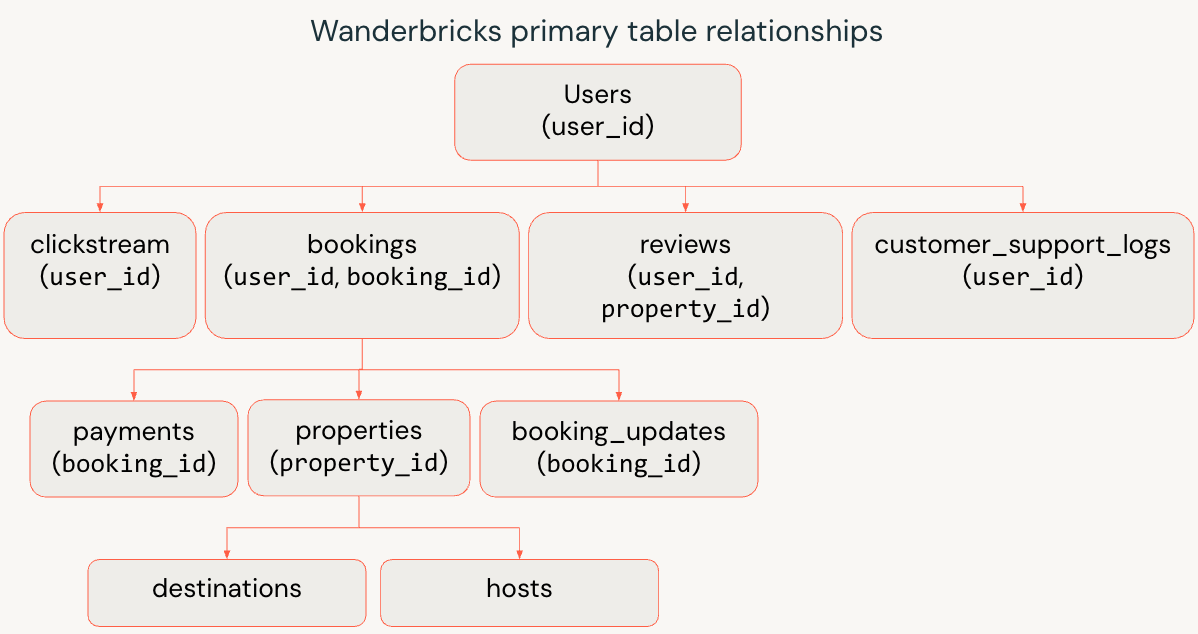
- Users and hosts
usersrepresents travelers and business customers.hostsrepresents property owners and operators.
- Properties and destinations
- Each row in
propertiesis a listing owned by a host. propertieslinks todestinationsto model where the listing is located.
- Each row in
- Bookings and payments
bookingsconnects travelers (user_id) to properties (property_id).paymentsandbooking_updatesreferencebooking_idto capture financial transactions and status changes.
- Behavior and experience
clickstreamandpage_viewstrack how users browse and interact with listings.reviewscaptures post-stay feedback by user and property.customer_support_logsrecords support interactions tied back to a user.
Example queries
The following examples show how to query the Wanderbricks dataset.
Join users, bookings, and properties
Return recent bookings with guest and property details:
- SQL
- Python
SELECT
  u.name              AS guest_name,
  p.title             AS property_title,
  b.check_in,
  b.check_out,
  b.total_amount,
  b.status
FROM samples.wanderbricks.bookings AS b
JOIN samples.wanderbricks.users AS u
  ON b.user_id = u.user_id
JOIN samples.wanderbricks.properties AS p
  ON b.property_id = p.property_id
ORDER BY b.check_in DESC
LIMIT 10;
bookings_df = spark.read.table("samples.wanderbricks.bookings")
users_df = spark.read.table("samples.wanderbricks.users")
properties_df = spark.read.table("samples.wanderbricks.properties")

result_df = (
    bookings_df
    .join(users_df, bookings_df.user_id == users_df.user_id)
    .join(properties_df, bookings_df.property_id == properties_df.property_id)
    .select(
        users_df.name.alias("guest_name"),
        properties_df.title.alias("property_title"),
        bookings_df.check_in,
        bookings_df.check_out,
        bookings_df.total_amount,
        bookings_df.status
    )
    .orderBy(bookings_df.check_in.desc())
    .limit(10)
)

display(result_df)
Analyze clickstream events by device
Summarize engagement by event type and device:
- SQL
- Python
SELECT
  metadata.device AS device_type,
  event,
  COUNT(*)        AS event_count
FROM samples.wanderbricks.clickstream
GROUP BY metadata.device, event
ORDER BY event_count DESC;
from pyspark.sql.functions import col, count

clickstream_df = spark.read.table("samples.wanderbricks.clickstream")

result_df = (
    clickstream_df
    .groupBy(col("metadata.device").alias("device_type"), col("event"))
    .agg(count("*").alias("event_count"))
    .orderBy(col("event_count").desc())
)

display(result_df)
Compute average ratings per property
Find the highest-rated properties with enough review volume:
- SQL
- Python
SELECT
  p.title                       AS property_title,
  p.property_type,
  ROUND(AVG(r.rating), 2)       AS avg_rating,
  COUNT(r.rating)               AS review_count
FROM samples.wanderbricks.properties AS p
JOIN samples.wanderbricks.reviews    AS r
  ON p.property_id = r.property_id
WHERE r.is_deleted = false
GROUP BY p.title, p.property_type
HAVING COUNT(r.rating) >= 5
ORDER BY avg_rating DESC
LIMIT 10;
from pyspark.sql.functions import avg, count, round as pyspark_round, col

properties_df = spark.read.table("samples.wanderbricks.properties")
reviews_df = spark.read.table("samples.wanderbricks.reviews")

result_df = (
    properties_df
    .join(reviews_df, properties_df.property_id == reviews_df.property_id)
    .where(reviews_df.is_deleted == False)
    .groupBy(
        properties_df.title.alias("property_title"),
        properties_df.property_type
    )
    .agg(
        pyspark_round(avg(reviews_df.rating), 2).alias("avg_rating"),
        count(reviews_df.rating).alias("review_count")
    )
    .filter(col("review_count") >= 5)
    .orderBy(col("avg_rating").desc())
    .limit(10)
)

display(result_df)