Genie Code features and capabilities
Genie Code helps developers generate, optimize, explain, and fix code in Databricks notebooks, the SQL editor, jobs, AI/BI dashboards, and the file editor. It answers questions sourced from Databricks documentation, adapts to the product surface you are working in, and offers built-in code assistance.
By default, Genie Code works as an autonomous agent. To open and navigate the Genie Code interface, see Navigate Genie Code.
Get help with code
Get help with code from Genie Code directly in your notebooks. Genie Code offers:
- Use Genie Code for data science to help you plan and automate multi-step data science workflows.
- AI-based autocomplete.
- Data filtering with natural language prompts.
- Code debugging with Diagnose Error.
- Quick Fix, which presents automatic recommendations for fixing code errors that you can Accept and run.
- Serverless code execution.
Databricks recommends that you always review any code generated by Genie Code before running it, because it can sometimes make mistakes.
For more information about how Genie Code can help with code, see Get coding help from Genie Code.
Code optimized for the Databricks environment
Code generated by Genie Code is intended to run in a Databricks compute environment. It is optimized to create code in Databricks-supported programming languages, frameworks, and dialects. It is not intended to be a general-purpose programming assistant.
Genie Code often uses information from Databricks resources, such as the Databricks documentation website or Knowledge Base, to better answer user queries. It performs best when the user question is related to questions that can be answered with knowledge from Databricks documentation, Unity Catalog, and user code in the workspace.
Get answers sourced from documentation
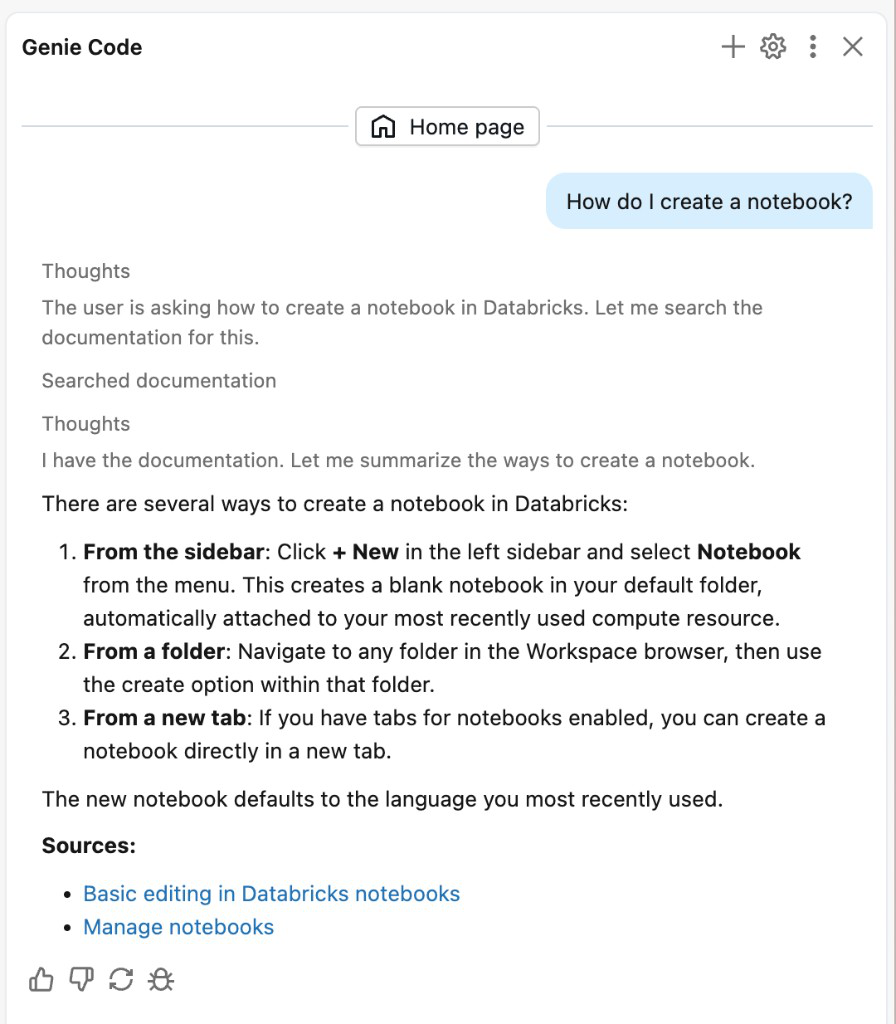
Genie Code searches Databricks documentation to answer your questions. When it references documentation, you see a Searched documentation step in the response. You can ask Genie Code to cite its sources, and it provides links to relevant documentation pages.
Genie Code across the Databricks platform
Genie Code adapts to the product surface you are using and handles multi-step tasks autonomously.
-
- Data science and ML in notebooks
- Genie Code is integrated with Databricks notebooks and optimized to automate exploratory data analysis and model training.
-
- Pipeline development in Lakeflow
- Genie Code has data engineering capabilities that make it easy to automate ETL workloads and build Lakeflow pipelines.
-
- Document processing
- Genie Code builds, evaluates, and troubleshoots pipelines that parse, classify, and extract structured data from unstructured documents.
-
- Data analysis in dashboards
- Genie Code can plan and generate production-ready dashboards and help with data analysis.
-
- Observability and evaluation in MLflow
- Genie Code can understand, debug, and improve your AI applications.
Built-in code assistance
Genie Code uses Unity Catalog metadata (tables, columns, descriptions, and your company's popular data assets) to give personalized responses while you write, debug, and run code. Use the following built-in features:
-
- Chat with Genie Code
- Ask Genie Code questions and it responds with relevant information, including citations from Databricks documentation.
-
- Inline suggestions and autocomplete
- Get help writing code with inline suggestions.
-
- Quick fix
- Genie Code automatically suggests fixes for basic errors that you can choose to accept and run.
-
- Diagnose error
- Genie Code analyzes more complex errors, including environment errors, and attempts to fix them.
-
- /slash commands
- Use /slash commands for common prompts.
-
- Command shortcuts
- Work with Genie Code directly in a notebook cell.
-
- Filter data
- Filter data using natural language in supported surfaces.
-
- Genie Ontology
- Public Preview. Genie Code searches your organization's business context, such as metric definitions and join hints, to write more accurate SQL.
More ways to use Genie Code
-
- Schedule tasks with Genie Code
- Schedule Genie Code to run recurring tasks automatically and review each run.
-
- Explore sample data
- Ask natural-language questions about sample data in Unity Catalog tables, then review or auto-run the generated SQL.
-
- Branch and edit chats
- Fork a chat from a point you choose, ask a quick side question with
/btw, or edit an earlier message to regenerate the chat.
-
- Search the web
- Let Genie Code search the public web for current information, such as recent release notes, third-party documentation, and news, and cite its sources.