Measure Genie Code impact
Measure Genie Code impact across three dimensions: adoption (top users, submission counts), engagement (active users, top tasks, frequency of use), and user satisfaction (productivity gains, time saved). Combine system table metrics with results from an internal survey, and visualize activity using the downloadable Genie Code events dashboard.
Requirements
To measure the impact of Genie Code, you need an internal survey to get subjective feedback on Genie Code from your team.
Data versus metrics
You get raw data from the system tables and a survey. To understand Genie Code impact, you must analyze and report data as metrics. Metrics are calculated values you use to measure specific aspects or activities related to Genie Code impact. This page also refers to metrics as measures.
Tips for measuring Genie Code impact
To understand how your organization is using Genie Code, start by measuring its adoption and engagement with Genie Code. This data can be calculated from system tables.
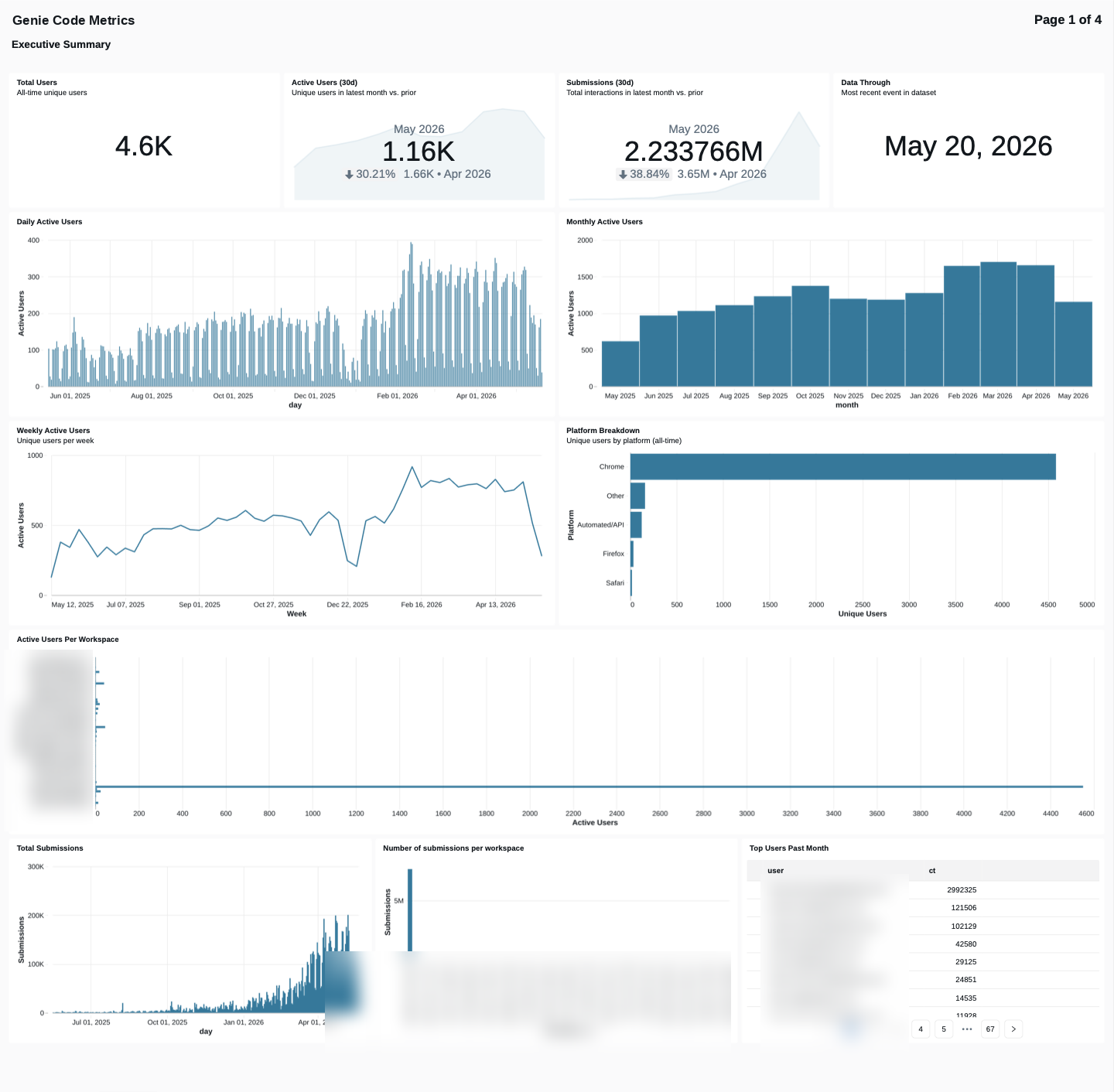
To visualize the system table activity for Genie Code, download the Genie Code events dashboard file from GitHub.
After you download the JSON file, import the dashboard into your workspace. For instructions on importing dashboards, see Import a dashboard file.
Genie Code impact metrics
The following table contains recommended measures of Genie Code impact, both from system tables and from user feedback.
Surveying your organization also helps you understand the effectiveness of its engagement with Genie Code. See Recommended survey questions.
Measure | Definition | Stage | Data source |
|---|---|---|---|
Top users overall | Users in a given period who interact most frequently with Genie Code | Adoption | Calculate from Genie Code system table data. |
Submissions data: per workspace and total | Number of requests submitted to Genie Code per workspace and per account | Adoption | Calculate from Genie Code system table data. |
Active users by day and month | Unique users who have received and accepted one or more suggestions or participated in one or more chats on a given day. | Engagement | Calculate from Genie Code system table data. |
Active users per workspace | Unique users in a given workspace who interact with Genie Code | Engagement | Calculate from Genie Code system table data. |
Top job roles using Genie Code | Number of people from each role identified in your org who use Genie Code | Engagement | |
Top tasks for Genie Code | Most common tasks Genie Code helps with | Engagement | |
How often do you use Genie Code | Self-reported frequency of Genie Code use per user | Engagement | |
Top areas of Genie Code use | Self-reported usage areas: SQL editor, notebooks, or both | Engagement | |
User satisfaction with Genie Code help | Self-reported satisfaction with Genie Code's answers on a scale of 1-5 | User satisfaction | |
Gains in user productivity | Self-reported increase in productivity gained using Genie Code on a scale of 1-5 | User satisfaction | |
Amount of time users save using Genie Code | Self-reported percentage of time saved by using Genie Code to complete tasks | User satisfaction |
Recommended survey questions
System tables won't capture all information about how your organization uses Genie Code. Use survey questions, such as the ones below, to understand how your organization uses Genie Code.
- What is your role? List roles in your organization
- How often do you use Genie Code?
- Hourly
- Daily
- Weekly
- Monthly
- Where do you use Genie Code?
- SQL editor
- Notebooks
- Both
- What are your main use cases for Genie Code?
- Fixing errors / troubleshooting
- Help writing code
- Code refactoring
- Writing SQL queries
- Writing unit tests
- Looking up documentation
- How satisfied are you with Genie Code's answers? Scale of 1-5, Not satisfied to Extremely satisfied
- Since using Genie Code, would you say you're more productive? Scale of 1-5, Much less productive to Much more productive
- How much time do you believe you save on an average task using Genie Code?
- 0-10%
- 10-30%
- 30-50%
- 50-70%
- More than 70%