Configure the Run as identity for a pipeline
Applies to:  SaaS connectors Database connectors Query-based connectors
The Run as setting determines which identity's permissions are used when a managed ingestion pipeline runs. By default, the pipeline runs as its owner (a user). Databricks recommends changing Run as to a service principal so that pipelines continue to run if the owner leaves the organization or loses access to the workspace. Using a service principal ensures the pipeline continues to run regardless of changes to individual user accounts.
Configure Run as during pipeline creation
You can set Run as when you create a new managed ingestion pipeline.
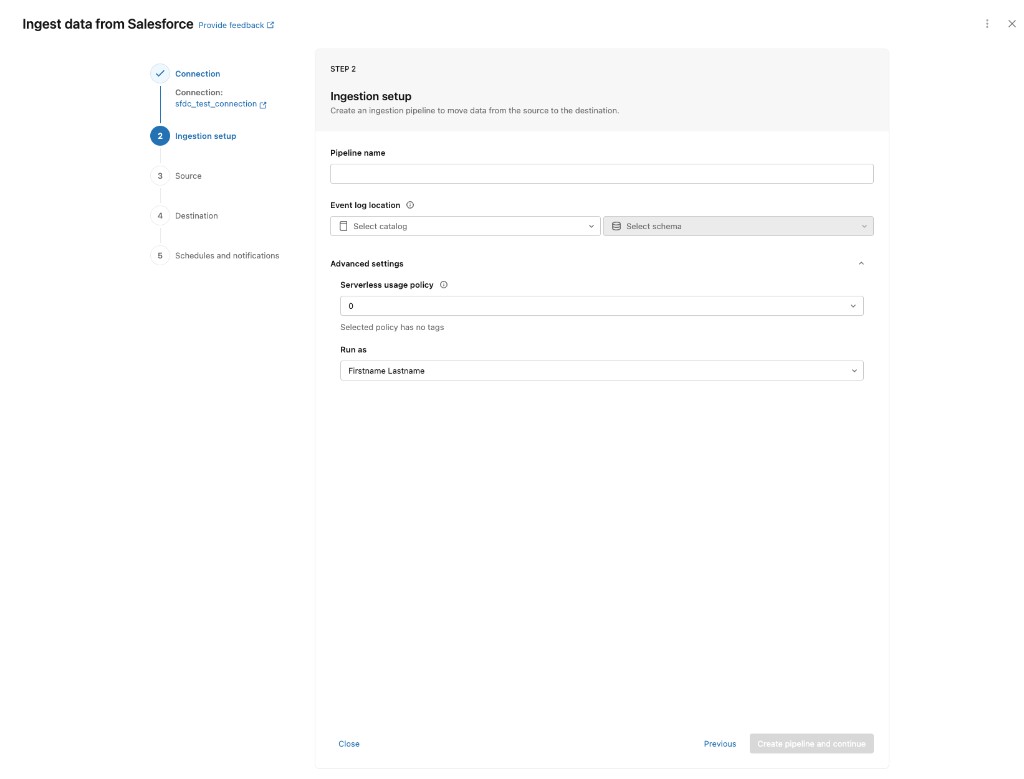
- In the Ingestion setup step of the pipeline creation wizard, expand Advanced settings.
- In the Run as dropdown, select a service principal. To run the pipeline as the owner, leave the default selection.
- Complete the remaining pipeline setup steps and save the pipeline.
View the Run as setting for an existing pipeline
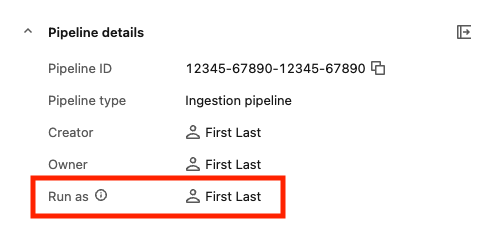
You can view the current Run as identity from the pipeline monitoring page.
On the pipeline monitoring page, locate the Pipeline details panel. The Run as field shows the identity currently configured for the pipeline.
Change Run as for an existing pipeline
- Open the pipeline monitoring page.
- Click Edit pipeline.
- In Advanced settings, update the Run as dropdown to the desired identity.
- Save the pipeline.