Enable history tracking (SCD type 2)
Applies to:  SaaS connectors Database connectors Query-based connectors
The history tracking setting, also known as the slowly changing dimensions (SCD) setting, determines how to handle changes in your data over time. Turn history tracking off (SCD type 1) to overwrite outdated records as they're updated and deleted in the source. Turn history tracking on (SCD type 2) to maintain a history of those changes. Deleting a table or column in the source does not delete that data from the destination, even when SCD type 1 is selected.
Not all connectors support SCD type 2. For support details, see the Feature availability section on the overview page for your connector.
History tracking behavior
For example, let's say that you ingest the following table:
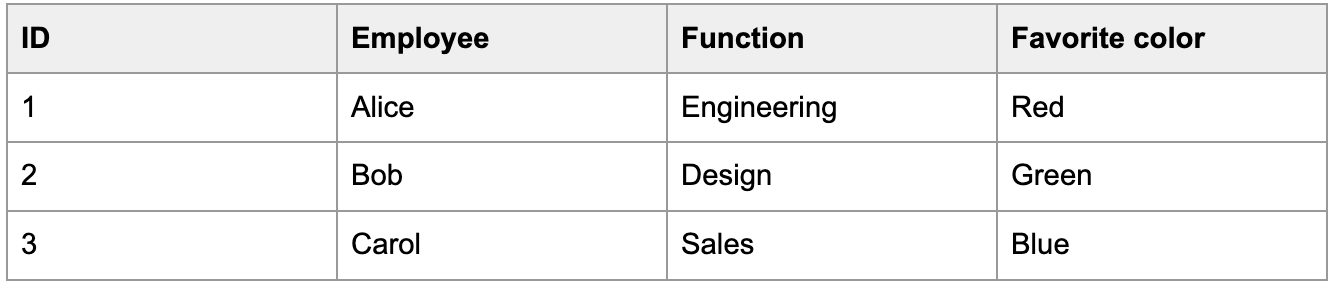
Let's also say that Alice's favorite color changes to purple on January 2.
If history tracking is off (SCD type 1), the next run of the ingestion pipeline updates that row in the destination table.
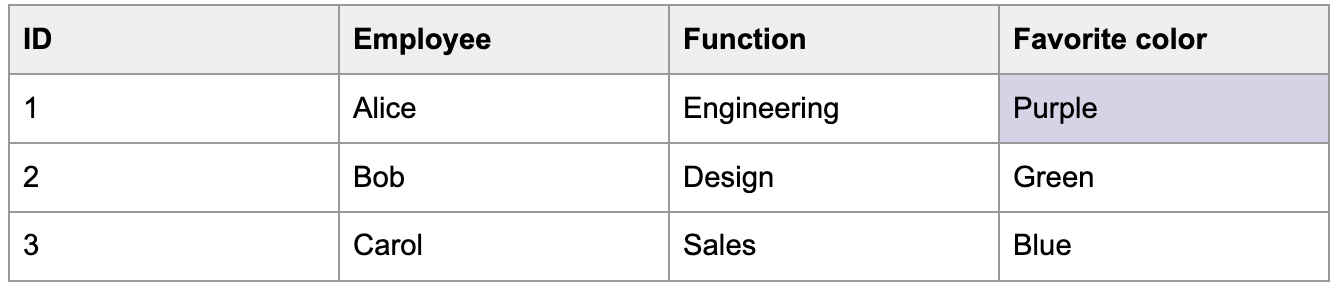
If history tracking is on (SCD type 2), the ingestion pipeline keeps the old row and adds the update as a new row. It marks the old row as inactive so that you know which row is up-to-date.

Enable history tracking in the UI
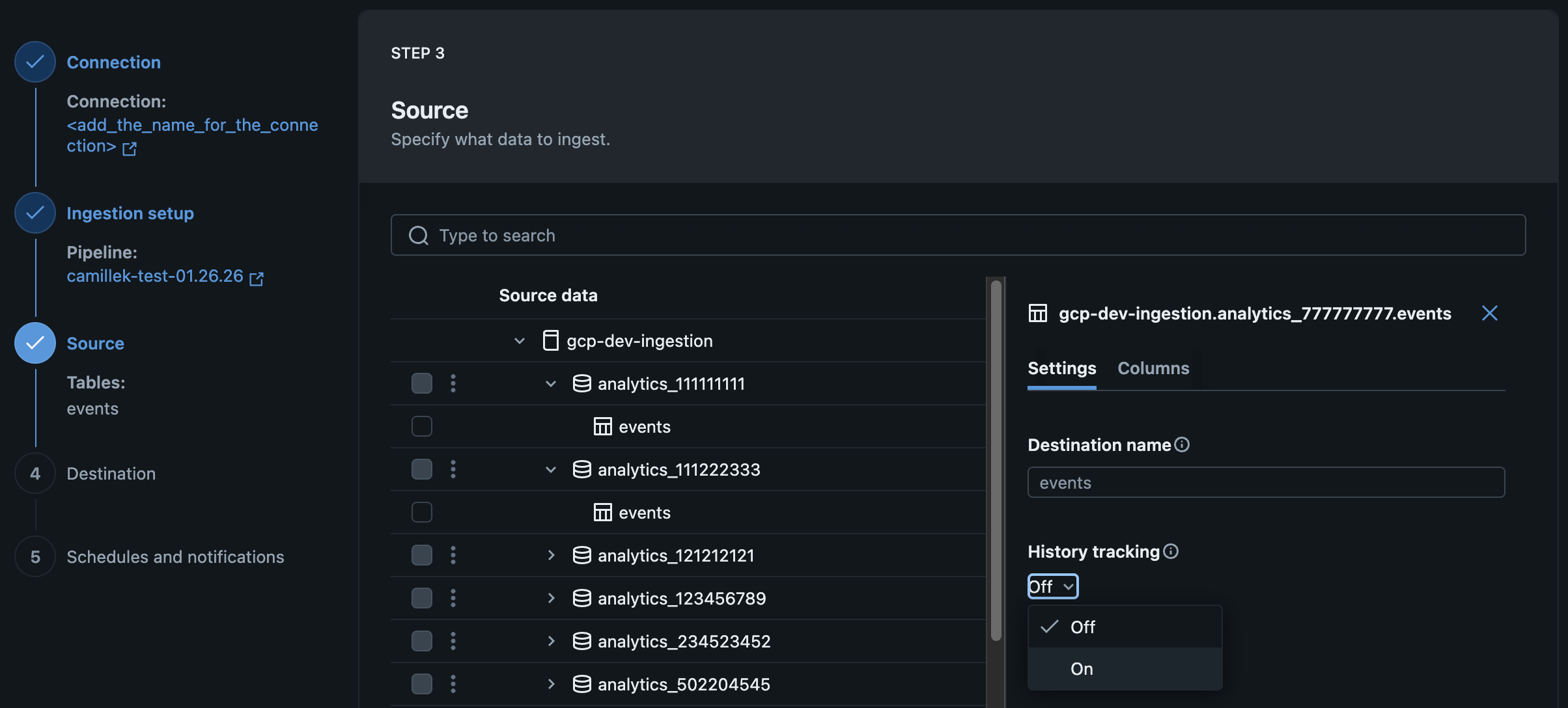
You can enable history tracking when you create or edit managed ingestion pipelines in the Databricks UI.
On the Source page of the data ingestion wizard, select On in the History tracking drop-down menu (SCD type 2).
Enable history tracking using the API
You can enable history tracking when you create or edit managed ingestion pipelines using Declarative Automation Bundles, notebooks, or the Databricks CLI by specifying the scd_type parameter.
SCD_TYPE_1: History tracking offSCD_TYPE_2: History tracking on
Examples: Google Analytics
SCD type 2 is supported for the users and pseudonymous_users tables using last_updated_date as the cursor column. It's not supported for event-level tables, which are append-only.
- Declarative Automation Bundles
- Databricks notebook
- Databricks CLI
By default, history tracking is off (SCD type 1). The following YAML configuration shows how to change this setting in a bundle:
resources:
  pipelines:
    pipeline_ga4:
      name: <pipeline-name>
      catalog: <destination-catalog>
      schema: <destination-schema>
      ingestion_definition:
        connection_name: <connection-name>
        objects:
          - table:
              source_url: <project-id>
              source_schema: <property-name>
              destination_catalog: <destination-catalog>
              destination_schema: <destination-schema>
              table_configuration:
                scd_type: SCD_TYPE_2
By default, history tracking is off (SCD type 1). The following Python code shows how to change this setting in a notebook:
pipeline_spec = """
{
  "name": "<pipeline-name>",
  "ingestion_definition": {
    "connection_name": "<connection-name>",
    "objects": [
      {
        "table": {
          "source_url": "<project-id>",
          "source_schema": "<property-name>",
          "destination_catalog": "<destination-catalog>",
          "destination_schema": "<destination-schema>",
          "table_configuration": {
            "scd_type": "SCD_TYPE_2",
          }
        }
      }
    ]
  }
}
"""
By default, history tracking is off (SCD type 1). The following JSON spec shows how to change this setting using the CLI:
{
  "resources": {
    "pipelines": {
      "pipeline_ga4": {
        "name": "<pipeline-name>",
        "catalog": "<destination-catalog>",
        "schema": "<destination-schema>",
        "ingestion_definition": {
          "connection_name": "<connection-name>",
          "objects": [
            {
              "table": {
                "source_url": "<project-id>",
                "source_schema": "<property-name>",
                "destination_catalog": "<destination-catalog>",
                "destination_schema": "<destination-schema>",
                "table_configuration": {
                  "scd_type": "SCD_TYPE_2"
                }
              }
            }
          ]
        }
      }
    }
  }
}
Examples: Salesforce
- Declarative Automation Bundles
- Databricks notebook
- Databricks CLI
By default, history tracking is off (SCD type 1). The following YAML configuration shows how to change this setting in a bundle:
resources:
  pipelines:
    pipeline_sfdc:
      name: <pipeline-name>
      catalog: <destination-catalog>
      schema: <destination-schema>
      ingestion_definition:
        connection_name: <connection-name>
        objects:
          - table:
              source_schema: <source-schema>
              source_table: <source-table>
              destination_catalog: <destination-catalog>
              destination_schema: <destination-schema>
              table_configuration:
                scd_type: SCD_TYPE_2
By default, history tracking is off (SCD type 1). The following Python code shows how to change this setting in a notebook:
pipeline_spec = """
{
  "name": "<pipeline-name>",
  "ingestion_definition": {
    "connection_name": "<connection-name>",
    "objects": [
      {
        "table": {
          "source_catalog": "<source-catalog>",
          "source_schema": "<source-schema>",
          "source_table": "<source-table>",
          "destination_catalog": "<destination-catalog>",
          "destination_schema": "<destination-schema>",
          "table_configuration": {
            "scd_type": "SCD_TYPE_2",
          }
        }
      }
    ]
  }
}
"""
By default, history tracking is off (SCD type 1). The following JSON spec shows how to change this setting using the CLI:
{
  "resources": {
    "pipelines": {
      "pipeline_sfdc": {
        "name": "<pipeline-name>",
        "catalog": "<destination-catalog>",
        "schema": "<destination-schema>",
        "ingestion_definition": {
          "connection_name": "<connection-name>",
          "objects": [
            {
              "table": {
                "source_schema": "<source-schema>",
                "source_table": "<source-table>",
                "destination_catalog": "<destination-catalog>",
                "destination_schema": "<destination-schema>",
                "table_configuration": {
                  "scd_type": "SCD_TYPE_2"
                }
              }
            }
          ]
        }
      }
    }
  }
}
Examples: SQL Server
The sequence column that you specify in the pipeline configuration (for example, last_updated, modified_at, or version_number) determines the time span that each row version was active (recorded in the __START_AT and __END_AT columns in the target table).
The following sequence_by column types are supported:
- Timestamp
- Date
- Integer
- Long
- String
- Declarative Automation Bundles
- Databricks notebook
- Databricks CLI
By default, history tracking is off (SCD type 1). The following YAML configuration shows how to change this setting in a bundle:
resources:
  pipelines:
    pipeline_sqlserver:
      name: <pipeline-name>
      catalog: <destination-catalog>
      schema: <destination-schema>
      ingestion_definition:
        connection_name: <connection-name>
        objects:
          - table:
              source_catalog: <source-catalog>
              source_schema: <source-schema>
              source_table: <source-table>
              destination_catalog: <destination-catalog>
              destination_schema: <destination-schema>
              table_configuration:
                scd_type: SCD_TYPE_2
                sequence_by: <sequence-column>
By default, history tracking is off (SCD type 1). The following Python code shows how to change this setting in a notebook:
pipeline_spec = """
{
  "name": "<pipeline-name>",
  "ingestion_definition": {
    "connection_name": "<connection-name>",
    "objects": [
      {
        "table": {
          "source_catalog": "<source-catalog>",
          "source_schema": "<source-schema>",
          "source_table": "<source-table>",
          "destination_catalog": "<destination-catalog>",
          "destination_schema": "<destination-schema>",
          "table_configuration": {
            "scd_type": "SCD_TYPE_2",
            "sequence_by": "<version-number>"
          }
        }
      }
    ]
  }
}
"""
By default, history tracking is off (SCD type 1). The following JSON spec shows how to change this setting using the CLI:
{
  "resources": {
    "pipelines": {
      "pipeline_sqlserver": {
        "name": "<pipeline-name>",
        "catalog": "<destination-catalog>",
        "schema": "<destination-schema>",
        "ingestion_definition": {
          "connection_name": "<connection-name>",
          "objects": [
            {
              "table": {
                "source_catalog": "<source-catalog>",
                "source_schema": "<source-schema>",
                "source_table": "<source-table>",
                "destination_catalog": "<destination-catalog>",
                "destination_schema": "<destination-schema>",
                "table_configuration": {
                  "scd_type": "SCD_TYPE_2",
                  "sequence_by": "<version-number>"
                }
              }
            }
          ]
        }
      }
    }
  }
}
Examples: Workday Reports
- Declarative Automation Bundles
- Databricks notebook
- Databricks CLI
By default, history tracking is off (SCD type 1). The following YAML configuration shows how to change this setting in a bundle:
resources:
  pipelines:
    pipeline_workday:
      name: <pipeline-name>
      catalog: <destination-catalog>
      schema: <destination-schema>
      ingestion_definition:
        connection_name: <connection-name>
        objects:
          - report:
              source_url: <report-url>
              destination_catalog: <destination-catalog>
              destination_schema: <destination-schema>
              table_configuration:
                scd_type: SCD_TYPE_2
By default, history tracking is off (SCD type 1). The following Python code shows how to change this setting in a notebook:
pipeline_spec = """
{
  "name": "<pipeline-name>",
  "ingestion_definition": {
    "connection_name": "<connection-name>",
    "objects": [
      {
        "report": {
          "source_url": "<report-url>",
          "destination_catalog": "<destination-catalog>",
          "destination_schema": "<destination-schema>",
          "table_configuration": {
            "scd_type": "SCD_TYPE_2",
          }
        }
      }
    ]
  }
}
"""
By default, history tracking is off (SCD type 1). The following JSON spec shows how to change this setting using the CLI:
{
  "resources": {
    "pipelines": {
      "pipeline_workday": {
        "name": "<pipeline-name>",
        "catalog": "<destination-catalog>",
        "schema": "<destination-schema>",
        "ingestion_definition": {
          "connection_name": "<connection-name>",
          "objects": [
            {
              "report": {
                "source_url": "<report-url>",
                "destination_catalog": "<destination-catalog>",
                "destination_schema": "<destination-schema>",
                "table_configuration": {
                  "scd_type": "SCD_TYPE_2"
                }
              }
            }
          ]
        }
      }
    }
  }
}
Limitations
Running a full refresh replaces the entire table. This removes all previous row versions. New history is tracked starting from the refresh point.