Message types
When you ingest with the Zerobus Ingest SDKs over gRPC, you choose how records are encoded on a given stream. Zerobus Ingest supports four message formats so you can trade off simplicity, type safety, and throughput for your workload: JSON, Protocol Buffers (protobuf), Apache Arrow, and Avro (Beta). Every format is validated against your Delta table schema before the data is made durable. See Schema management.
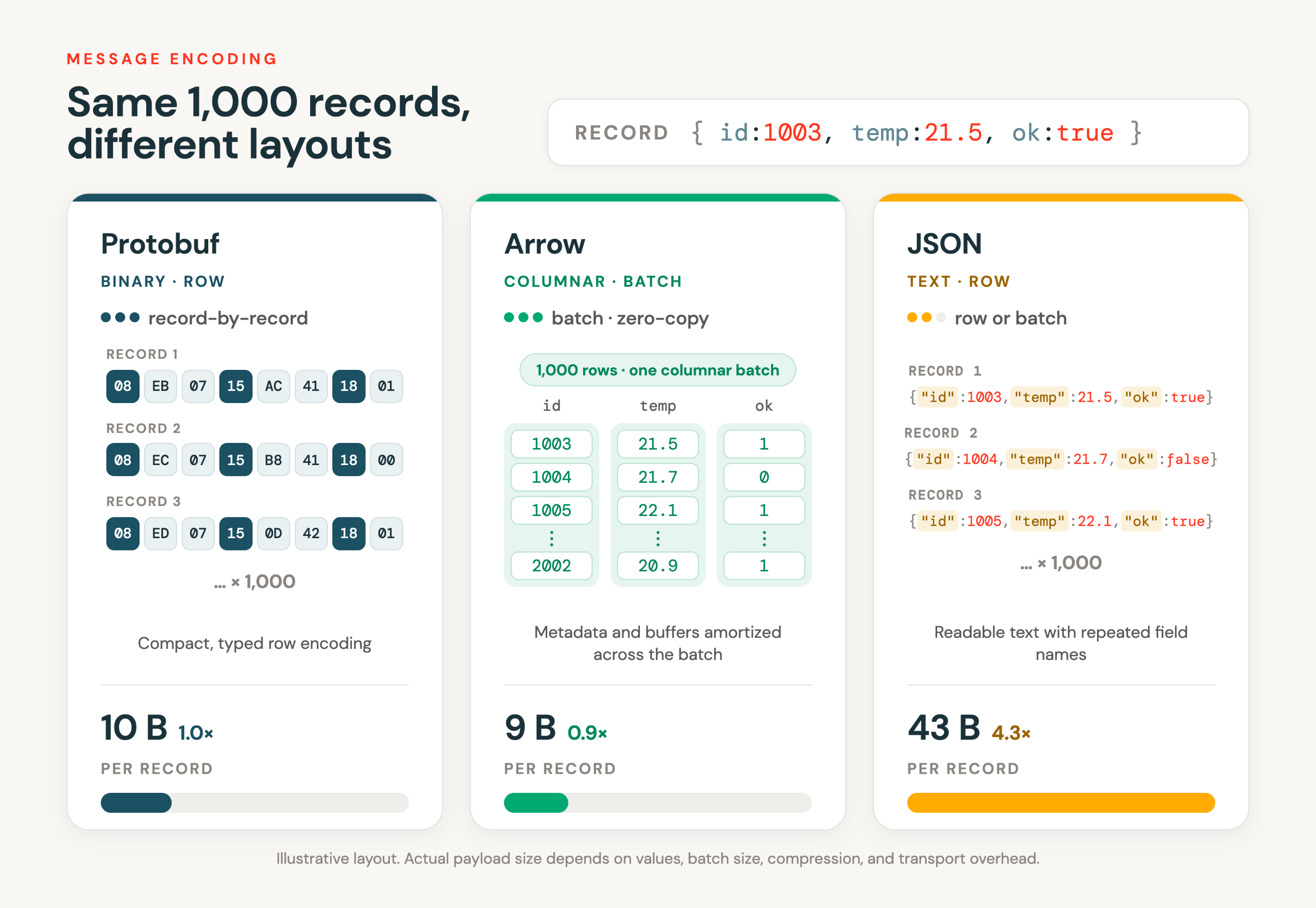
The diagram shows JSON, protobuf, and Apache Arrow. It doesn't include Avro, which uses a compact, row-oriented encoding similar to protobuf.
Which format should you use?
Format | Best for | Notes |
|---|---|---|
JSON | Getting started and simple producers. | The simplest option, with no schema definition to compile. Convenient, but slower than the binary formats for high-volume workloads. |
Protocol Buffers | Production, row-oriented, high-volume streams. | Type-safe, compact binary encoding. Recommended for most production workloads. Requires a compiled schema. |
Apache Arrow | Columnar or batch-oriented workloads. | Sends Apache Arrow record batches directly, avoiding row-by-row serialization. Best when your data is already columnar or you ingest in batches. See Use Arrow Flight with Zerobus Ingest. |
Avro (Beta) | Row-oriented producers that already work with Avro. | Compact row-oriented binary encoding described by a JSON schema, an alternative to protobuf. |
The snippets below show the shape of each format in the Python SDK. They assume you have already created the SDK client and know your target table. For the full setup (endpoint, table, service principal) and examples in every language, see Use Zerobus Ingest.
JSON
JSON is the simplest way to start: you send records as JSON objects with no schema definition to compile. It's ideal for getting up and running, prototyping, and producers where convenience matters more than raw throughput. For high-volume production workloads, a binary format (protobuf or Arrow) is more efficient.
Create a stream for JSON records by passing a table name to TableProperties with no descriptor:
table_properties = TableProperties(TABLE_NAME)
stream = sdk.create_stream(CLIENT_ID, CLIENT_SECRET, table_properties)

stream.ingest_record_offset({"device_name": "sensor-1", "temp": 22, "humidity": 55})
For the full JSON walkthrough, see Write a client.
Protocol Buffers
Protobuf provides a type-safe, compact binary encoding and is the recommended format for most production, row-oriented workloads. You define a protobuf schema that fits your target Delta table (see Protobuf schema), compile it, and the SDK ingests records record-by-record over gRPC.
Using protobuf takes three steps: generate a .proto schema that matches your table, compile it to a language module, then ingest records by passing the descriptor to TableProperties. The following example uses the Python SDK.
1. Generate a .proto schema from your table. The Python SDK includes a generate_proto tool that reads your Delta table and writes a matching schema:
python -m zerobus.tools.generate_proto \
    --uc-endpoint "https://<workspace-id>.cloud.databricks.com" \
    --client-id "<client-id>" \
    --client-secret "<client-secret>" \
    --table "main.default.air_quality" \
    --output "record.proto" \
    --proto-msg "AirQuality"
The generated schema uses proto2 syntax, with an optional field for each Delta column:
syntax = "proto2";
message AirQuality {
    optional string device_name = 1;
    optional int32 temp = 2;
    optional int64 humidity = 3;
}
2. Compile the schema to a Python module with the protobuf compiler:
pip install "grpcio-tools>=1.60.0,<2.0"
python -m grpc_tools.protoc --python_out=. --proto_path=. record.proto
This generates record_pb2.py.
3. Ingest records by passing the compiled descriptor to TableProperties (the default for protobuf). The SDK uses the descriptor to serialize each record:
import record_pb2

descriptor_bytes = record_pb2.AirQuality.DESCRIPTOR.file.serialized_pb
table_properties = TableProperties(TABLE_NAME, descriptor_bytes)
stream = sdk.create_stream(CLIENT_ID, CLIENT_SECRET, table_properties)

record = record_pb2.AirQuality(device_name="sensor-1", temp=22, humidity=55)
stream.ingest_record_offset(record)
The example above uses the Python SDK. The tooling varies by language: some SDKs ship a generate_proto utility that generates a .proto from your table, while others (such as Go and TypeScript) compile an existing .proto. For the per-language steps, see the protobuf notes in each SDK tab of Write a client. For tool sources and complete examples, see the Zerobus SDK repository.
Apache Arrow
Apache Arrow ingestion sends Arrow RecordBatch data directly over the same gRPC connection, instead of converting each row to JSON or protobuf first. It's the best choice when your application already produces Arrow data or when you ingest rows in batches, especially for wide, numeric-heavy, or analytics-oriented schemas where row-by-row serialization adds overhead.
Arrow is also a good fit for very large batches. Unlike the JSON and protobuf batch methods, which are all-or-nothing and bounded by the per-message size limit, the Arrow Flight path splits a large batch into smaller transport messages that are sent and acknowledged individually. See Arrow Flight batches are the exception and Use Arrow Flight with Zerobus Ingest.
Open an Arrow stream with a pyarrow.Schema and ingest RecordBatch data:
stream = sdk.create_arrow_stream(TABLE_NAME, schema, CLIENT_ID, CLIENT_SECRET)

stream.ingest_batch(batch)
For the full Arrow Flight walkthrough, including schema definition, batching, and compression, see Use Arrow Flight with Zerobus Ingest.
Avro
This feature is in Beta. To use it, a workspace admin must turn on Zerobus Ingest Avro Support from the Previews page. See Manage Databricks previews.
Apache Avro is a row-oriented, compact, binary, schema-driven format. Like protobuf, each record is encoded against a schema instead of carrying its field names inline, which keeps records small. The difference is that protobuf uses a compiled .proto descriptor, while Avro describes its records with a schema written in JSON. Avro ingestion runs over gRPC through the Zerobus SDKs. For which SDKs support Avro, see the Zerobus SDK repository.
Avro is a good fit when your producer already works with Avro, for example when it reads Avro data from an upstream system or already holds an Avro writer schema.
Schema handling
Zerobus Ingest doesn't use a schema registry, and records on the wire carry no schema ID or fingerprint. Instead, you supply the Avro writer schema as JSON when you create the stream, and every record on that stream is decoded against that schema. The schema is validated against the target Delta table up front, so an incompatible schema is rejected before any data flows.
The writer schema is fixed for the life of the stream. To ingest with a different schema, create a new stream.
Avro fields are paired to Delta columns by name at every level, so field order in the writer schema doesn't matter. For how Avro types map to Delta columns and which columns can't be targeted, see Avro types. For how records are validated against the table, see Schema management.
An Avro writer schema must declare each type inline. Named-type references, which reuse a named record, enum, or fixed type elsewhere in the schema by referring to its name, aren't supported.
How to provide data
Whether or not you use an SDK, you can ingest one value at a time or in batches. What differs is who encodes the data to Avro:
- With an SDK, you can either:
- Let the SDK encode your data: hand the SDK your Avro records and it encodes them against the writer schema.
- Send pre-encoded Avro bytes: if you already hold Avro-encoded data, for example from an upstream system, the SDK sends it as-is.
- Without an SDK, calling the gRPC API directly, you send pre-encoded Avro bytes only. Create the stream with the writer schema, then send the raw Avro binary encoding of your data, with no container-file header, schema-registry ID prefix, or fingerprint.
Write a client
The examples below use the Python and Rust SDKs. They create a stream, send records that the SDK encodes against the writer schema, and flush. They assume you have already set up Zerobus Ingest (endpoint, target table, and service principal). See Use Zerobus Ingest. For which SDKs support Avro, see the Zerobus SDK repository.
- Python SDK
- Rust SDK
Install the SDK with the avro extra, which pulls in the fastavro encoder:
pip install "databricks-zerobus-ingest-sdk[avro]"
Pass the writer schema as a JSON string to TableProperties with the avro_schema keyword, then ingest records as dictionaries:
import json

from zerobus.sdk.sync import ZerobusSdk
from zerobus.sdk.shared import TableProperties

SERVER_ENDPOINT = "https://1234567890123456.zerobus.us-west-2.cloud.databricks.com"
DATABRICKS_WORKSPACE_URL = "https://dbc-a1b2c3d4-e5f6.cloud.databricks.com"
TABLE_NAME = "main.default.air_quality"
CLIENT_ID = "your-client-id"
CLIENT_SECRET = "your-client-secret"

SCHEMA = {
    "type": "record",
    "name": "AirQuality",
    "fields": [
        {"name": "device_name", "type": "string"},
        {"name": "temp", "type": "int"},
        {"name": "humidity", "type": "long"},
    ],
}

sdk = ZerobusSdk(SERVER_ENDPOINT, DATABRICKS_WORKSPACE_URL)
table_properties = TableProperties(TABLE_NAME, avro_schema=json.dumps(SCHEMA))
stream = sdk.create_stream(CLIENT_ID, CLIENT_SECRET, table_properties)

try:
    for i in range(1000):
        stream.ingest_record_offset(
            {"device_name": f"sensor-{i}", "temp": 20 + (i % 5), "humidity": 55 + (i % 10)}
        )
    stream.flush()
finally:
    stream.close()
To send data you have already encoded, pass the raw bytes to ingest_record_offset directly, with no wrapper type. The SDK sends them through unchanged. The bytes must be a schemaless Avro datum encoded against the same writer schema. They're shown here as a literal, but in practice they come from an upstream system:
# A schemaless Avro datum for {"device_name": "sensor-0", "temp": 21, "humidity": 55},
# encoded against the writer schema above: a length-prefixed "sensor-0", then temp
# and humidity as Avro varints.
payload = b"\x10sensor-0\x2a\x6e"
stream.ingest_record_offset(payload)
Add the crate with the avro feature, which requires Rust 1.88 or later:
cargo add databricks-zerobus-ingest-sdk --features avro
cargo add tokio --features macros,rt-multi-thread
Select the Avro format with .avro(schema_json) on the stream builder, then ingest AvroRecord values that the SDK encodes against the writer schema:
use databricks_zerobus_ingest_sdk::{AvroRecord, AvroValue, ZerobusSdk};

const SERVER_ENDPOINT: &str = "https://1234567890123456.zerobus.us-west-2.cloud.databricks.com";
const DATABRICKS_WORKSPACE_URL: &str = "https://dbc-a1b2c3d4-e5f6.cloud.databricks.com";
const TABLE_NAME: &str = "main.default.air_quality";
const CLIENT_ID: &str = "your-client-id";
const CLIENT_SECRET: &str = "your-client-secret";

const AVRO_SCHEMA: &str = r#"{
  "type": "record",
  "name": "AirQuality",
  "fields": [
    {"name": "device_name", "type": "string"},
    {"name": "temp", "type": "int"},
    {"name": "humidity", "type": "long"}
  ]
}"#;

#[tokio::main]
async fn main() -> Result<(), Box<dyn std::error::Error>> {
    let sdk = ZerobusSdk::builder()
        .endpoint(SERVER_ENDPOINT)
        .unity_catalog_url(DATABRICKS_WORKSPACE_URL)
        .build()?;

    let mut stream = sdk
        .stream_builder()
        .table(TABLE_NAME)
        .oauth(CLIENT_ID, CLIENT_SECRET)
        .avro(AVRO_SCHEMA)
        .build()
        .await?;

    for i in 0..1000 {
        let record = AvroValue::Record(vec![
            ("device_name".to_string(), AvroValue::String(format!("sensor-{i}"))),
            ("temp".to_string(), AvroValue::Int(20 + i % 5)),
            ("humidity".to_string(), AvroValue::Long((55 + i % 10) as i64)),
        ]);
        stream.ingest_record_offset(AvroRecord(record)).await?;
    }
    stream.flush().await?;
    stream.close().await?;

    Ok(())
}
To send a datum you have already encoded, pass AvroBytes(bytes) to ingest_record_offset instead of AvroRecord.
Related
- API protocols: The API protocols these formats travel over.
- Schema management: How records are validated against your table.
- Supported data types: Supported Delta, Protobuf, and Avro data types.