Docs content model
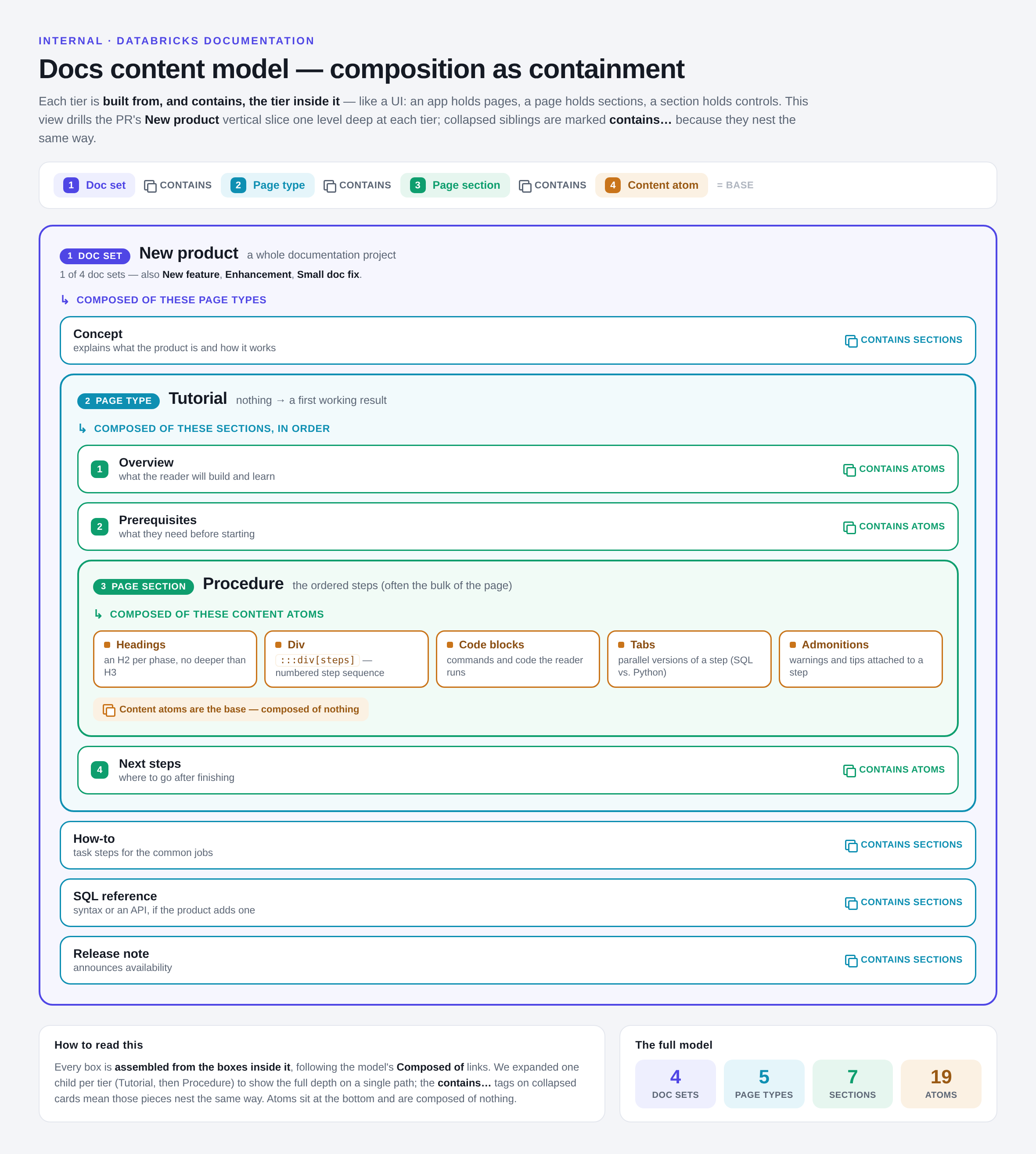
The docs content model describes what a Databricks documentation page is built out of, at every level of abstraction. It is a compositional model: each tier is assembled from the tier below it, the same way a UI is built from controls, then sections, then pages, then a whole app.
Use it two ways:
- Human writers — start at the tier that matches your task (planning a project? start with doc sets; writing a page? start with page types), then follow the Composed of links down into the parts you need to assemble.
- AI authoring agents — read the relevant component page before drafting. Each page states the required structure, hard rules, and style for that component, and links to the smaller components it is composed of.
The four tiers
Tier | What it is | Composed of |
|---|---|---|
A whole documentation project — everything a single change to the product needs. | Page types | |
A single page of a given kind, such as a tutorial or a concept. | Page sections | |
A reusable section within a page, such as a procedure or a limitations list. | Content atoms | |
The lowest-level Markdown and Docusaurus building blocks. | (nothing — atoms are the base) |
The following image shows this containment model:
How to read a component page
Every component page in this model follows the same template, so you always know where to look:
Section | What it tells you |
|---|---|
When to use | The situations the component is for. |
Composed of | Links down one tier to the parts this component is built from. (Omitted for content atoms.) |
Technical details | How to format it: Markdown or directive syntax, frontmatter, and structure. |
Rules | Hard constraints you must follow. |
Style | Grammar and voice rules specific to content in this component. |
Template | A copy-paste skeleton. |
Examples | Inline examples, or links to live pages that use the component. |
Used in | Links up one tier to components that include this one. |
Every page also carries a [↑ Docs content model] back-link to this index. Because these pages are
unlisted, they do not appear in the normal sidebar — this index and those back-links are the
primary way to navigate the model.
Full contents
Doc sets
Page types
Page sections
Content atoms
- Admonitions
- Cloud directives
- Details
- Div
- Docs table of contents
- Feed
- Include
- List table
- Literal include
- Notebook
- Replace
- Section table of contents
- Tabs
- YouTube
- Frontmatter
- Headings
- Links
- Code blocks
- Images
Resources
Relationship to the directives reference
The directives reference documents the same Docusaurus directives that content atoms cover. The content model supersedes it: the atoms tier folds each directive into the fuller template above (when to use, rules, style) and places it in the compositional hierarchy. The directives reference stays in place until writers have moved to this model.