Phase 1: Design account and identity strategy
In this phase, you design the foundational account administration and identity management strategy for your Databricks account.
Understand administrative boundaries
Databricks administration is structured in four intentional layers that provide flexibility and control for securing data and enabling users. Understanding these boundaries is critical for designing an effective administration strategy.
Administrative layers
- Account layer: Centralizes tenant-wide administration and shared services (for example, identity federation, workspace management, and billing).
- Workspace layer: Operational boundary where teams run workloads and workspace-specific controls are applied.
- Data governance layer: Materialized through Unity Catalog, enables centralized governance of data and AI assets across the entire account.
- Compute plane layer: Describes where workloads execute and how network paths are governed.
Layered security model
No single layer is sufficient on its own. Administrators should avoid concentrating protections in only one boundary and consider the following instead:
- Account-level controls establish consistent identity and governance fundamentals (for example, metastore creation, workspace-metastore binding, identity management).
- Workspace-level controls shape how users operate and what execution patterns are allowed.
- Data governance controls provide fine-grained access control and auditing at the metastore and workspace levels.
- Compute plane controls determine where workloads run and which network paths the runtime can use.
This model provides administrators with the flexibility required to enable users while securing data and compute resources.
Design administrative roles strategy
Databricks provides five admin roles with different scopes of control. Design your administrative role strategy based on organizational structure, governance model, and separation of duties requirements.
Global admin roles
Admin Type | Scope | Key Responsibilities |
|---|---|---|
Account admin | Account-wide | Manage account settings, billing, identity configuration, workspace creation, Unity Catalog metastores, cloud resource allocation |
Workspace admin | Single workspace | Manage workspace identities, access control, settings, features, compute policies |
Feature-specific admin roles
Admin Type | Scope | Key Responsibilities |
|---|---|---|
Metastore admin | Unity Catalog metastore | Optional role for managing storage of Unity Catalog objects at metastore level, managing data centrally across workspaces |
Marketplace admin | Account-wide | Manage Marketplace provider profile, create and manage Marketplace listings |
Billing admin | Account-wide | View budgets and manage serverless usage policies across the account |
Administrative role design patterns
- Centralized administration: Small team of account admins manages all workspaces and metastores (suitable for small organizations)
- Federated administration: Account admins handle account-level services, workspace admins manage their workspaces, metastore admins manage data governance (suitable for large organizations)
- Segregated duties: Separate individuals for account admin, billing admin, and metastore admin roles to enforce compliance (suitable for regulated industries)
Best practices for administrative roles
- Limit account admin privileges to two or three trusted individuals.
- Use workspace admins for day-to-day workspace management.
- Assign metastore admin role based on governance model (centralized versus decentralized).
- Enable audit logging to track admin activities across all layers.
- Document administrative responsibilities and escalation procedures.
- Use groups for admin roles rather than individual users where possible.
- Enforce segregation of duties between administrative accounts.
Design identity strategy
Identity federation enables centralized management of users, service principals, and groups at the account level, and then assigns those identities access to specific workspaces. Design your identity strategy to balance centralized control with operational flexibility.
Identity types in Databricks:
- Users: User identities recognized by Databricks and represented by email addresses.
- Service principals: Identities for use with jobs, automated tools, and systems such as scripts, apps, and CI/CD platforms.
- Groups: Collections of identities for managing group access to workspaces, data, and other securable objects.
Identity federation benefits:
- Centralized management: Configure users, groups, and service principals at the account level.
- Simplified administration: Assign account-level identities to multiple workspaces without recreating them.
- Unified governance: Single source of truth for identity management across all workspaces.
- Automated provisioning: Use automatic identity management or SCIM to synchronize identities from your identity provider.
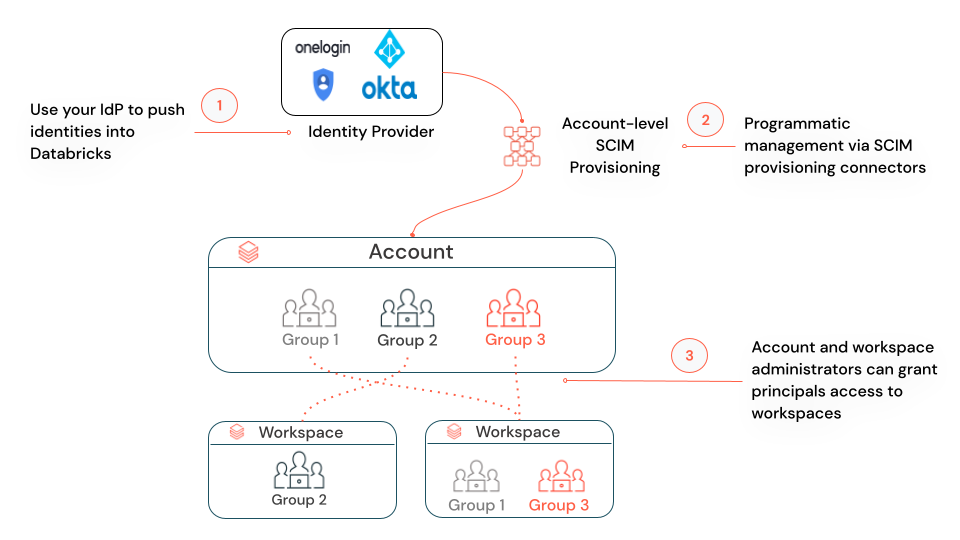
Databricks enables identity federation by default for all new workspaces, and you cannot disable it.
For comprehensive identity management documentation, see Manage users, service principals, and groups.
Consider cross-domain identity requirements
Some enterprises have multiple email domains, such as one used exclusively for emails and another for user access. This setup is supported in Databricks by providing appropriate mapping in SCIM provisioning or identity provider configuration.
Cross-domain identity scenarios
- Email domain versus access domain: Users have different email addresses for communication rather than authentication.
- Merged organizations: Multiple organizations with different email domains consolidated into single Databricks account.
- Multi-brand enterprises: Different business units using separate email domains but shared Databricks platform.
Best practices for cross-domain identity:
- Map email addresses correctly in SCIM attribute mappings.
- Test authentication flows for users from all domains before production rollout.
- Document domain mapping configurations for operational teams.
- Ensure identity provider supports multi-domain scenarios.
Design single sign-on strategy
Single sign-on (SSO) enhances security and streamlines user management by centralizing authentication through your identity provider. Design your SSO strategy based on identity provider capabilities, security requirements, and user experience goals.
On Google Cloud Platform (GCP), single sign-on using Google Cloud Identity is available by default. Optionally, you can bring your own identity provider (for example, Okta or Microsoft Entra ID) to configure single sign-on to Databricks.
SSO protocol selection
Protocol | Use Case | Supported Providers |
|---|---|---|
OIDC (OpenID Connect) | Modern authentication, API integration, recommended for new deployments | Microsoft Entra ID, Okta, Google Workspace, OneLogin |
SAML 2.0 | Enterprise SSO, legacy systems, required for some identity providers | Microsoft Entra ID, Okta, PingFederate, ADFS |
SSO design considerations:
- Multifactor authentication (MFA): Enable MFA in identity provider for enhanced security.
- Fallback authentication: Plan for identity provider outages using emergency access.
Best practices for SSO:
- Use SSO with multifactor authentication to centralize authentication and reduce password risks.
- Test SSO configuration with test users before enabling enforcement.
- Configure attribute mappings accurately for user email, first name, and last name.
- Enable SSO enforcement only after thorough testing to avoid locking users out.
- Plan for identity provider maintenance windows and failover scenarios.
For detailed SSO configuration instructions, see Configure SSO in Databricks.
Provision users using automatic identity management
Automatic identity management allows Databricks to automatically sync users and groups from your identity provider without manual SCIM configuration. It replaces the previous SCIM provisioning model and eliminates configuration complexity.
Automatic identity management capabilities
- Direct synchronization: Users, service principals, groups, and nested groups synchronized directly from your identity provider.
- Source of truth: Your identity provider is the source of record; changes are automatically reflected in Databricks.
- Simplified configuration: Reduces administrative overhead compared to SCIM.
- Enhanced features: Synchronizes nested groups and service principals from Microsoft Entra ID (not available with SCIM).
Best practices for automatic identity management
- Use automatic identity management as the standard method for identity synchronization (recommended for all new deployments).
- Leverage nested groups to simplify permission management.
- Use service principals for automated workloads instead of user accounts.
- Document your identity provider group structure for Databricks administrators.
For detailed automatic identity management configuration, see Automatic identity management.
If your identity provider is not supported by automatic identity management, use SCIM instead. See Sync users and groups from your identity provider using SCIM.
Understand just-in-time provisioning
Just-in-time (JIT) provisioning automatically creates user accounts when users first log in to Databricks using single sign-on (SSO). This streamlines user onboarding by eliminating manual account creation.
JIT provisioning workflow
- User authenticates through SSO identity provider
- Databricks checks if account exists for authenticated user
- If no account exists, Databricks provisions new user account using identity provider attributes
- User gains immediate access to assigned workspaces
JIT benefits
- Automated onboarding: No manual account creation required for new users.
- Reduced administrative overhead: Eliminate account creation tickets and delays.
- Consistent provisioning: User details automatically synchronized from identity provider.
- Improved user experience: Users access Databricks immediately after authentication.
JIT design considerations
- Workspace assignment: Plan how new users are assigned to workspaces (for example, manual assignment versus automated group-based assignment).
- Default permissions: Define default permissions for newly provisioned users.
- Attribute mapping: Ensure identity provider provides accurate user attributes (for example, email, name).
JIT provisioning is enabled by default for accounts created after February 2, 2026.
For detailed JIT provisioning configuration, see Automatically provision users (JIT).
Account and identity recommendations
Recommended
- Authenticate via single sign-on (SSO) at the account level with your identity provider.
- Leverage multi-factor authentication (MFA) in your identity provider for enhanced security.
- Use SCIM or automatic identity management to synchronize users and groups to the account console.
- Enable just-in-time (JIT) provisioning for automated user onboarding.
- Limit the number of account admin users (2-3 trusted individuals).
- Enforce segregation of duties between administrative accounts.
- Restrict workspace admins based on organizational structure and governance requirements.
- Use OAuth authentication for service principals.
- Use service principals to run administrative tasks and production workloads.
- Automate all administrative operations using Terraform or similar tools.
- Document administrative roles, responsibilities, and escalation procedures.
- Use groups for admin roles rather than individual users where possible.
Evaluate based on requirements
- Consider cross-domain identity requirements if your organization uses multiple email domains.
- Balance administrative role granularity with operational complexity.
- Consider emergency access procedures for identity provider outages.
- Plan for identity provider maintenance windows and SSO failover scenarios.
Phase 1 outcomes
After completing Phase 1, you should have the following:
- Administrative role strategy designed (for example, account admin, workspace admin, metastore admin).
- Identity federation strategy defined (account-first provisioning with automatic identity management or SCIM).
- SSO strategy designed with protocol selection (OIDC or SAML) and MFA requirements.
- User provisioning strategy defined (automatic identity management or SCIM + JIT provisioning).
- Cross-domain identity requirements identified (if applicable).
- Administrative responsibilities and escalation procedures documented.
- Service principal strategy designed for automated workloads.
Next phase: Phase 2: Design workspace strategy
Implementation guidance: For step-by-step instructions to implement your account and identity strategy, see Manage users, service principals, and groups.