Phase 2: Design workspace strategy
In this phase, you design your workspace architecture to align with your organization's structure, security requirements, and operational needs.
Understand workspaces
A Databricks workspace is the operational boundary in a cloud region where teams develop and run workloads. It contains collaboration artifacts (for example, notebooks, jobs, dashboards, and repositories) and workspace-scoped configurations, such as workspace permissions, cluster policies, secrets, and SQL configurations. The workspace is an execution and collaboration environment. Persistent data is typically stored in cloud services, such as object storage.
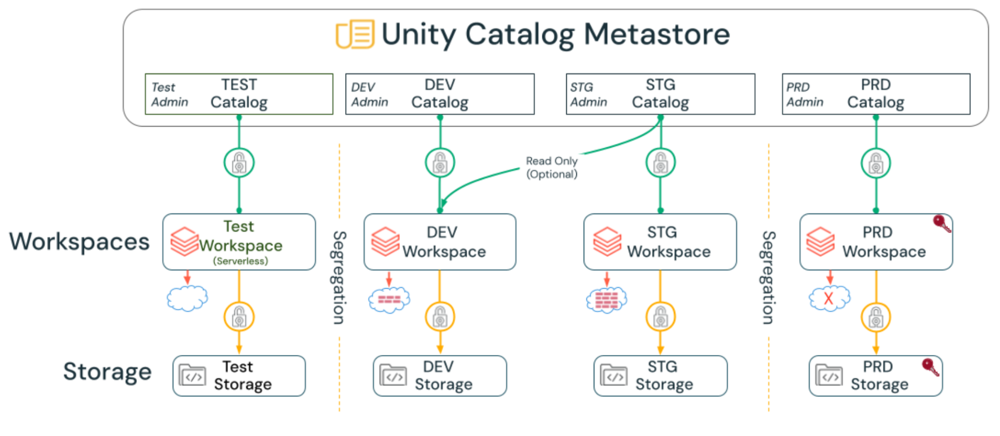
Administrators create and configure workspaces based on their organization's objectives. Some use a single workspace while others separate by domain, environment (dev/test/prod), line of business, geography, or regulatory boundaries. These choices determine the administrative radius, separation of duties, cost attribution, and the frequency of replication. Starting small with Databricks requires minimal configuration, but larger deployments should consider future requirements and how they affect your ability to protect data while enabling teams.
Choose workspace deployment model
There are two types of Databricks workspaces available:
Serverless workspaces
A workspace deployment in your Databricks account that comes pre-configured with serverless compute and default storage to provide a completely serverless experience.
Serverless workspace characteristics
- Default storage: Cloud storage on Databricks's cloud account, in the same region as the workspace.
- You can still connect to your cloud storage from serverless workspaces.
- Serverless compute: Pre-configured and immediately available.
- Fast startup: No infrastructure provisioning required.
- Automatic scaling: Scales with workload demand.
Classic workspaces
A workspace deployment in your Databricks account that provisions storage and compute resources in your existing cloud account. Serverless compute and services are still available in classic workspaces.
Classic workspace characteristics
- Customer-managed storage: Storage in your cloud account.
- Customer-managed compute: Compute infrastructure in your cloud account.
- Network control: Full control over VPC/VNet configuration.
- Flexibility: Serverless compute can still be used alongside classic compute.
Workspace deployment model recommendations
Use these recommendations to decide whether to deploy a serverless or classic workspace for your scenario:
- Confirm that the region you plan to use supports serverless workspaces and serverless compute if you intend to use serverless.
- Review the serverless workspace limitations to verify that they meet your requirements.
- Evaluate your primary use cases (for example autoscaling versus fine-grained cluster control) and choose serverless or classic workspaces accordingly.
- Recommendation: Start with serverless workspaces for operational efficiency.
- Use classic workspaces when: You require custom network configurations, on-premises connectivity, or specific compliance requirements.
Design workspace split strategy
There are several reasons to split a Databricks setup into different workspaces. Consider these patterns when designing your workspace architecture.
Reasons to split workspaces
Isolate workspaces based on data protection requirements
For strongly regulated industries with strict data separation enforcement, isolate workspaces to simplify implementing controls for sensitive data without interfering with lower-risk workstreams.
Isolate different business units
Ensure that no workspace assets in Databricks are shared between business units when organizational boundaries require complete isolation.
Isolate teams with different platform needs
If different teams require access to different sets of platform features (for example, full access to all features for a central administration team, but not for other teams or platform testing), then these teams should be separated by workspaces.
Isolate software development lifecycle (SDLC) environments
Separate Dev, Staging, and Prod environments if you have strict isolation requirements. For example:
- Some organizations deploy Dev/Staging/Prod environments in different virtual networks, so separate workspaces are required for each environment.
- To test new workspace settings before applying them to Prod (like enabling or restricting features), Prod must be a different workspace than Dev or Staging.
- Many enterprises also isolate these environments from a storage and compute perspective by using different storage containers, virtual networks, and Databricks workspaces.
Operate in several cloud regions
When an organization serves users or collects data in multiple countries or geographies, regulations or internal policies might require that specific data remain in-region, which drives the need for separate workspaces deployed in each cloud region that process or store that data. Splitting workspaces per region allows teams to align Databricks deployments with local storage accounts and virtual networks, while still following common enterprise standards for governance and security.
Regional workspaces also help reduce latency for interactive analytics and data applications by placing compute closer to local users and data sources, which improves user experience and query performance.
Split to overcome resource limits
Cloud accounts (or subscriptions) have resource limits. Deploying workspaces into different accounts is a way of ensuring sufficient resources are available for each workspace. There are also limits in each Databricks workspace, such as the number of tasks that can run simultaneously or the maximum number of Databricks Apps. Splitting workspaces ensures that workloads in each workspace have access to more resources.
Cloud provider resource limits
GCP workspace limits
On GCP, the maximum number of workspaces allowed by default is 20.
Important limits
- GCP project and service limits.
- GCP Databricks workspace limits.
Considerations for split workspaces
Collaboration limitations
There is no notebook sharing (collaboration) across workspaces. Use Unity Catalog across workspaces to promote data sharing where possible. Code can be shared using GitHub across workspaces.
Administrative overhead
Administrative overhead for large numbers of workspaces can become substantial. Often, having 100+ workspaces can inadvertently lead to orphaned or unmanaged workspaces, which can pose a cost and/or exfiltration risk.
Automation requirement
For multiple workspaces, both setup and maintenance must be fully automated (using tools such as Terraform, cloud-specific tools, or the REST API). This is especially important for mobility purposes and disaster recovery (DR) scenarios, where rapid workspace provisioning, failover, and configuration replication across regions or clouds are critical operational requirements.
Network infrastructure costs
If every workspace needs to be secured at the network layer (like for data exfiltration protection), the necessary network infrastructure can get very expensive if you have hundreds of workspaces.
Feature limitations
Some features have limited cross-workspace support, such as serverless compute with serverless egress controls, which access Unity Catalog managed services. Certain features, such as AI features, Google Private Service Connect, and encryption keys, are defined at a workspace level. If the enterprise requires different security setups for other teams, the approval of these features defines the workspace split.
SDLC and business unit matrix
If you want to separate workspaces for Dev/Staging/Prod, and you also want to segregate business units by workspace, consider the workspace limits of the different cloud providers. The matrix can quickly lead to a large number of workspaces.
Understand workspace security modes
Workspaces that are assigned to Unity Catalog support the following access modes for clusters:
Security mode | Characteristics |
|---|---|
Standard | Multiple users can work on the same cluster. Suitable for general workloads (for example, ETL, data exploration). Supports SQL, Python, and Scala only. Supports fine-grained access control (FGAC), including view-based permissions and attribute-based/table-based access control (ABAC). No support for the Machine Learning ML DBR (but many ML libraries can be installed on the standard DBR). |
Dedicated | Supports ML DBR and all languages. Dedicated for a single user: Cluster is accessible by only one user (assigned during cluster creation). Dedicated for a single group: Multiple users of the same group can work on the same cluster (the group is assigned during cluster creation). |
Example workspace deployments
When getting started with Databricks, most organizations run a single-tenant Databricks deployment in a single cloud region. However, as your organization grows, administrators can tailor their deployments to meet their complex use cases.
Single-tenant, single-region deployment
- One production workspace.
- One development workspace.
- All resources in a single cloud region.
Multi-region deployment
- Production workspace in US region.
- Production workspace in EU region (for GDPR compliance).
- Shared development workspace.
- Unity Catalog metastore per region with D2D OpenSharing for cross-region data access.
Multi-business unit deployment
- One workspace per business unit (for example, Sales, Marketing, Engineering).
- Shared development workspace for all teams.
- Central Unity Catalog metastore with catalog-level segregation.
Environment-based deployment
- Production workspace (all business units).
- Staging workspace (pre-production testing).
- Development workspace (shared development).
- Separate networks and storage for each environment.
Define workspace naming conventions
Establish a consistent naming convention for workspaces to improve discoverability and management.
Recommended naming pattern
{organization}-{environment}-{region}-{purpose}
Examples
acme-prod-us-west-analyticsacme-dev-sharedacme-prod-eu-west-gdpracme-staging-us-east-dataeng
Best practices for workspace naming
- Use lowercase letters and hyphens.
- Include environment designation (for example, prod, staging, dev).
- Include region for multi-region deployments.
- Include business unit or purpose when applicable.
- Keep names under 50 characters.
- Document naming conventions in your runbook.
Workspace strategy recommendations
Recommended
- Split SDLC environments into separate workspaces (at least Dev and Prod, but possibly more depending on requirements).
- Use automation tools such as Terraform whenever possible to minimize human error and establish repeatable deployment patterns.
- Start with serverless workspaces and switch to classic workspaces only when you have specific network or compliance requirements.
- Document workspace split strategy and naming conventions.
- Create an administrative workspace per region for managing Unity Catalog resources.
Avoid these patterns
- Do not create separate workspaces for individual teams or small projects (use Unity Catalog catalogs and schemas for isolation instead).
- Do not deploy more than 50-100 workspaces without strong justification and robust automation.
- Do not split workspaces unnecessarily (balance isolation needs with operational complexity).
- Avoid ad-hoc workspace creation without following naming conventions.
Phase 2 outcomes
After completing Phase 2, you should have:
- Workspace deployment model selected (serverless vs classic workspaces).
- Workspace split strategy designed based on organizational needs (for example, environment, business unit, region, compliance).
- Understanding of resource limits and mitigation strategies.
- Workspace naming convention defined.
- Security modes understood (standard vs dedicated).
- Example deployment architecture documented.
- Automation strategy planned for workspace provisioning.
Next phase: Phase 3: Design Unity Catalog architecture