Use Genie Code for pipeline development
Genie Code in Agent mode is the AI data engineering partner for developers in the Lakeflow Pipelines Editor. It explores data, generates and runs pipeline code, and fixes errors from a single prompt.
This page describes using Genie Code to develop and migrate Spark Declarative Pipelines on Lakeflow (SDP) pipelines. To convert legacy SQL from other dialects, such as T-SQL, Snowflake, or Oracle, to ANSI SQL, use the agentic code converter instead. See Convert SQL with the agentic code converter.
What is Genie Code for pipeline development?
Genie Code in Agent mode is an autonomous partner that can automate entire multi-step data engineering workflows in the Lakeflow Pipelines Editor.
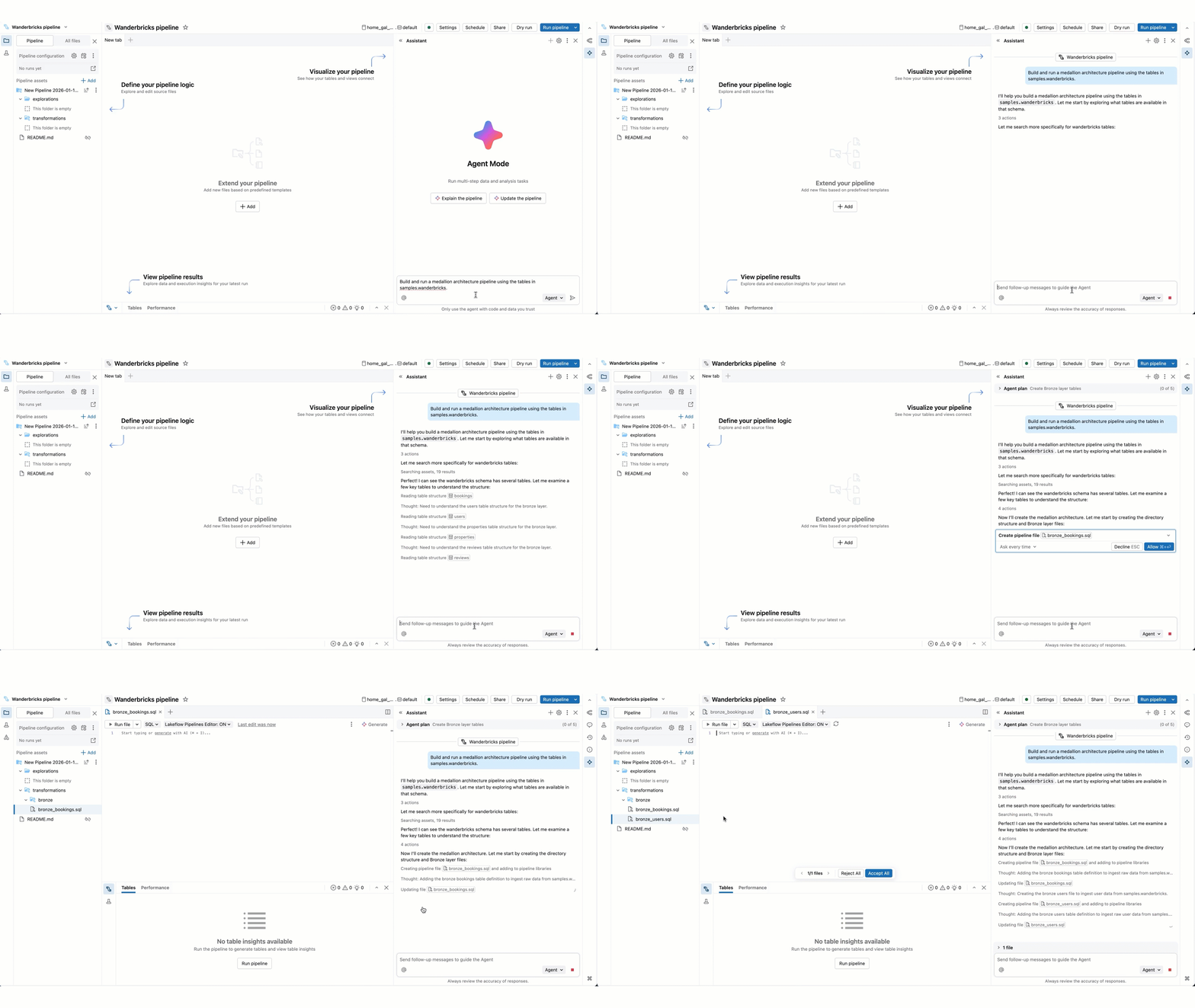
Compared to Genie Code chat mode, Agent mode has expanded capabilities: planning a solution, retrieving relevant assets, running code, using pipeline outputs to improve results, fixing errors automatically, and more.
Genie Code in Agent mode can plan and generate entire pipelines end-to-end from scratch, or accelerate working on an existing pipeline. The agent works with you to approve its plans and confirm its next steps before proceeding. With your approval, Genie Code can use tools to perform tasks like searching tables, editing a SQL or Python source file, running pipeline updates, and reading pipeline datasets.
Genie Code's access and actions are governed by the user’s permissions. It can only access data that you have access to and perform operations that you have permissions for.
When you turn on Agent mode in Genie Code, Genie Code adapts its capabilities based on the features you are currently using in Databricks. For example, in the Lakeflow Pipelines Editor, Genie Code focuses on pipeline editing and data engineering tasks. In notebooks and the SQL Editor, Genie Code supports data exploration and analysis. See Use Genie Code for data science for more information.
Requirements
To use Genie Code for data engineering, your workspace needs the following:
- Partner-powered AI features enabled for both the account and workspace. See Partner-powered AI features.
- Your workspace must be in a supported region. Genie Code is a Designated Service that uses Geos to manage data residency. See Geo availability of Genie Code features.
Use Genie Code for pipeline development
To use Genie Code's agentic capabilities for pipeline development:
-
From Lakeflow Pipelines Editor, open the Genie Code side panel by clicking
 Genie Code in the upper-right corner of your workspace.
 -
In the lower-right corner, select Agent. This toggles on Genie Code’s Agent mode, allowing you to use Genie Code's agentic data engineering capabilities.
-
Enter a prompt for Genie Code. For example, you can ask it questions about your pipeline, such as “describe this pipeline”. You can also ask it to add new datasets, for example, "create silver_sales_data in a new file that reads from bronze_sales_data and cleans the data and adds useful quality expectations."
noteGenie Code respects the user’s Unity Catalog permissions, so it can only access the data and pipeline source that you have access to.
-
As Genie Code generates its response, it often pauses to get your input:
-
For more complex tasks, Genie Code may create a step-by-step plan and ask clarifying questions. Answer its clarifying questions to help it hone its plan.
-
When Genie Code needs to run code or update a pipeline, it asks for your approval before proceeding. Allow or Decline its request. You can also select Allow in this thread (referring to the Genie Code conversation thread) or Always allow.
importantGenie Code in Agent mode can generate and execute code in your pipeline. While it has guardrails to prevent dangerous actions, there is still risk. You should only use it with data you trust, and you should review code before running it.
-
As Genie Code continues its work, you may be prompted to select Continue or Reject. Review its existing work, then select Continue to allow it to continue to its next steps or Reject to tell it to try something else.
-
To stop Genie Code while it is working, click the red
 .
.
-
Genie Code can create new files, generate text, queries, and code, run the files or pipelines, and access the output datasets to interpret the results.
In order for Genie Code to continue its work and take next steps, you need to stay on the current tab that it is working in.
You can add instructions for Genie Code to use in most responses. For example, if you have code conventions you want to use, or preferred libraries to use, you can add these guidelines to instructions for Genie Code. You can also create skills to extend Genie Code with specialized capabilities for your domain-specific tasks. For more details and other tips, see Tips to improve Genie Code responses.
Agent mode capabilities
In Agent mode, Genie Code can help with most pipeline development tasks. Key capabilities include:
- Data discovery: Genie Code can search tables in the workspace to help you find the required data for a task.
- Pipeline code edits: Genie Code can create and edit multiple files at a time. It keeps you informed about which files it is changing and shows you the code diff in each file, so you can review the changes individually or all together at the end.
- Pipeline execution: Genie Code can run individual files, dry-run/run the pipeline, or do a full refresh. When Genie Code wants to proceed, it asks for your confirmation before doing so.
- Understanding and improving pipeline behavior: Genie Code can inspect datasets and pipeline outputs to help you understand what a pipeline is doing end-to-end and why. For example, it can summarize transformations, trace how data flows into downstream tables, and highlight unexpected changes in row counts or schemas. When it surfaces potential data quality issues, Genie Code can help you reason about their cause and suggest where and how to address them in the pipeline.
These capabilities support common use cases such as:
- Authoring a new pipeline: Genie Code can help with all steps of creating a new medallion architecture pipeline, from ingesting data, to standardizing and cleaning the data, to transforming and analyzing the data.
- Explain a pipeline: Genie Code can analyze and explain an existing pipeline to help you ramp up quickly.
- Fix issues: When you have errors, Genie Code can help diagnose and fix the problems, iterating through multiple files until the issue is resolved.
- Fix incremental refresh: When materialized views in your pipeline are refreshed using the full recompute strategy, Genie Code can diagnose the cause from the pipeline's incrementalization insights, suggest and apply query improvements that make them better suited for incremental refresh, and flag hard blockers.
Migrate from other ETL frameworks to Lakeflow pipelines
This feature is in Beta.
Genie Code can migrate an existing data transformation project into a Lakeflow pipeline. You point it at your uploaded project, and it plans and runs the migration end-to-end. This migration capability is part of Lakebridge and is also available through the Lakebridge Switch transpiler.
Migration currently supports dbt and Informatica projects only. Support for additional sources is planned.
Migrate a project
-
Upload the project to Databricks. Use one of the following:
- Catalog: open a Volume, then Upload to this Volume.
- Workspace: open a directory, then click
 > Import.
-
Create an empty Lakeflow pipeline. Go to Jobs & Pipelines and create an ETL pipeline.
-
Ask Genie Code to migrate it. Open Genie Code and prompt it with the path to your uploaded project, for example:
promptMigrate the project at /Volumes/my_catalog/my_schema/my_volume/my_project
How the migration works
After you start the migration, Genie Code generates a plan and then executes it:
- Read the source. It reads the source project to understand its models, transformations, and dependencies.
- Gather inputs. It pauses to ask for any required inputs, such as whether to generate SQL or Python pipeline source.
- Research and generate an intermediate representation (IR). It analyzes the project and builds an intermediate representation that captures the pipeline's logic independent of the source tool.
- Convert, validate, and repair. It converts the IR into pipeline source, validates the result, and iterates in a repair loop until the pipeline is correct.
Review the migrated pipeline source and run the pipeline to confirm the results match the original project before relying on it in production.
Examples
Try the following prompts to get started:
- "Build and run a medallion architecture pipeline for fraud detection using the table transactions and customers in my_catalog.my_schema."
- "Explain every step of this pipeline."
- "Fix the failure in this pipeline."
Additional resources
- Learn more about Databricks AI assistive features
- Get tips to Tips to improve Genie Code responses
- Use Genie Code for data science, for data discovery and exploration
- Use Genie Code for dashboard authoring
- Use Use Genie Code for intelligent document processing, to build document processing pipelines
- Explore the Lakeflow Pipelines Editor