Declarative features API reference
This feature is in Beta. Workspace admins can control access to this feature from the Previews page. See Manage Databricks previews.
Declarative Feature Engineering API
Feature constructor and register_feature()
The recommended approach is to construct a Feature object locally and use register_feature to persist it to Unity Catalog. This two-step workflow lets you experiment with features (including create_training_set) before registering them.
Feature(
    source: DataSource,                                    # Required: DeltaTableSource or RequestSource
    function: Union[AggregationFunction, ColumnSelection], # Required: Aggregation or column selection
    entity: Optional[List[str]] = None,                    # Required for aggregation: entity columns
    timeseries_column: Optional[str] = None,               # Required for aggregation: timestamp column
    name: Optional[str] = None,                            # Optional: Feature name (auto-generated if omitted)
    description: Optional[str] = None,                     # Optional: Feature description
)
FeatureEngineeringClient.register_feature() registers a locally constructed Feature in Unity Catalog.
FeatureEngineeringClient.register_feature(
    feature: Feature,       # Required: A Feature instance (not already registered)
    catalog_name: str,      # Required: UC catalog name
    schema_name: str,       # Required: UC schema name
) -> Feature
from databricks.feature_engineering.entities import Feature, DeltaTableSource, AggregationFunction, Sum, RollingWindow
from datetime import timedelta

# Step 1: Construct the feature locally
feature = Feature(
    source=DeltaTableSource(catalog_name="main", schema_name="store", table_name="transactions"),
    entity=["user_id"],
    timeseries_column="transaction_time",
    function=AggregationFunction(Sum(input="amount"), RollingWindow(window_duration=timedelta(days=7))),
)

# Step 2: Register in Unity Catalog
fe = FeatureEngineeringClient()
registered_feature = fe.register_feature(
    feature=feature,
    catalog_name="main",
    schema_name="store",
)
create_feature()
FeatureEngineeringClient.create_feature() validates, constructs, and immediately registers a feature in Unity Catalog in a single step. Use this when you don't need to experiment with the feature locally first.
FeatureEngineeringClient.create_feature(
    source: DataSource,                                    # Required: DeltaTableSource or RequestSource
    function: Union[AggregationFunction, ColumnSelection], # Required: Aggregation or column selection
    catalog_name: str,                                     # Required: The catalog name for the feature
    schema_name: str,                                      # Required: The schema name for the feature
    entity: Optional[List[str]] = None,                    # Required for aggregation: entity columns
    timeseries_column: Optional[str] = None,               # Required for aggregation: timestamp column
    name: Optional[str] = None,                            # Optional: Feature name (auto-generated if omitted)
    description: Optional[str] = None,                     # Optional: Feature description
) -> Feature
Parameters:
source: The data source used in feature computation (DeltaTableSourceorRequestSource).function: AnAggregationFunctionthat bundles the operator (for example,Sum(input="amount")), input column, and time window together. OrColumnSelection("column_name")for pass-through features.catalog_name: The Unity Catalog catalog name for the feature.schema_name: The Unity Catalog schema name for the feature.entity: List of column names that define the aggregation level (primary keys). Required for aggregation features. For example,["user_id"]aggregates per user.timeseries_column: The timestamp column used for time window aggregation. Required for aggregation features.name: Optional feature name. If omitted, auto-generated from the input column, function, and window (for example,amount_avg_rolling_7d).description: Optional description of the feature.
Returns: A validated Feature instance
Raises: ValueError if any validation fails
delete_feature()
Deletes a feature from Unity Catalog by its fully qualified name.
FeatureEngineeringClient.delete_feature(
    full_name: str,  # Required: '<catalog>.<schema>.<feature_name>'
) -> None
fe.delete_feature(full_name="main.store.amount_sum_rolling_7d")
Before deleting a feature, remove or update any models or feature specs that reference it. If the feature has been materialized, delete the materialized feature first. See How to delete a materialized feature.
Auto-generated names
When name is omitted, a name is automatically generated. Generated names follow the pattern: {column}_{function}_{window}. For example:
price_avg_rolling_1h(1-hour average price)transaction_count_rolling_30d_1d(30-day count of transaction with 1d delay from event timestamp)
Supported functions
Aggregation functions
Aggregation functions are wrapped in an AggregationFunction together with a time window, as described in time windows. Each function takes an input parameter specifying the source column to aggregate.
Function | Description | Example use case |
|---|---|---|
| Total of values | Per user daily app usage in minutes |
| Average of values | Mean transaction amount |
| Number of records | Number of logins per user |
| Minimum value | Lowest heart rate recorded by a wearable device |
| Maximum value | Highest transaction amount per session |
| Population standard deviation | Daily transaction amount variability across all customers |
| Sample standard deviation | Variability of ad campaign click-through rates |
| Population variance | Spread of sensor readings for IoT devices in a factory |
| Sample variance | Spread of movie ratings over a sampled group |
| Approximate unique count | Distinct count of items purchased |
| Approximate percentile | p95 response latency |
| First value | First login timestamp |
| Last value | Most recent purchase amount |
ColumnSelection (pass-through)
ColumnSelection selects a single column from a source without applying any aggregation. It is wrapped directly in the function parameter (not inside AggregationFunction). The return type is inferred from the source schema.
Function | Description | Example use case |
|---|---|---|
| Latest value of a column (no aggregation) | Most recent vendor category, pass-through of a request field |
ColumnSelection can be used with any data source:
DeltaTableSource: Returns the latest value per entity key via a point-in-time join (no lookback window aggregation).RequestSource: Passes through the value provided at inference time (or extracted from the labeled DataFrame at training time).
from databricks.feature_engineering.entities import (
    ColumnSelection, DeltaTableSource, Feature, FieldDefinition,
    RequestSource, ScalarDataType,
)

delta_source = DeltaTableSource(
    catalog_name="main", schema_name="feature_store", table_name="transactions",
)

request_source = RequestSource(
    schema=[
        FieldDefinition(name="session_duration", data_type=ScalarDataType.DOUBLE),
    ]
)

# ColumnSelection from a Delta table
latest_amount = Feature(
    source=delta_source,
    function=ColumnSelection("amount"),
    entity=["user_id"],
    timeseries_column="transaction_time",
    name="latest_transaction_amount",
)

# ColumnSelection from a RequestSource
session_feature = Feature(
    source=request_source,
    function=ColumnSelection("session_duration"),
    name="session_duration",
)
Example: aggregation and column selection features
The following example shows features defined over the same data source.
from databricks.feature_engineering.entities import (
    AggregationFunction, Feature, Sum, Avg, ApproxCountDistinct,
    ColumnSelection, RollingWindow,
)
from datetime import timedelta

window = RollingWindow(window_duration=timedelta(days=7))

sum_feature = Feature(
    source=source,
    entity=["user_id"],
    timeseries_column="event_time",
    function=AggregationFunction(Sum(input="amount"), window),
)

avg_feature = Feature(
    source=source,
    entity=["user_id"],
    timeseries_column="event_time",
    function=AggregationFunction(Avg(input="amount"), window),
)

distinct_count = Feature(
    source=source,
    entity=["user_id"],
    timeseries_column="event_time",
    function=AggregationFunction(ApproxCountDistinct(input="product_id", relativeSD=0.01), window),
)

# Column selection (no aggregation, no time window)
latest_amount = Feature(
    source=source,
    function=ColumnSelection("amount"),
    entity=["user_id"],
    timeseries_column="event_time",
    name="latest_amount",
)
Features with filter conditions
The filter_condition parameter allows you to filter rows from the source table before computing aggregations. This functions as a SQL WHERE clause that is applied prior to grouping and aggregating data.
filter_condition filters rows before aggregation, like a SQL WHERE clause applied before GROUP BY. It does not change the granularity, which is always defined by entity on the feature definition.
Filters are useful when working with large source tables that include a superset of data needed for feature computation, and minimize the need for creating separate views on top of these tables.
from databricks.feature_engineering.entities import AggregationFunction, Sum, Count, RollingWindow, DeltaTableSource
from datetime import timedelta

# Source with filter applied at the source level
high_value_transactions = DeltaTableSource(
    catalog_name="main",
    schema_name="ecommerce",
    table_name="transactions",
    filter_condition="amount > 100",  # Only transactions over $100
)

high_value_sales = Feature(
    source=high_value_transactions,
    entity=["user_id"],
    timeseries_column="transaction_time",
    function=AggregationFunction(Sum(input="amount"), RollingWindow(window_duration=timedelta(days=30))),
)

# Multiple conditions
completed_orders_source = DeltaTableSource(
    catalog_name="main",
    schema_name="ecommerce",
    table_name="orders",
    filter_condition="status = 'completed' AND payment_method = 'credit_card'",
)

completed_orders = Feature(
    source=completed_orders_source,
    entity=["user_id"],
    timeseries_column="order_time",
    function=AggregationFunction(Count(input="order_id"), RollingWindow(window_duration=timedelta(days=7))),
)
Data sources
DeltaTableSource
DeltaTableSource is an ephemeral Python object used to define how features are computed from a source table. It does not create a new table. It specifies the configuration for reading data and aggregating features.
DeltaTableSource(
    catalog_name: str,                              # Required: Catalog name
    schema_name: str,                               # Required: Schema name
    table_name: str,                                # Required: Table name
    filter_condition: Optional[str] = None,         # Optional: SQL WHERE clause to filter source data
    transformation_sql: Optional[str] = None,       # Optional: SQL SELECT expression for column transformations
    schema_json: Optional[str] = None,              # Required if transformation_sql is set: schema of the resulting DataFrame
)
Parameters:
catalog_name,schema_name,table_name: Identify the source Delta table in Unity Catalog.filter_condition: A SQLWHEREclause applied before aggregation. Example:"status = 'completed'".transformation_sql: A SQLSELECTexpression applied to the source table. Use this to rename columns, cast types, or compute derived columns before aggregation. If omitted, all columns are selected (*). Example:"user_id, CAST(amount AS DOUBLE) AS amount, event_time".schema_json: The schema of the resulting DataFrame after transformations, in Spark StructType JSON format (fromdf.schema.json()). Required iftransformation_sqlis provided. This tells the system the column names and types that result from your transformation.
When both filter_condition and transformation_sql are set, the resulting query is: SELECT {transformation_sql} FROM {table} WHERE {filter_condition}.
The timeseries_column (specified on the feature definition, not on DeltaTableSource) must be of type TimestampType or DateType. Integer types can work but cause loss in precision for time window aggregates.
Example: Using transformation_sql for column transformations
source = DeltaTableSource(
    catalog_name="main",
    schema_name="analytics",
    table_name="raw_events",
    transformation_sql="user_id, CAST(price_cents AS DOUBLE) / 100 AS price, event_time",
    filter_condition="event_type = 'purchase'",
    schema_json=spark.sql(
        "SELECT user_id, CAST(price_cents AS DOUBLE) / 100 AS price, event_time FROM main.analytics.raw_events LIMIT 0"
    ).schema.json(),
)
Example: Deriving transformation_sql and schema_json from a PySpark DataFrame
You can write your transformation as a PySpark query, then extract the schema from the resulting DataFrame:
df = spark.sql(f"""
  SELECT user_id, CAST(amount AS DOUBLE) / 100 AS amount_dollars, event_time
  FROM main.analytics.events
  WHERE event_date >= date_sub(current_date(), 7)
  LIMIT 0
""")

# Use df.schema.json() as the schema_json
source = DeltaTableSource(
    catalog_name="main",
    schema_name="analytics",
    table_name="events",
    transformation_sql="user_id, CAST(amount AS DOUBLE) / 100 AS amount_dollars, event_time",
    filter_condition="event_date >= date_sub(current_date(), 7)",
    schema_json=df.schema.json(),
)
transformation_sql supports only row-wise expressions (column renames, casts, arithmetic). Aggregation functions like COUNT(*) or SUM() are not supported. Use AggregationFunction on the feature definition instead.
DeltaTableSource.from_sql()
As a convenience, you can create a DeltaTableSource from a SQL query. The method parses the query to automatically extract the table name, transformation_sql, and filter_condition.
DeltaTableSource.from_sql(
    sql: str,                           # Required: SQL SELECT query
    spark_client,                       # Required: Spark client (for schema inference)
) -> DeltaTableSource
Only simple SELECT ... FROM ... [WHERE ...] queries are supported. Complex SQL (JOINs, subqueries, CTEs, UNIONs) is rejected. For complex queries, construct DeltaTableSource directly with transformation_sql and filter_condition.
from databricks.feature_engineering.entities import (
    AggregationFunction,
    DeltaTableSource,
    Feature,
    Sum,
    TumblingWindow,
)
from databricks.ml_features._spark_client._spark_client import SparkClient

spark_client = SparkClient()
source = DeltaTableSource.from_sql(
    spark_client=spark_client,
    sql=f"SELECT customer_id, event_ts, amount * 2 AS doubled_amount, amount FROM {CATALOG}.{SCHEMA}.{TABLE}",
)

feature = Feature(
    source=source,
    function=AggregationFunction(Sum(input="doubled_amount"), time_window=TumblingWindow(window_duration=timedelta(days=7))),
    entity=["customer_id"], timeseries_column="event_ts",
)
Iterate with to_dataframe()
Use source.to_dataframe() to preview the data that will be used for feature computation. This is useful for iterating on filter_condition and transformation_sql until they produce the expected results.
source = DeltaTableSource(
    catalog_name="main",
    schema_name="analytics",
    table_name="events",
    filter_condition="event_type = 'purchase'",
)

# Preview the filtered source data
source.to_dataframe().display()
Understanding entities
Entity columns define the level of aggregation for your features. They are specified on the Feature definition, not on DeltaTableSource. Entities determine:
- How data is grouped: Features are aggregated per unique combination of entity values (similar to
GROUP BYin SQL) - The primary key structure: Each unique entity combination results in one row of computed features
Example: Customer-level features
The following code aggregates features at the customer level (one row per customer):
from databricks.feature_engineering.entities import DeltaTableSource

source = DeltaTableSource(
    catalog_name="main",
    schema_name="analytics",
    table_name="user_events",
)

Feature(
    source=source,
    entity=["user_id"],                # Features aggregated per user
    timeseries_column="event_time",    # Timestamp for time windows
    function=AggregationFunction(Sum(input="amount"), RollingWindow(window_duration=timedelta(days=7))),
)
Example: Customer-Store-level features
To aggregate features at a more detailed level (one row per customer-store combination), use multiple entity columns:
source = DeltaTableSource(
    catalog_name="main",
    schema_name="retail",
    table_name="transactions",
)

Feature(
    source=source,
    entity=["user_id", "store_id"],  # Features aggregated per user-store pair
    timeseries_column="transaction_time",
    function=AggregationFunction(Sum(input="amount"), RollingWindow(window_duration=timedelta(days=7))),
)
When you need features at different levels of aggregation (for example, customer-level and customer-store-level), use different entity values in your feature definitions. The same DeltaTableSource can be shared across features with different entity configurations.
RequestSource
RequestSource defines a schema for data that is provided at inference time in the request payload rather than looked up from a pre-materialized table. During training, these columns are extracted from the labeled DataFrame passed to create_training_set. During model serving, the caller must include them in the HTTP request payload.
RequestSource is used with ColumnSelection (to pass through a value directly). It does not support aggregation functions or time windows.
Defining the schema
Define the schema as a list of FieldDefinition objects, each specifying a column name and a ScalarDataType:
from databricks.feature_engineering.entities import (
    FieldDefinition, RequestSource, ScalarDataType,
)

request_source = RequestSource(
    schema=[
        FieldDefinition(name="transaction_amount", data_type=ScalarDataType.DOUBLE),
        FieldDefinition(name="vendor_id", data_type=ScalarDataType.STRING),
        FieldDefinition(name="transaction_id", data_type=ScalarDataType.STRING),
        FieldDefinition(name="transaction_time", data_type=ScalarDataType.DATE),
    ]
)
Supported data types
RequestSource supports the scalar types defined in ScalarDataType: INTEGER, FLOAT, BOOLEAN, STRING, DOUBLE, LONG, TIMESTAMP, DATE, SHORT. Complex types like arrays, maps, and structs are not supported.
How request data is hydrated
Context | Behavior |
|---|---|
Training ( | Columns are extracted from the labeled DataFrame. Types are validated against the declared schema. Mismatches raise an error (no implicit casting). |
Serving (model endpoint) | Columns are pulled from |
Model signature
When a model is logged using log_model with a training set that includes RequestSource features, the RequestSource columns are added to the MLflow model signature as required inputs. This means the serving endpoint's API schema reflects which fields callers must provide at inference time.
Training and inference API
create_training_set()
Creates a training dataset with point-in-time correct feature computation. For details, see Train models with declarative features.
FeatureEngineeringClient.create_training_set(
    df: DataFrame,                                # DataFrame with training data
    features: Optional[List[Feature]],            # List of Feature objects
    label: Union[str, List[str], None],           # Label column name(s)
    exclude_columns: Optional[List[str]] = None,  # Optional: columns to exclude
) -> TrainingSet
log_model()
Logs a model with feature metadata for lineage tracking and automatic feature lookup during inference. For details, see Train models with declarative features.
FeatureEngineeringClient.log_model(
    model,                                    # Trained model object
    artifact_path: str,                       # Path to store model artifact
    flavor: ModuleType,                       # MLflow flavor module (e.g., mlflow.sklearn)
    training_set: TrainingSet,                # TrainingSet used for training
    registered_model_name: Optional[str],     # Optional: register model in Unity Catalog
)
score_batch()
Performs offline batch inference with automatic feature lookup. Uses the feature metadata stored with the model to compute point-in-time correct features, ensuring consistency with training.
FeatureEngineeringClient.score_batch(
    model_uri: str,                           # URI of logged model (e.g., "models:/catalog.schema.model/1")
    df: DataFrame,                            # DataFrame with entity keys and timestamps
) -> DataFrame
The input DataFrame must contain the entity and timeseries columns used during training. Features are automatically computed from the source data.
fe = FeatureEngineeringClient()

# Batch scoring with automatic feature lookup
predictions = fe.score_batch(
    model_uri="models:/main.ecommerce.fraud_model/1",
    df=inference_df,
)
predictions.display()
Time windows
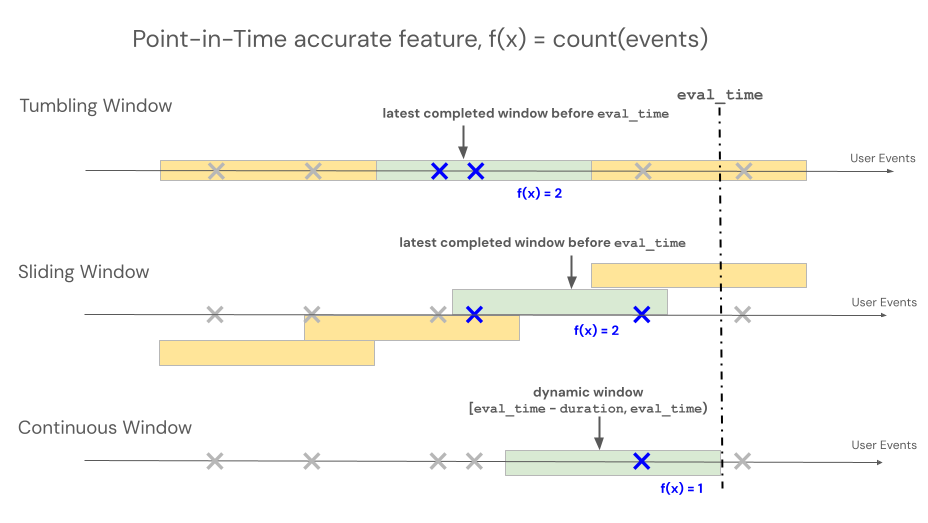
Declarative Feature Engineering APIs support three different window types to control lookback behavior for time window-based aggregations: rolling, tumbling, and sliding.
- Rolling windows look back from the event time. Duration and delay are explicitly defined.
- Tumbling windows are fixed, non-overlapping time windows. Each data point belongs to exactly one window.
- Sliding windows are overlapping, rolling time windows with a configurable slide interval.
The following illustration shows how they work.
Rolling window
RollingWindow was previously named ContinuousWindow. If you are migrating from an earlier SDK version, update your imports accordingly.
Rolling windows are up-to-date and real-time aggregates, typically used over streaming data. In streaming pipelines, the rolling window emits a new row only when the contents of the fixed-length window change, such as when an event enters or leaves. When a rolling window feature is used in training pipelines, an accurate point-in-time feature calculation is performed on the source data using the fixed-length window duration immediately preceding a specific event's timestamp. This helps prevent online-offline skew or data leakage. Features at time T aggregate events from [T − duration, T).
class RollingWindow(TimeWindow):
    window_duration: datetime.timedelta
    delay: Optional[datetime.timedelta] = None
The following table lists the parameters for a rolling window. The window start and end times are based on these parameters as follows:
- Start time:
evaluation_time - window_duration - delay(inclusive) - End time:
evaluation_time - delay(exclusive)
Parameter | Constraints |
|---|---|
| Must be ≥ 0 (shifts the window backward in time from the evaluation timestamp). Use |
| Must be > 0 |
from databricks.feature_engineering.entities import RollingWindow
from datetime import timedelta

# Look back 7 days from evaluation time
window = RollingWindow(window_duration=timedelta(days=7))
Define a rolling window with delay using code below.
# Look back 7 days, offset by 1 minute to account for data ingestion delay
window = RollingWindow(
    window_duration=timedelta(days=7),
    delay=timedelta(minutes=1)
)
Rolling window examples
-
window_duration=timedelta(days=7): This creates a 7-day lookback window ending at the current evaluation time. For an event at 2:00 PM on Day 7, this includes all events from 2:00 PM on Day 0 up to (but not including) 2:00 PM on Day 7. -
window_duration=timedelta(hours=1), delay=timedelta(minutes=30): This creates a 1-hour lookback window ending 30 minutes before the evaluation time. For an event at 3:00 PM, this includes all events from 1:30 PM up to (but not including) 2:30 PM. This is useful to account for data ingestion delays.
Tumbling window
For features defined using tumbling windows, aggregations are computed over a pre-determined fixed-length window that advances by a slide interval, producing non-overlapping windows that fully partition time. As a result, each event in the source contributes to exactly one window. Features at time t aggregate data from windows ending at or before t (exclusive). Windows start at the Unix epoch.
class TumblingWindow(TimeWindow):
    window_duration: datetime.timedelta
The following table lists the parameters for a tumbling window.
Parameter | Constraints |
|---|---|
| Must be > 0 |
from databricks.feature_engineering.entities import TumblingWindow
from datetime import timedelta

window = TumblingWindow(
    window_duration=timedelta(days=7)
)
Tumbling window example
window_duration=timedelta(days=5): This creates pre-determined fixed-length windows of 5 days each. Example: Window #1 spans Day 0 to Day 4, Window #2 spans Day 5 to Day 9, Window #3 spans Day 10 to Day 14, and so on. Specifically, Window #1 includes all events with timestamps starting at00:00:00.00on Day 0 up to (but not including) any events with timestamp00:00:00.00on Day 5. Each event belongs to exactly one window.
Sliding window
For features defined using sliding windows, aggregations are computed over a pre-determined fixed-length window that advances by a slide interval, producing overlapping windows. Each event in the source can contribute to feature aggregation for multiple windows. Features at time t aggregate data from windows ending at or before t (exclusive). Windows start at the Unix epoch.
class SlidingWindow(TimeWindow):
    window_duration: datetime.timedelta
    slide_duration: datetime.timedelta
The following table lists the parameters for a sliding window.
Parameter | Constraints |
|---|---|
| Must be > 0 |
| Must be > 0 and < |
from databricks.feature_engineering.entities import SlidingWindow
from datetime import timedelta

window = SlidingWindow(
    window_duration=timedelta(days=7),
    slide_duration=timedelta(days=1)
)
Sliding window example
window_duration=timedelta(days=5), slide_duration=timedelta(days=1): This creates overlapping 5-day windows that advance by 1 day each time. Example: Window #1 spans Day 0 to Day 4, Window #2 spans Day 1 to Day 5, Window #3 spans Day 2 to Day 6, and so on. Each window includes events from00:00:00.00on the start day up to (but not including)00:00:00.00on the end day. Because windows overlap, a single event can belong to multiple windows (in this example, each event belongs to up to 5 different windows).
Materialization triggers
Triggers control when a materialization pipeline runs. The trigger type depends on the feature type.
CronSchedule
Use CronSchedule for aggregation features (AggregationFunction). The pipeline runs on a fixed schedule defined by a Quartz cron expression.
from databricks.feature_engineering.entities import CronSchedule
from databricks.sdk.service.ml import MaterializedFeaturePipelineScheduleState

trigger = CronSchedule(
    quartz_cron_expression="0 0 * * * ?",  # Hourly
    timezone_id="UTC",
    pipeline_schedule_state=MaterializedFeaturePipelineScheduleState.ACTIVE,
)
TableTrigger
Use TableTrigger for ColumnSelection features backed by a DeltaTableSource. The pipeline runs whenever the upstream Delta table receives a new commit.
from databricks.feature_engineering.entities import TableTrigger

trigger = TableTrigger()
Choosing a trigger
Feature type | Trigger | When it runs |
|---|---|---|
Aggregation ( |
| On a fixed cron schedule |
|
| On each source table commit |
You cannot mix ColumnSelection and aggregation features in a single materialize_features call because they require different trigger types. Issue separate calls instead.