Redact PII from OpenTelemetry traces in Unity Catalog
OpenTelemetry (OTel) trace data often contains personally identifiable information (PII) such as email addresses, phone numbers, and credit card numbers embedded in span attributes, log bodies, and resource metadata. Sharing this trace data broadly for debugging or observability can create compliance and privacy risks.
This page describes an example solution that uses AI Functions and Spark Declarative Pipelines to incrementally redact PII from raw OTel tables and write the results to a separate set of tables with broader access controls. A configurable retention job handles cleanup of the raw data. Deploy the downloadable assets into your own workspace and adapt them to your requirements.
You can use this solution with any OTel traces stored in Unity Catalog, including Store OpenTelemetry traces in Unity Catalog.
To prevent PII from being stored in the first place, Redact PII from traces before export.
How it works
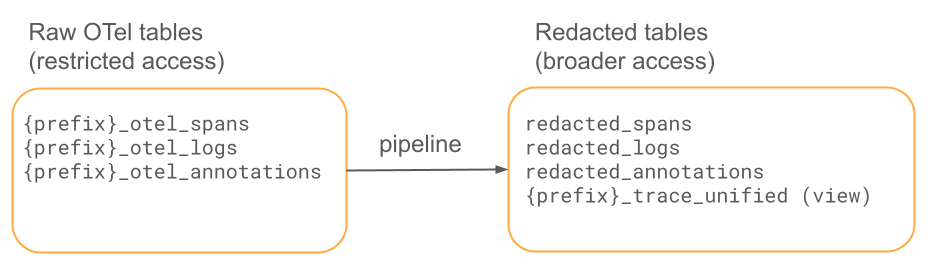
A Lakeflow pipeline incrementally reads new OTel spans, applies ai_mask to redact PII (emails, phones, SSNs, credit cards, names, and addresses), and writes to the redacted tables. A scheduled job handles optional retention cleanup on the raw tables.
Prerequisites
- A Unity Catalog-enabled workspace.
- AI Functions available through a serverless SQL warehouse or serverless pipeline.
- The Databricks CLI authenticated to your workspace.
- OTel trace data in Unity Catalog tables, written through MLflow, an OTel exporter, or any OTLP client. See Store OpenTelemetry traces in Unity Catalog.
Download the assets
Download the following files and import them into your workspace:
File | Description |
|---|---|
Guided deployment notebook — interactive alternative to | |
CLI deployment script. | |
The pipeline — streaming tables with | |
Unified trace view joining spans and annotations. | |
Schema creation and access control grants. | |
Example pipeline configuration (reference). | |
Test utility that sends PII test data as OTel spans. | |
50 lines of synthetic PII test data. |
For more details, see the reference documentation.
Deploy the solution
Select one of the following deployment methods.
- Guided notebook (recommended)
- CLI
- Manual
For a step-by-step deployment directly in your workspace:
- Import deploy_notebook.py into your workspace, along with the other downloaded assets. See Databricks Git folders.
- Open
deploy_notebook.pyin your workspace. - Fill in the widget parameters at the top (catalog, source schema, target schema, and table prefix).
- Click Run all. Each step validates before proceeding.
This approach uses the Databricks Python SDK (no CLI required), is safe to re-run, and provides interactive feedback at each step.
Run the deployment script with your workspace details:
./deploy.sh <WORKSPACE_HOST> <CATALOG> <SOURCE_SCHEMA> <TARGET_SCHEMA> <TABLE_PREFIX>
For example:
./deploy.sh https://my-workspace.cloud.databricks.com my_catalog traces_raw traces_redacted my_app
The script does the following:
- Uploads the pipeline SQL to your workspace.
- Creates the target schema.
- Creates and triggers the pipeline.
- Configures auto-TTL on the raw tables (if
retention_daysis set).
After the pipeline completes, run unified_view.sql to create the unified trace view. Replace the ${...} variables with your values.
To set things up step by step:
- Create the target schema. Run the statements in
setup_schema_and_grants.sql. - Upload the pipeline SQL. Import
pii_redaction_pipeline.sqlinto your workspace. - Create the pipeline. Use
pipeline_config.jsonas a template and replace the<PLACEHOLDER>values. - Trigger a pipeline run. Use the UI or run
databricks pipelines start-update <PIPELINE_ID>. - Create the unified view. Run
unified_view.sqlafter the first pipeline run. - Configure retention. Enable auto time-to-live on the raw tables. See PII redaction from OTel traces reference.
Parameters
The following table describes the widget parameters in the guided deployment notebook (deploy_notebook.py):
Parameter | Description | Default |
|---|---|---|
| Unity Catalog catalog for both the raw and redacted tables. | (required) |
| Schema containing the raw OTel tables. | (required) |
| Schema for the redacted output tables. | (required) |
| Prefix used for the OTel table names. | (required) |
| PII types to redact, comma-separated and single-quoted. |
|
| Name for the pipeline. |
|
| Days to retain raw data before deletion. A blank value, |
|
| Pipeline execution mode: |
|
| How often the pipeline runs (triggered mode only): |
|
Source tables are named {catalog}.{source_schema}.{table_prefix}_otel_spans, {catalog}.{source_schema}.{table_prefix}_otel_logs, and {catalog}.{source_schema}.{table_prefix}_otel_annotations.
The pipeline supports two execution modes:
- triggered: Creates a scheduled job that triggers the pipeline on the chosen frequency. The pipeline processes new data on each run and then stops.
- continuous: Runs the pipeline continuously, processing new data as it arrives. No scheduling job is created. This mode has higher compute costs than triggered mode because the pipeline is always running.
What gets redacted
The pipeline applies ai_mask to the following fields:
Table | Fields redacted |
|---|---|
Spans |
|
Logs |
|
Annotations | Passthrough (no PII expected) |
The pipeline preserves non-PII fields unchanged, such as trace IDs, span IDs, timestamps, service names, and status codes.
Supported PII categories
ai_mask is LLM-backed and recognizes standard PII types, including email, phone, name, address, ssn, credit_card, ip_address, and date_of_birth.
ai_mask is recommended because it handles varied PII formats (for example, phone numbers written as (555) 123-4567, 555.123.4567, or +1 555-123-4567) without requiring a separate pattern for each variation. You can adapt the pipeline to use a different redaction method, such as explicit regular expressions with regexp_replace.
For custom patterns, such as employee IDs like EMP-XXXXXX, use regexp_replace before ai_mask in the pipeline SQL. For details, see PII redaction from OTel traces reference.
Retention and access control
Raw data retention
The deployment configures auto time-to-live on the raw OTel tables to automatically delete trace data older than a configurable number of days (default: 90). This helps you comply with GDPR and other data protection regulations that require personal data to be deleted after it is no longer needed for its original purpose. After the pipeline processes the raw spans, auto-TTL removes the originals that contain PII according to your retention policy. Set retention_days to 0 or none to disable automatic deletion if you manage retention separately. If your compliance requirements demand strict deletion timelines, you can set up a manual scheduled job with DELETE and VACUUM instead, as exact auto-TTL deletion timing is not guaranteed.
Limit access to raw tables
The raw OTel tables contain unredacted PII and should have restricted access. Grant access to the raw source schema only to pipeline service principals and administrators who need it for debugging or incident response. All routine analytics, dashboards, and observability workflows should query the redacted tables instead. The setup_schema_and_grants.sql file includes example grants to help enforce this separation. For more information about Unity Catalog privileges, see Manage privileges in Unity Catalog.
Test the redaction
Send test PII data
Generate test spans with known PII to validate redaction:
pip install opentelemetry-exporter-otlp-proto-http

python send_pii_traces.py <WORKSPACE_HOST> <CATALOG.SCHEMA.PREFIX_otel_spans>
This sends 50 test traces that contain emails, phones, SSNs, credit cards, names, and addresses.
Validate the output
After running the pipeline, compare the raw and redacted spans:
SELECT
  s.span_id,
  CAST(s.attributes AS STRING) AS raw,
  CAST(r.attributes AS STRING) AS redacted
FROM <source_catalog>.<source_schema>.<prefix>_otel_spans s
JOIN <target_catalog>.<target_schema>.redacted_spans r
  ON s.trace_id = r.trace_id AND s.span_id = r.span_id
WHERE s.name = 'pii-test-interaction'
LIMIT 5;