PII redaction from OTel traces reference
This page describes a reference architecture for redacting PII from OpenTelemetry (OTel) spans stored in Unity Catalog. It covers two complementary flows: server-side batch processing and view-based on-read redaction. Both flows use AI Functions and Spark Declarative Pipelines. For deployment instructions and downloadable assets, see Redact PII from OpenTelemetry traces in Unity Catalog.
Parameters
All components in this solution are parameterized for reuse across environments.
Table parameters
Parameter | Description | Example |
|---|---|---|
| Unity Catalog catalog containing the raw OTel tables. |
|
| Unity Catalog schema containing the raw OTel tables. |
|
| Prefix used when configuring OTel trace storage. |
|
| Unity Catalog catalog for the redacted output tables. |
|
| Unity Catalog schema for the redacted output tables. |
|
| TTL for unredacted data (GDPR compliance). Set to |
|
Derived source table names:
{source_catalog}.{source_schema}.{table_prefix}_otel_spans{source_catalog}.{source_schema}.{table_prefix}_otel_logs{source_catalog}.{source_schema}.{table_prefix}_otel_annotations
PII redaction rules
Parameter | Description | Example |
|---|---|---|
| List of PII types to redact. |
|
| How to mask PII: |
|
| Character used for masking. |
|
| OTel fields to apply redaction to. |
|
| Attribute keys to skip redaction on (for example, |
|
| Regex patterns for domain-specific PII. |
|
Flow 1: Server-side batch processing (recommended)
This flow uses Spark Declarative Pipelines to materialize redacted tables from the raw OTel tables.
Why use a declarative pipeline
Consideration | Lakeflow pipelines (streaming table) | Notebook and scheduled job |
|---|---|---|
Incremental processing | Built-in — streaming tables only process new rows. | Manual checkpoint management with Structured Streaming. |
AI function support | Built-in in SQL. | Built-in in SQL. |
Monitoring and alerting | Built-in pipeline UI and event log. | Must configure separately. |
Retry and failure handling | Automatic. | Manual. |
Lineage | Automatic Unity Catalog lineage tracking. | Manual. |
Serverless compute | Yes. | Yes (with serverless jobs). |
Ops overhead | Low — fully managed. | Medium — manage state, schedules, and alerting. |
Lakeflow pipelines with streaming tables are the best fit. OTel spans are append-only, making them ideal for incremental streaming table ingestion. AI functions such as ai_mask are built-in in SQL, so a SQL pipeline is the simplest implementation.
Architecture

Implementation
Step 1: Lock down the raw tables
Grant access to the raw tables only to the pipeline service principal and administrator users.
-- Restrict raw table access
GRANT USE CATALOG ON CATALOG ${source_catalog} TO `pii_pipeline_sp`;
GRANT USE SCHEMA ON SCHEMA ${source_catalog}.${source_schema} TO `pii_pipeline_sp`;
GRANT SELECT ON TABLE ${source_catalog}.${source_schema}.${table_prefix}_otel_spans TO `pii_pipeline_sp`;
GRANT SELECT ON TABLE ${source_catalog}.${source_schema}.${table_prefix}_otel_logs TO `pii_pipeline_sp`;

-- Revoke broader access
REVOKE SELECT ON TABLE ${source_catalog}.${source_schema}.${table_prefix}_otel_spans FROM `data_team`;
Step 2: Create the pipeline SQL
Define the redacted streaming tables in pii_redaction_pipeline.sql.
-- =============================================================
-- Streaming Table: Redacted Spans
-- =============================================================
CREATE OR REFRESH STREAMING TABLE redacted_spans
COMMENT 'PII-redacted OTel spans'
TBLPROPERTIES (
  'quality' = 'gold',
  'pipelines.autoOptimize.zOrderCols' = 'trace_id,date'
)
AS
SELECT
  trace_id,
  span_id,
  parent_span_id,
  name,
  kind,
  start_time,
  end_time,
  status,
  date,
  record_id,
  service_name,
  time,
  instrumentation_scope,

  -- Redact span attributes (VARIANT field)
  -- ai_mask replaces PII with masked values in free-text content
  CASE
    WHEN attributes IS NOT NULL THEN
      ai_mask(
        CAST(attributes AS STRING),
        array(${pii_categories})  -- e.g. array('email','phone','ssn','name','address')
      )
    ELSE attributes
  END AS attributes,

  -- Redact resource attributes
  CASE
    WHEN resource:attributes IS NOT NULL THEN
      named_struct(
        'attributes',
        ai_mask(
          CAST(resource:attributes AS STRING),
          array(${pii_categories})
        ),
        'dropped_attributes_count',
        resource:dropped_attributes_count
      )
    ELSE resource
  END AS resource,

  -- Redact events (may contain exception messages with PII)
  CASE
    WHEN events IS NOT NULL THEN
      ai_mask(
        CAST(events AS STRING),
        array(${pii_categories})
      )
    ELSE events
  END AS events,

  -- Pass through links unchanged (typically just trace/span IDs)
  links

FROM STREAM(${source_catalog}.${source_schema}.${table_prefix}_otel_spans);


-- =============================================================
-- Streaming Table: Redacted Logs
-- =============================================================
CREATE OR REFRESH STREAMING TABLE redacted_logs
COMMENT 'PII-redacted OTel logs'
AS
SELECT
  trace_id,
  span_id,
  severity_number,
  severity_text,
  date,
  record_id,
  service_name,
  time,
  instrumentation_scope,

  -- Redact log body
  CASE
    WHEN body IS NOT NULL THEN
      ai_mask(
        CAST(body AS STRING),
        array(${pii_categories})
      )
    ELSE body
  END AS body,

  -- Redact log attributes
  CASE
    WHEN attributes IS NOT NULL THEN
      ai_mask(
        CAST(attributes AS STRING),
        array(${pii_categories})
      )
    ELSE attributes
  END AS attributes,

  -- Redact resource attributes
  CASE
    WHEN resource:attributes IS NOT NULL THEN
      named_struct(
        'attributes',
        ai_mask(
          CAST(resource:attributes AS STRING),
          array(${pii_categories})
        ),
        'dropped_attributes_count',
        resource:dropped_attributes_count
      )
    ELSE resource
  END AS resource

FROM STREAM(${source_catalog}.${source_schema}.${table_prefix}_otel_logs);


-- =============================================================
-- Streaming Table: Annotations (passthrough — no PII expected)
-- =============================================================
CREATE OR REFRESH STREAMING TABLE redacted_annotations
COMMENT 'OTel annotations (passthrough, no PII redaction applied)'
AS
SELECT *
FROM STREAM(${source_catalog}.${source_schema}.${table_prefix}_otel_annotations);
Step 3: Create the pipeline resource
Use the following configuration as a template.
{
  "name": "otel-pii-redaction",
  "catalog": "${target_catalog}",
  "schema": "${target_schema}",
  "serverless": true,
  "continuous": false,
  "channel": "CURRENT",
  "configuration": {
    "source_catalog": "<value>",
    "source_schema": "<value>",
    "table_prefix": "<value>",
    "pii_categories": "'email','phone','ssn','credit_card','name','address'"
  },
  "libraries": [{ "file": { "path": "/Workspace/path/to/pii_redaction_pipeline.sql" } }]
}
Run the pipeline in triggered mode (for example, every 15 minutes or hourly) depending on your latency requirements. Continuous mode is also an option, but it increases cost.
Step 4: Create the unified view on the redacted tables
-- Recreate the trace_unified view pointing at redacted tables
CREATE OR REPLACE VIEW ${target_catalog}.${target_schema}.${table_prefix}_trace_unified AS
SELECT
  s.trace_id,
  s.date,
  min(s.start_time) AS request_time,
  max(s.end_time) - min(s.start_time) AS execution_duration,
  collect_list(
    named_struct(
      'span_id', s.span_id,
      'parent_span_id', s.parent_span_id,
      'name', s.name,
      'kind', s.kind,
      'start_time', s.start_time,
      'end_time', s.end_time,
      'status', s.status,
      'attributes', s.attributes,
      'events', s.events
    )
  ) AS spans,
  a.tags,
  a.assessments
FROM ${target_catalog}.${target_schema}.redacted_spans s
LEFT JOIN ${target_catalog}.${target_schema}.redacted_annotations a
  ON s.trace_id = a.target_id
GROUP BY s.trace_id, s.date, a.tags, a.assessments;
Step 5: Grant broader access to the redacted tables
GRANT USE CATALOG ON CATALOG ${target_catalog} TO `data_team`;
GRANT USE SCHEMA ON SCHEMA ${target_catalog}.${target_schema} TO `data_team`;
GRANT SELECT ON SCHEMA ${target_catalog}.${target_schema} TO `data_team`;
Step 6: Set up retention on the raw tables (optional, for GDPR compliance)
If retention_days is configured (greater than 0), use auto time-to-live to automatically delete expired rows. The OTel trace tables are Unity Catalog managed Delta tables with time TIMESTAMP columns, so auto-TTL is supported. Predictive optimization must be enabled on the workspace (or table).
ALTER TABLE ${source_catalog}.${source_schema}.${table_prefix}_otel_spans
  DELETE ROWS ${retention_days} DAYS AFTER time;

ALTER TABLE ${source_catalog}.${source_schema}.${table_prefix}_otel_logs
  DELETE ROWS ${retention_days} DAYS AFTER time;
Databricks runs DELETE, PURGE, and VACUUM operations in the background automatically — no scheduled job is required.
Exact deletion timing is not guaranteed. There can be a buffer of up to 6 days between row expiration and permanent deletion, plus the data retention duration (default 7 days). If your compliance requirements demand strict deletion timelines, use a scheduled job with manual DELETE and VACUUM as a fallback. See auto time-to-live for details on calculating configuration values for a target expiration period.
Flow 2: View-based redaction (no data duplication)
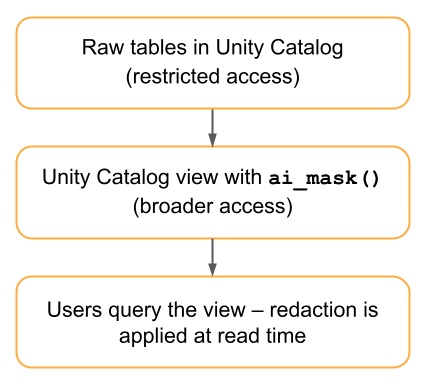
This flow applies ai_mask in a Unity Catalog view, so redaction happens at read time and no redacted copy is stored.
When to use
- Storage cost is a primary concern.
- Redacted data is queried infrequently.
- It is acceptable to pay the compute cost on every query.
Architecture
Implementation
CREATE OR REPLACE VIEW ${target_catalog}.${target_schema}.${table_prefix}_otel_spans_redacted
AS
SELECT
  trace_id,
  span_id,
  parent_span_id,
  name,
  kind,
  start_time,
  end_time,
  status,
  date,
  service_name,
  time,
  instrumentation_scope,
  links,

  ai_mask(
    CAST(attributes AS STRING),
    array(${pii_categories})
  ) AS attributes,

  ai_mask(
    CAST(events AS STRING),
    array(${pii_categories})
  ) AS events,

  named_struct(
    'attributes',
    ai_mask(CAST(resource:attributes AS STRING), array(${pii_categories})),
    'dropped_attributes_count',
    resource:dropped_attributes_count
  ) AS resource

FROM ${source_catalog}.${source_schema}.${table_prefix}_otel_spans;
Trade-offs
Aspect | Advantages | Disadvantages |
|---|---|---|
Storage | No duplication. | — |
Compute | — |
|
Latency | Immediately reflects new data. | Slower query response. |
Flexibility | Redaction rules update instantly. | — |
Flow comparison
Dimension | Flow 1: batch pipeline | Flow 2: view-based |
|---|---|---|
Data fidelity preserved | Yes (raw table retained). | Yes (raw table retained). |
Storage cost | 2x (time-windowed, or ~1x if auto-TTL applies). | 1x. |
Compute cost | One-time per record. | Per query. |
Query performance | Fast (pre-materialized). | Slow (recomputes). |
Latency to availability | Minutes (pipeline interval). | Immediate. |
Rule change rollout | Pipeline refresh. | Instant. |
GDPR compliance | Auto-TTL or scheduled cleanup on raw tables. | Auto-TTL or scheduled cleanup on raw tables. |
Best for | Primary production use. | Low-query-volume use. |
Databricks feature | Lakeflow pipelines. | Unity Catalog view and AI Functions. |
Recommended approach
Use Flow 1 (batch pipeline) as the primary solution for most enterprise deployments:
- Preserves full-fidelity data for authorized debugging.
- Optimizes query performance through materialization.
- Supports GDPR compliance with auto-TTL retention on raw data.
- Handles both PII redaction and trace filtering in one pipeline.
- Is fully managed with built-in monitoring and alerting.
Use Flow 2 (view-based) as a lightweight option for low-query-volume scenarios, or as a quick interim solution while you set up Flow 1.
Prerequisites
- AI Functions enabled — requires a SQL warehouse or serverless compute with AI Functions access.
- Unity Catalog — OTel traces must be stored in Unity Catalog tables with MLflow trace-to-Unity Catalog binding configured. See Store OpenTelemetry traces in Unity Catalog.
- Service principal — for pipeline execution, with appropriate grants on the source tables.
- Foundation model endpoint —
ai_maskuses a foundation model. Verify that the endpoint is available and sized for throughput.
Implementation checklist
- Validate
ai_maskbehavior on VARIANT columns with sample OTel span data. - Benchmark
ai_maskthroughput to size the pipeline schedule interval. - Define the allowlisted attribute keys that should skip redaction.
- Set up access control groups (raw access versus redacted access).
- Configure auto-TTL for raw table retention (or a scheduled
DELETEandVACUUMjob if strict deletion timing is required). - Build a monitoring dashboard for pipeline health and redaction coverage.