Span concepts

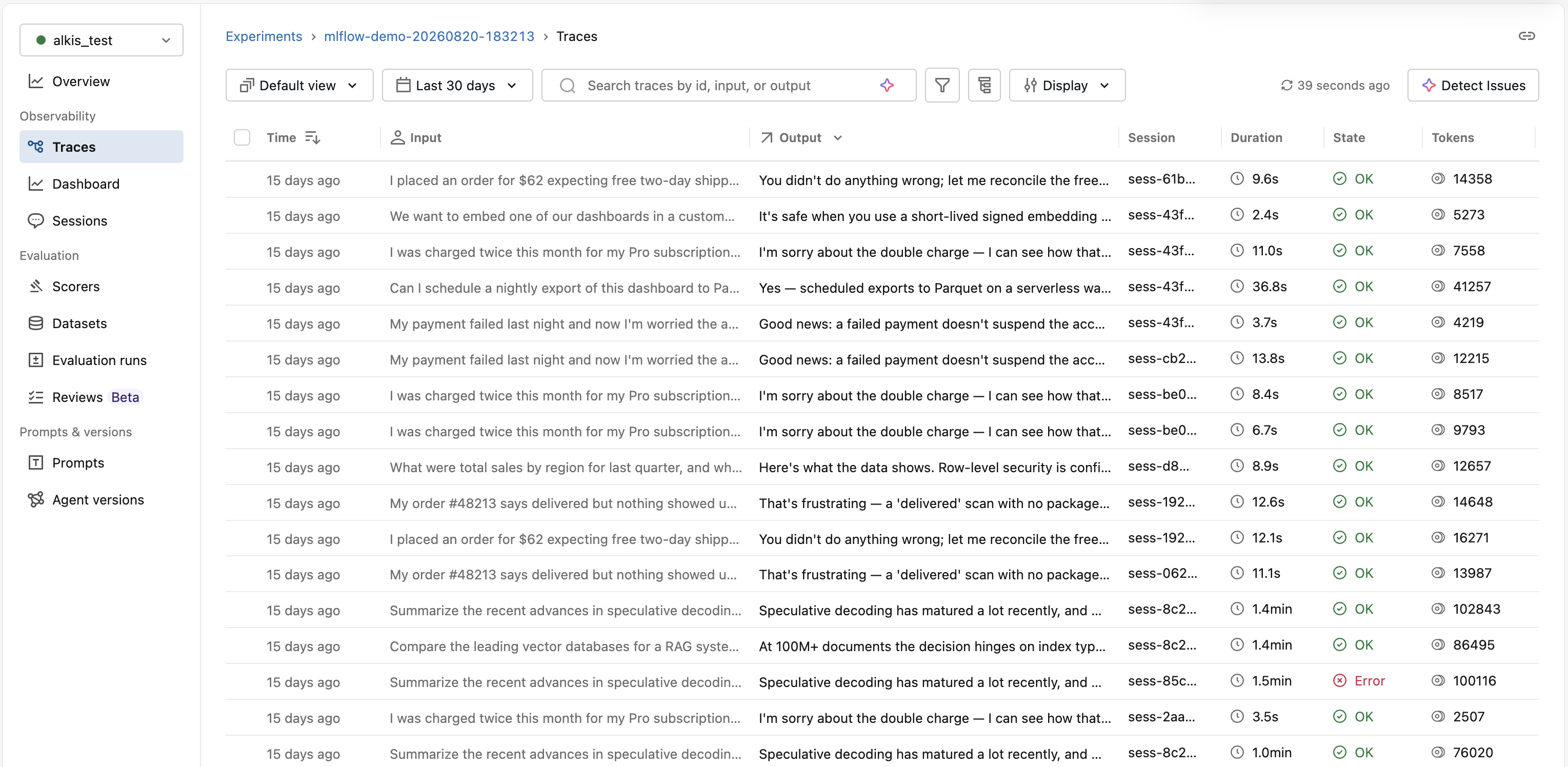
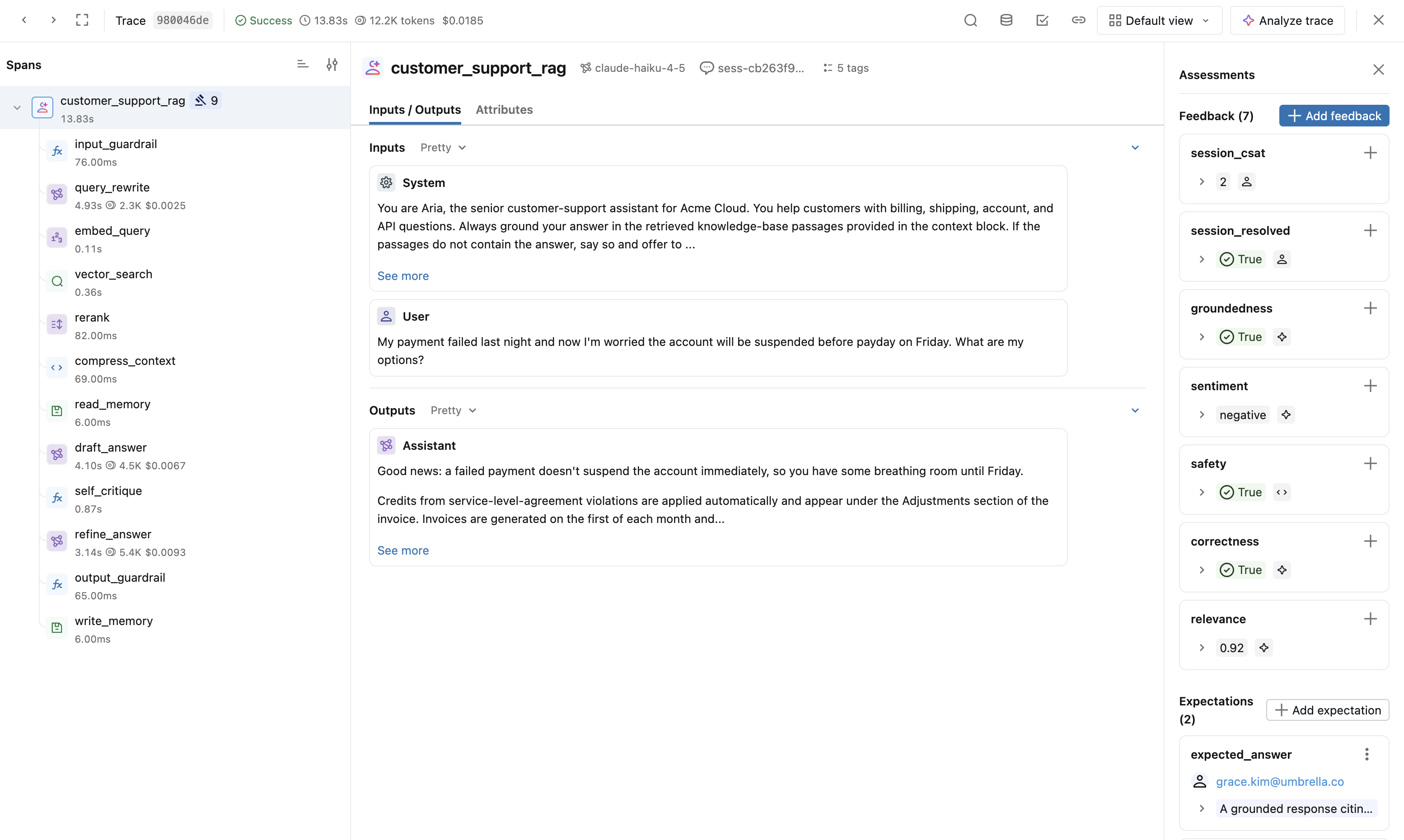
The Span object is a fundamental building block in the Trace data model. It serves as a container for information about individual steps of a trace, such as LLM calls, tool execution, retrieval operations, and more.

Spans organize hierarchically within a trace to represent your application's execution flow. Each span captures:

  • Input and output data
  • Timing information (start and end times)
  • Status (success or error)
  • Metadata and attributes about the operation
  • Relationship to other spans (parent-child connections)

Span Architecture

Span object schema

MLflow's Span design maintains compatibility with OpenTelemetry specifications. The schema includes eleven core properties:

Property

Type

Description

span_id

str

Unique identifier for this span within the trace

trace_id

str

Links span to its parent trace

parent_id

Optional[str]

Establishes hierarchical relationship; None for root spans

name

str

User-defined or auto-generated span name

start_time_ns

int

Unix timestamp (nanoseconds) when span started

end_time_ns

int

Unix timestamp (nanoseconds) when span ended

status

SpanStatus

Span status: OK, UNSET, or ERROR with optional description

inputs

Optional[Any]

Input data entering this operation

outputs

Optional[Any]

Output data exiting this operation

attributes

Dict[str, Any]

Metadata key-value pairs providing behavioral insights

events

List[SpanEvent]

System-level exceptions and stack trace information

For complete details, see the MLflow API reference.

Span attributes

Attributes are key-value pairs that provide insight into behavioral modifications for function and method calls. They capture metadata about the operation's configuration and execution context.

You can add platform-specific attributes like Unity Catalog information, model serving endpoint details, and infrastructure metadata for enhanced observability.

Example attributes for an LLM call:

Python
span.set_attributes({
"ai.model.name": "claude-3-5-sonnet-20250122",
"ai.model.version": "2025-01-22",
"ai.model.provider": "anthropic",
"ai.model.temperature": 0.7,
"ai.model.max_tokens": 1000,
})

Span types

MLflow provides ten predefined span types for categorization. You can also use custom string values for specialized operations.

Type

Description

CHAT_MODEL

Query to a chat model (specialized LLM interaction)

CHAIN

Chain of operations

AGENT

Autonomous agent operation

TOOL

Tool execution (typically by agents) like search queries

EMBEDDING

Text embedding operation

RETRIEVER

Context retrieval operation such as vector database queries

PARSER

Parsing operation transforming text to structured format

RERANKER

Re-ranking operation ordering contexts by relevance

MEMORY

Memory operation persisting context in long-term storage

UNKNOWN

Default type when no other type specified

Setting span types

Use the span_type parameter with decorators or context managers:

Python
import mlflow
from mlflow.entities import SpanType

# Using a built-in span type
@mlflow.trace(span_type=SpanType.RETRIEVER)
def retrieve_documents(query: str):
...

# Using a custom span type
@mlflow.trace(span_type="ROUTER")
def route_request(request):
...

# With context manager
with mlflow.start_span(name="process", span_type=SpanType.TOOL) as span:
span.set_inputs({"data": data})
result = process_data(data)
span.set_outputs({"result": result})

Searching spans by type

Query spans programmatically using the SDK:

Python
import mlflow
from mlflow.entities import SpanType

trace = mlflow.get_trace("<trace_id>")
retriever_spans = trace.search_spans(span_type=SpanType.RETRIEVER)

You can also filter by span type in the MLflow UI when viewing traces.

Specialized span schemas

Certain span types have specific output schemas that enable enhanced UI features and evaluation capabilities.

RETRIEVER spans

The RETRIEVER span type handles operations involving retrieving data from a data store, such as querying documents from a vector store. The output should be a list of documents, where each document is a dictionary with:

  • page_content (str): Text content of the retrieved document chunk
  • metadata (Optional[Dict[str, Any]]): Additional metadata, including:
    • doc_uri (str): Document source URI
    • chunk_id (str): Identifier if document is part of a larger chunked document
  • id (Optional[str]): Unique identifier for the document chunk

Example implementation:

Python
import mlflow
from mlflow.entities import SpanType, Document

def search_store(query: str) -> list[tuple[str, str]]:
# Simulate retrieving documents from a vector database
return [
("MLflow Tracing helps debug GenAI applications...", "docs/mlflow/tracing_intro.md"),
("Key components of a trace include spans...", "docs/mlflow/tracing_datamodel.md"),
("MLflow provides automatic instrumentation...", "docs/mlflow/auto_trace.md"),
]

@mlflow.trace(span_type=SpanType.RETRIEVER)
def retrieve_relevant_documents(query: str):
docs = search_store(query)
span = mlflow.get_current_active_span()

# Set outputs in the expected format
outputs = [
Document(page_content=doc, metadata={"doc_uri": uri})
for doc, uri in docs
]
span.set_outputs(outputs)

return docs

# Usage
user_query = "MLflow Tracing benefits"
retrieved_docs = retrieve_relevant_documents(user_query)

On Databricks: When using Vector Search, RETRIEVER spans can include Unity Catalog volume paths in the doc_uri metadata for full lineage tracking.

CHAT_MODEL spans

Spans of type CHAT_MODEL or LLM represent interactions with chat completions APIs (for example, OpenAI's chat completions or Anthropic's messages API).

While there are no strict format requirements for inputs and outputs, MLflow provides utility functions to standardize chat messages and tool definitions for rich UI visualization and evaluation:

Python
import mlflow
from mlflow.entities import SpanType
from mlflow.tracing.constant import SpanAttributeKey
from mlflow.tracing import set_span_chat_messages, set_span_chat_tools

# Example messages and tools
messages = [
{
"role": "system",
"content": "please use the provided tool to answer the user's questions",
},
{"role": "user", "content": "what is 1 + 1?"},
]

tools = [
{
"type": "function",
"function": {
"name": "add",
"description": "Add two numbers",
"parameters": {
"type": "object",
"properties": {
"a": {"type": "number"},
"b": {"type": "number"},
},
"required": ["a", "b"],
},
},
}
]

@mlflow.trace(span_type=SpanType.CHAT_MODEL)
def call_chat_model(messages, tools):
# Simulate a response with tool calls
response = {
"role": "assistant",
"tool_calls": [
{
"id": "123",
"function": {"arguments": '{"a": 1,"b": 2}', "name": "add"},
"type": "function",
}
],
}

combined_messages = messages + [response]

# Use MLflow utilities to standardize the format
span = mlflow.get_current_active_span()
set_span_chat_messages(span, combined_messages)
set_span_chat_tools(span, tools)

return response

# Usage
call_chat_model(messages, tools)

# Retrieve the standardized data
trace = mlflow.get_last_active_trace()
span = trace.data.spans[0]

print("Messages:", span.get_attribute(SpanAttributeKey.CHAT_MESSAGES))
print("Tools:", span.get_attribute(SpanAttributeKey.CHAT_TOOLS))

Next steps