LTAP architecture
Lake Transactional/Analytical Processing (LTAP) is a data architecture that serves both transactional (OLTP) and analytical (OLAP) workloads from a unified data storage layer in the lake, under one governance model, so you don't have to keep separate transactional and analytical systems in sync. It removes the change data capture (CDC), replication, and transformation pipelines that teams traditionally maintain to copy operational data into a separate analytical system. Databricks builds LTAP on the Lakebase storage architecture. For the announcement, see Databricks launches LTAP: the first Lake Transactional/Analytical Processing architecture.
LTAP is an architecture, not a single feature. Databricks delivers it through a set of Lakebase capabilities that are actively being developed and expanded. The capabilities available to you depend on your cloud. This page explains the architecture. For the capabilities you can use today on your cloud, see Capabilities that implement LTAP.
Before you read this page, read Lakebase architecture to understand the Lakebase architecture and its components: stateless Postgres compute, safekeepers, pageservers, and cloud object storage. LTAP builds directly on how Lakebase separates compute from storage, and the rest of this page assumes that foundation.
The cost of keeping two stacks in sync
Applications split their data work into two kinds of workload. Transactional (OLTP) workloads act on a few rows at a time and need the full contents of those rows fast, such as processing a payment or returning an API result. Analytical (OLAP) workloads look for insights across large datasets, often aggregating and joining many rows, such as forecasting sales or detecting fraud. These patterns pull in opposite directions: OLTP needs constant low-latency reads and writes on individual rows, while OLAP needs to scan and aggregate across large volumes of data. For decades, the answer was two separate systems: a transactional database for the application, and a data warehouse or lakehouse for analytics.
Bridging those two stacks is the expensive part. Keeping them in sync means running change data capture (CDC), streaming pipelines, and read replicas whose only job is to copy data from one system to the other. That infrastructure is fragile, it adds latency between when data is written and when it can be analyzed, and it competes for resources with the primary transactional database. As applications and AI agents increasingly need analytics on the freshest transactional data, this gap slows teams down. Copying data between two systems also creates governance risk: lineage can break as data moves, which makes obligations like GDPR takedown requests harder to satisfy.
How LTAP unifies data at the storage layer
Rather than build a better pipeline between two stacks, LTAP removes the need for a pipeline at all. It does this by rethinking the database from storage up.
Lakebase already separates stateless Postgres compute from a durable storage layer of safekeepers, pageservers, and cloud object storage. A transaction commits once a quorum of safekeepers durably records its write-ahead log, and pageservers then asynchronously materialize those changes to cloud object storage, so the data no longer lives locked inside a single database engine.
For how Lakebase separates compute and storage, see Lakebase architecture.
LTAP adds one step to that storage layer. As Lakebase storage materializes data into object storage, it transcodes the row-oriented Postgres data into Parquet's columnar layout as the data lands in the lake, where it is readable through open table formats such as Delta and Iceberg. This transcoding is what lets a single copy of data serve both OLTP and OLAP workloads. It's designed so the columnar copy stays a faithful, efficient representation of the Postgres original:
- Semantics are preserved. Lakebase storage transcodes every value into its columnar form while keeping the original Postgres representation, so any Postgres-compatible engine can reinterpret the data without losing information. Types that don't map cleanly to Parquet, such as
NaN,NUMERICoverflow, or extension types like vector, array, geography, and JSON, are preserved in an overflow field that holds the canonical Postgres representation. - Row versions are preserved. The transcoding retains intermediate row versions, so the columnar copy carries the same version information as the row data.
- Columnar data compresses well. The columnar layout is highly compressed, which reduces storage footprint and the amount of data moved to and from object storage.
Transcoding runs entirely in the storage layer, isolated from the primary Postgres instance, so it doesn't affect your transactional serving workload. It builds on something Lakebase already does: flushing committed data to cloud object storage. LTAP simply adds the columnar format to that same flush. There is no pipeline for you to build, and no external process polling your database.
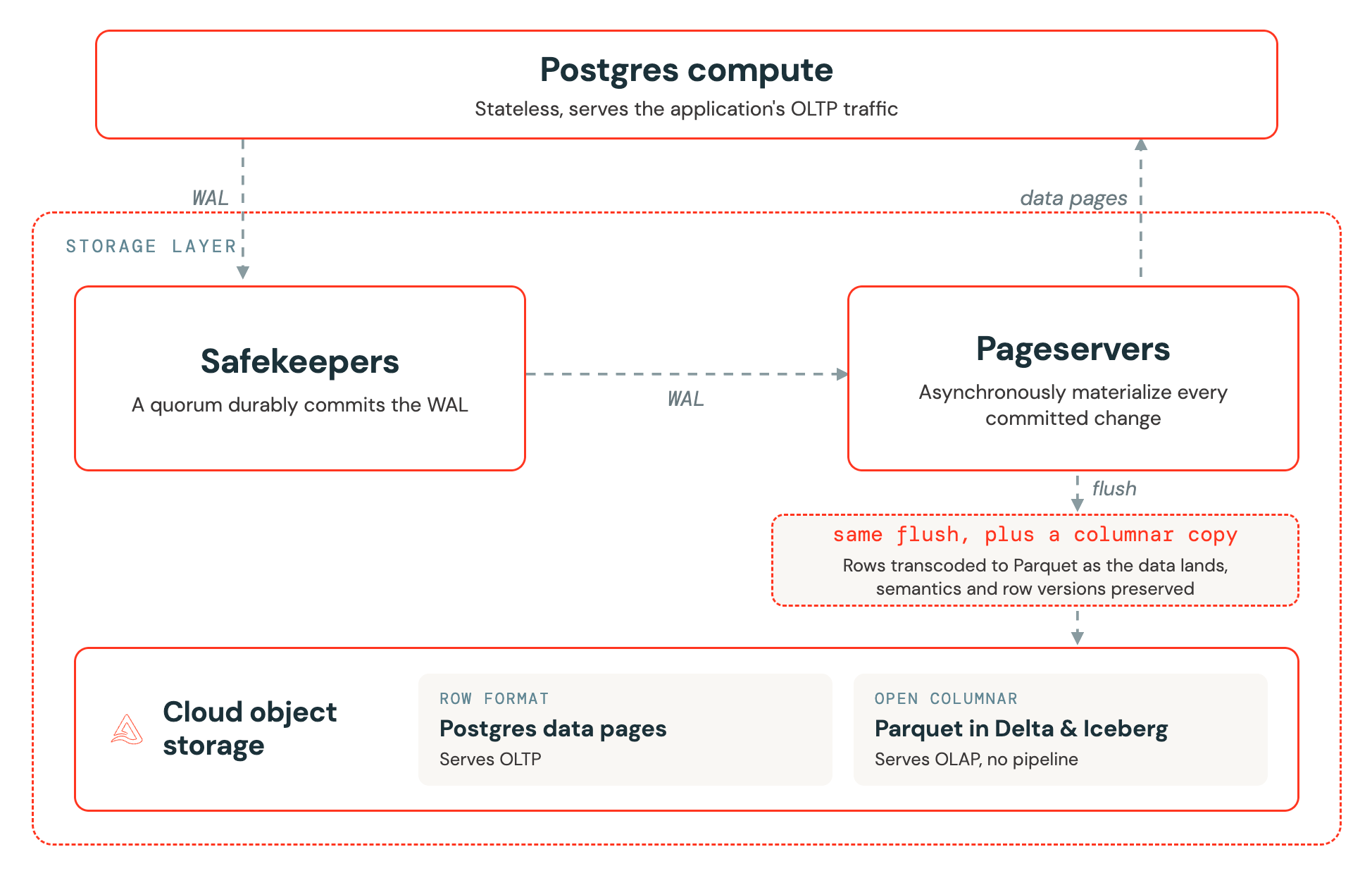
Not everything is transcoded. Postgres indexes stay in their original representation in the durable storage layer, rather than being converted to columns, so transactional point reads and lookups stay fast while the columnar copy serves analytics.
Because the data lives in externalized, versioned storage, creating a branch or restoring to a point in time is a metadata operation rather than a physical copy. You can branch a large production database in seconds, run an experiment or a risky migration against the branch, and discard it, without duplicating the underlying data.
A Lakebase branch is a copy-on-write clone of your database's storage: it shares the parent's existing data and stores only what changes, so it duplicates no data up front. Point-in-time restore uses the same versioned storage to return a database to an earlier moment within its restore window. To learn more, see Database branches and Point-in-time restore.
This storage-level approach is what sets LTAP apart from change data capture (CDC). CDC replicates data out of your OLTP storage into a separate analytics tier using an external process that continuously polls the primary database and a pipeline that transforms row changes into columnar data. That pipeline consumes resources on your primary transactional database, makes you handle schema changes and edge cases yourself, and trades data freshness against pipeline cost, all while adding points of failure. LTAP takes a storage-level approach instead: Lakebase storage transcodes data into the lake as part of normal storage operation, with no external process competing with your workload and no pipeline for you to build or maintain.
The three pillars of LTAP
Unifying data at the storage layer gives LTAP three defining properties.
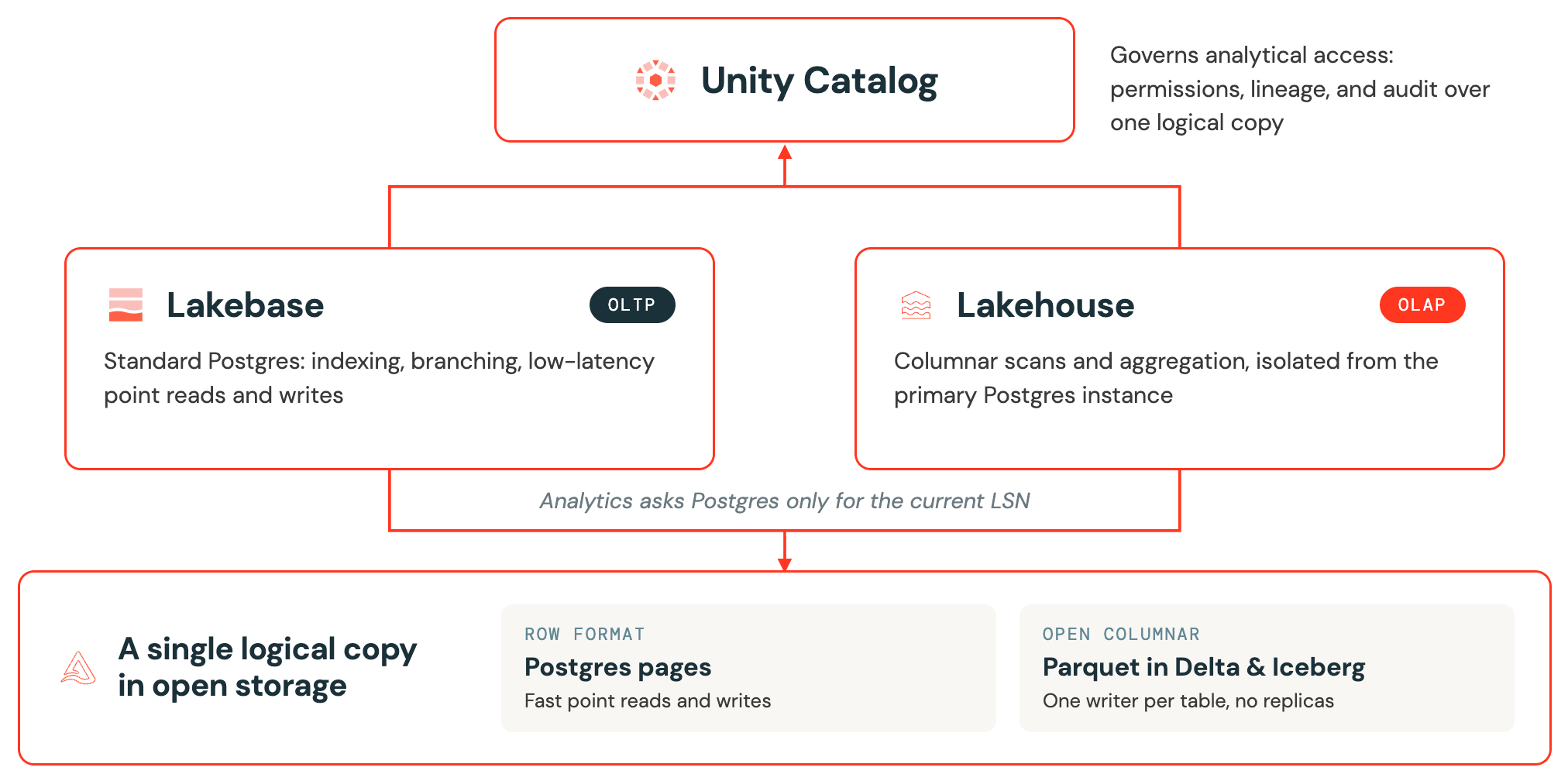
- Universal governance. Unity Catalog governs analytical access to one logical copy of your data across both workloads.
- Purpose-built engines. Postgres serves transactions and the Lakehouse serves analytics, and neither compromises the other.
- A single logical copy in open storage. Both engines read one copy of your data in open formats, with no replicas or pipelines to keep in sync.
Universal governance
Unity Catalog governs analytical access to your data across both workloads. After you register a Lakebase database, Unity Catalog applies permissions, lineage, and audit to the external compute that reads it.
Unity Catalog governance applies today to analytical access: the external compute, such as Lakehouse//RT and Change Data Feed, that reads your registered Lakebase data. It does not yet govern individual Postgres tables directly. Access through the transactional path, meaning applications and clients connecting to Postgres, is still controlled by standard Postgres privileges (GRANT and REVOKE), not by Unity Catalog. In practice, Unity Catalog governs analytical and lakehouse access, while Postgres roles and privileges govern transactional access.
Purpose-built engines
Postgres serves your transactional workload and the Lakehouse serves analytics, each with the strengths it was built for. A common misconception is that unifying the two means your operational data becomes cold data sitting in Iceberg. That is not the case. Lakebase remains standard Postgres. Indexing, branching, point-in-time recovery, extensions, and low-latency point reads and writes all continue to work exactly as they do today.
Analytical reads don't compete with your transactional workload because they are isolated from the primary Postgres instance. When an analytical engine such as Lakehouse//RT queries live Lakebase data, it returns a fresh, transactionally consistent result without copying data:
- The engine reads the bulk of the data from the columnar copy in object storage, not from Postgres.
- To get a transactionally consistent view, it asks Postgres only for the current log sequence number (LSN), a single value that marks a position in the write-ahead log. This is a cheap metadata lookup.
- For the small set of very recent changes that have not yet materialized to the lake, it reads them from the pageserver and merges them on top.
Postgres serves none of the analytical read traffic beyond returning that single LSN, and transcoding runs in the storage layer, not on the Postgres instance that serves your application. Your operational workload keeps running as expected.
A single logical copy in open storage
Because the data lives in the lake as columnar Parquet, readable through open table formats such as Delta and Iceberg, Lakebase (OLTP) and the Lakehouse (OLAP) share the same storage foundation. You maintain one logical copy of data across both workloads, instead of reconciling a transactional database against a separate analytical copy.
Each engine can cache or represent that data in a different physical format for performance. Lakebase uses Postgres pages for fast OLTP point reads, and analytical engines read columnar Parquet. You still work with a single logical dataset, rather than maintaining separate transactional and analytical copies and keeping them in sync.
Each table has a single writer, either Lakebase or the lakehouse. Both engines read that one logical copy, so the same data is available to your applications and to analytics without a second copy.
Do you need to change how you use Lakebase
No. Adopting LTAP capabilities doesn't require a data migration or a change to how your applications connect to Lakebase. Lakebase remains standard Postgres: your existing extensions, indexes, queries, and application code continue to work unchanged. Each of the LTAP capabilities is independent, so you can adopt any of them whenever a workload needs it.
Capabilities that implement LTAP
You put the LTAP architecture into practice through a set of Lakebase capabilities. Each one builds on the shared storage foundation described above, and together they cover the paths data takes through LTAP:
- Govern and register: bring Lakebase data under Unity Catalog.
- Serve lakehouse data in Lakebase: synced tables.
- Query live Lakebase data: Lakehouse//RT for analytics, Lakebase Change Data Feed for change streams.
The following diagram shows how these capabilities write to and read from one copy of your data, governed by Unity Catalog.
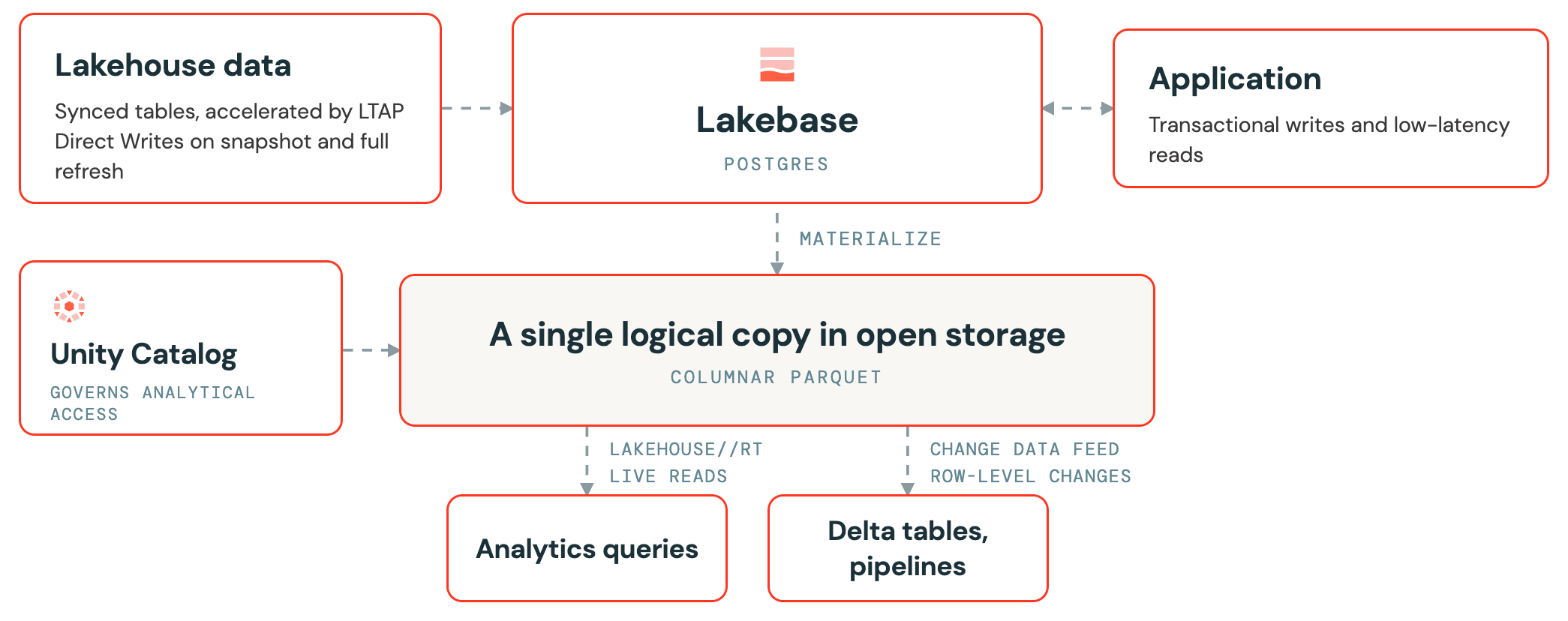
Lakehouse//RT and Lakebase Change Data Feed both read the same underlying data but represent it differently. Lakehouse//RT reads the current state of live Postgres data for analytics. Change Data Feed delivers a stream of row-level changes for downstream pipelines and audit. Neither is the external CDC that LTAP removes: both operate on the single copy of data.
The following table lists every LTAP capability and what it does, along with its release status on your cloud. Availability varies by cloud, so a capability that isn't offered on your cloud is marked as not available.
Capability | Status | Description |
|---|---|---|
GA | Govern analytical access to Lakebase data and run cross-source queries from the lakehouse. | |
GA | Serve Unity Catalog table data in Lakebase for low-latency OLTP reads. | |
Lakehouse//RT querying Lakebase | Not available on GCP | Run transactionally consistent OLAP queries on live Postgres data, without impacting Lakebase OLTP performance. |
Public Preview | Store row-level changes from Lakebase Postgres tables as Unity Catalog Delta tables for downstream pipelines and audit. |
How to approach implementation
Now that you know the capabilities, the question is which ones your workload needs. You implement LTAP by combining the capabilities that match how data flows through your architecture.
The key decision is direction: for each dataset, which system owns the write? Each table has a single writer, and that determines which capabilities you use.
- Lakebase owns the write. Your application writes to Postgres, and you want that operational data available for analytics without copying it out. For instance, a sales application writes orders and payments to Lakebase as they happen. Use Lakehouse//RT to run a live revenue dashboard on those orders, or Lakebase Change Data Feed to stream each order change into a downstream pipeline or audit log.
- The lakehouse owns the write. Your data is produced or maintained in the lakehouse, and you want low-latency OLTP reads on it from your application. For instance, a nightly lakehouse job computes product recommendations or a pricing table. Use synced tables to serve that data into Lakebase so your application can read it with low latency.
Map each dataset to one of these directions, register the database in Unity Catalog for governance, then follow the capability docs to implement each path. A single application often uses both directions: serving reference data from the lakehouse into Postgres, while exposing its own transactional writes back to analytics. Availability varies by cloud, so check the capability table above to confirm what's offered on your cloud.
Next steps
- Lakebase architecture: Understand how Lakebase separates stateless compute from durable storage. See Lakebase architecture.
- Register a database in Unity Catalog: Govern Lakebase data and query it from the lakehouse. See Register a Lakebase database in Unity Catalog.
- Serve data with synced tables: Sync Unity Catalog table data into Lakebase for low-latency reads. See Serve lakehouse data with synced tables.