Classic compute plane networking
This page introduces features to customize network access between the Databricks control plane and the classic compute plane. By default, the classic compute plane connects to the control plane over an encrypted channel using secure cluster connectivity. To keep that traffic on private networking and off the public internet, configure the classic compute plane private connectivity features described on this page.
To learn more about the control plane and the compute plane, see Networking security architecture.
To learn more about classic compute and serverless compute, see Compute.
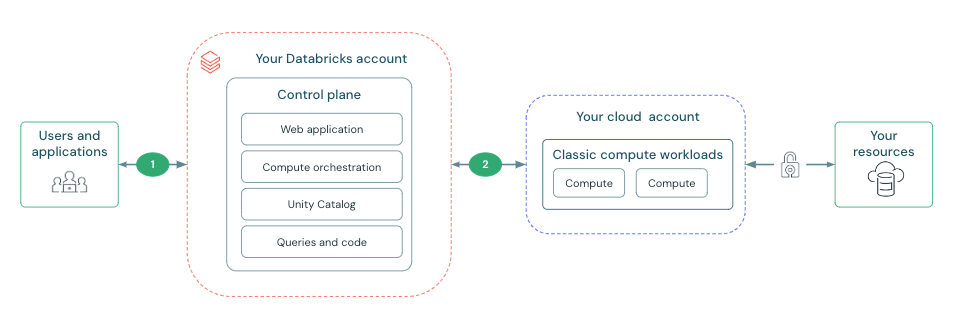
The features in this section focus on establishing and securing the connection between the Databricks control plane and classic compute plane. This connection is labeled as 2 in the diagram below:
What is secure cluster connectivity?
All new workspaces are created with secure cluster connectivity by default. Secure cluster connectivity means that customer VPCs have no open ports and classic compute plane resources have no public IP addresses. This simplifies network administration by removing the need to configure ports on security groups or network peering.
Secure cluster connectivity ensures that clusters connect to the Databricks control plane through a secure tunnel using HTTPS (port 443) without requiring public IP addresses on cluster nodes. This connection is established using a secure cluster connectivity relay, which separates the network traffic for the web application and REST API from cluster management tasks.
Although the serverless compute plane does not use the secure cluster connectivity relay for the classic compute plane, serverless compute resources do not have public IP addresses.
Deploy a workspace in your own VPC
A Google Cloud Virtual Private Cloud (VPC) lets you provision a logically isolated section of Google Cloud where you can launch GCP resources in a virtual network. The VPC is the network location for your Databricks clusters. By default, Databricks creates and manages a VPC for the Databricks workspace.
You can instead provide your own VPC to host your Databricks clusters, enabling you to maintain more control of your own GCP account and limit outgoing connections. To take advantage of a customer-managed VPC, you must specify a VPC when you first create the Databricks workspace. You can share VPCs across workspaces, but you cannot share subnets across workspaces. For more information, see Configure a customer-managed VPC.
Enable private connectivity from the control plane to the compute plane
Google Private Service Connect (PSC) provides private connectivity from Google Cloud VPCs to Google Cloud services without exposing the traffic to the public network. This enables private connectivity from Databricks compute in a customer-managed VPC to a Databricks workspace's core services.
For an overview of PSC connectivity patterns, see Private Service Connect concepts. For classic compute plane configuration steps, see Enable Private Service Connect for your workspace.