Serverless compute plane networking
This page introduces tools to secure network access between the compute resources in the Databricks serverless compute plane and customer resources.
To learn more about the control plane and the serverless compute plane, see Networking security architecture.
To learn more about classic compute and serverless compute, see Compute.
To control serverless traffic between Databricks workspaces, see Cross-workspace access.
There are currently no networking charges for serverless features. In a later release, you might be charged. Databricks will provide advance notice for networking pricing changes.
Serverless compute plane networking overview
Serverless compute resources run in the serverless compute plane, which is managed by Databricks. Account admins can configure secure connectivity between the serverless compute plane and their resources. This network connection is labeled as 2 on the diagram below:
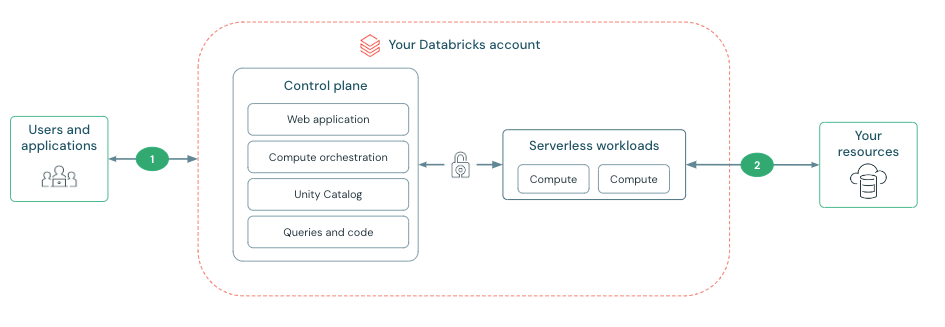
Traffic between the control plane and the serverless compute plane uses the cloud network backbone instead of the public internet. On the serverless compute plane, traffic to Google APIs routes over the Google Cloud backbone. You can use Private Service Connect to route traffic to resources behind a customer-managed service attachment. See Configure private connectivity to resources in your VPC.
For more information on configuring security features on the other network connections in the diagram, see Networking.
Identifying serverless compute traffic to enable firewall configurations
Serverless compute reaches your resources using different connectivity methods depending on the resource's location, configuration, and type.
For resources behind a customer-managed service attachment in your workspace's region, serverless compute can connect through a Private Service Connect endpoint managed by a network connectivity configuration (NCC). By default, Databricks connects to Google APIs in your workspace's region using serverless project numbers with virtual private cloud (VPC) Service Controls (VPC-SC). For other resources, serverless compute reaches them using public outbound IP addresses that Databricks publishes.
If you want to create a firewall around your resources while still allowing access from serverless compute, see Serverless compute firewall configuration.
Creating a resource firewall also affects connectivity from the classic compute plane. You must also allow the networks on your resource firewalls for connections from classic compute resources.
Configure access to Google Cloud resources using serverless project numbers
This feature is in Private Preview. To join this preview, contact your Databricks account team.
Google Cloud VPC Service Controls (VPC-SC) are used to define service perimeters that create a security boundary around Google Cloud resources. Serverless project numbers enable you to create VPC-SCs between the Databricks serverless compute plane and your Google Cloud resources, such as GCS buckets. This ensures that only Databricks serverless compute projects can access your resources. For configuration instructions, see Serverless compute firewall configuration.
Configure access to other resources using outbound IPs
This feature is in Public Preview.
For resources other than Google Cloud resources in the same region as your workspace, serverless compute reaches your resources using outbound IP addresses that Databricks publishes. If your resource is protected by a firewall, add these IPs to your allowlist. For the list of outbound IPs and configuration instructions, see Serverless compute firewall configuration.
The legacy list of stable IPs was decommissioned. If you use legacy IPs, migrate to the new method. See Outbound IPs for serverless compute firewall preview. Until you migrate, serverless compute might return a 403 Forbidden error when it tries to access your resources.
What is a network connectivity configuration (NCC)?
Serverless network connectivity is managed with network connectivity configurations (NCCs). NCCs are account-level regional constructs that manage private endpoint creation.
Account admins create NCCs in the account console. An NCC can be attached to one or more workspaces in the same region to manage access from serverless compute to resources in your VPC.
When you add a private endpoint rule to an NCC, Databricks creates a Private Service Connect endpoint that connects to your customer-managed service attachment. After you approve the endpoint on Google Cloud, Databricks uses it to access your resource from the serverless compute plane. See Configure private connectivity to resources in your VPC.
If no private endpoint rule is configured, serverless compute reaches Google APIs using serverless project numbers and other resources using published outbound IP addresses.