レガシーな入出力エージェントスキーマ(Model Serving)
新しいエージェントには、Agent Bricks CLI が推奨されます。CLI は、Agent ランタイム 上の Agent Bricks エージェントサーバー を使用してエージェントをデプロイします。Databricks上のエージェントのデプロイを参照してください。既存のエージェントを Model Serving から Databricks Apps に移行する方法については、Model Serving から Databricks Apps へのエージェントの移行を参照してください。
Databricks recommends migrating to the ResponsesAgent schema to author agents.See ラン agents on Databricks Apps using the legacy agent server.
エージェントは、Databricksの他の機能との互換性を確保するために、特定の入力および出力スキーマ要件に準拠する必要があります。このページでは、レガシーエージェントオーサリングシグネチャとインターフェイスの使用方法について説明します: ChatAgentインターフェイス、ChatModelインターフェイス、SplitChatMessageRequest入力スキーマ、およびStringResponse出力スキーマ。
レガシー ChatAgent エージェントを作成します
MLflow ChatAgentインターフェースは、OpenAI ChatCompletionスキーマに似ていますが、厳密には互換性がありません。
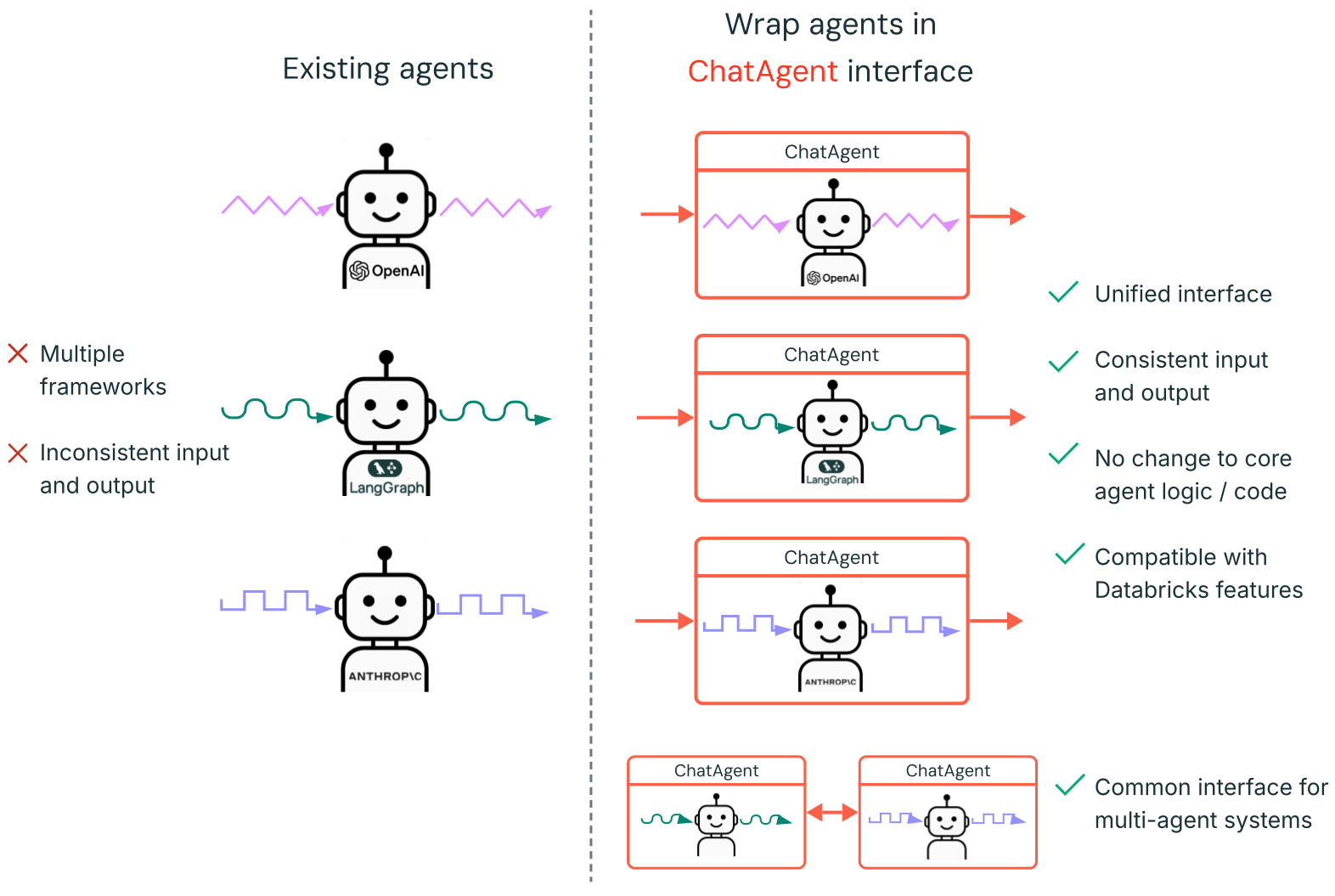
ChatAgent の作成方法については、以下のセクションの例と MLflowドキュメント - ChatAgentインターフェイスとはを参照してください。
ChatAgentを使用してエージェントを作成およびデプロイするには、以下をインストールしてください:
databricks-agents0.16.0以上mlflow2.20.2以上- Python 3.10 以降。
- この要件を満たすには、ServerlessコンピュートまたはDatabricks Runtime 13.3 LTS以降を使用できます。
%pip install -U -qqqq databricks-agents==0.16.0 mlflow==2.20.2
すでにエージェントをお持ちの場合はどうすればよいですか?
LangChain、LangGraph、または類似のフレームワークで構築されたエージェントがすでにある場合、Databricks でそれを使用するためにエージェントを書き直す必要はありません。代わりに、既存のエージェントを MLflow ChatAgent インターフェースでラップするだけです。
-
mlflow.pyfunc.ChatAgentを継承するPythonラッパークラスを記述します。ラッパークラス内で、既存のエージェントを属性
self.agent = your_existing_agentとして保持します。 -
ChatAgentクラスは、非ストリーミングリクエストを処理するために、predictメソッドを実装する必要があります。predict承諾する必要があります。-
messages: list[ChatAgentMessage]、これはChatAgentMessageのリストであり、それぞれに「user」や「assistant」のようなロール、プロンプト、およびIDが含まれています。 -
(任意)追加データ用の
context: Optional[ChatContext]とcustom_inputs: Optional[dict]
Pythonimport uuid# input example[ChatAgentMessage(id=str(uuid.uuid4()), # Generate a unique ID for each messagerole="user",content="What's the weather in Paris?")]predictChatAgentResponseを返す必要があります。Pythonimport uuid# output exampleChatAgentResponse(messages=[ChatAgentMessage(id=str(uuid.uuid4()), # Generate a unique ID for each messagerole="assistant",content="It's sunny in Paris.")]) -
-
形式間の変換
predictでは、list[ChatAgentMessage]からの着信メッセージをエージェントが想定する入力形式に変換します。エージェントが応答を生成した後、その出力を1つまたは複数の
ChatAgentMessageオブジェクトに変換し、ChatAgentResponseでラップします。
LangChain出力を自動的に変換
LangChain エージェントをラップしている場合、mlflow.langchain.output_parsers.ChatAgentOutputParser を使用して LangChain の出力を MLflow の ChatAgentMessage および ChatAgentResponse スキーマに自動的に変換できます。
以下は、エージェントを変換するための簡素化されたTemplateです:
from mlflow.pyfunc import ChatAgent
from mlflow.types.agent import ChatAgentMessage, ChatAgentResponse, ChatAgentChunk
import uuid


class MyWrappedAgent(ChatAgent):
  def __init__(self, agent):
    self.agent = agent

  def predict(self, messages, context=None, custom_inputs=None):
    # Convert messages to your agent's format
    agent_input = ... # build from messages
    agent_output = self.agent.invoke(agent_input)
    # Convert output to ChatAgentMessage
    return ChatAgentResponse(
      messages=[ChatAgentMessage(role="assistant", content=agent_output, id=str(uuid.uuid4()),)]
    )

  def predict_stream(self, messages, context=None, custom_inputs=None):
    # If your agent supports streaming
    for chunk in self.agent.stream(...):
      yield ChatAgentChunk(delta=ChatAgentMessage(role="assistant", content=chunk, id=str(uuid.uuid4())))
完全な例については、次のセクションのノートブックを参照してください。
ChatAgent の例
次のノートブックでは、一般的なライブラリである OpenAI、LangGraph、AutoGen を使用して、ストリーミングおよび非ストリーミングの ChatAgents を作成する方法を示します。
- LangGraph
- OpenAI
- AutoGen
- DSPy
LangChain エージェントをラップしている場合、mlflow.langchain.output_parsers.ChatAgentOutputParser を使用して LangChain の出力を MLflow の ChatAgentMessage および ChatAgentResponse スキーマに自動的に変換できます。
LangGraph ツール呼び出しエージェント
OpenAIツール呼び出しエージェント
OpenAI Responses API ツール呼び出しエージェント
OpenAIチャット専用エージェント
AutoGenツール呼び出しエージェント
DSPy チャット専用エージェント
ツールを追加してこれらのエージェントの機能を拡張する方法については、MCPを参照してください。
ストリーミングChatAgentレスポンス
ストリーミングエージェントは、より小さく、インクリメンタルなチャンクの連続ストリームで応答を配信します。ストリーミングは、体感レイテンシーを低減し、会話型エージェントのユーザーエクスペリエンスを向上させます。
ストリーミングChatAgentを作成するには、ChatAgentChunkオブジェクトを生成するジェネレーターを返すpredict_streamメソッドを定義します。各ChatAgentChunkには応答の一部が含まれます。MLflowドキュメントで、理想的なChatAgentストリーミング動作について詳しくお読みください。
ストリーミングエージェントの完全な例については、ChatAgentの例を参照してください。以下に、predict_stream関数の例を示します。
def predict_stream(
  self,
  messages: list[ChatAgentMessage],
  context: Optional[ChatContext] = None,
  custom_inputs: Optional[dict[str, Any]] = None,
) -> Generator[ChatAgentChunk, None, None]:
  # Convert messages to a format suitable for your agent
  request = {"messages": self._convert_messages_to_dict(messages)}

  # Stream the response from your agent
  for event in self.agent.stream(request, stream_mode="updates"):
    for node_data in event.values():
      # Yield each chunk of the response
      yield from (
        ChatAgentChunk(**{"delta": msg}) for msg in node_data["messages"]
      )
レガシー ChatModel エージェントを作成します
Databricks は、エージェントまたは AI アプリを作成するために ChatAgent インターフェイスを推奨します。ChatModel から ChatAgent に移行するには、MLflow ドキュメント - ChatModel から ChatAgent への移行を参照してください。
ChatModel は、MLflow のレガシーエージェント作成インターフェイスで、OpenAI の ChatCompletion スキーマを拡張しています。これにより、ChatCompletion 標準をサポートするプラットフォームとの互換性を維持しつつ、カスタム機能を追加できます。詳細については、「MLflow: ChatModel の概要」を参照してください。
エージェントをmlflow.pyfunc.ChatModel のサブクラスとして作成すると、次の利点があります。
-
提供されているエージェントを呼び出す際に、ストリーミングエージェント出力を有効にします (リクエストボディ内の
{stream: true}をバイパス)。 -
エージェントが提供されると、AI Gateway 推論テーブルが自動的に有効になり、リクエスター名などの強化されたリクエストLogsメタデータへのアクセスが提供されます。
リクエストLogsと評価Logsは非推奨であり、将来のリリースで廃止されます。See request Logs and assessment Logs deprecation for migration guidance.
-
型付き Python クラスを使用して、ChatCompletion スキーマと互換性のあるエージェントコードを記述できます。
-
MLflow は、エージェントのログを記録するときに、
input_exampleがなくても、チャットコンプリーションと互換性のあるシグネチャを自動的に推論します。 これにより、エージェントの登録とデプロイのプロセスが簡素化されます。 ログ記録中のモデルシグネチャの推論を参照してください。
次のコードは、Databricksノートブックで実行するのが最適です。ノートブックは、エージェントの開発、テスト、および反復を行うための便利な環境を提供します。
MyAgent クラスは mlflow.pyfunc.ChatModel を継承し、必須の predict メソッドを実装しています。これにより、カスタムエージェントとの互換性が確保されます。
このクラスには、ストリーミング出力を処理するためのオプションのメソッド_create_chat_completion_chunkとpredict_streamも含まれています。
# Install a pinned version of mlflow
%pip install -U mlflow==2.20.2
dbutils.library.restartPython()
import re
from typing import Optional, Dict, List, Generator
from mlflow.pyfunc import ChatModel
from mlflow.types.llm import (
  # Non-streaming helper classes
  ChatCompletionRequest,
  ChatCompletionResponse,
  ChatCompletionChunk,
  ChatMessage,
  ChatChoice,
  ChatParams,
  # Helper classes for streaming agent output
  ChatChoiceDelta,
  ChatChunkChoice,
)

class MyAgent(ChatModel):
  """
  Defines a custom agent that processes ChatCompletionRequests
  and returns ChatCompletionResponses.
  """
  def predict(self, context, messages: list[ChatMessage], params: ChatParams) -> ChatCompletionResponse:
    last_user_question_text = messages[-1].content
    response_message = ChatMessage(
      role="assistant",
      content=(
        f"I will always echo back your last question. Your last question was: {last_user_question_text}. "
      )
    )
    return ChatCompletionResponse(
      choices=[ChatChoice(message=response_message)]
    )

  def _create_chat_completion_chunk(self, content) -> ChatCompletionChunk:
    """Helper for constructing a ChatCompletionChunk instance for wrapping streaming agent output"""
    return ChatCompletionChunk(
      choices=[ChatChunkChoice(
        delta=ChatChoiceDelta(
          role="assistant",
          content=content
        )
      )]
    )

  def predict_stream(
    self, context, messages: List[ChatMessage], params: ChatParams
  ) -> Generator[ChatCompletionChunk, None, None]:
    last_user_question_text = messages[-1].content
    yield self._create_chat_completion_chunk(f"Echoing back your last question, word by word.")
    for word in re.findall(r"\S+\s*", last_user_question_text):
      yield self._create_chat_completion_chunk(word)

agent = MyAgent()
model_input = ChatCompletionRequest(
  messages=[ChatMessage(role="user", content="What is Databricks?")]
)
response = agent.predict(context=None, messages=model_input.messages, params=None)
print(response)
エージェントクラスMyAgentを1つのノートブックで定義している一方、別のドライバーノートブックを作成することをお勧めします。ドライバーノートブックは、エージェントをModel RegistryにLogし、Model Servingを使用してエージェントをデプロイします。
この分離は、MLflow の Models from Code 手法を使用してモデルをログに記録するために Databricks が推奨するワークフローに従っています。
SplitChatMessageRequest 入力スキーマ(非推奨)
SplitChatMessagesRequest 現在のクエリーと履歴をエージェント入力として個別に渡すことができます。
  question = {
    "query": "What is MLflow",
    "history": [
      {
        "role": "user",
        "content": "What is Retrieval-augmented Generation?"
      },
      {
        "role": "assistant",
        "content": "RAG is"
      }
    ]
  }
StringResponse出力スキーマ(非推奨)
StringResponse エージェントの応答を、単一の文字列 content フィールドを持つオブジェクトとして返すことができます。
{"content": "This is an example string response"}