エージェントメモリ(Model Serving)
プレビュー
この機能は パブリック プレビュー段階です。
新しいエージェントの場合は、Agent Bricks CLIの使用を Databricks が推奨しています。CLI は、Agent ランタイム 上のAgent Bricks エージェント サーバー を使用してエージェントをデプロイします。詳細は、Databricks へのエージェントのデプロイを参照してください。既存のエージェントを Model Serving から Databricks Apps に移行する方法については、Model Serving から Databricks Apps へのエージェントの移行を参照してください。
メモリによって、エージェントは以前の会話や過去の会話からの情報を記憶できます。これにより、エージェントは状況に応じた応答を提供し、時間の経過とともにパーソナライズされたエクスペリエンスを構築できます。Databricks Lakebase を使用して、会話の状態と履歴を管理します。これは、フルマネージドの Postgres OLTP データベースです。
要件
- Lakebaseプロジェクトについては、Postgresデータベースの取得を参照してください。
短期記憶と長期記憶
短期記憶は単一の会話セッションでコンテキストを捕捉し、一方、長期記憶は複数の会話にわたる重要な情報を抽出し、保存します。エージェントをどちらか一方、または両方のタイプのメモリを使用して構築できます。
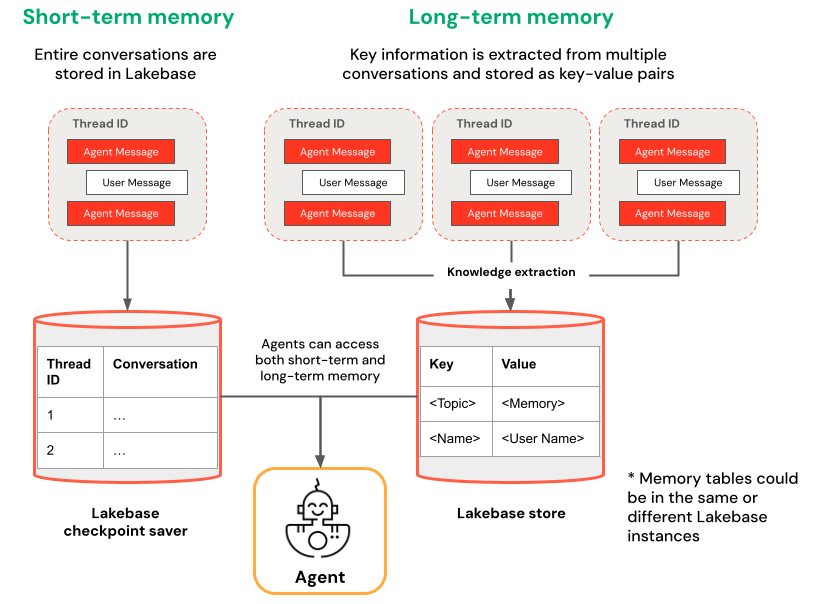
短期記憶 | 長期メモリ |
|---|---|
スレッドIDとチェックポイントを使用して単一の会話セッションでコンテキストを保持 セッション内でフォローアップの質問に対するコンテキストを維持します。 タイムトラベルを使用して会話フローをデバッグおよびテストします。 | 複数のセッションで重要な知見を自動的に抽出および保存します。 過去の設定に基づいてインタラクションをパーソナライズします。 時間の経過とともに応答を改善するユーザーに関するナレッジベースを構築します。 |
ノートブックの例
短期記憶付きエージェント
長期メモリを持つエージェント
デプロイ済みエージェントにクエリーする
エージェントを Model Serving エンドポイントにデプロイした後、クエリーの手順については Model Serving でのレガシーエージェントのクエリーを参照してください。
スレッドIDを渡すには、extra_bodyパラメーターを使用します。次の例は、スレッドIDをResponsesAgent Endpointに渡す方法を示しています:
   response1 = client.responses.create(
    model=endpoint,
    input=[{"role": "user", "content": "What are stateful agents?"}],
    extra_body={
        "custom_inputs": {"thread_id": thread_id}
    }
)
Playground または Review アプリのように ChatContext を自動的に渡すクライアントを使用している場合、会話 ID とユーザー ID は、短期記憶/長期記憶のユースケースに自動的に渡されます。
短期メモリのタイムトラベル
短期記憶を持つエージェントの場合は、LangGraph タイムトラベルを使用してチェックポイントから実行を再開します。会話を再生するか、変更して代替パスを探索することができます。チェックポイントから再開するたびに、LangGraphは会話履歴に新しい分岐を作成し、元の履歴を保持しながら実験を可能にします。
-
エージェントコードでは、
LangGraphResponsesAgentクラス内に、チェックポイント履歴を取得し、チェックポイントの状態を更新する関数を作成します。Pythonfrom typing import List, Dictdef get_checkpoint_history(self, thread_id: str, limit: int = 10) -> List[Dict[str, Any]]:"""Retrieve checkpoint history for a thread.Args:thread_id: The thread identifierlimit: Maximum number of checkpoints to returnReturns:List of checkpoint information including checkpoint_id, timestamp, and next nodes"""config = {"configurable": {"thread_id": thread_id}}with CheckpointSaver(instance_name=LAKEBASE_INSTANCE_NAME) as checkpointer:graph = self._create_graph(checkpointer)history = []for state in graph.get_state_history(config):if len(history) >= limit:breakhistory.append({"checkpoint_id": state.config["configurable"]["checkpoint_id"],"thread_id": thread_id,"timestamp": state.created_at,"next_nodes": state.next,"message_count": len(state.values.get("messages", [])),# Include last message summary for context"last_message": self._get_last_message_summary(state.values.get("messages", []))})return historydef _get_last_message_summary(self, messages: List[Any]) -> Optional[str]:"""Get a snippet of the last message for checkpoint identification"""return getattr(messages[-1], "content", "")[:100] if messages else Nonedef update_checkpoint_state(self, thread_id: str, checkpoint_id: str,new_messages: Optional[List[Dict]] = None) -> Dict[str, Any]:"""Update state at a specific checkpoint (used for modifying conversation history).Args:thread_id: The thread identifiercheckpoint_id: The checkpoint to updatenew_messages: Optional new messages to set at this checkpointReturns:New checkpoint configuration including the new checkpoint_id"""config = {"configurable": {"thread_id": thread_id,"checkpoint_id": checkpoint_id}}with CheckpointSaver(instance_name=LAKEBASE_INSTANCE_NAME) as checkpointer:graph = self._create_graph(checkpointer)# Prepare the values to updatevalues = {}if new_messages:cc_msgs = self.prep_msgs_for_cc_llm(new_messages)values["messages"] = cc_msgs# Update the state (creates a new checkpoint)new_config = graph.update_state(config, values=values)return {"thread_id": thread_id,"checkpoint_id": new_config["configurable"]["checkpoint_id"],"parent_checkpoint_id": checkpoint_id} -
チェックポイントの受け渡しをサポートするように、
predictとpredict_streamの関数を更新します。
- Predict
- Predict_stream
def predict(self, request: ResponsesAgentRequest) -> ResponsesAgentResponse:
    """Non-streaming prediction"""
    # The same thread_id is used by BOTH predict() and predict_stream()
    ci = dict(request.custom_inputs or {})
    if "thread_id" not in ci:
        ci["thread_id"] = str(uuid.uuid4())
    request.custom_inputs = ci

    outputs = [
        event.item
        for event in self.predict_stream(request)
        if event.type == "response.output_item.done"
    ]

    # Include thread_id and checkpoint_id in custom outputs
    custom_outputs = {
        "thread_id": ci["thread_id"]
    }
    if "checkpoint_id" in ci:
        custom_outputs["parent_checkpoint_id"] = ci["checkpoint_id"]

    try:
        history = self.get_checkpoint_history(ci["thread_id"], limit=1)
        if history:
            custom_outputs["checkpoint_id"] = history[0]["checkpoint_id"]
    except Exception as e:
        logger.warning(f"Could not retrieve new checkpoint_id: {e}")

    return ResponsesAgentResponse(output=outputs, custom_outputs=custom_outputs)
def predict_stream(
    self,
    request: ResponsesAgentRequest,
) -> Generator[ResponsesAgentStreamEvent, None, None]:
    """Streaming prediction with PostgreSQL checkpoint branching support.

    Accepts in custom_inputs:
    - thread_id: Conversation thread identifier for session
    - checkpoint_id (optional): Checkpoint to resume from (for branching)
    """
    # Get thread ID and checkpoint ID from custom inputs
    custom_inputs = request.custom_inputs or {}
    thread_id = custom_inputs.get("thread_id", str(uuid.uuid4()))  # generate new thread ID if one is not passed in
    checkpoint_id = custom_inputs.get("checkpoint_id")  # Optional for branching

    # Convert incoming Responses messages to LangChain format
    langchain_msgs = self.prep_msgs_for_cc_llm([i.model_dump() for i in request.input])

    # Build checkpoint configuration
    checkpoint_config = {"configurable": {"thread_id": thread_id}}
    # If checkpoint_id is provided, we're branching from that checkpoint
    if checkpoint_id:
        checkpoint_config["configurable"]["checkpoint_id"] = checkpoint_id
        logger.info(f"Branching from checkpoint: {checkpoint_id} in thread: {thread_id}")

    # DATABASE CONNECTION POOLING LOGIC FOLLOWS
    # Use connection from pool
次に、チェックポイントのブランチをテストします。
-
会話スレッドを開始し、いくつかのメッセージを追加してください:
Pythonfrom agent import AGENT# Initial conversation - starts a new threadresponse1 = AGENT.predict({"input": [{"role": "user", "content": "I'm planning for an upcoming trip!"}],})print(response1.model_dump(exclude_none=True))thread_id = response1.custom_outputs["thread_id"]# Within the same thread, ask a follow-up question - short-term memory will remember previous messages in the same thread/conversation sessionresponse2 = AGENT.predict({"input": [{"role": "user", "content": "I'm headed to SF!"}],"custom_inputs": {"thread_id": thread_id}})print(response2.model_dump(exclude_none=True))# Within the same thread, ask a follow-up question - short-term memory will remember previous messages in the same thread/conversation sessionresponse3 = AGENT.predict({"input": [{"role": "user", "content": "Where did I say I'm going?"}],"custom_inputs": {"thread_id": thread_id}})print(response3.model_dump(exclude_none=True)) -
チェックポイント履歴を取得し、別のメッセージで会話をフォークします:
Python# Get checkpoint history to find branching pointhistory = AGENT.get_checkpoint_history(thread_id, 20)# Retrieve checkpoint at index - indices count backward from most recent checkpointindex = max(1, len(history) - 4)branch_checkpoint = history[index]["checkpoint_id"]# Branch from node with next_node = `('__start__',)` to re-input message to agent at certain part of conversation# I want to update the information of which city I am going to# Within the same thread, branch from a checkpoint and override it with different context to continue the conversation in a new forkresponse4 = AGENT.predict({"input": [{"role": "user", "content": "I'm headed to New York!"}],"custom_inputs": {"thread_id": thread_id,"checkpoint_id": branch_checkpoint # Branch from this checkpoint!}})print(response4.model_dump(exclude_none=True))# Thread ID stays the same even though it branched from a checkpoint:branched_thread_id = response4.custom_outputs["thread_id"]print(f"original thread id was {thread_id}")print(f"new thread id after branching is the same as original: {branched_thread_id}")# Continue the conversation in the same thread and it will pick up from the information you tell it in your branchresponse5 = AGENT.predict({"input": [{"role": "user", "content": "Where am I going?"}],"custom_inputs": {"thread_id": thread_id,}})print(response5.model_dump(exclude_none=True))