ラベル付けスキーマの作成と管理
ラベリングスキーマは、レビューアプリで既存のトレースをラベリングする際に、ドメインの専門家が回答する特定の質問を定義します。これらはフィードバック収集プロセスを構築し、エージェントを評価するための一貫性のある関連情報を確保します。
ラベル付けスキーマは、レビュー アプリを使用して既存のトレースをラベル付けする場合にのみ適用されます。これらは、レビュー アプリ チャット UIでの雰囲気チェックには使用されません。
新しい人間によるレビューワークフローに対して、Databricks は レビューキュー(ベータ版)を推奨しています。これは、質問の定義とレビュアーの割り当てを単一の集中型ワークフローに統合するものです。
ラベリングスキーマの仕組み
ラベリングセッションを作成すると、1つ以上のラベリングスキーマに関連付けられます。各スキーマは、トレースに添付される評価を表します。評価は Feedback または Expectation のいずれかです。詳細については、開発者としてトレースにラベルを付けるを参照してください。
スキーマは以下を制御します。
- レビュー担当者に表示される質問。
- 入力方法(例:ドロップダウンメニューまたはテキストボックス)。
- 検証ルールと制約。
- オプションの指示とコメント。
組み込みLLMジャッジのラベル付けスキーマ
MLflow は、期待値を使用する組み込み LLM ジャッジに定義済みのスキーマ名を提供します。これらの名前を使用してカスタム スキーマを作成し、組み込みの評価機能との互換性を確保できます。
次の表は、定義済みのラベル付けスキーマとその使用方法を示しています。
スキーマ名 | 使用方法 | これらの組み込みジャッジによって使用される |
|---|---|---|
| リクエストに対してエージェントが従うべき理想的な指示を収集します。 | |
| 正確性を保つために含めなければならない事実の記述を収集します。 | |
| 完全な真実の回答を収集します。 |
組み込みLLMジャッジのラベル付けスキーマの例
詳細については、 API リファレンスを参照してください。
import mlflow.genai.label_schemas as schemas
from mlflow.genai.label_schemas import LabelSchemaType, InputTextList, InputText

# Schema for collecting expected facts
expected_facts_schema = schemas.create_label_schema(
    name=schemas.EXPECTED_FACTS,
    type=LabelSchemaType.EXPECTATION,
    title="Expected facts",
    input=InputTextList(max_length_each=1000),
    instruction="Please provide a list of facts that you expect to see in a correct response.",
    overwrite=True
)

# Schema for collecting guidelines
guidelines_schema = schemas.create_label_schema(
    name=schemas.GUIDELINES,
    type=LabelSchemaType.EXPECTATION,
    title="Guidelines",
    input=InputTextList(max_length_each=500),
    instruction="Please provide guidelines that the model's output is expected to adhere to.",
    overwrite=True
)

# Schema for collecting expected response
expected_response_schema = schemas.create_label_schema(
    name=schemas.EXPECTED_RESPONSE,
    type=LabelSchemaType.EXPECTATION,
    title="Expected response",
    input=InputText(),
    instruction="Please provide a correct agent response.",
    overwrite=True
)
カスタムラベルスキーマを作成する
収集するフィードバックをさらに制御するには、MLflow UI または API を使用してカスタム ラベル付けスキーマを作成します。
スキーマのスコープはエクスペリメントであるため、スキーマ名はMLflowエクスペリメント内で一意である必要があります。
スキーマには次の 2 つのタイプがあります。
feedback: 評価、好み、意見などの主観的な評価。expectation: 正解や期待される動作などの客観的な真実。
詳細については、開発者としてのトレースのラベル付けを参照してください。パラメーターの定義については、APIリファレンスを参照してください。
UI を使用してカスタム スキーマを作成する
MLflow UI でカスタム スキーマを作成するには:
-
Databricksワークスペースの左側のサイドバーで、 [エクスペリメント] をクリックします。
-
エクスペリメントの名前をクリックして開きます。
-
サイドバーの 「ラベリング スキーマ」 をクリックします。
-
既存のラベル付けスキーマが表示される場合は、それを編集できます。新しいラベル付けスキーマを作成または追加するには、 「ラベル スキーマの追加」 をクリックし、フィールドを編集します。
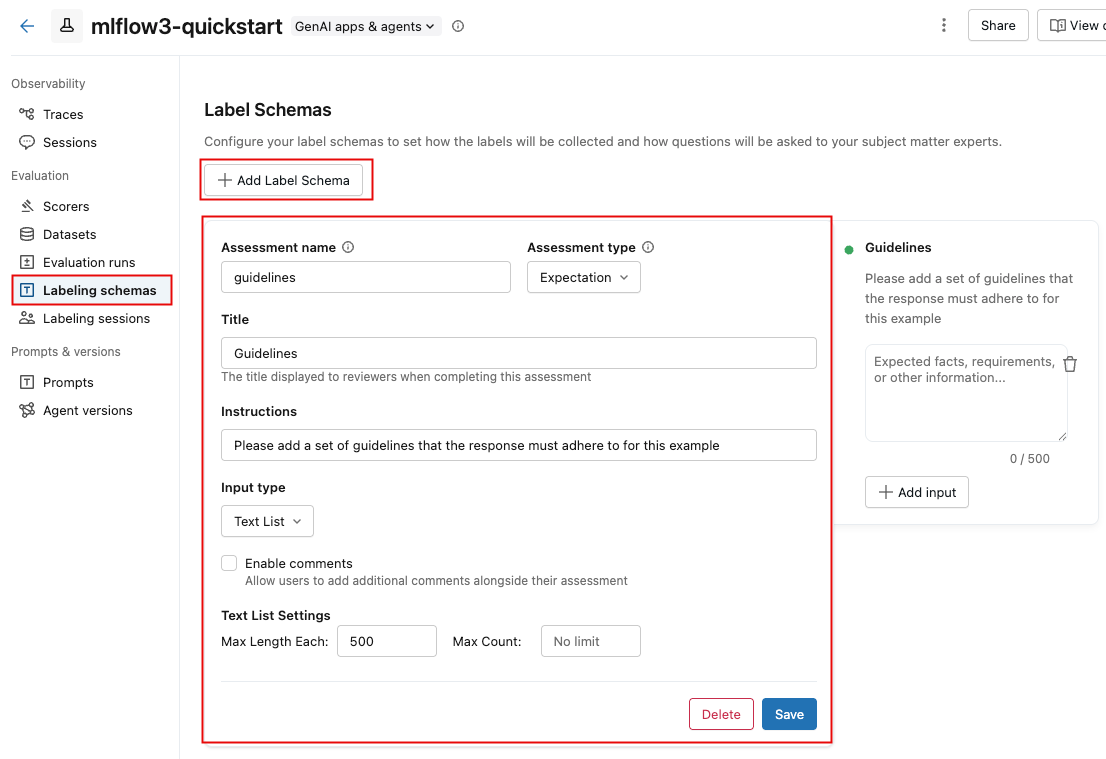
入力タイプ を選択すると、その下のフィールドが変更され、テキストの長さ制限、カテゴリ選択のオプション、数値の範囲などの詳細な要件を指定できるようになります。
フィールドに情報を入力すると、右側のボックスが更新され、作成しているスキーマが反映されます。
-
完了したら、 「保存」 をクリックします。
次のビデオでそのプロセスを示します。

API を使用してカスタム スキーマを作成する
mlflow.genai.label_schemas.create_label_schema()を使用してスキーマを作成できます。すべてのスキーマには、名前、タイプ、タイトル、および入力仕様が必要です。
基本スキーマの例
import mlflow.genai.label_schemas as schemas
from mlflow.genai.label_schemas import InputCategorical, InputText

# Create a feedback schema for rating response quality
quality_schema = schemas.create_label_schema(
    name="response_quality",
    type="feedback",
    title="How would you rate the overall quality of this response?",
    input=InputCategorical(options=["Poor", "Fair", "Good", "Excellent"]),
    instruction="Consider accuracy, relevance, and helpfulness when rating."
)
カスタムスキーマフィードバックの例
import mlflow.genai.label_schemas as schemas
from mlflow.genai.label_schemas import InputCategorical, InputTextList

# Feedback schema for subjective assessment
tone_schema = schemas.create_label_schema(
    name="response_tone",
    type="feedback",
    title="Is the response tone appropriate for the context?",
    input=InputCategorical(options=["Too formal", "Just right", "Too casual"]),
    enable_comment=True  # Allow additional comments
)
カスタムスキーマの期待値の例
# Expectation schema for ground truth
facts_schema = schemas.create_label_schema(
    name="required_facts",
    type="expectation",
    title="What facts must be included in a correct response?",
    input=InputTextList(max_count=5, max_length_each=200),
    instruction="List key facts that any correct response must contain."
)
ラベル付けスキーマを管理する
API を使用すると、ラベル付けスキーマを一覧表示、更新、削除できます。
スキーマの一覧
既存のスキーマに関する情報を取得するには、API get_label_schemaを使用します。スキーマの名前を指定する必要があります。次の例に示すように。詳細については、API リファレンスget_label_schemaを参照してください。
import mlflow.genai.label_schemas as schemas

# Get an existing schema
schema = schemas.get_label_schema("response_quality")
print(f"Schema: {schema.name}")
print(f"Type: {schema.type}")
print(f"Title: {schema.title}")
スキーマを更新する
既存のスキーマを更新するには、 API create_label_schemaを使用し、 overwrite問題をTrueに設定します。 詳細については、API リファレンスcreate_label_schemaを参照してください。
import mlflow.genai.label_schemas as schemas
from mlflow.genai.label_schemas import InputCategorical

# Update by recreating with overwrite=True
updated_schema = schemas.create_label_schema(
    name="response_quality",
    type="feedback",
    title="Rate the response quality (updated question)",
    input=InputCategorical(options=["Excellent", "Good", "Fair", "Poor", "Very Poor"]),
    instruction="Updated: Focus on factual accuracy above all else.",
    overwrite=True  # Replace existing schema
)
スキーマを削除する
次の例は、ラベル付けスキーマを削除する方法を示しています。詳細については、API リファレンスdelete_label_schemaを参照してください。
import mlflow.genai.label_schemas as schemas

# Remove a schema that's no longer needed
schemas.delete_label_schema("old_schema_name")
カスタムスキーマの入力タイプ
MLflow は、さまざまな種類のフィードバックを収集するために、表に示す入力タイプをサポートしています。次のセクションでは、各タイプの例を示します。
入力タイプ | 説明と使用方法 |
|---|---|
| 単一選択ドロップダウン メニュー。評価や分類など、相互に排他的なオプションに使用します。 |
| 複数選択ドロップダウンメニュー。複数のオプションを選択できる場合に使用します。 |
| 自由形式のテキスト ボックス。詳細な説明やカスタム フィードバックなど、応答が自由形式の場合に使用します。 |
| 複数の自由形式のテキスト ボックス。事実や要件などのテキスト項目のリストに使用します。 |
| 数値の範囲。数値による評価やスコアに使用します。 |
InputCategorical
from mlflow.genai.label_schemas import InputCategorical

# Rating scale
rating_input = InputCategorical(
    options=["1 - Poor", "2 - Below Average", "3 - Average", "4 - Good", "5 - Excellent"]
)

# Binary choice
safety_input = InputCategorical(options=["Safe", "Unsafe"])

# Multiple categories
error_type_input = InputCategorical(
    options=["Factual Error", "Logical Error", "Formatting Error", "No Error"]
)
InputCategoricalList
from mlflow.genai.label_schemas import InputCategoricalList

# Multiple error types can be present
errors_input = InputCategoricalList(
    options=[
        "Factual inaccuracy",
        "Missing context",
        "Inappropriate tone",
        "Formatting issues",
        "Off-topic content"
    ]
)

# Multiple content types
content_input = InputCategoricalList(
    options=["Technical details", "Examples", "References", "Code samples"]
)
InputText
from mlflow.genai.label_schemas import InputText

# General feedback
feedback_input = InputText(max_length=500)

# Specific improvement suggestions
improvement_input = InputText(
    max_length=200  # Limit length for focused feedback
)

# Short answers
summary_input = InputText(max_length=100)
InputTextList
from mlflow.genai.label_schemas import InputTextList

# List of factual errors
errors_input = InputTextList(
    max_count=10,        # Maximum 10 errors
    max_length_each=150  # Each error description limited to 150 chars
)

# Missing information
missing_input = InputTextList(
    max_count=5,
    max_length_each=200
)

# Improvement suggestions
suggestions_input = InputTextList(max_count=3)  # No length limit per item
InputNumeric
from mlflow.genai.label_schemas import InputNumeric

# Confidence score
confidence_input = InputNumeric(
    min_value=0.0,
    max_value=1.0
)

# Rating scale
rating_input = InputNumeric(
    min_value=1,
    max_value=10
)

# Cost estimate
cost_input = InputNumeric(min_value=0)  # No maximum limit
完全な例
顧客 サービス の評価
以下は、顧客サービスのレスポンスを評価するための包括的な例です。
import mlflow.genai.label_schemas as schemas
from mlflow.genai.label_schemas import (
    InputCategorical,
    InputCategoricalList,
    InputText,
    InputTextList,
    InputNumeric
)

# Overall quality rating
quality_schema = schemas.create_label_schema(
    name="service_quality",
    type="feedback",
    title="Rate the overall quality of this customer service response",
    input=InputCategorical(options=["Excellent", "Good", "Average", "Poor", "Very Poor"]),
    instruction="Consider helpfulness, accuracy, and professionalism.",
    enable_comment=True
)

# Issues identification
issues_schema = schemas.create_label_schema(
    name="response_issues",
    type="feedback",
    title="What issues are present in this response? (Select all that apply)",
    input=InputCategoricalList(options=[
        "Factually incorrect information",
        "Unprofessional tone",
        "Doesn't address the question",
        "Too vague or generic",
        "Contains harmful content",
        "No issues identified"
    ]),
    instruction="Select all issues you identify. Choose 'No issues identified' if the response is problem-free."
)

# Expected resolution steps
resolution_schema = schemas.create_label_schema(
    name="expected_resolution",
    type="expectation",
    title="What steps should be included in the ideal resolution?",
    input=InputTextList(max_count=5, max_length_each=200),
    instruction="List the key steps a customer service rep should take to properly resolve this issue."
)

# Confidence in assessment
confidence_schema = schemas.create_label_schema(
    name="assessment_confidence",
    type="feedback",
    title="How confident are you in your assessment?",
    input=InputNumeric(min_value=1, max_value=10),
    instruction="Rate from 1 (not confident) to 10 (very confident)"
)
医療情報のレビュー
医療情報の回答を評価する例:
import mlflow.genai.label_schemas as schemas
from mlflow.genai.label_schemas import InputCategorical, InputTextList, InputNumeric

# Safety assessment
safety_schema = schemas.create_label_schema(
    name="medical_safety",
    type="feedback",
    title="Is this medical information safe and appropriate?",
    input=InputCategorical(options=[
        "Safe - appropriate general information",
        "Concerning - may mislead patients",
        "Dangerous - could cause harm if followed"
    ]),
    instruction="Assess whether the information could be safely consumed by patients."
)

# Required disclaimers
disclaimers_schema = schemas.create_label_schema(
    name="required_disclaimers",
    type="expectation",
    title="What medical disclaimers should be included?",
    input=InputTextList(max_count=3, max_length_each=300),
    instruction="List disclaimers that should be present (e.g., 'consult your doctor', 'not professional medical advice')."
)

# Accuracy of medical facts
accuracy_schema = schemas.create_label_schema(
    name="medical_accuracy",
    type="feedback",
    title="Rate the factual accuracy of the medical information",
    input=InputNumeric(min_value=0, max_value=100),
    instruction="Score from 0 (completely inaccurate) to 100 (completely accurate)"
)
ラベリングセッションとの統合
次の例は、ラベル付けセッションでスキーマを使用する方法を示しています。
import mlflow.genai.label_schemas as schemas

# Schemas are automatically available when creating labeling sessions
# The Review App will present questions based on your schema definitions

# Example: Using schemas in a session (conceptual - actual session creation
# happens through the Review App UI or other APIs)
session_schemas = [
    "service_quality",      # Your custom schema
    "response_issues",      # Your custom schema
    schemas.EXPECTED_FACTS  # Built-in schema
]
ベストプラクティス
スキーマ設計
- 質問を明確かつ具体的なプロンプトとして書きます。
- レビュー担当者をガイドするためのコンテキストを提供します。
- テキストの長さとリストの数に適切な制限を設定します。
- カテゴリ入力の場合、オプションが相互に排他的かつ包括的であることを確認します。
スキーマ管理
- スキーマ全体で説明的で一貫性のある名前を使用します。
- スキーマを更新するときは、既存のセッションへの影響を考慮してください。
- 未使用のスキーマを削除して、ワークスペースを整理された状態に保ちます。
その他のリソース
- 既存のトレースにラベルを付ける - スキーマを適用して構造化されたフィードバックを収集します
- ラベリングセッションの作成 - スキーマを使用してレビューワークフローを整理します
- 評価データセットの構築 - ラベル付きデータをテスト データセットに変換します
次のステップ: ラベル付けセッションを作成および管理する