Unity Catalogでのトレースのガバナンスと秘匿化
Unity Catalogにトレースを保存することは、コンプライアンスレイヤーとしても機能します。トレースはガバナンスが適用された Delta テーブルとして保存されるため、追加のツールを使用することなく、他の Unity Catalog データアセットに適用するのと同様の RBAC、列マスキング、行フィルター、保持ポリシー、および監査証跡が継承されます。その後、2つのアプローチによって、特にPIIを処理することができます。
- エクスポート前の秘匿化 (クライアントサイド) : MLflowがバックエンドに送信する前に、エージェント内のスパンの入力と出力をフィルタリングします。生データ形式のPIIが環境外に出ることはありません。
- 保存されたトレースのマスキング(サーバーサイド) :LakeFlow Pipelinesを使用して、Unity Catalog にすでに保存されている OTel スパンに
ai_maskを適用し、未加工のテーブルへのアクセスを制限します。エージェントコードを変更する必要はありません。
Use client-side redaction when you need to guarantee sensitive values are never transmitted or persisted.Use the server-side パイプライン approach when traces are already stored in Unity Catalog and you prefer not to modify your agent.
MLflowの機密情報マスキングは、トレースに記録される内容にのみ影響します。エージェント自体は、マスキングされていない元のコンテンツを引き続き受信および返します。PIIが Unity Catalog に登録されたAI サービスに送信されるのをブロックするため、または組織全体で一元的なポリシーを適用するには、 サービスポリシーを使用します。
エクスポート前にPIIをマスキング
スパンプロセッサはクライアント側のマスキングを実装します。各プロセッサはスパンを受け取り、その場で変更し、何も返しません。mlflow.tracing.configureに1つ以上のプロセッサを登録すると、MLflowはエクスポート前にすべてのスパンにそれらを適用します。
from mlflow.entities.span import Span

def filter_function(span: Span) -> None:
    # Read span.inputs / span.outputs, redact, then write back.
    span.set_inputs(...)
    span.set_outputs(...)

mlflow.tracing.configure(span_processors=[filter_function])
主な挙動:
- フィルタリングはクライアント側で行われます。トレースバックエンドが機密情報の修正前のデータを受信することはありません。
- 複数のプロセッサは登録する順序で実行され、各プロセッサは前のプロセッサによって変更された後のスパンを受け取ります。
- プロセッサは、LangChain や LangGraph などのフレームワーク統合によって作成されたものを含む、トレース内のすべてのスパンに適用されます。
- Use
span.span_typeto apply different logic to different span kinds:LLM,TOOL, orAGENT.
前提条件
-
エージェント用に構成された MLflow Tracing。トレーシングの概要を参照してください。
-
If you store traces in Unity Catalog, create the エクスペリメント with a Unity Catalog trace location first.See Setup: Create an エクスペリメント with a Unity Catalog trace location.
-
必要なパッケージをインストールする:
Bashpip install --upgrade "mlflow-skinny[databricks]>=3.14" databricks-sdk "databricks-langchain>=0.19.0" "langgraph>=1.1.0"軽量な本番運用トレースには、
mlflow-tracingのインストールが推奨されます。Unity Catalog SDK と LangChain および LangGraph の統合も検証するため、これらの例ではmlflow-skinny[databricks]を使用しています。Microsoft Presidio の例の場合は、以下もインストールします。
Bashpip install presidio_analyzer presidio_anonymizer
python -m spacy download en_core_web_lg
正規表現によるマスキング
次の例では、正規表現を使用してスパン入力内の Eメールアドレスに一致させ、[REDACTED] に置き換えます。
import re
import mlflow
from mlflow.entities.span import Span

# mlflow.set_experiment(experiment_id=experiment_id)

@mlflow.trace
def predict(text: str):
    return "Answer"

EMAIL_PATTERN = r"[A-Za-z0-9._%+-]+@[A-Za-z0-9.-]+\.[A-Za-z]{2,}"

def redact_email(span: Span) -> None:
    raw_input = span.inputs.get("text")
    redacted_input = re.sub(EMAIL_PATTERN, "[REDACTED]", raw_input)
    span.set_inputs({"text": redacted_input})

mlflow.tracing.configure(span_processors=[redact_email])

predict("My e-mail address is test@example.com")
スパンタイプでフィルター
span.span_type を使用して、さまざまな種類のスパン(LLM、TOOL、AGENT など)に異なる墨消し(リダクション)ロジックを適用します。これにより、フレームワークが生成する可能性のあるすべてのペイロードの形状をスキャンするのではなく、機密値の発生源であるスパンをターゲットにすることができます。
次の例では、LangGraph エージェントから銀行アカウント番号をマスクします。アカウント番号はツールから取得されるため、プロセッサは TOOL スパンの出力を完全に置換し、バックストップとして他のすべてのスパンの入力と出力に正規表現を適用します。
エージェントを設定する:
import mlflow
from langchain_core.tools import tool
from databricks_langchain import ChatDatabricks
from langchain.agents import create_agent

# autolog() registers a LangChain callback so MLflow automatically captures spans
# for every LLM call, tool invocation, and agent step.
mlflow.langchain.autolog()

@tool
def get_bank_account_number(user_name: str):
    """Return the bank account number for the given user name."""
    return "1234567890"

llm = ChatDatabricks(model="databricks-llama-4-maverick", use_ai_gateway=True)
graph = create_agent(llm, [get_bank_account_number])
スパン プロセッサを定義する:
import re
from mlflow.entities.span import Span, SpanType

ACCOUNT_NUMBER_PATTERN = re.compile(r"\d{10}")

def filter_bank_account_number(span: Span) -> None:
    # The tool returns the account number directly — redact its output entirely.
    if span.span_type == SpanType.TOOL:
        span.set_outputs("[REDACTED]")
        return

    # For all other spans, mask any account-number pattern in the inputs and outputs.
    if span.inputs is not None:
        span.set_inputs(ACCOUNT_NUMBER_PATTERN.sub("[REDACTED]", str(span.inputs)))
    if span.outputs is not None:
        span.set_outputs(ACCOUNT_NUMBER_PATTERN.sub("[REDACTED]", str(span.outputs)))
プロセッサを登録し、エージェントを呼び出します。
mlflow.tracing.configure(span_processors=[filter_bank_account_number])

result = graph.invoke(
    {"messages": [{"role": "user", "content": "What is the bank account number for John Doe?"}]}
)
Microsoft Presidioで除外する
正規表現を超えるより精度の高い PII 検出を行うには、 Microsoft Presidio を使用します。An AnalyzerEngine detects entities such as names, credit cards, and Eメール addresses, and an AnonymizerEngine rewrites them.
import mlflow
from mlflow.entities.span import Span, SpanType

@mlflow.trace(span_type=SpanType.AGENT)
def customer_support_agent(request: str):
    return "Yes"
Presidioを初期化し、Spanプロセッサを定義します:
from presidio_analyzer import AnalyzerEngine
from presidio_anonymizer import AnonymizerEngine

analyzer = AnalyzerEngine()
anonymizer = AnonymizerEngine()

def filter_pii(span: Span) -> None:
    text = span.inputs.get("request")
    results = analyzer.analyze(
        text=text,
        entities=["PERSON", "CREDIT_CARD", "EMAIL_ADDRESS", "LOCATION", "DATE_TIME"],
        language="en",
    )
    anonymized_text = anonymizer.anonymize(text=text, analyzer_results=results)
    span.set_inputs({"request": anonymized_text.text})
プロセッサを登録し、エージェントを実行します。
mlflow.tracing.configure(span_processors=[filter_pii])

customer_support_agent(
    "Please cancel my credit card effective September 19th. My name is John Doe and my credit "
    "card number is 4095-2609-9393-4932. My email is john.doe@example.com and I live in Amsterdam."
)
スパン プロセッサの Reset
スパンのマスクを停止するには、空のリストを渡して登録済みのプロセッサをすべてクリアします。
mlflow.tracing.configure(span_processors=[])
または、reset を使用してトレース設定全体をクリアします。
mlflow.tracing.reset()
保存された OTel トレースからの PII のマスキング
このアプローチにより、エージェントを変更することなく、Unity Catalogにすでに保存されているOTelトレーススパン内のPIIがマスクされます。A Lakeflow pipeline reads new OTel spans incrementally, applies ai_mask to mask PII, and writes the results to a separate schema with broader access.スケジュールされたジョブにより、生テーブルのオプションの保持クリーンアップが処理されます。
このアプローチは、MLflowによって書き込まれたトレースを含め、Unity Catalog内のあらゆるOTelトレースで機能します。Unity CatalogへのOpenTelemetryトレースの保存を参照してください。

前提条件
- Unity Catalog が有効化されたワークスペース。
- AI Functions は、Serverless SQL Warehouse または Serverless パイプラインを通じて利用できます。
- ワークスペースに対して認証されたDatabricks CLI。
- Unity Catalog テーブル内の OTel トレースデータ。Unity Catalog への OpenTelemetry トレースの保存を参照してください。
download the assets
これらのファイルをdownloadし、ワークスペースにインポートします。
ファイル | 説明 |
|---|---|
ガイド付きデプロイ ノートブック — | |
CLI デプロイメントスクリプト。 | |
パイプライン — | |
スパンとアノテーションを結合する統合トレースビュー。 | |
スキーマの作成とアクセス制御の権限付与。 | |
Example パイプライン configuration (reference). | |
PII のテストデータを OTel スパンとして送信するテストユーティリティ。 | |
合成 PII テストデータの 50 行。 |
ソリューションのデプロイ
- Guided notebook (recommended)
- CLI
- Manual
ワークスペースで直接ステップバイステップでデプロイする場合:
- ダウンロードした他のアセットとともに、deploy_notebook.py をワークスペースにインポートします。Databricks Git フォルダーを参照してください。
deploy_notebook.pyをワークスペースで開きます。- 上部のウィジェットパラメーターを入力します:カタログ、ソーススキーマ、ターゲットスキーマ、テーブルプレフィックス。
- 「 すべてラン 」をクリックします。各ステップは、続行する前に検証を行います。
このアプローチでは Databricks Python SDK を使用し(CLI は不要)、安全に再実行でき、各ステップでインタラクティブなフィードバックが提供されます。
ワークスペースの詳細を指定してデプロイメントスクリプトを実行します。
./deploy.sh <WORKSPACE_HOST> <CATALOG> <SOURCE_SCHEMA> <TARGET_SCHEMA> <TABLE_PREFIX>
例えば:
./deploy.sh https://my-workspace.cloud.databricks.com my_catalog traces_raw traces_redacted my_app
このスクリプトは、パイプラインの SQL をuploadし、ターゲットスキーマを作成し、パイプラインを作成およびTriggerし、retention_daysが設定されている場合は生テーブルで auto-TTL を構成します。パイプラインが完了したら、unified_view.sqlを実行して統合トレースビューを作成します。
- ターゲットスキーマを作成します。
setup_schema_and_grants.sql内のステートメントを実行します。 - パイプラインの SQL を upload します。
pii_redaction_pipeline.sqlをワークスペースにインポートします。 - パイプラインを作成
pipeline_config.jsonをTemplateとして使用し、<PLACEHOLDER>の値を置き換えます。 - パイプラインのランをTriggerします。 UIを使用するか、
databricks pipelines start-update <PIPELINE_ID>を実行します。 - 統合ビューを作成します。 最初のパイプラインのランの後に
unified_view.sqlを実行します。 - 保持期間の構成。 未処理テーブルで 自動タイム・トゥ・リブを有効にします。
デプロイメントパラメーター
deploy_notebook.py で各パラメーターをウィジェット値として渡すか、deploy.sh の引数として渡します。
パラメーター | 説明 | デフォルト |
|---|---|---|
| 生データ テーブルと機密情報マスキング済みテーブルの両方の Unity Catalog カタログ。 | (必須) |
| 生のOTelテーブルを含むスキーマ。 | (必須) |
| マスク処理された出力テーブルのスキーマ。 | (必須) |
| OTel テーブル名のプレフィックス。 | (必須) |
| マスキングするPIIの種類(カンマ区切り、シングルクォーテーション囲み)。 |
|
| パイプラインの名前。 |
|
| 削除する前に生データを保持する日数。空白の値、 |
|
| パイプライン execution mode: |
|
| パイプラインの実行頻度(Trigger モードのみ): |
|
ソーステーブルは、{catalog}.{source_schema}.{table_prefix}_otel_spans、{catalog}.{source_schema}.{table_prefix}_otel_logs、{catalog}.{source_schema}.{table_prefix}_otel_annotationsの命名パターンに従います。
パイプラインモード:
- Trigger : 構成された頻度でパイプラインを実行する、スケジュールされたジョブを作成します。パイプラインはランごとに新しいデータを処理し、停止します。
- 連続 :パイプラインは継続的に実行され、到着した新しいデータを処理します。パイプラインが常時稼働するため、Triggerモードよりコンピュートコストが高くなります。
PIIマスキングパラメーター
これらのパラメーターは、どのPIIをどのようにマスクするかを制御します。pii_categories をデプロイパラメーターとして渡し、pii_redaction_pipeline.sql を直接編集して他のパラメーターを上書きします。
パラメーター | 説明 | 例 |
|---|---|---|
| 検出およびマスクする PII のタイプのリスト。サポートされている値: |
|
| PII をマスクする方法: |
|
|
|
|
| マスキングを適用する OTel フィールド。 |
|
| マスキングをスキップする属性キー — たとえば、PIIが含まれない技術的メタデータなど。 |
|
|
|
|
従業員ID(EMP-XXXXXX)などのカスタムパターンの場合は、パイプラインのSQLでai_maskの前にregexp_replaceを適用します。
除外される内容
パイプラインは、次のフィールドに ai_mask を適用します。
テーブル | フィールドが編集されました |
|---|---|
スパン |
|
ログ |
|
注釈 | パススルー — PII は想定されていません |
個人情報(PII)以外のフィールド(トレースID、スパンID、Timestamp、サービス名、ステータスコードなど)はそのまま保持されます。
ai_mask LLM を活用しており、バリエーションごとに個別のパターンを必要とせずにさまざまな PII 形式を処理します(たとえば、(555) 123-4567、555.123.4567、+1 555-123-4567 の電話番号はすべて認識されます)。
保持とアクセス制御
生データ保持期間 :デプロイでは、構成可能な日数(default:90)より古いトレースデータを削除するために、生OTelテーブルで自動生存時間(TTL)を構成します。これは、GDPR および同様のデータ保護規則をサポートします。保持期間を個別に管理するには、retention_days を 0 または none に設定します。
正確な自動TTL削除のタイミングは保証されません。行の有効期限切れから完全削除までの間に最大6日間のバッファが存在し、さらにデータ保持期間(default 7日)が追加されます。コンプライアンス要件により厳格な削除スケジュールが求められる場合は、代わりに手動の DELETE と VACUUM を使用するスケジュールされたジョブを使用してください。
アクセス制御 :生OTelテーブルには秘匿化されていないPIIが含まれているため、アクセスを制限する必要があります。デバッグやインシデント対応のために必要なパイプラインの Service Principal と管理者に対してのみ、生ソーススキーマへのアクセス権を付与してください。すべてのルーチンのアナリティクスおよびオブザーバビリティ(可観測性)ワークフローでは、秘匿化されたテーブルに対してクエリーを実行する必要があります。setup_schema_and_grants.sql ファイルには、権限付与の例が含まれています。Unity Catalog の権限の詳細については、Unity Catalog での特権の管理を参照してください。
秘匿化をテストする
既知の PII を含むテストスパンを生成して出力を検証します。
pip install opentelemetry-exporter-otlp-proto-http

python send_pii_traces.py <WORKSPACE_HOST> <CATALOG.SCHEMA.PREFIX_otel_spans>
これにより、Eメール、電話番号、SSN、クレジットカード、名前、住所を含む50件のテストトレースが送信されます。
パイプラインを実行した後、未加工のスパンと秘匿化されたスパンを比較します:
SELECT
  s.span_id,
  CAST(s.attributes AS STRING) AS raw,
  CAST(r.attributes AS STRING) AS redacted
FROM <source_catalog>.<source_schema>.<prefix>_otel_spans s
JOIN <target_catalog>.<target_schema>.redacted_spans r
  ON s.trace_id = r.trace_id AND s.span_id = r.span_id
WHERE s.name = 'pii-test-interaction'
LIMIT 5;
リファレンスアーキテクチャ
2つのフローを利用できます。ほとんどの 本番運用 デプロイには Flow 1 (バッチ パイプライン) を使用します — 高速クエリー用の編集済みテーブルが事前にマテリアライズされ、自動 TTL 保持がサポートされます。ストレージ コストが主な懸念事項であり、クエリーの頻度が低い場合の軽量なオプションとして、 Flow 2 (ビューベース) を使用します。
ディメンション | フロー 1: バッチパイプライン | フロー 2: ビューベース |
|---|---|---|
ストレージ コスト | 2倍(タイムウィンドウ方式、自動TTLが適用される場合は約1倍) | 1x — 重複なし |
コンピュートコスト | レコードごとに 1 回 | クエリごと |
クエリーのパフォーマンス | 高速(事前マテリアライズ済み) | 低速(クエリーごとに再計算されます) |
利用可能になるまでのレイテンシー | 分(パイプライン間隔) | 直ちに |
ルール変更のロールアウト | パイプライン更新 | インスタント |
GDPR コンプライアンス | 未処理テーブルに対する自動 TTL またはスケジュールされたクリーンアップ | 未処理テーブルに対する自動 TTL またはスケジュールされたクリーンアップ |
どのようなタスクにベストなのか | 主な本番運用ユースケース | クエリーボリュームの低い使用または一時的な使用 |
フロー 1: バッチパイプライン(推奨)
Lakeflow パイプラインは、未加工の OTel テーブルからマスクされたストリーミングテーブルをマテリアライズします。OTel スパンは追加専用であるため、増分ストリーミング取り込みに最適です。
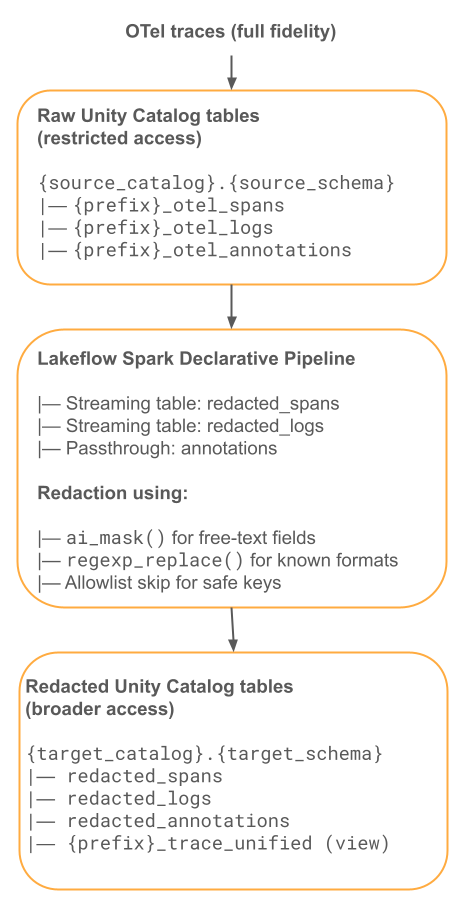
次の SQL は、編集されたストリーミングテーブル(pii_redaction_pipeline.sql)を定義します。
-- Streaming Table: Redacted Spans
CREATE OR REFRESH STREAMING TABLE redacted_spans
COMMENT 'PII-redacted OTel spans'
TBLPROPERTIES (
  'quality' = 'gold',
  'pipelines.autoOptimize.zOrderCols' = 'trace_id,date'
)
AS
SELECT
  trace_id, span_id, parent_span_id, name, kind, start_time, end_time,
  status, date, record_id, service_name, time, instrumentation_scope,

  -- Redact span attributes
  CASE
    WHEN attributes IS NOT NULL THEN
      ai_mask(CAST(attributes AS STRING), array(${pii_categories}))
    ELSE attributes
  END AS attributes,

  -- Redact resource attributes
  CASE
    WHEN resource:attributes IS NOT NULL THEN
      named_struct(
        'attributes',
        ai_mask(CAST(resource:attributes AS STRING), array(${pii_categories})),
        'dropped_attributes_count', resource:dropped_attributes_count
      )
    ELSE resource
  END AS resource,

  -- Redact events (may contain exception messages with PII)
  CASE
    WHEN events IS NOT NULL THEN
      ai_mask(CAST(events AS STRING), array(${pii_categories}))
    ELSE events
  END AS events,

  -- Pass through links unchanged (typically just trace/span IDs)
  links

FROM STREAM(${source_catalog}.${source_schema}.${table_prefix}_otel_spans);


-- Streaming Table: Redacted Logs
CREATE OR REFRESH STREAMING TABLE redacted_logs
COMMENT 'PII-redacted OTel logs'
AS
SELECT
  trace_id, span_id, severity_number, severity_text, date, record_id,
  service_name, time, instrumentation_scope,

  CASE
    WHEN body IS NOT NULL THEN
      ai_mask(CAST(body AS STRING), array(${pii_categories}))
    ELSE body
  END AS body,

  CASE
    WHEN attributes IS NOT NULL THEN
      ai_mask(CAST(attributes AS STRING), array(${pii_categories}))
    ELSE attributes
  END AS attributes,

  CASE
    WHEN resource:attributes IS NOT NULL THEN
      named_struct(
        'attributes',
        ai_mask(CAST(resource:attributes AS STRING), array(${pii_categories})),
        'dropped_attributes_count', resource:dropped_attributes_count
      )
    ELSE resource
  END AS resource

FROM STREAM(${source_catalog}.${source_schema}.${table_prefix}_otel_logs);


-- Streaming Table: Annotations (passthrough — no PII expected)
CREATE OR REFRESH STREAMING TABLE redacted_annotations
COMMENT 'OTel annotations (passthrough, no PII redaction applied)'
AS SELECT * FROM STREAM(${source_catalog}.${source_schema}.${table_prefix}_otel_annotations);
Restrict access to the raw tables and grant access to the redacted tables:
-- Lock down raw tables: grant only to the pipeline service principal
GRANT USE CATALOG ON CATALOG ${source_catalog} TO `pii_pipeline_sp`;
GRANT USE SCHEMA ON SCHEMA ${source_catalog}.${source_schema} TO `pii_pipeline_sp`;
GRANT SELECT ON TABLE ${source_catalog}.${source_schema}.${table_prefix}_otel_spans TO `pii_pipeline_sp`;
GRANT SELECT ON TABLE ${source_catalog}.${source_schema}.${table_prefix}_otel_logs TO `pii_pipeline_sp`;
REVOKE SELECT ON TABLE ${source_catalog}.${source_schema}.${table_prefix}_otel_spans FROM `data_team`;

-- Broad access to redacted tables only
GRANT USE CATALOG ON CATALOG ${target_catalog} TO `data_team`;
GRANT USE SCHEMA ON SCHEMA ${target_catalog}.${target_schema} TO `data_team`;
GRANT SELECT ON SCHEMA ${target_catalog}.${target_schema} TO `data_team`;
GDPR コンプライアンスを確保するため、生データテーブルに自動 TTL 保持を設定します:
ALTER TABLE ${source_catalog}.${source_schema}.${table_prefix}_otel_spans
  DELETE ROWS ${retention_days} DAYS AFTER time;

ALTER TABLE ${source_catalog}.${source_schema}.${table_prefix}_otel_logs
  DELETE ROWS ${retention_days} DAYS AFTER time;
秘匿化されたテーブルを参照する統合トレースビューを作成します:
CREATE OR REPLACE VIEW ${target_catalog}.${target_schema}.${table_prefix}_trace_unified AS
SELECT
  s.trace_id,
  s.date,
  min(s.start_time) AS request_time,
  max(s.end_time) - min(s.start_time) AS execution_duration,
  collect_list(
    named_struct(
      'span_id', s.span_id,
      'parent_span_id', s.parent_span_id,
      'name', s.name,
      'kind', s.kind,
      'start_time', s.start_time,
      'end_time', s.end_time,
      'status', s.status,
      'attributes', s.attributes,
      'events', s.events
    )
  ) AS spans,
  a.tags,
  a.assessments
FROM ${target_catalog}.${target_schema}.redacted_spans s
LEFT JOIN ${target_catalog}.${target_schema}.redacted_annotations a
  ON s.trace_id = a.target_id
GROUP BY s.trace_id, s.date, a.tags, a.assessments;
パイプライン構成 Template(pipeline_config.json):
{
  "name": "otel-pii-redaction",
  "catalog": "${target_catalog}",
  "schema": "${target_schema}",
  "serverless": true,
  "continuous": false,
  "channel": "CURRENT",
  "configuration": {
    "source_catalog": "<value>",
    "source_schema": "<value>",
    "table_prefix": "<value>",
    "pii_categories": "'email','phone','ssn','credit_card','name','address'"
  },
  "libraries": [{ "file": { "path": "/Workspace/path/to/pii_redaction_pipeline.sql" } }]
}
フロー 2:ビューベースの冗長化
このフローでは、Unity Catalog ビューに ai_mask が適用されるため、読み取り時に機密情報マスキングが行われます。マスキングされたコピーは保存されず、パイプライン ジョブも必要ありません。
使用する場合:
- ストレージコストは主要な懸念事項であり、トレースデータの 2 つ目のコピーは許容されません。
- マスクされたデータはクエリーされる頻度が低いため、
ai_maskの実行にかかるクエリーごとのコンピュート コストは許容範囲内です。 - パイプラインを更新せずに、マスクルールを即座に有効にしたい場合。
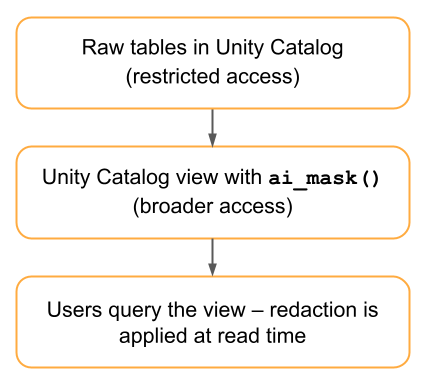
CREATE OR REPLACE VIEW ${target_catalog}.${target_schema}.${table_prefix}_otel_spans_redacted
AS
SELECT
  trace_id, span_id, parent_span_id, name, kind, start_time, end_time,
  status, date, service_name, time, instrumentation_scope, links,

  ai_mask(CAST(attributes AS STRING), array(${pii_categories})) AS attributes,
  ai_mask(CAST(events AS STRING), array(${pii_categories})) AS events,

  named_struct(
    'attributes',
    ai_mask(CAST(resource:attributes AS STRING), array(${pii_categories})),
    'dropped_attributes_count', resource:dropped_attributes_count
  ) AS resource

FROM ${source_catalog}.${source_schema}.${table_prefix}_otel_spans;
トレードオフ:
観点 | 利点 | デメリット |
|---|---|---|
ストレージ | 重複はありません。 | — |
コンピュート | — |
|
レイテンシー | 新しいデータが即座に反映されます。 | クエリー応答の遅延。 |
柔軟性 | マスキング規則は、パイプラインを更新せずに即座に更新されます。 | — |
実装チェックリスト
本番運用へのデプロイ前:
- サンプルOTelスパンデータを使用して、VARIANT列での
ai_maskの動作を検証します。 ai_maskの throughput をベンチマークして、パイプラインのスケジュール間隔のサイズを決定します。- 冗長化をスキップする許可リストに登録された属性キーを定義します。
- アクセス制御グループの設定: 生データへのアクセスとマスキングされたアクセス。
- 生テーブル保持のための自動TTL、または厳格な削除スケジュールを設定するためのスケジュールされた
DELETEおよびVACUUMジョブを構成します。 - パイプラインの健全性とマスキングのカバレッジのためのモニタリング ダッシュボードを構築します。