トレーシングの概要
ヒント
コーディングエージェントのクイックスタート
コーディングエージェントを使用していますか?次のプロンプトを貼り付けます。
Read the documentation at https://docs.databricks.com/aws/en/mlflow3/genai/tracing/overview and set up MLflow tracing for my agent.
オプションで、mlflow/skills をインストールして、MLflow とのより深い統合を実現します。
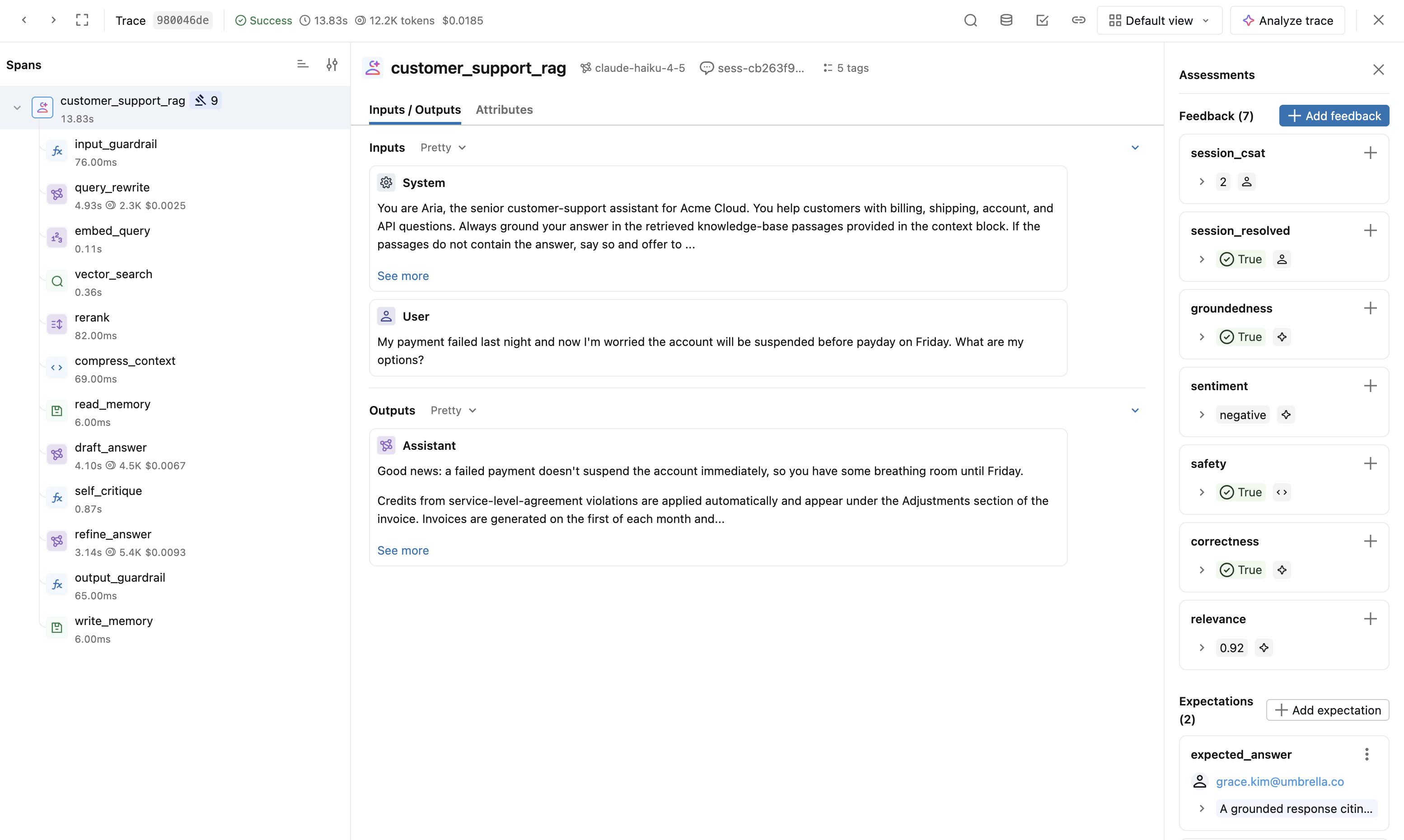
MLflow Tracing は、Databricks における GenAI 開発の可観測性の基盤です。AI エージェントは、LLM、リトリーバー、ツール、サブエージェントなどのコンポーネントを組み合わせた、複雑なマルチステップのワークフローを実行します。トレースは、すべてのステップの入力、出力、レイテンシー、トークン使用量、コストを記録し、実行フロー全体をマッピングするため、エージェントの動作を正確に確認し、問題の原因を特定することができます。トレースは、エージェントの品質に関する基礎的なデータレイヤーです。デバッグ、評価、本番運用モニタリングはいずれも、トレースが取得するエビデンスに基づいています。
![Databricks MLflow UI の [Traces (トレース)] tab。](/gcp/ja/assets/images/traces-ui-managed-9383d1852a34db876ac910d35e3ffd0d.png)
トレースを使用すると、次のことが可能です。
- エージェントのデバッグと理解。
- パフォーマンスを監視し、コストを最適化します。
- 本番運用のエージェントを監視する
- エージェントの品質を評価および改善します。
- Genie Code で自然言語を使用して、トレースデータの分析、デバッグ、探索を行います。
Databricks における MLflow Tracing の理由
- オープンソースのMLflowを、フルマネージドで。 標準のMLflow SDKとOpenTelemetryを使用するため、実行する追跡サーバーや自分で維持するバージョンはありません。
- Unity Catalogネイティブのストレージとガバナンス。 スキーマおよびテーブルレベルのアクセス制御、エクスペリエンスごとの制限なし、直接SQLアクセスを備えたUnity Catalog Deltaテーブルとしてトレースを保存します。OpenTelemetryトレースをUnity Catalogに保存するを参照してください。
- Genie Codeによる自然言語分析。 SQLを使用せずに、トレースデータに対する質問や障害の探索を行えます。
- 開発から本番運用まで、これ 1 つのプラットフォームで。 同じトレースによってデバッグ、評価、および本番運用モニタリングが実行され、AI/BI ダッシュボード、アラート、Lakeflow Pipelines などのレイクハウスのその他の機能と連携します。
最初のトレースを取得する
MLflow とサンプル エージェント用のライブラリをインストールします:
Python
%pip install --upgrade "mlflow[databricks]>=3.1.0" "langgraph" "langchain-openai"
dbutils.library.restartPython()
OPENAI_API_KEY を設定して、エージェントがモデルを呼び出せるようにするか (または、外部キーを回避するためにエージェントを Databricks 基盤モデルAPIに向けます)。
Python
import os

os.environ["OPENAI_API_KEY"] = "your-api-key"
このエージェントを実行します。自動ログ記録により、ステップごとにスパンを含むトレースがキャプチャされます:
Python
import mlflow
from langchain_core.tools import tool
from langchain_openai import ChatOpenAI
from langgraph.prebuilt import create_react_agent

mlflow.langchain.autolog()  # LangGraph uses LangChain's autolog
mlflow.set_tracking_uri("databricks")
mlflow.set_experiment("/Shared/my-first-trace")

@tool
def get_weather(city: str):
    """Get weather for a city."""
    return f"It might be cloudy in {city}"

agent = create_react_agent(ChatOpenAI(model="gpt-4o-mini"), [get_weather])
agent.invoke({"messages": [("user", "What is the weather in SF?")]})
# Trace appears in the MLflow UI automatically
トレースを表示するには:
- ワークスペースで、 エクスペリメント に移動します。
- エクスペリメント(ここでは
mlflow.set_experiment("/Shared/my-first-trace")によって設定されたもの)を見つけます。 - Click the Traces tab to see the trace.
- トレースを開いて、完全なスパンツリー(エージェント → LLM呼び出し → ツール呼び出し)を表示します。
次のステップ
- 自動トレースと統合 — 1行のコードで30種類以上のフレームワークをトレースします。
- 手動およびカスタムトレーシング — 自動ログがコードをカバーしていない場合にカスタムスパンを追加します。
- 観察と問題の検出 — トレースの探索、問題の検出、トレース データのクエリーを行います。