Enrich data using AI Functions
This feature is in Public Preview.
AI Functions are built-in functions that you can use to apply LLMs or state-of-the-art research techniques on data stored on Databricks for data transformation and enrichment. They can be run from anywhere on Databricks, including Databricks SQL, notebooks, Lakeflow Spark Declarative Pipelines, and Workflows.
AI Functions are simple to use, fast, and scalable. Analysts can use them to apply data intelligence to their proprietary data, while data engineers, data scientists, and machine learning engineers can use them to build production-grade batch pipelines.
Task specific and general-purpose
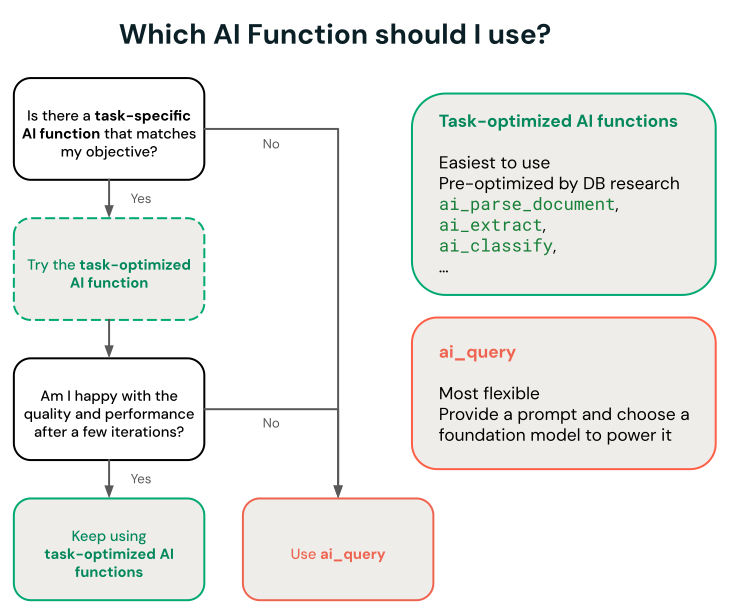
AI Functions has task-specific and general-purpose functions:
- Task-specific AI Functions — Purpose-built functions optimized for a specific task, such as document parsing, entity extraction, classification, and sentiment analysis. These functions are powered by Databricks-managed, research-back systems. Some functions include UI experiences. See Task-specific AI functions for supported functions and models.
ai_query— The general-purpose function for task and model flexibility. Provide a prompt and choose any supported Foundation Model API. See Useai_query.
Task-specific AI functions
Task-specific functions are scoped for a certain task so you can automate routine transformations, like entity extraction, translation, and classification. Databricks recommends these functions for getting started because they invoke a state-of-the-art research techniques maintained by Databricks and do not require any customization.
See Analyze customer reviews using AI Functions for an example.
The following functions are grouped by task.
Intelligent document processing:
Function | Description |
|---|---|
Parse structured content (text, tables, figure descriptions) and layout from unstructured documents using state-of-the-art research techniques. | |
Extract structured fields from documents or text using a schema you define. | |
Classify input text according to labels you provide using state-of-the-art research techniques. | |
ai_prep_search (Beta) | Transform parsed document output into search-ready chunks optimized for vector search and RAG pipelines. |
Transform text:
Function | Description |
|---|---|
Correct grammatical errors in text using a state-of-the-art generative AI model. | |
Translate text to a specified target language using a state-of-the-art generative AI model. | |
Generate a summary of text using SQL and a state-of-the-art generative AI model. | |
Mask specified entities in text using a state-of-the-art generative AI model. |
Analyze text:
Function | Description |
|---|---|
Perform sentiment analysis on input text using a state-of-the-art generative AI model. | |
Compare two strings and compute the semantic similarity score using a state-of-the-art generative AI model. |
Generate content. For custom prompts or a specific model, see Use ai_query:
Function | Description |
|---|---|
Answer a user-provided prompt using a state-of-the-art generative AI model. |
Forecast time series:
Function | Description |
|---|---|
Forecast data up to a specified horizon. This table-valued function is designed to extrapolate time series data into the future. |
Search with Vector Search embeddings:
Function | Description |
|---|---|
Search and query a Vector Search index using a state-of-the-art generative AI model. |
Use AI Functions in production workflows
For large-scale batch inference, you can integrate task-specific AI Functions, or the general-purpose function ai_query into your production workflows, like Lakeflow Spark Declarative Pipelines, Databricks workflows and Structured Streaming. This enables production-grade processing at scale.
Best practices for AI functions in production:
Let AI Functions handle your workload at scale: AI Functions automatically manage parallelization, retries, and scaling. It is advised to submit your full dataset in a single query rather than manually splitting it into small batches. Performance may not scale linearly from very small workloads to large-scale workloads.
Use Databricks-hosted foundation models: When using the ai_query AI Function, use Databricks-hosted foundation models (prefixed with databricks-), not provisioned throughput. These provisionless endpoints are fully managed and work best for batch processing.
See Deploy batch inference pipelines for examples and details.
Monitor AI Functions progress
To understand how many inferences have completed or failed and troubleshoot performance, you can monitor the progress of AI Functions using the query profile feature.
In Databricks Runtime 16.1 ML and above, from the SQL editor query window in your workspace:
- Select the link, Running--- at the bottom of the Raw results window. The performance window appears on the right.
- Click See query profile to view performance details.
- Click AI Query to see metrics for that particular query including the number of completed and failed inferences and the total time the request took to complete.
View costs for AI Function workloads
AI Function costs are recorded as part of the MODEL_SERVING product under the BATCH_INFERENCE offering type. See View costs for batch inference workloads for an example query.
For ai_parse_document, ai_extract, and ai_classify costs are recorded as part of the AI_FUNCTIONS product. See View costs for ai_parse_document runs for an example query.
View costs for batch inference workloads
The following examples show how to filter batch inference workloads based on job, compute, SQL warehouses, and Lakeflow Spark Declarative Pipelines.
See Monitor model serving costs for general examples on how to view costs for your batch inference workloads that use AI Functions.
- Jobs
- Compute
- Lakeflow Spark Declarative Pipelines
- SQL warehouse
The following query shows which jobs are being used for batch inference using the system.workflow.jobs systems table. See Monitor job costs & performance with system tables.
SELECT *
FROM system.billing.usage u
  JOIN system.workflow.jobs x
    ON u.workspace_id = x.workspace_id
    AND u.usage_metadata.job_id = x.job_id
  WHERE u.usage_metadata.workspace_id = <workspace_id>
    AND u.billing_origin_product = "MODEL_SERVING"
    AND u.product_features.model_serving.offering_type = "BATCH_INFERENCE";
The following shows which clusters are being used for batch inference using the system.compute.clusters systems table.
SELECT *
FROM system.billing.usage u
  JOIN system.compute.clusters x
    ON u.workspace_id = x.workspace_id
    AND u.usage_metadata.cluster_id = x.cluster_id
  WHERE u.usage_metadata.workspace_id = <workspace_id>
    AND u.billing_origin_product = "MODEL_SERVING"
    AND u.product_features.model_serving.offering_type = "BATCH_INFERENCE";
The following shows which Lakeflow Spark Declarative Pipelines are being used for batch inference using the system.lakeflow.pipelines systems table.
SELECT *
FROM system.billing.usage u
  JOIN system.lakeflow.pipelines x
    ON u.workspace_id = x.workspace_id
    AND u.usage_metadata.dlt_pipeline_id = x.pipeline_id
  WHERE u.usage_metadata.workspace_id = <workspace_id>
    AND u.billing_origin_product = "MODEL_SERVING"
    AND u.product_features.model_serving.offering_type = "BATCH_INFERENCE";
The following shows which SQL warehouses are being used for batch inference using the system.compute.warehouses systems table.
SELECT *
FROM system.billing.usage u
  JOIN system.compute.clusters x
    ON u.workspace_id = x.workspace_id
    AND u.usage_metadata.cluster_id = x.cluster_id
  WHERE u.workspace_id = <workspace_id>
    AND u.billing_origin_product = "MODEL_SERVING"
    AND u.product_features.model_serving.offering_type = "BATCH_INFERENCE";
View costs for ai_parse_document runs
The following example shows how to query billing system tables to view costs for ai_parse_document runs.
SELECT *
FROM system.billing.usage u
WHERE u.workspace_id = <workspace_id>
  AND u.billing_origin_product = "AI_FUNCTIONS"
  AND u.product_features.ai_functions.ai_function = "AI_PARSE_DOCUMENT";