Adaptive query execution
Adaptive query execution (AQE) is query re-optimization that occurs during query execution.
Before a query runs, the optimizer chooses a query plan based on estimates of the data size. Those estimates might be wrong if table statistics are missing or stale, if the data is skewed, or for later steps in a complex query. A plan built on wrong estimates might use a slow join strategy, create too many small tasks after a shuffle, or create a few oversized tasks that hold up the whole stage. AQE fixes these problems by re-optimizing the plan while the query runs, based on the actual size of the data.
At the end of each shuffle or broadcast exchange, Databricks has accurate statistics for the data produced so far. AQE uses these statistics to choose a better physical strategy, pick an optimal number and size of post-shuffle partitions, or apply optimizations that otherwise require query hints, such as skew join handling.
AQE is enabled by default. You don't need to change your queries to benefit from it. Check whether AQE changed a query plan when you troubleshoot a slow query. Tune AQE settings only when the defaults don't fit your workload. See Query plans and Configuration.
Capabilities
AQE has four major features:
- Dynamically changes sort merge join into broadcast hash join.
- Dynamically coalesces partitions (combine small partitions into reasonably sized partitions) after shuffle exchange. Very small tasks have worse I/O throughput and tend to suffer more from scheduling overhead and task setup overhead. Combining small tasks saves resources and improves cluster throughput.
- Dynamically handles skew in sort merge join and shuffle hash join by splitting (and replicating if needed) skewed tasks into roughly evenly sized tasks.
- Dynamically detects and propagates empty relations, which are parts of a query that return no rows.
Supported queries
AQE applies to queries that meet both of these conditions:
- The query isn't a streaming query.
- The query contains at least one exchange (usually from a join, aggregate, or window), at least one subquery, or both.
AQE re-optimizes every supported query, but the result might be the same plan that the optimizer compiled before the query ran. To check whether AQE changed a query's plan, see Query plans.
Query plans
AQE-applied queries contain one or more AdaptiveSparkPlan nodes, usually as the root node of each main query or sub-query. Each AdaptiveSparkPlan node has an isFinalPlan flag. The flag is false before and during query execution, and changes to true when the query finishes.
To view a query plan, use the Spark UI, DataFrame.explain(), or SQL EXPLAIN. Each one shows different information about how AQE changes the plan.
Spark UI
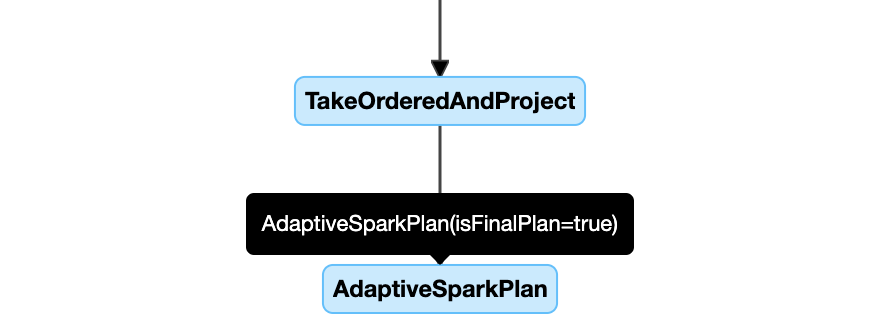
The query plan diagram in the Spark UI shows the most current plan and updates as the query runs. Nodes that have already run, and have metrics, don't change. Nodes that haven't run yet might change as AQE re-optimizes the plan.
This example shows a query plan diagram:
DataFrame.explain()
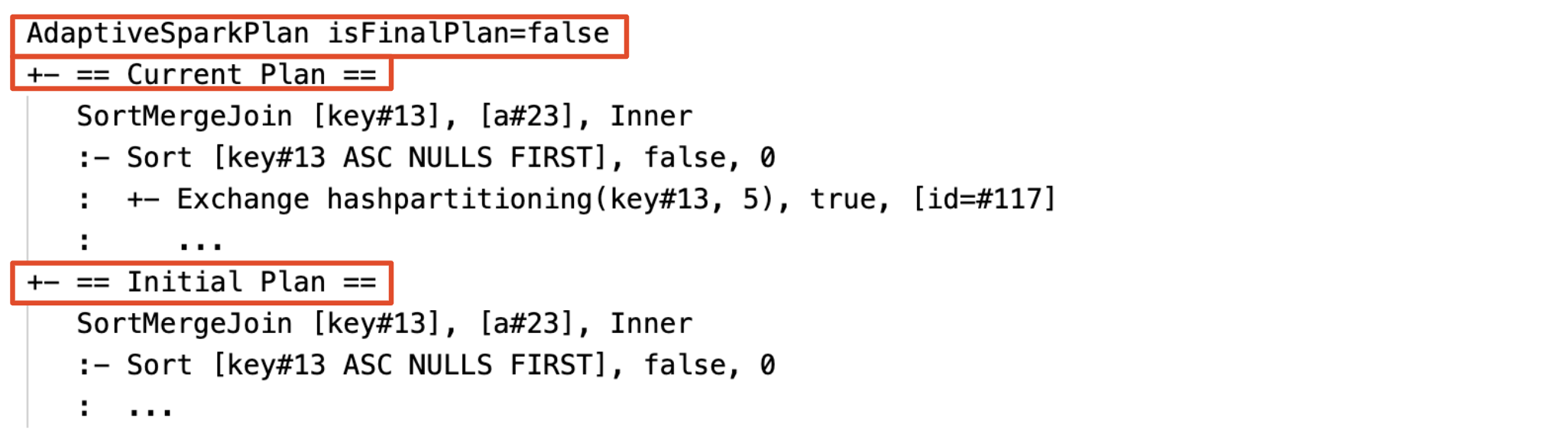
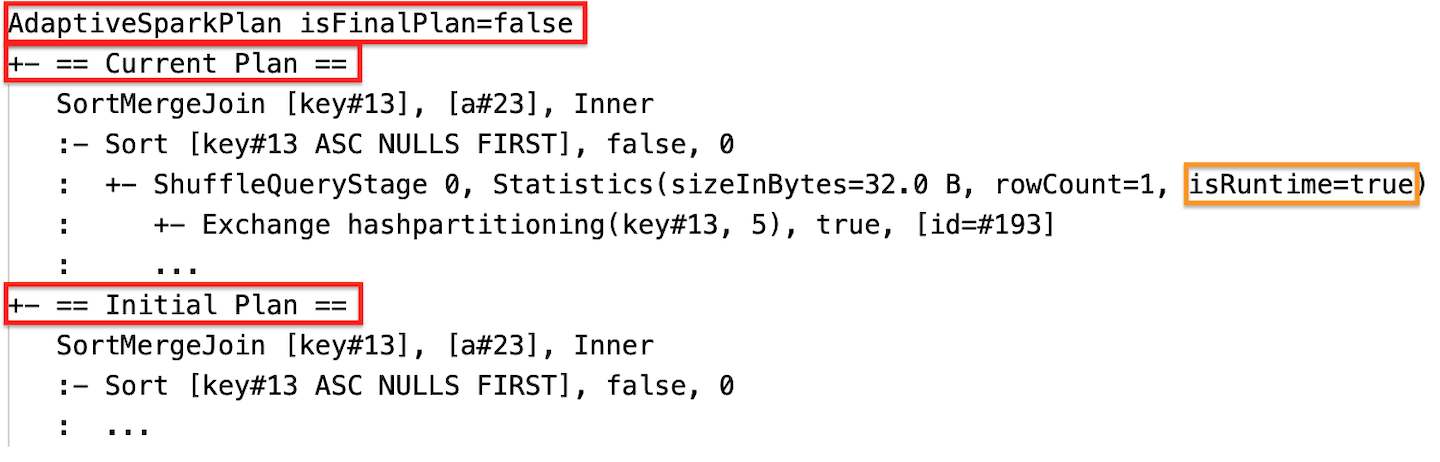
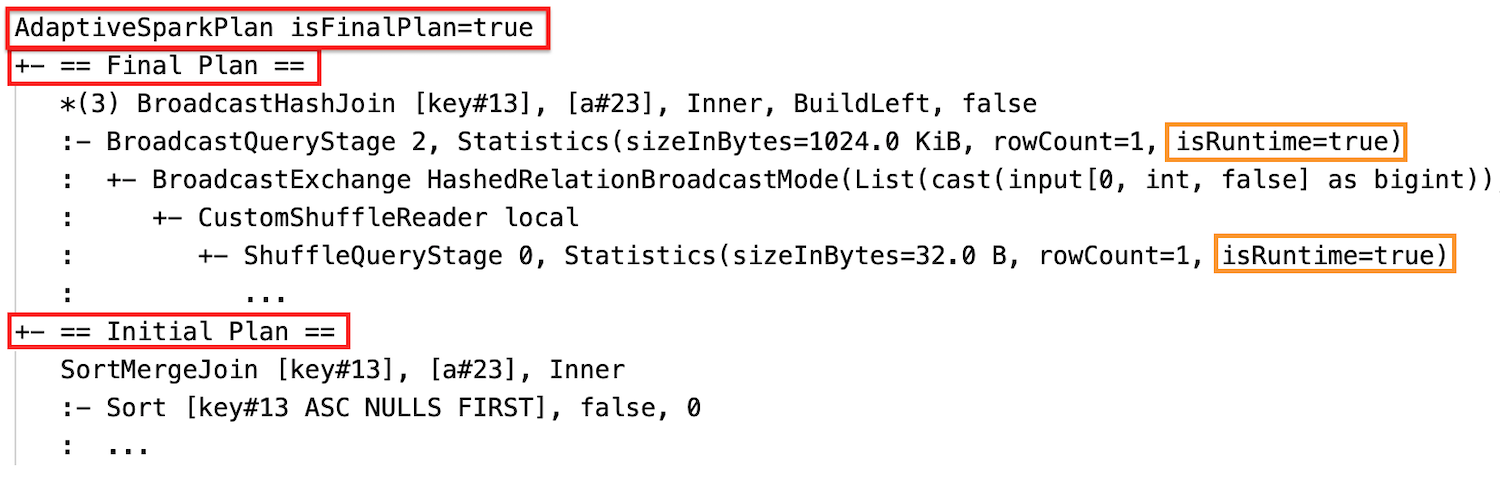
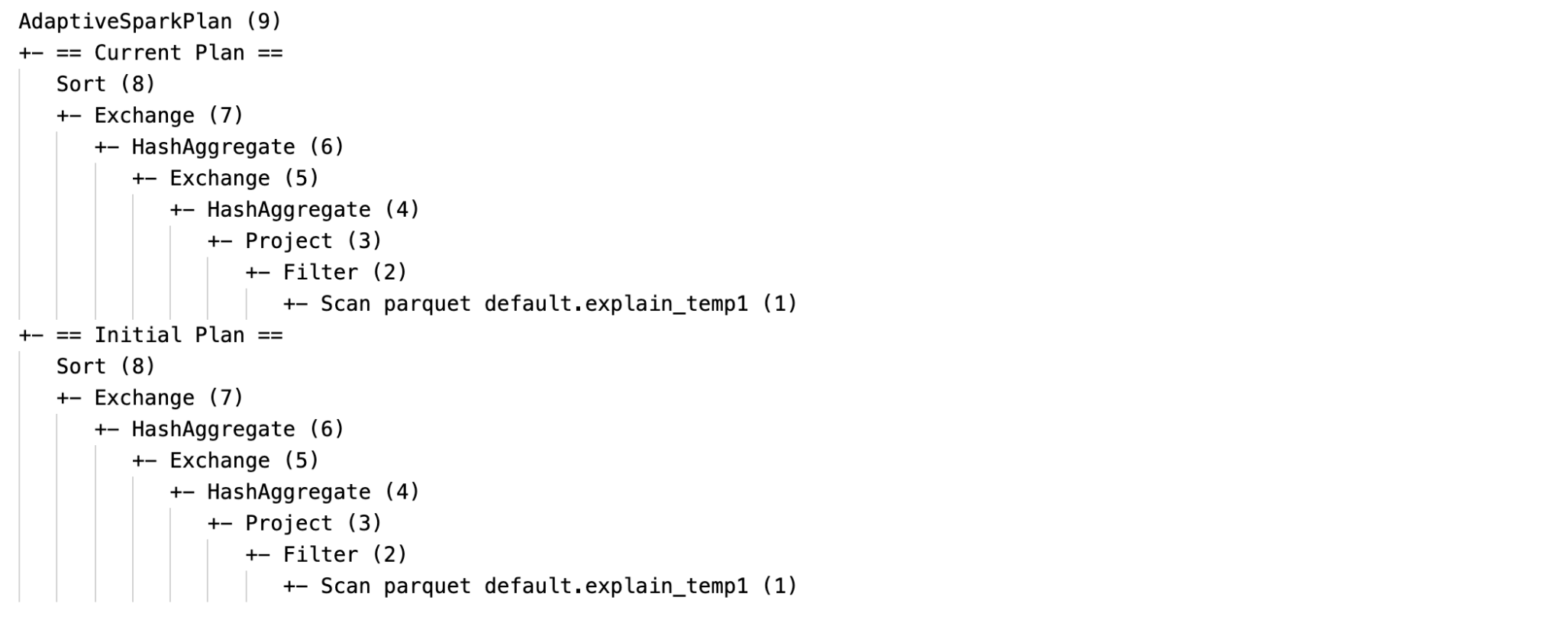
DataFrame.explain() shows two plans under each AdaptiveSparkPlan node: the initial plan, before AQE applies any optimizations, and the current plan. The current plan changes as the query runs and becomes the final plan when the query finishes.
The output includes data statistics for each shuffle and broadcast stage. The statistics depend on whether the stage has run:
- Before and during the stage run,
isRuntimeisfalseand the statistics are compile-time estimates. For example,Statistics(sizeInBytes=1024.0 KiB, rowCount=4, isRuntime=false). - After the stage runs,
isRuntimeistrueand the statistics are runtime measurements. For example,Statistics(sizeInBytes=658.1 KiB, rowCount=2.81E+4, isRuntime=true).
These screenshots show DataFrame.explain() output before, during, and after execution:
-
Before execution
-
During execution
-
After execution
SQL EXPLAIN
SQL EXPLAIN doesn't run the query, so AQE can't re-optimize it. The output shows only the initial plan, which might differ from the plan that AQE runs.
This example shows SQL EXPLAIN output:
Identify applied optimizations in a query plan
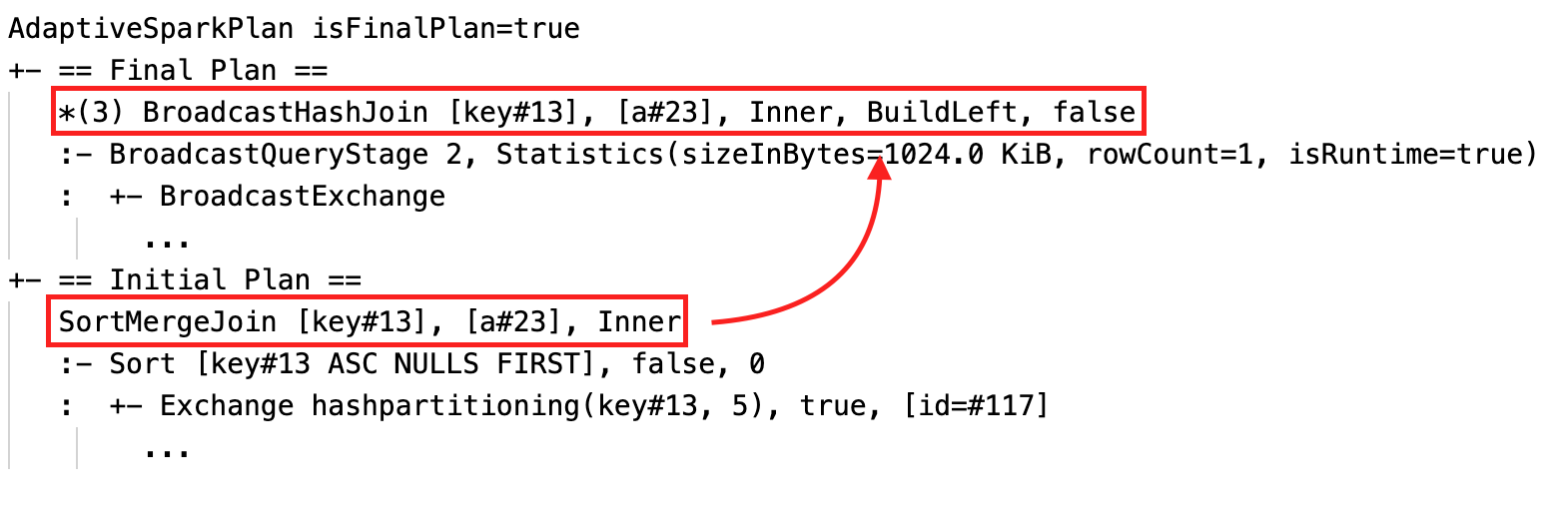
When AQE applies an optimization, the query plan changes. To identify which optimizations took effect, compare the current or final plan with the initial plan. Each optimization changes the plan in a specific way:
-
Join strategy change. The current or final plan has a different physical join node than the initial plan.
-
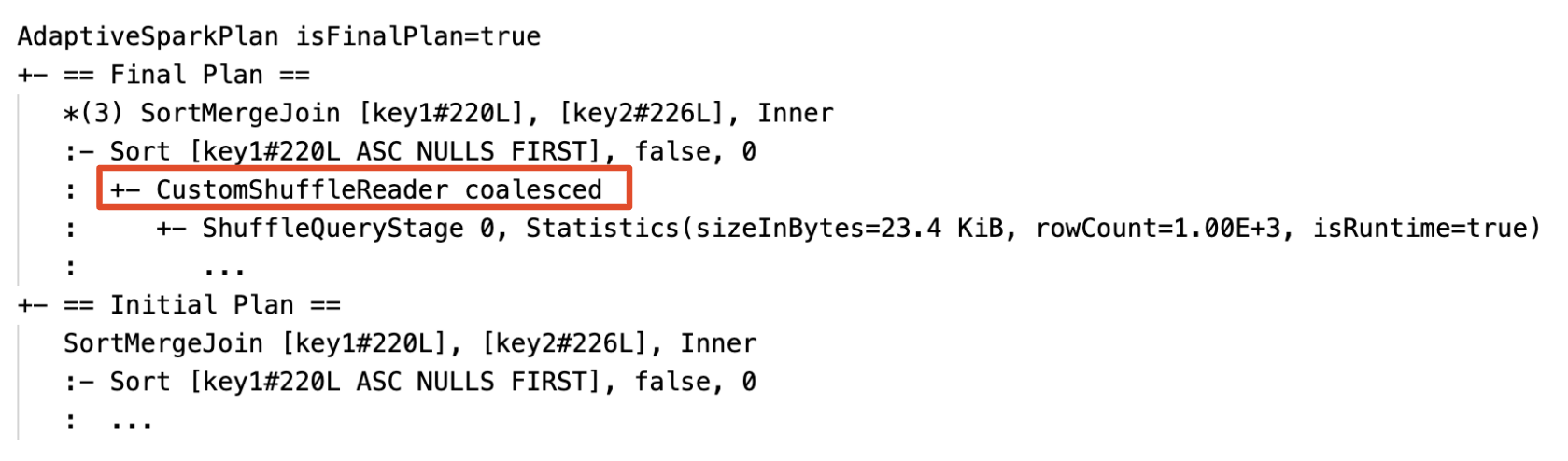
Partition coalescing. The plan contains a
CustomShuffleReadernode with theCoalescedproperty.
-
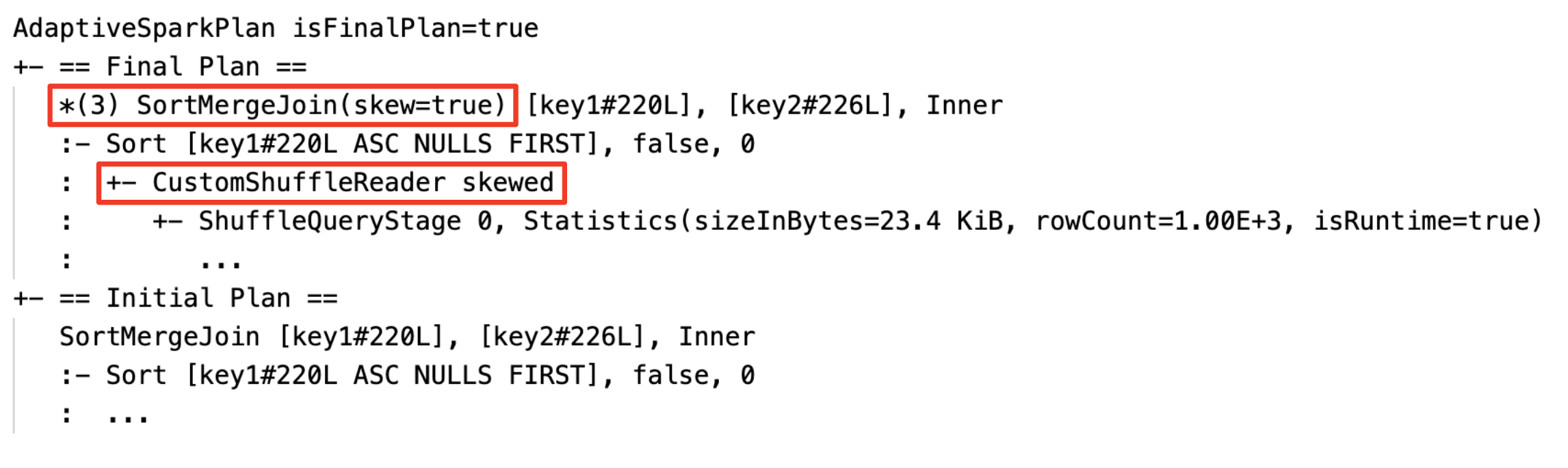
Skew join handling. The plan contains a
SortMergeJoinnode with theisSkewfield set totrue.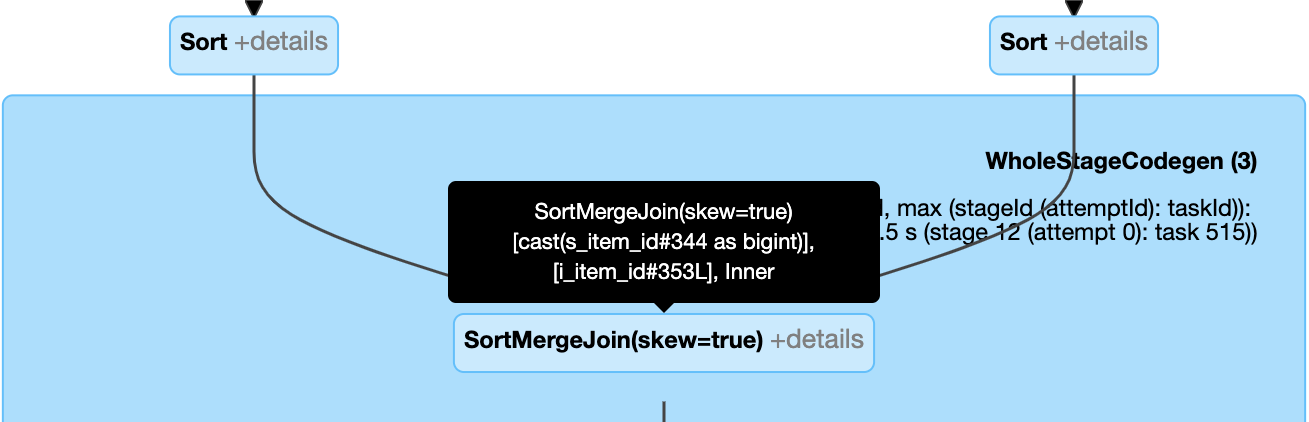
-
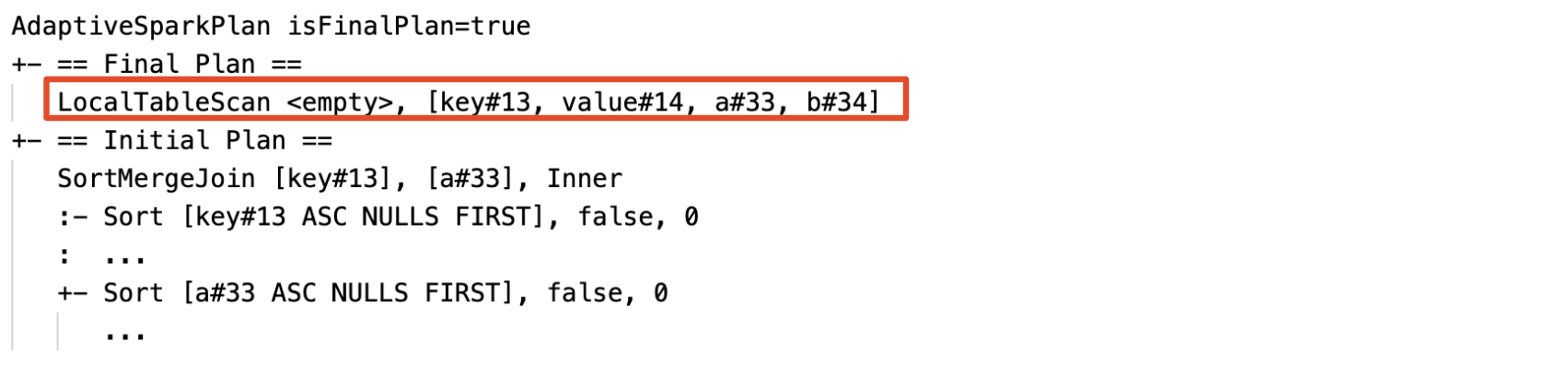
Empty relation propagation. A
LocalTableScannode with an empty relation field replaces part or all of the plan.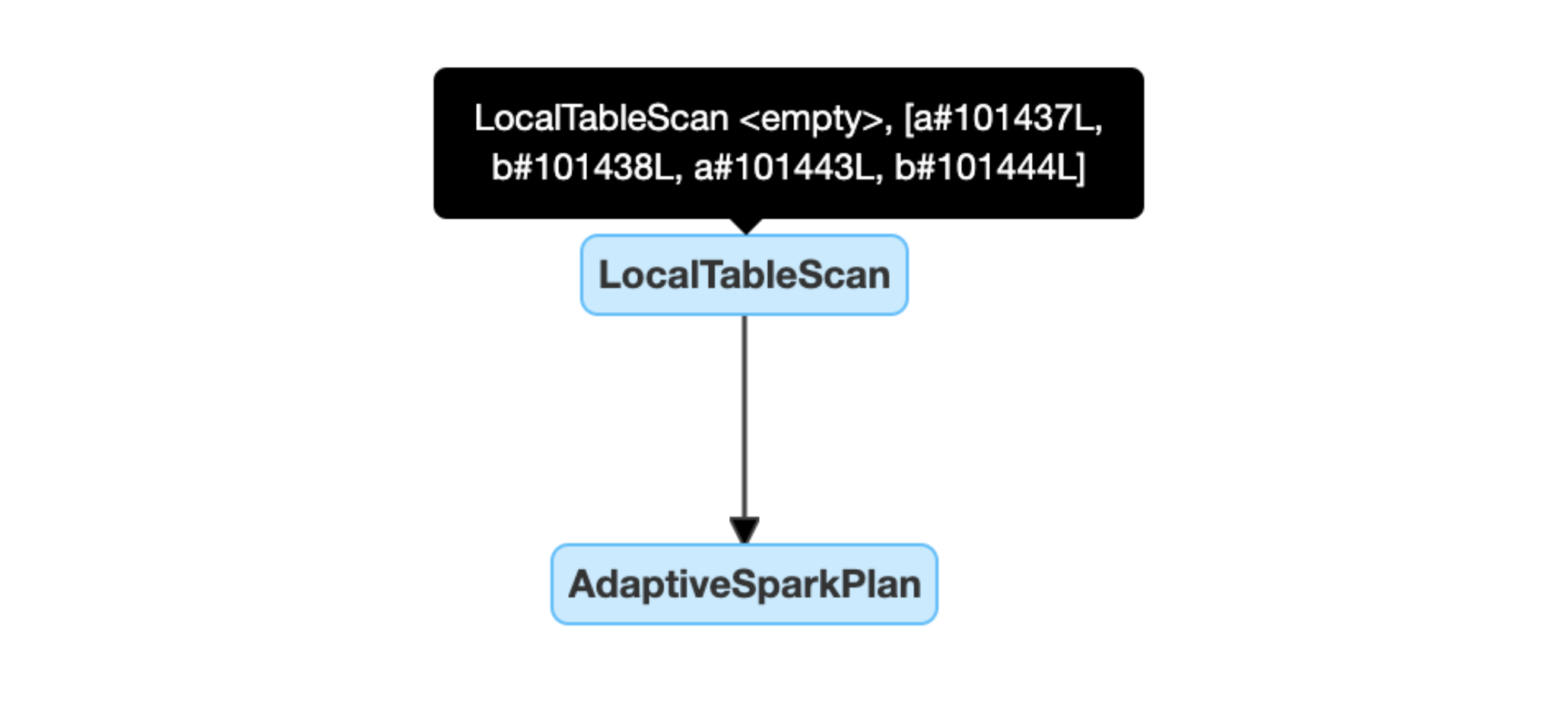
Configuration
These Apache Spark configuration properties control AQE. Most workloads don't need to change the defaults.
Enable AQE and tune individual optimizations
Use these properties to turn AQE on or off and to tune auto-optimized shuffle, broadcast join switching, and empty relation propagation:
Property | Type | Default | Description |
|---|---|---|---|
|
|
| Turns adaptive query execution on or off. |
|
|
| The default number of partitions to use when shuffling data for joins or aggregations. Set it to For Structured Streaming, you can't change this value between query restarts from the same checkpoint location. |
|
|
| The size threshold for switching a sort merge join to a broadcast hash join at runtime. |
|
|
| Turns dynamic empty relation propagation on or off. |
Dynamically coalesce partitions
Property | Type | Default | Description |
|---|---|---|---|
|
|
| Turns partition coalescing on or off. |
|
|
| The target size after coalescing. Coalesced partitions are close to, but no larger than, this size. |
|
|
| The minimum size of partitions after coalescing. Coalesced partitions are no smaller than this size. |
|
| Two times the number of cluster cores | The minimum number of partitions after coalescing. Don't set this property, because setting it overrides |
Dynamically handle skew join
Property | Type | Default | Description |
|---|---|---|---|
|
|
| Turns skew join handling on or off. |
|
|
| The multiplier for the median partition size that a partition must exceed to be considered skewed. |
|
|
| The minimum size that a partition must exceed to be considered skewed. |
AQE treats a partition as skewed only when both of these conditions are true: (partition size > skewedPartitionFactor * median partition size) and (partition size > skewedPartitionThresholdInBytes).
Frequently asked questions (FAQ)
Why didn't AQE broadcast a small join table?
If the table is smaller than spark.databricks.adaptive.autoBroadcastJoinThreshold but AQE doesn't broadcast it, check these causes:
- The join type doesn't support broadcast. Some join types can't broadcast one side. For example, AQE can't broadcast the left side of a
LEFT OUTER JOIN. - The table has many empty partitions. Most tasks in the sort merge join finish quickly, or skew join handling optimizes the join. AQE doesn't change a sort merge join to a broadcast hash join if the percentage of non-empty partitions is lower than
spark.sql.adaptive.nonEmptyPartitionRatioForBroadcastJoin.
Should I still use a broadcast join hint with AQE enabled?
Yes, if you know your query well. A broadcast join that the optimizer plans before the query runs usually performs better than one that AQE plans at runtime. AQE might not switch to a broadcast join until after it shuffles both sides of the join, which is when it learns the actual table sizes.
AQE respects query hints the same way that static optimization does, and still applies the dynamic optimizations that the hints don't affect.
Should I use the skew join hint or AQE skew join handling?
Use AQE skew join handling. It's automatic and usually performs better than the skew join hint.
Why didn't AQE reorder my joins?
AQE doesn't reorder joins at runtime. To improve the join order, collect table statistics so that the cost-based optimizer can choose a better plan. See Cost-based optimizer.
Why didn't AQE detect my data skew?
AQE treats a partition as skewed only when both of these conditions are true:
- The partition is larger than
spark.sql.adaptive.skewJoin.skewedPartitionThresholdInBytes(default256MB). - The partition is larger than
spark.sql.adaptive.skewJoin.skewedPartitionFactor(default5) times the median partition size.
AQE also handles skew only in shuffle-based joins, which are sort merge joins and shuffle hash joins. It never optimizes skew in broadcast joins. For shuffle-based joins, the join type determines which side AQE can optimize:
Join type | Skew optimized on left side | Skew optimized on right side |
|---|---|---|
| Yes | Yes |
| Yes | Yes |
| Yes | No |
| No | Yes |
| Yes | No |
| Yes | No |
| No | No |
Legacy
Spark 1.6 introduced a feature called adaptive execution, but AQE in Spark 3.0 is a different feature. Spark 1.6 adaptive execution only coalesces partitions dynamically. AQE is a framework that plans and replans queries based on runtime statistics, and it supports all of the optimizations on this page.